Solved HDD was seen by my PC, but after 3rd party format it is not visible

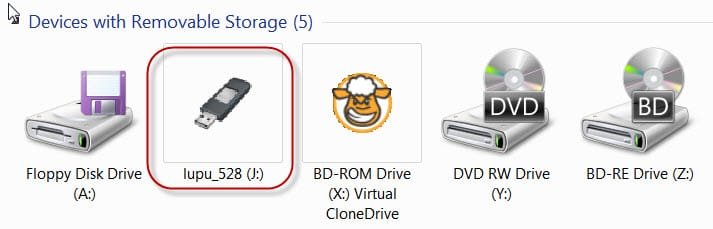
My suggestion has not been answered, unsubscribed. What is "lupo" I never saw a mention of that? :confused:
 

My Computer My Computer

At a glance

Windows 7 Ultimate X64 SP1Intel i5-2550K, Differing ~4.4-4.8GHz No buil...16GB G.Skill Sniper 1866MHz @ 2133MHz 2x8GBASUS GTX650TIB-DC2OC-2GD5, (650TI Boost)
Computer type
PC/Desktop
Computer Manufacturer/Model Number
Home Built Desktop By DataTech
OS
Windows 7 Ultimate X64 SP1
CPU
Intel i5-2550K, Differing ~4.4-4.8GHz No built in GPU
Motherboard
ASUS P8Z68-V PRO/GEN3
Memory
16GB G.Skill Sniper 1866MHz @ 2133MHz 2x8GB
Graphics Card(s)
ASUS GTX650TIB-DC2OC-2GD5, (650TI Boost)
Sound Card
Onboard Realtek 5-1
Monitor(s) Displays
Samsung P2570HD
Screen Resolution
1920x1080
Hard Drives
Samsung 840 Pro 256GB SSD for OS, 500GB Seagate Constellation (Enterprise drive) for Data
PSU
Corsair HX650W
Case
Inwin Dragon Rider
Cooling
Hyper 212 EVO w/two Noctua fans, push-pull, @1300 RPM
Keyboard
E-Z Eyes, bright yellow keys with large characters
Mouse
steelseries SENSEI Laser Pro Gaming
Internet Speed
48-51Mbs Mbs down, 11 Mbs up Xfinity Cable
Antivirus
Norton Internet Security 2013
Browser
IE 10, Opera, Pale Moon if needed
Other Info
4 case fans, LG BluRay-RE, ASUS DVD-RW, Mr. Fusion power supply, 1.21 gigawatts.

My Computer My Computer

At a glance

Windows 7 Home Premium 32 bit
OS
Windows 7 Home Premium 32 bit
So the question is does Gparted always initialise the disk as a GPT disk?
Yes, if the drive is 1TB or larger, then the default setting is GPT. However, you can choose others. [see below]

Is it not possible to initialize the disk as an MBR disk?
Yes, you can choose to initialize the disk any way you like. [see below]

Also in my limited exploration, I could not find anyway to convert a GPT to MBR or vice versa as I could do in Windows Disk Management or most other partitioning/formatting software. Or am I missing something?
Go to the main menu, and select "Partition" > then hover over "Format to" > select which file system you want to format to in the provided list. There should be around twenty different options, which is only one of the things that makes GParted such an awesome piece of software. :D
 

My Computer My Computer

At a glance

Windows 7 Enterprise SP1 x64AMD Athlon 64x2 4200+ Dual Core Windsor 2.2GHz4Gb: PNY PC2-6400 Dual Channel 2x2GbPNY NVIDIA GeForce 9800 GT
Computer type
PC/Desktop
Computer Manufacturer/Model Number
HP Pavillion
OS
Windows 7 Enterprise SP1 x64
CPU
AMD Athlon 64x2 4200+ Dual Core Windsor 2.2GHz
Motherboard
Socket AM2: ECS MCP61PM-HM
Memory
4Gb: PNY PC2-6400 Dual Channel 2x2Gb
Graphics Card(s)
PNY NVIDIA GeForce 9800 GT
Sound Card
Creative Sound Blaster Audigy 24Bit @96000Hz
Monitor(s) Displays
HP w1907 Wide LCD 19"
Screen Resolution
1440x900
Hard Drives
1.) OS Drive: 500Gb Seagate Barracuda ST35004-18AS


2.) Storage: 1Tb Seagate Barracuda ST310005-28AS
PSU
OCZ StealthXStream OCZ500SXS 500W
Case
Hp Pavillion
Cooling
Thermaltake
Keyboard
HP
Mouse
Microsoft Wireless
Internet Speed
300Mb
Antivirus
Norton Internet Security 2014
Browser
Internet Explorer 11
Other Info
Custom Build

My Computer My Computer

At a glance

Windows 7 Ultimate X64 SP1Intel i5-2550K, Differing ~4.4-4.8GHz No buil...16GB G.Skill Sniper 1866MHz @ 2133MHz 2x8GBASUS GTX650TIB-DC2OC-2GD5, (650TI Boost)
Computer type
PC/Desktop
Computer Manufacturer/Model Number
Home Built Desktop By DataTech
OS
Windows 7 Ultimate X64 SP1
CPU
Intel i5-2550K, Differing ~4.4-4.8GHz No built in GPU
Motherboard
ASUS P8Z68-V PRO/GEN3
Memory
16GB G.Skill Sniper 1866MHz @ 2133MHz 2x8GB
Graphics Card(s)
ASUS GTX650TIB-DC2OC-2GD5, (650TI Boost)
Sound Card
Onboard Realtek 5-1
Monitor(s) Displays
Samsung P2570HD
Screen Resolution
1920x1080
Hard Drives
Samsung 840 Pro 256GB SSD for OS, 500GB Seagate Constellation (Enterprise drive) for Data
PSU
Corsair HX650W
Case
Inwin Dragon Rider
Cooling
Hyper 212 EVO w/two Noctua fans, push-pull, @1300 RPM
Keyboard
E-Z Eyes, bright yellow keys with large characters
Mouse
steelseries SENSEI Laser Pro Gaming
Internet Speed
48-51Mbs Mbs down, 11 Mbs up Xfinity Cable
Antivirus
Norton Internet Security 2013
Browser
IE 10, Opera, Pale Moon if needed
Other Info
4 case fans, LG BluRay-RE, ASUS DVD-RW, Mr. Fusion power supply, 1.21 gigawatts.
Yes, if the drive is 1TB or larger, then the default setting is GPT. However, you can choose others. [see below]

Yes, you can choose to initialize the disk any way you like. [see below]

Go to the main menu, and select "Partition" > then hover over "Format to" > select which file system you want to format to in the provided list. There should be around twenty different options, which is only one of the things that makes GParted such an awesome piece of software. :D

With all that you never said how to initialise the disk in GParted. :p

Never mind. On further exploration, I found out Device > Create Partition Table > Advanced gives one the option to initialise as msdos (MBR), aix, amiga, bsd, dvh, gpt, mac, pc98, sun, loop.

When I missed that step, and straight away did Partition > Format to ntfs ( yes, that only selects the filesystem and not the initialisation), it formatted my 750GB drive as a GPT drive. ( It is not a >1TB or 2TB drive.)

Before I put it into GParted, I had initialised the drive with MBR, created a simple volume but did not format and Windows Disk Management showed it as RAW as expected (as in my post#11).

When I put it into GParted, I was surprised to find it showed the 128 MB MSR partition and three ntfs partitions which it was as a GPT disk before.Anyway I deleted all the four partitions and created a simple volume and straightaway formatted it as ntfs and the result was a GPT drive.

Anyway now I know how to make amends. :)

Ahh, Lucid Puppy was, not lupu. Never mind, I see it as part of the name of the iso.:o

Yep, and when Rufus creates the bootable pendrive it also names it as lupu_528.

19-03-2014 12-19-45.jpg
 

My Computer My Computer

At a glance

Windows 7 Home Premium 32 bit
OS
Windows 7 Home Premium 32 bit
Ok, I have my USB thumb drive ready.
But after reading the recent posts about mbr, GParted, etc. I'm not sure what to do with my lupu_528. Is there a tutorial on using Lucid Puppy to format?
 

My Computer My Computer

At a glance

Windows Pro 7 32bit
Computer type
PC/Desktop
Computer Manufacturer/Model Number
eMachine
OS
Windows Pro 7 32bit
Hard Drives
Internal?
External - Iomega 2TB
Antivirus
AVG Free, Zone Alarm
Browser
Mozilla Firefox
With all that you never said how to initialise the disk in GParted. :p

Never mind. On further exploration, I found out Device > Create Partition Table > Advanced gives one the option to initialise as msdos (MBR), aix, amiga, bsd, dvh, gpt, mac, pc98, sun, loop.

When I missed that step, and straight away did Partition > Format to ntfs ( yes, that only selects the filesystem and not the initialisation), it formatted my 750GB drive as a GPT drive. ( It is not a >1TB or 2TB drive.)

Before I put it into GParted, I had initialised the drive with MBR, created a simple volume but did not format and Windows Disk Management showed it as RAW as expected (as in my post#11).

When I put it into GParted, I was surprised to find it showed the 128 MB MSR partition and three ntfs partitions which it was as a GPT disk before.Anyway I deleted all the four partitions and created a simple volume and straightaway formatted it as ntfs and the result was a GPT drive.

Anyway now I know how to make amends. :)
Wow, it doesn't appear that I was any help at all. Sorry about that, Bro. I was a little confused by what you were asking me [had a really bad day yesterday]. Glad you got it figured out though. GParted will do anything you need to do with a HDD, or a file system, and I've been using it for a few years now. It is absolutely reliable too, as in, it doesn't create partition or file system errors....ever. Yes, it shows the "system reserved" partition as well. I always increase that partitions size to 500MB when performing a clean install of Windows 7. GParted will also allow you to browse the files in that partition, so I add a couple of my favorite tools in that partition, such as "EasyBCD" and "Memtest86"...etc.


Ok, I have my USB thumb drive ready.
But after reading the recent posts about mbr, GParted, etc. I'm not sure what to do with my lupu_528. Is there a tutorial on using Lucid Puppy to format?
Do you mean that you got the side USB ports to work with your USB 3.0 device?

The conversation Jumanji and I were having did not pertain to your thumb drive problem. He just wanted to know a few things about the GParted software program. Of which, I was no help whatsoever, and he figured it all out on his own...LOL!!
 

My Computer My Computer

At a glance

Windows 7 Enterprise SP1 x64AMD Athlon 64x2 4200+ Dual Core Windsor 2.2GHz4Gb: PNY PC2-6400 Dual Channel 2x2GbPNY NVIDIA GeForce 9800 GT
Computer type
PC/Desktop
Computer Manufacturer/Model Number
HP Pavillion
OS
Windows 7 Enterprise SP1 x64
CPU
AMD Athlon 64x2 4200+ Dual Core Windsor 2.2GHz
Motherboard
Socket AM2: ECS MCP61PM-HM
Memory
4Gb: PNY PC2-6400 Dual Channel 2x2Gb
Graphics Card(s)
PNY NVIDIA GeForce 9800 GT
Sound Card
Creative Sound Blaster Audigy 24Bit @96000Hz
Monitor(s) Displays
HP w1907 Wide LCD 19"
Screen Resolution
1440x900
Hard Drives
1.) OS Drive: 500Gb Seagate Barracuda ST35004-18AS


2.) Storage: 1Tb Seagate Barracuda ST310005-28AS
PSU
OCZ StealthXStream OCZ500SXS 500W
Case
Hp Pavillion
Cooling
Thermaltake
Keyboard
HP
Mouse
Microsoft Wireless
Internet Speed
300Mb
Antivirus
Norton Internet Security 2014
Browser
Internet Explorer 11
Other Info
Custom Build
I may not have worded that in the best way.
I don't have a thumb drive/USB problem.
My trouble is my external HDD, and as suggested I made a lupu_528 for the purpose of formatting said drive.
I tried to follow the conversation about the use of the lupu_528 drive. But now I am not sure how to proceed.
My External HDD is now in good health, but RAW. I want to use it for back-ups and imaging my C drive and another external HDD.
 

My Computer My Computer

At a glance

Windows Pro 7 32bit
Computer type
PC/Desktop
Computer Manufacturer/Model Number
eMachine
OS
Windows Pro 7 32bit
Hard Drives
Internal?
External - Iomega 2TB
Antivirus
AVG Free, Zone Alarm
Browser
Mozilla Firefox
I may not have worded that in the best way.
I don't have a thumb drive/USB problem.
My trouble is my external HDD, and as suggested I made a lupu_528 for the purpose of formatting said drive.
I tried to follow the conversation about the use of the lupu_528 drive. But now I am not sure how to proceed.
My External HDD is now in good health, but RAW. I want to use it for back-ups and imaging my C drive and another external HDD.
Aaahh, okay, I misunderstood you. I'm going to let Jumanji take it from here then, since he has the experience with lupu_528. I've never even heard of that until now. Should you happen to need any further assistance from me, just ask and I'll chime back in. Good luck, Bro! :D
 

My Computer My Computer

At a glance

Windows 7 Enterprise SP1 x64AMD Athlon 64x2 4200+ Dual Core Windsor 2.2GHz4Gb: PNY PC2-6400 Dual Channel 2x2GbPNY NVIDIA GeForce 9800 GT
Computer type
PC/Desktop
Computer Manufacturer/Model Number
HP Pavillion
OS
Windows 7 Enterprise SP1 x64
CPU
AMD Athlon 64x2 4200+ Dual Core Windsor 2.2GHz
Motherboard
Socket AM2: ECS MCP61PM-HM
Memory
4Gb: PNY PC2-6400 Dual Channel 2x2Gb
Graphics Card(s)
PNY NVIDIA GeForce 9800 GT
Sound Card
Creative Sound Blaster Audigy 24Bit @96000Hz
Monitor(s) Displays
HP w1907 Wide LCD 19"
Screen Resolution
1440x900
Hard Drives
1.) OS Drive: 500Gb Seagate Barracuda ST35004-18AS


2.) Storage: 1Tb Seagate Barracuda ST310005-28AS
PSU
OCZ StealthXStream OCZ500SXS 500W
Case
Hp Pavillion
Cooling
Thermaltake
Keyboard
HP
Mouse
Microsoft Wireless
Internet Speed
300Mb
Antivirus
Norton Internet Security 2014
Browser
Internet Explorer 11
Other Info
Custom Build
Yes indeed that was the conversation between me and Tora Lishmah on the sidelines, educating myself on using GParted while I waited for you.:)

Our aim now is to try to format your RAW drive with GParted in Lucid Puppy.

Here are the instructions: (actually run through before posting.)

1. Boot from your Lupu pendrive and allow Lucid Puppy to load. This may take a few minutes.

2. After the Welcome Screen you will get a Personalise settings screen. Just click OKAY and close it.

3. Now menu > System > GParted Partition Manager

4. In the GParted Screen, select your external "sdd USB drive" > OKAY ( Please make sure you do not have any other external HDD connected)

5. You will get a screen something like in my post #19.

6. Right click on that drive /dev/sdd1 465GB >format to > ntfs. ( For the time being don't worry about GPT and MBR. If as in the old thread referenced we can successfully format your drive, we can tackle that later.)

7. Click on Apply.

Let us see if format is successful.

To close Lupu menu > Shutdown > reboot computer. In the next screen asking you to save or not , press N. You will get back into Windows.

If you have any problem, Torah Lishmah can help you even if I go to sleep early today or go missing in the Malaysian Airlines MH 370.:)
 

My Computer My Computer

At a glance

Windows 7 Home Premium 32 bit
OS
Windows 7 Home Premium 32 bit
My External HDD is now in good health, but RAW. I want to use it for back-ups and imaging my C drive and another external HDD.
I missed this part of your last reply. If the drive is showing up in Windows Disk Management and it's a healthy drive, then go ahead and format the drive in Windows Disk Management. If Windows can format the drive then by all means allow it to. It's a good practice to use Windows' native features if at all possible. ;)
 

My Computer My Computer

At a glance

Windows 7 Enterprise SP1 x64AMD Athlon 64x2 4200+ Dual Core Windsor 2.2GHz4Gb: PNY PC2-6400 Dual Channel 2x2GbPNY NVIDIA GeForce 9800 GT
Computer type
PC/Desktop
Computer Manufacturer/Model Number
HP Pavillion
OS
Windows 7 Enterprise SP1 x64
CPU
AMD Athlon 64x2 4200+ Dual Core Windsor 2.2GHz
Motherboard
Socket AM2: ECS MCP61PM-HM
Memory
4Gb: PNY PC2-6400 Dual Channel 2x2Gb
Graphics Card(s)
PNY NVIDIA GeForce 9800 GT
Sound Card
Creative Sound Blaster Audigy 24Bit @96000Hz
Monitor(s) Displays
HP w1907 Wide LCD 19"
Screen Resolution
1440x900
Hard Drives
1.) OS Drive: 500Gb Seagate Barracuda ST35004-18AS


2.) Storage: 1Tb Seagate Barracuda ST310005-28AS
PSU
OCZ StealthXStream OCZ500SXS 500W
Case
Hp Pavillion
Cooling
Thermaltake
Keyboard
HP
Mouse
Microsoft Wireless
Internet Speed
300Mb
Antivirus
Norton Internet Security 2014
Browser
Internet Explorer 11
Other Info
Custom Build
So how did it go, Pooky? Let us know if you got everything squared away, Bro.
 

My Computer My Computer

At a glance

Windows 7 Enterprise SP1 x64AMD Athlon 64x2 4200+ Dual Core Windsor 2.2GHz4Gb: PNY PC2-6400 Dual Channel 2x2GbPNY NVIDIA GeForce 9800 GT
Computer type
PC/Desktop
Computer Manufacturer/Model Number
HP Pavillion
OS
Windows 7 Enterprise SP1 x64
CPU
AMD Athlon 64x2 4200+ Dual Core Windsor 2.2GHz
Motherboard
Socket AM2: ECS MCP61PM-HM
Memory
4Gb: PNY PC2-6400 Dual Channel 2x2Gb
Graphics Card(s)
PNY NVIDIA GeForce 9800 GT
Sound Card
Creative Sound Blaster Audigy 24Bit @96000Hz
Monitor(s) Displays
HP w1907 Wide LCD 19"
Screen Resolution
1440x900
Hard Drives
1.) OS Drive: 500Gb Seagate Barracuda ST35004-18AS


2.) Storage: 1Tb Seagate Barracuda ST310005-28AS
PSU
OCZ StealthXStream OCZ500SXS 500W
Case
Hp Pavillion
Cooling
Thermaltake
Keyboard
HP
Mouse
Microsoft Wireless
Internet Speed
300Mb
Antivirus
Norton Internet Security 2014
Browser
Internet Explorer 11
Other Info
Custom Build
Well, it still refuses to format even after following Britton30 advise and did the "Clean All". Then I did the simple volume and told it to format. The message said it was unable to complete the format. So now it is RAW, Healthy, but not formatted, again.
 

My Computer My Computer

At a glance

Windows Pro 7 32bit
Computer type
PC/Desktop
Computer Manufacturer/Model Number
eMachine
OS
Windows Pro 7 32bit
Hard Drives
Internal?
External - Iomega 2TB
Antivirus
AVG Free, Zone Alarm
Browser
Mozilla Firefox
Well, it still refuses to format even after following Britton30 advise and did the "Clean All". Then I did the simple volume and told it to format. The message said it was unable to complete the format. So now it is RAW, Healthy, but not formatted, again.
I was waiting on you to create a backup of the drive before we went any further. If you already made a backup, formatting it will be a breeze. Did you already download and burn the ISO for "The Ultimate Boot Disc?" If not, you can download the ISO image from my own server.

The Ultimate Boot Disc

Let me know when you get the drive backed up, and the ISO image burned, and we'll go from there.
 

My Computer My Computer

At a glance

Windows 7 Enterprise SP1 x64AMD Athlon 64x2 4200+ Dual Core Windsor 2.2GHz4Gb: PNY PC2-6400 Dual Channel 2x2GbPNY NVIDIA GeForce 9800 GT
Computer type
PC/Desktop
Computer Manufacturer/Model Number
HP Pavillion
OS
Windows 7 Enterprise SP1 x64
CPU
AMD Athlon 64x2 4200+ Dual Core Windsor 2.2GHz
Motherboard
Socket AM2: ECS MCP61PM-HM
Memory
4Gb: PNY PC2-6400 Dual Channel 2x2Gb
Graphics Card(s)
PNY NVIDIA GeForce 9800 GT
Sound Card
Creative Sound Blaster Audigy 24Bit @96000Hz
Monitor(s) Displays
HP w1907 Wide LCD 19"
Screen Resolution
1440x900
Hard Drives
1.) OS Drive: 500Gb Seagate Barracuda ST35004-18AS


2.) Storage: 1Tb Seagate Barracuda ST310005-28AS
PSU
OCZ StealthXStream OCZ500SXS 500W
Case
Hp Pavillion
Cooling
Thermaltake
Keyboard
HP
Mouse
Microsoft Wireless
Internet Speed
300Mb
Antivirus
Norton Internet Security 2014
Browser
Internet Explorer 11
Other Info
Custom Build
I didn't want to back it up. I want to use it just for backing up my computer.
jumanji had suggested using Lucid Puppy, so I made a bootable USB thumb drive of that, but my computer does not recognize it as a bootable media.
 

My Computer My Computer

At a glance

Windows Pro 7 32bit
Computer type
PC/Desktop
Computer Manufacturer/Model Number
eMachine
OS
Windows Pro 7 32bit
Hard Drives
Internal?
External - Iomega 2TB
Antivirus
AVG Free, Zone Alarm
Browser
Mozilla Firefox

My Computer My Computer

At a glance

Windows 7 Ultimate X64 SP1Intel i5-2550K, Differing ~4.4-4.8GHz No buil...16GB G.Skill Sniper 1866MHz @ 2133MHz 2x8GBASUS GTX650TIB-DC2OC-2GD5, (650TI Boost)
Computer type
PC/Desktop
Computer Manufacturer/Model Number
Home Built Desktop By DataTech
OS
Windows 7 Ultimate X64 SP1
CPU
Intel i5-2550K, Differing ~4.4-4.8GHz No built in GPU
Motherboard
ASUS P8Z68-V PRO/GEN3
Memory
16GB G.Skill Sniper 1866MHz @ 2133MHz 2x8GB
Graphics Card(s)
ASUS GTX650TIB-DC2OC-2GD5, (650TI Boost)
Sound Card
Onboard Realtek 5-1
Monitor(s) Displays
Samsung P2570HD
Screen Resolution
1920x1080
Hard Drives
Samsung 840 Pro 256GB SSD for OS, 500GB Seagate Constellation (Enterprise drive) for Data
PSU
Corsair HX650W
Case
Inwin Dragon Rider
Cooling
Hyper 212 EVO w/two Noctua fans, push-pull, @1300 RPM
Keyboard
E-Z Eyes, bright yellow keys with large characters
Mouse
steelseries SENSEI Laser Pro Gaming
Internet Speed
48-51Mbs Mbs down, 11 Mbs up Xfinity Cable
Antivirus
Norton Internet Security 2013
Browser
IE 10, Opera, Pale Moon if needed
Other Info
4 case fans, LG BluRay-RE, ASUS DVD-RW, Mr. Fusion power supply, 1.21 gigawatts.
I didn't want to back it up. I want to use it just for backing up my computer.
I'm sorry about that, I got you confused with another guy I'm helping out. Doh!!!

jumanji had suggested using Lucid Puppy, so I made a bootable USB thumb drive of that, but my computer does not recognize it as a bootable media.
If you have a Windows installation disc, you can simply use that without having to download any additional formatting tools. Just boot from your installation disc, and when it asks you where you want to install Windows, highlight the trouble drive and then click on the "delete" button. This will delete the corrupted partition. You may have to click on an "Advanced" button when it asks you to choose an installation partition.

On the other hand, if you know how to burn bootable ISO images, then go ahead and create "The Ultimate Boot Disc." Not only does it have excellent HDD tools, it has just about everything you can think of in the way of diagnostic software. They all run in DOS too, which is really important if you cannot boot into a Windows environment. It really is the only bootable diagnostic disc you will ever need. ;)
 

My Computer My Computer

At a glance

Windows 7 Enterprise SP1 x64AMD Athlon 64x2 4200+ Dual Core Windsor 2.2GHz4Gb: PNY PC2-6400 Dual Channel 2x2GbPNY NVIDIA GeForce 9800 GT
Computer type
PC/Desktop
Computer Manufacturer/Model Number
HP Pavillion
OS
Windows 7 Enterprise SP1 x64
CPU
AMD Athlon 64x2 4200+ Dual Core Windsor 2.2GHz
Motherboard
Socket AM2: ECS MCP61PM-HM
Memory
4Gb: PNY PC2-6400 Dual Channel 2x2Gb
Graphics Card(s)
PNY NVIDIA GeForce 9800 GT
Sound Card
Creative Sound Blaster Audigy 24Bit @96000Hz
Monitor(s) Displays
HP w1907 Wide LCD 19"
Screen Resolution
1440x900
Hard Drives
1.) OS Drive: 500Gb Seagate Barracuda ST35004-18AS


2.) Storage: 1Tb Seagate Barracuda ST310005-28AS
PSU
OCZ StealthXStream OCZ500SXS 500W
Case
Hp Pavillion
Cooling
Thermaltake
Keyboard
HP
Mouse
Microsoft Wireless
Internet Speed
300Mb
Antivirus
Norton Internet Security 2014
Browser
Internet Explorer 11
Other Info
Custom Build
.......jumanji had suggested using Lucid Puppy, so I made a bootable USB thumb drive of that, but my computer does not recognize it as a bootable media.

To boot from the pen drive you have to enter the onetime boot menu when the bios starts and select the USB drive. ( On my computer I hit F12 to bring the boot menu. The key may be different for your computer but that is usually indicated on the first bios screen.)

Or

You have to enter the bios settings , boot priority and select the USB device as the first boot device.

Are you doing that?

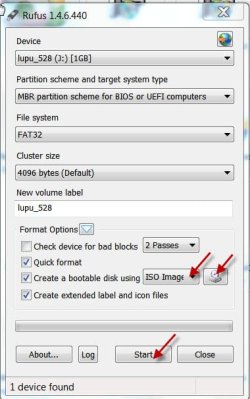
Creating a bootable pendrive with Rufus itself is very easy as shown in the screenshot.

Leave everything to its default settings. Only check that the correct pendrive is selected.

Just select ISO image in the dropdown menu, hit the drive icon next to it, select the ISO and hit Start.

If you have any problems, you should come back and let us know what exactly is the problem so that we can help you.
 

Attachments

  • 21-03-2014 10-08-11.jpg
    21-03-2014 10-08-11.jpg
    35.5 KB · Views: 25

My Computer My Computer

At a glance

Windows 7 Home Premium 32 bit
OS
Windows 7 Home Premium 32 bit
And both PepperMint3 and/or my Windows installation disc will work for my external HDD?
 

My Computer My Computer

At a glance

Windows Pro 7 32bit
Computer type
PC/Desktop
Computer Manufacturer/Model Number
eMachine
OS
Windows Pro 7 32bit
Hard Drives
Internal?
External - Iomega 2TB
Antivirus
AVG Free, Zone Alarm
Browser
Mozilla Firefox
And both PepperMint3 and/or my Windows installation disc will work for my external HDD?
I don't have any experience with PepperMint3, but your Windows installation disc should work just fine. I've performed that operation dozens of times on drives that were presumed dead, but in reality, only had a corrupt partition, or a few bad sectors. Many hard drives get thrown in the trash without any physical damage done to them at all. It is almost always a software problem [like corrupt firmware, corrupt drivers, or a corrupt file system]. Hard drives can, and do fail because of physical problems, but believe it or not, it is actually pretty rare. ;)
 

My Computer My Computer

At a glance

Windows 7 Enterprise SP1 x64AMD Athlon 64x2 4200+ Dual Core Windsor 2.2GHz4Gb: PNY PC2-6400 Dual Channel 2x2GbPNY NVIDIA GeForce 9800 GT
Computer type
PC/Desktop
Computer Manufacturer/Model Number
HP Pavillion
OS
Windows 7 Enterprise SP1 x64
CPU
AMD Athlon 64x2 4200+ Dual Core Windsor 2.2GHz
Motherboard
Socket AM2: ECS MCP61PM-HM
Memory
4Gb: PNY PC2-6400 Dual Channel 2x2Gb
Graphics Card(s)
PNY NVIDIA GeForce 9800 GT
Sound Card
Creative Sound Blaster Audigy 24Bit @96000Hz
Monitor(s) Displays
HP w1907 Wide LCD 19"
Screen Resolution
1440x900
Hard Drives
1.) OS Drive: 500Gb Seagate Barracuda ST35004-18AS


2.) Storage: 1Tb Seagate Barracuda ST310005-28AS
PSU
OCZ StealthXStream OCZ500SXS 500W
Case
Hp Pavillion
Cooling
Thermaltake
Keyboard
HP
Mouse
Microsoft Wireless
Internet Speed
300Mb
Antivirus
Norton Internet Security 2014
Browser
Internet Explorer 11
Other Info
Custom Build
Back
Top