HDDGURU - HDD Raw Copy Tool: any users?

TVeblen

Building Stuff
Guru
Gold Member
VIP
Local time
3:46 PM
Messages
6,239
Location
In The Woods
I just found this program this morning, it is supposed to be able to recover data from a failed hard drive, by-passing the OS, using a sector by sector approach.

HDDGURU: HDD Raw Copy Tool

It sounds promising, but has anyone here used it?
 

My Computer My Computer

Computer type
PC/Desktop
Computer Manufacturer/Model Number
Home Built - Jan 2013
OS
Windows 7 64 Bit Home Premium SP1
CPU
i7-3820
Motherboard
Asus P9X79-PRO - Bios 4608
Memory
GSkill F3-14900CL9Q - 16GB
Graphics Card(s)
EVGA GeForce GTX660 - Driver 352.86
Sound Card
On board Realtek ALC898
Monitor(s) Displays
Acer S271HL
Screen Resolution
1920 x 1080
Hard Drives
#1- Samsung 840 Pro Series
#2- Western Digital WD1002FAEX Sata3 Black
#3- Western Digital WD1002FAEX Sata3 Black
PSU
Corsair CMPSU-850TX-V2 - 850 watt (by Seasonic)
Case
Corsair Obsidian 550D
Cooling
Standard 3 120mm case fans, Cooler Master Hyper 212 EVO
Keyboard
MS KC-0405
Mouse
Intellimouse 5-button
Internet Speed
56 Mbits/Sec (on a good day)
Antivirus
Avast & Malwarebytes
Browser
Firefox
Other Info
Asus DVD - DRW-24B1ST 24X
Though this program seems to have been on board since atleast March 2010, there seems to be very little information by way of expert reviews/user reviews. Even in CNets's download.com there is not a single user review.

I could get a small video review here HDD Raw Copy Tool Video Review - HDD Raw Copy Tool Video Trailer - HDD Raw Copy Tool Screenshots

May be someone here - who actually needs data to be recovered - should try and report. A mock trial can only be a second best. :)

Looks to be a promising program using which one can make a sector to sector copy of a battered HDD to another good HDD and try recovery on it, keeping the original HDD unscathed. ( More often when one tries Data Recovery using various Data Recovery tools, the chances are that one can muck it up further and stress it further.)
 

My Computer My Computer

OS
Windows 7 Home Premium 32 bit
Yes, that is why I am checking. It sounds very promising. Almost too good to be true.

I'm working with someone right now who may need to recover data from a unrecognized drive. I hate to recommend a program that I have never used or seen recommended by trusted, knowledgeable people.

Maybe I will ask him if he wants to to be our lab rat!:geek:
 

My Computer My Computer

Computer type
PC/Desktop
Computer Manufacturer/Model Number
Home Built - Jan 2013
OS
Windows 7 64 Bit Home Premium SP1
CPU
i7-3820
Motherboard
Asus P9X79-PRO - Bios 4608
Memory
GSkill F3-14900CL9Q - 16GB
Graphics Card(s)
EVGA GeForce GTX660 - Driver 352.86
Sound Card
On board Realtek ALC898
Monitor(s) Displays
Acer S271HL
Screen Resolution
1920 x 1080
Hard Drives
#1- Samsung 840 Pro Series
#2- Western Digital WD1002FAEX Sata3 Black
#3- Western Digital WD1002FAEX Sata3 Black
PSU
Corsair CMPSU-850TX-V2 - 850 watt (by Seasonic)
Case
Corsair Obsidian 550D
Cooling
Standard 3 120mm case fans, Cooler Master Hyper 212 EVO
Keyboard
MS KC-0405
Mouse
Intellimouse 5-button
Internet Speed
56 Mbits/Sec (on a good day)
Antivirus
Avast & Malwarebytes
Browser
Firefox
Other Info
Asus DVD - DRW-24B1ST 24X

My Computer My Computer

Computer Manufacturer/Model Number
HP Pavilion DM4-1165dx
OS
Windows 7 Home Premium (x64) (build 7600)
CPU
2.4gib Intel core i5
Motherboard
Hewlett-Packard 146A 58.23
Memory
4gb
Graphics Card(s)
Intel HD Graphics with shared video memory
Sound Card
IDT High Definition Audio CODEC
Monitor(s) Displays
Intel(R) HD Graphics [Display adapter] Generic PnP Monitor
Hard Drives
Hitachi HTS725050A9A364
500.11 GB
Case
Notebook
Cooling
built in fan
Hddguru

I see there is not a lot of feedback on this tool so I thought I would post our experience with it. Our problem was not with recovering a damaged hard drive, but making a clone of a drive with an unrecognizable format. We have an older radio system that utilizes 3 Posix boxes (probably early 90s) as part of the system. We need to keep these going for about another 5 years so we wanted spare hard drives ready to go. We do not foresee any new configuration changes since the system is End of Life, so a cloned drive was a good and fast solution for us if we were to have a failure. They each contain a Seagate ST34520N 4.55GB SCSI hard drive. The first thing we did was to purchase a couple of used external SCSI hard drive boxes. We also purchased a couple of USB to SCSI adapters on the used market since we could not find any manufacturers of these any longer. We did initially try using 1 USB to SCSI adapter with a SCSI chain but discovered only SCSI 0 would work with the USB adapters. We also purchase another Seagate ST34520N drive to clone to. Initially we tried using Clonezilla but found it difficult to use, and we did not have any success with it. Then we came across HDDGURU HDD Raw Copy Tool. It has a very user friendly GUI and was simple to use. It took 3.5 hours to clone the drive (USB to serial adapters USB 1.1), but in the end we had a cloned drive. We plugged the new drive into our spare Posix box and everything worked fine.
I found HDD raw copy tool to be the best solution for our situation. I would mention that we done this on an XP machine. We do have a Windows 7 machine but have not tried it on there yet, but I thought this experience with HDDGURU HDD Raw Copy Tool may be informative and useful for others .
 

My Computer My Computer

OS
windows 7 home premium 32bit
Welcome to SevenForums and you start your journey here with a rep.:)

Thanks ka0jdn for sharing your valuable experience and bringing back to life this almost 9 months old thread.

This almost immediately set my mind rolling. We have been discussing ways and means of cloning a bootable flash drive which brought to the fore two programs ImageUSB and USB Image Tool.

Why not use this HDD RAW Copy Tool? And so here it is.

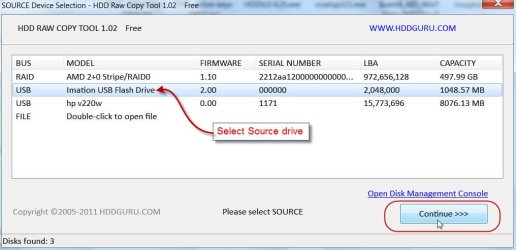
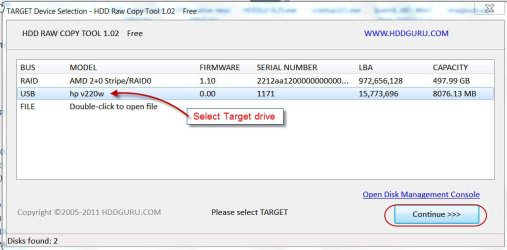
Plug in the Source UFD (here my 1 GB Imation bootable Lucid Puppy drive) and the Target UFD ( my 8GB HP v220w UFD) and run HDDRawCopy1.02Portable.exe . ( I downloaded the Windows executable requiring no installation - portable)

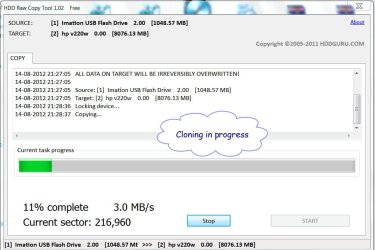
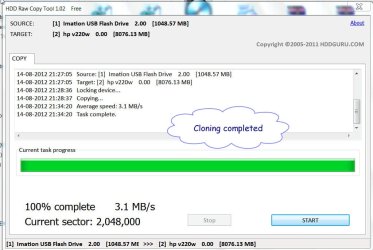
Rest of the story in Screenshots.

1SelSD.jpg

2SelTD.jpg

3Start.jpg

4In progress.jpg

5Complete.jpg

6DskMgt.jpg

In about 6 minutes my bootable Lucid Puppy on the HP UFD was ready.

Confirmed that I could boot Lucid Puppy.

So then here is another easy way to clone your pendrive and on the fly - tried and tested.

Thanks again to ka0jdn.
 

My Computer My Computer

OS
Windows 7 Home Premium 32 bit
HDDRawCopy 1.10 does not see two SCSI disk drives??

I am trying to clone my Solaris system disk (SCSI) as a spare system disk using HDDRawCopy 1.10 on Windows. I use AHA 2940U2 to connect two SCSI ST32430N disk drives. The system BIOS sees and power up both SCSI disks at the power up. The Windows boots up all right. My goal is to clone one SCSI drive (Solaris system disk) to another SCSI drive. When I run the HDDRawCopy 1.10 (2028KB) and the app only sees one SCSI disk drive. So, my task failed. Does anyone know how to resolve this?
Thanks,
 

My Computer My Computer

Computer type
PC/Desktop
OS
7, XP, all.
One well-known idea amongst data recovery folks concerning usage of any data recovery utility: single sector single pass, meaning, the utility only attempts to read each sector once and only once, and moves onto the next sector, and so on.
One of the things that shorten the life of going-bad HDDs is the usage of utilities that are "told" to read, re-read, re-read, etc., each problematic sector encountered.
 
Last edited:

My Computer My Computer

Computer type
PC/Desktop
Computer Manufacturer/Model Number
Antec desktop; Acer Aspire laptops
OS
Windows 7 Professional 64-bit
CPU
Desktop i5; Acers i5 & i7
Memory
desktop 16GB; 1 Acer 8GB & 1 Acer 16GB
Hard Drives
1TB split into 2 equal partitions [OS and data] usable by RJS
Internet Speed
AT&T DSL
Browser
FF, GChrome, msIE
Other Info
Windows 7 Firewall, Emsisoft AM/AV, MSE [scan-only], SpywareBlaster, Ruiware/BillP combine
The one problem if you clone a drive with bad sectors is it then writes bad sectors to the new drive unless there is a special settings not to copy bad sectors
 

My Computer My Computer

Computer type
PC/Desktop
OS
win 8 32 bit
Funny I see this thread now. I wanted to just clone an encrypted drive to a SSD via USB to SATA adapters. I tried HDDGURU HDD Raw Copy but it kept stalling out and would have took forever. So I tried Roadkil's RawCopy instead and that seemed to work, at least with a full progress and copy. However, I discovered my older laptop was not compatible with the new SSD since the connector port was too small. Never had that trouble before replacing HDD with SSDs in laptops, but this one I did. I think I was able to insert the SSD into the laptop's connector port without the adapter that inserts in the laptop which was a real PITA to get the SSD aligned right to insert into the laptop's connector. I booted the laptop and it said no boot device found. So that figures.

I'll try Roadkil's RawCopy again in an unencrypted environment and see if it will work.
 

My Computer My Computer

Computer type
PC/Desktop
OS
Windows 7 Ultimate x64
Back
Top