
HDMI audio not working on windows 7 (Vista did)

bagulhodoido

New member
Local time
10:44 PM
Messages
10
EDIT:

Here is the drivers that worked on my 8600 GT (aparently, work on other Nvidia GPUs as well)*:

179.28 - HDMI Audio works fine, no overscanning, full function, no problems with unwanted clocks.

182.50 - HDMI Audio works fine, no overscanning, full function, no problems with unwanted clocks. (Possible best solution, so far)

190.56 - HDMI Audio works fine, OVERSCANNED, crazy clocks (boost on full 3d clock when opening windows with Aero enabled, and after the clock boosts it only go down after rebooting the system)**

Soon I'll post a list of drivers I already tried and the AUDIO didn't work.

*: For more info about working drivers, check on this thread on nVidia forums: http://forums.nvidia.com/index.php?showtopic=103307

**: For more info about the clock problem, check on this thread on laptopvideo2go forums: http://forums.laptopvideo2go.com/topic/24736-v19056-windows-7vista-64bit-nvidia/

If any nVidia GPU owner have a different driver and is successfully using HDMI Audio, please feed.


------------ ORIGINAL POST (PROBLEM) --------------


Hello guys..

I have seen several topics with this issue, but on pretty much all of them there was no recognition of the hdmi device itself, even while connected.

My problem is a little different.

My computer is a Asus Notebook G1S, with a Geforce 8600M GT.

My tv is a LCD Philis Full-HD. Got to check for better specifications about it.

I'm currently using Windows 7 RTM 7600 Trial with a multi language pack.

With Windows VISTA, everything worked fine, HDMI video was great and audio was working fine. After installing Windows 7, video is still working, I got a little overscan issues, solved with different video card drivers.

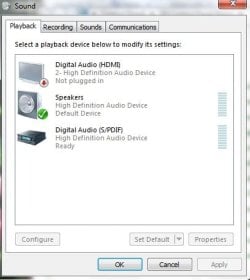
Here is a screenshot on how my audio devices shows up.


Note that the digital audio is set on Default (Padrão on my language)

I'm using the last driver provided from Nvidia (186.91), downloaded from NVIDIA & Laptop News | Latest NVIDIA drivers and related news | laptopvideo2go.com, but I tried it with different drivers. Even from 19x series.

What might be the problem with my HDMI audio?

If anyone might know but need some more info about my system, please ask and I provide any additional information.

I'll keep trying to fix this and if I eventually come up with a solution I'll post it here.

Thanks already for your concern!:geek:
 
Last edited:

My Computer My Computer

At a glance

Windows 7 Build 7600 - 64 bitsMobile DualCore Intel Core 2 Duo T7500, 2200 ...3072 MB (DDR2-667 DDR2 SDRAM)NVIDIA GeForce 8600M GT (256 MB)
Computer Manufacturer/Model Number
ACPI x64-based PC (Mobile)
OS
Windows 7 Build 7600 - 64 bits
CPU
Mobile DualCore Intel Core 2 Duo T7500, 2200 MHz (11 x 200)
Motherboard
Asus G1000S Series Notebook
Memory
3072 MB (DDR2-667 DDR2 SDRAM)
Graphics Card(s)
NVIDIA GeForce 8600M GT (256 MB)
Sound Card
Realtek ALC660 @ Intel 82801HBM ICH8M - High Definition Audi
Monitor(s) Displays
Samsung LTN154P1-L03 [15.4" LCD]
Screen Resolution
1680x1050
Hard Drives
Hitachi HTS542525K9SA00 ATA Device (250 GB, 5400 RPM, SATA)
Please do fill out your system specs in your user cp it helps those with more knowledge than I to help you. Make sure you list what version of 7 your using build and 32 bit or 64. thanks.
 

My Computer My Computer

At a glance

Windows 7 ultimate 64 bit / XP Home sp3intel Core 2 Duo E8400 3.0ghz8 gigs 1066 OCZ Fata1tyEVGA GTX 580 Call of Duty Black Ops Edition
Computer Manufacturer/Model Number
Self Built
OS
Windows 7 ultimate 64 bit / XP Home sp3
CPU
intel Core 2 Duo E8400 3.0ghz
Motherboard
Asus P5ND bios 1401
Memory
8 gigs 1066 OCZ Fata1ty
Graphics Card(s)
EVGA GTX 580 Call of Duty Black Ops Edition
Sound Card
Creative Soundblaster Audigy 2zs
Monitor(s) Displays
Asus 24in LCD's 2MS X2
Screen Resolution
1920x1080p @60Hz
Hard Drives
WD Caviar 500 Black/ WD Caviar 200 Blue
PSU
OCZ 700W GameXtreme
Case
NZXT Apollo
Cooling
Corsair H50 CPU/120mm x3 /60mm x2 /Corsair Dominator Ram
Keyboard
Logitech Bluetooth Wireless MX5000
Mouse
Logitech Bluetooth Wireless MX1000
Internet Speed
Download 19.83 Upload 0.97
Other Info
Logitech Z2300 Speakers/ Bose Noise Cancelling Headphones/Avermedia PCI-e Hybrid TV Bravo/Epson NX415 all in one/ 4 Port Powered USB Hub/ LG 10x Bluray Burner /TSST Corp DVDRW External
I uploaded my computer Specs, the right way I think. If there is anything wrong on my specs, please tell me.
 

My Computer My Computer

At a glance

Windows 7 Build 7600 - 64 bitsMobile DualCore Intel Core 2 Duo T7500, 2200 ...3072 MB (DDR2-667 DDR2 SDRAM)NVIDIA GeForce 8600M GT (256 MB)
Computer Manufacturer/Model Number
ACPI x64-based PC (Mobile)
OS
Windows 7 Build 7600 - 64 bits
CPU
Mobile DualCore Intel Core 2 Duo T7500, 2200 MHz (11 x 200)
Motherboard
Asus G1000S Series Notebook
Memory
3072 MB (DDR2-667 DDR2 SDRAM)
Graphics Card(s)
NVIDIA GeForce 8600M GT (256 MB)
Sound Card
Realtek ALC660 @ Intel 82801HBM ICH8M - High Definition Audi
Monitor(s) Displays
Samsung LTN154P1-L03 [15.4" LCD]
Screen Resolution
1680x1050
Hard Drives
Hitachi HTS542525K9SA00 ATA Device (250 GB, 5400 RPM, SATA)
I have seen on several threads that there is some kind of HDMI driver, but after researching I found out that it was only for ATI video cards. Also, on some threads there was screenshots were the audio devices showed up like a "HDMI sound device", while mine shows up as "Realtek Audio Output".

I wonder if it should detect the device as a HDMI output. Btw, on windows vista it was exactly the same way. A "Realtek Audio Output" but it worked.

So, might not be problem.
 

My Computer My Computer

At a glance

Windows 7 Build 7600 - 64 bitsMobile DualCore Intel Core 2 Duo T7500, 2200 ...3072 MB (DDR2-667 DDR2 SDRAM)NVIDIA GeForce 8600M GT (256 MB)
Computer Manufacturer/Model Number
ACPI x64-based PC (Mobile)
OS
Windows 7 Build 7600 - 64 bits
CPU
Mobile DualCore Intel Core 2 Duo T7500, 2200 MHz (11 x 200)
Motherboard
Asus G1000S Series Notebook
Memory
3072 MB (DDR2-667 DDR2 SDRAM)
Graphics Card(s)
NVIDIA GeForce 8600M GT (256 MB)
Sound Card
Realtek ALC660 @ Intel 82801HBM ICH8M - High Definition Audi
Monitor(s) Displays
Samsung LTN154P1-L03 [15.4" LCD]
Screen Resolution
1680x1050
Hard Drives
Hitachi HTS542525K9SA00 ATA Device (250 GB, 5400 RPM, SATA)
Last edited:

My Computer My Computer

At a glance

Windows 7 Build 7600 - 64 bitsMobile DualCore Intel Core 2 Duo T7500, 2200 ...3072 MB (DDR2-667 DDR2 SDRAM)NVIDIA GeForce 8600M GT (256 MB)
Computer Manufacturer/Model Number
ACPI x64-based PC (Mobile)
OS
Windows 7 Build 7600 - 64 bits
CPU
Mobile DualCore Intel Core 2 Duo T7500, 2200 MHz (11 x 200)
Motherboard
Asus G1000S Series Notebook
Memory
3072 MB (DDR2-667 DDR2 SDRAM)
Graphics Card(s)
NVIDIA GeForce 8600M GT (256 MB)
Sound Card
Realtek ALC660 @ Intel 82801HBM ICH8M - High Definition Audi
Monitor(s) Displays
Samsung LTN154P1-L03 [15.4" LCD]
Screen Resolution
1680x1050
Hard Drives
Hitachi HTS542525K9SA00 ATA Device (250 GB, 5400 RPM, SATA)
Hi mate,

I was wondering if you could help - Im having exactly the same problem as yours and from what I read in your post you've found a resolution for it.
Are you just downloading these Nvidia drivers you mention about? 179.28?
And that fixes the problem? Can you paste the exact link for this, becasue the one you've pasted directs me to lot of drivers and I can't find the one you have mentioned.
Or do you download any realtek drivers as well? Im also using Windows 7 RC.

Thanks a lot for the help, I will really appreciate it
 

My Computer My Computer

At a glance

Win 7Core 2 Duo, 1.6 Ghz3 gbNvidia 8800M
Computer Manufacturer/Model Number
Asus
OS
Win 7
CPU
Core 2 Duo, 1.6 Ghz
Memory
3 gb
Graphics Card(s)
Nvidia 8800M
Hard Drives
250 Gb
Hi mate,

I was wondering if you could help - Im having exactly the same problem as yours and from what I read in your post you've found a resolution for it.
Are you just downloading these Nvidia drivers you mention about? 179.28?
And that fixes the problem? Can you paste the exact link for this, becasue the one you've pasted directs me to lot of drivers and I can't find the one you have mentioned.
Or do you download any realtek drivers as well? Im also using Windows 7 RC.

Thanks a lot for the help, I will really appreciate it

Hi there.

Here is the direct link to the driver:

v179.28 Windows Vista 64bit | NVIDIA - NVISION

Follow this steps:
  • Download the driver
  • Download Modified INF
  • Unzip the driver (Using 7zip or similar)
  • Place the modified INF in the folder you unziped the driver
  • Install the driver

Everything should work after you reboot your computer. Btw, this driver have a little underscan issue on my television, but I don't mind at all since it works to any resolution without overscaning (which is the real pain in the *ss of HDMI).

About the Realtek Drivers, I'm using the new one "Realtek R2.33", which can be found on the same site, here is the direct link:

Realtek Audio Codecs - NVISION

No secrets installing this driver, just run the *.exe

OBS.: This driver used to be the best choice for 8600gt users about 6 months ago. Low heat, nice performance and less flickerings. Right now I believe that there are lots of better drivers around, I'll be trying on and on for a better driver that works with HDMI audio.

--------------------- EDIT ---------------------

You might want to check on this thread - http://forums.nvidia.com/index.php?showtopic=103307 - on nvidia forums, aparently, is completely related to the drivers, and might be happening to any nvidia user, whichever the card is.

Quote to this post on that thread:

ok guys here is the solution, for windows 7
http://downloads.guru3d.com/GeForce-ForceW...nload-2339.html
190.56 win7 64 bit drivers
now my sound is fully working.

also if any one has any problems and have never got any sound, try inserting the s/pdif reversed the opposite you had it in, (only for those you have never had hdmi sound.

good luck

I didn't try it yet, but everyone who did said it works.

Follow that thread and they will let you know which drivers work and which don't as soon as released.

Hope I could help.
 

My Computer My Computer

At a glance

Windows 7 Build 7600 - 64 bitsMobile DualCore Intel Core 2 Duo T7500, 2200 ...3072 MB (DDR2-667 DDR2 SDRAM)NVIDIA GeForce 8600M GT (256 MB)
Computer Manufacturer/Model Number
ACPI x64-based PC (Mobile)
OS
Windows 7 Build 7600 - 64 bits
CPU
Mobile DualCore Intel Core 2 Duo T7500, 2200 MHz (11 x 200)
Motherboard
Asus G1000S Series Notebook
Memory
3072 MB (DDR2-667 DDR2 SDRAM)
Graphics Card(s)
NVIDIA GeForce 8600M GT (256 MB)
Sound Card
Realtek ALC660 @ Intel 82801HBM ICH8M - High Definition Audi
Monitor(s) Displays
Samsung LTN154P1-L03 [15.4" LCD]
Screen Resolution
1680x1050
Hard Drives
Hitachi HTS542525K9SA00 ATA Device (250 GB, 5400 RPM, SATA)
thanks a lot for all your help, I will check the links you have sent me and try to reinstall see what happens. Thanks again!
 

My Computer My Computer

At a glance

Win 7Core 2 Duo, 1.6 Ghz3 gbNvidia 8800M
Computer Manufacturer/Model Number
Asus
OS
Win 7
CPU
Core 2 Duo, 1.6 Ghz
Memory
3 gb
Graphics Card(s)
Nvidia 8800M
Hard Drives
250 Gb
bagulhodoido, this is the way mine is set up. You might try switching to the speakers as your default
 

Attachments

  • HDMI setup.jpg
    HDMI setup.jpg
    22 KB · Views: 3,732

My Computer My Computer

At a glance

Windows 7 Ultimate 32bit SP1Intel(R) Core(TM)2 Quad CPU @ 2.40GHz, 2400 MHz4 GBATI Radeon HD 2600 Pro
Computer type
PC/Desktop
Computer Manufacturer/Model Number
Bruce ... somewhere in his 40's
OS
Windows 7 Ultimate 32bit SP1
CPU
Intel(R) Core(TM)2 Quad CPU @ 2.40GHz, 2400 MHz
Motherboard
INTEL/D975XBX2
Memory
4 GB
Graphics Card(s)
ATI Radeon HD 2600 Pro
Monitor(s) Displays
Samsung SyncMaster 914v
Screen Resolution
1280 x 1024
Hard Drives
2/500GB each ... ST3500630AS ATA Device.
One is not connected
PSU
Rocketfish 700 W
Case
G.Skill Gigabyte Chassis
Keyboard
Standard PS/2 Keyboard
Mouse
Microsoft PS/2 Mouse
Internet Speed
DSL
Antivirus
Avira Internet Security
Browser
IE 11
Other Info
ATI HDMI Audio
bagulhodoido, this is the way mine is set up. You might try switching to the speakers as your default

You got Nvidia or ATI gpu? I haven't seen any Nvidia GPU with realtek audio drivers the shows the HDMI driver as your screenshot.

ATI gpus, though, after installing the "ATI Realtek HDMI Driver", show exactly like your screenshot.
 

My Computer My Computer

At a glance

Windows 7 Build 7600 - 64 bitsMobile DualCore Intel Core 2 Duo T7500, 2200 ...3072 MB (DDR2-667 DDR2 SDRAM)NVIDIA GeForce 8600M GT (256 MB)
Computer Manufacturer/Model Number
ACPI x64-based PC (Mobile)
OS
Windows 7 Build 7600 - 64 bits
CPU
Mobile DualCore Intel Core 2 Duo T7500, 2200 MHz (11 x 200)
Motherboard
Asus G1000S Series Notebook
Memory
3072 MB (DDR2-667 DDR2 SDRAM)
Graphics Card(s)
NVIDIA GeForce 8600M GT (256 MB)
Sound Card
Realtek ALC660 @ Intel 82801HBM ICH8M - High Definition Audi
Monitor(s) Displays
Samsung LTN154P1-L03 [15.4" LCD]
Screen Resolution
1680x1050
Hard Drives
Hitachi HTS542525K9SA00 ATA Device (250 GB, 5400 RPM, SATA)
I had the same problem on my asrock k10N78fullehd3.0 board. remove both HD audio controlers and install latest driver for soundcard. Then download this driver : NVIDIA DRIVERS 1.00.00.59 WHQL

install and everything should work fine.
 

My Computer My Computer

At a glance

Windows vista premiumAMD Phenom triple core 8650 2,3 Ghz4 GB DDR2 1066NVIDIA® GeForce 8200 Chipset
OS
Windows vista premium
CPU
AMD Phenom triple core 8650 2,3 Ghz
Motherboard
K10N78FullHD-hSLI R3.0
Memory
4 GB DDR2 1066
Graphics Card(s)
NVIDIA® GeForce 8200 Chipset
Sound Card
Realtek ALC662 Audio Codec
Monitor(s) Displays
Samsung Syncmaster T 220
Hard Drives
Samsung HD103UJ 1 TB SATA II
Maxtor V080E0 80 GB SATA II
PSU
Quiet 80 PLUS® Certified 350 Watt custom power supply
Case
Antec NSK1380 - EC
Cooling
120mm fan
Back
Top