
Solved HDMI not recognized on graphic card

tomsalford

New member
Local time
2:41 AM
Messages
2
I have recently installed a new graphics card Radeon HD 4350 as I wanted to have dual monitors from my PC. When I installed it I found that the DVI connection worked fine but when I plugged in the HDMI the screen went black. I thought I must have mucked up the installation or there may be some more up to date drivers. Went to the AMD website and downloaded the recommended driver. Unistalled the previous driver and rebooted the PC. Installed the new driver and had the same result. When I unplug the HDMI connection I get the desktop. I have also downloaded the HDMI_R261 driver from Realtek thinking that it may be that but it has made no difference. The monitor has a VGA input and that works fine and the HDMI cable works OK on my mate's laptop so I'm satified that it's not the cable or the monitor. I have to add that it was all working fine before I upgraded to Windows 7 before that I had Windows Vista and a Radeon HD 3400 graphics card. I did try to reinstall that but still it is not recognizing the HDMI. Has anyone had an experience like this? Were you able to fix it? If so can you tell me how please.
 

My Computer My Computer

Computer Manufacturer/Model Number
Compaq-Presario SR5027UK
OS
Windows 7 Ultimate 32 bit
CPU
Intel(R) Pentium(R) D CPU 3.00GHz
Motherboard
Intel 82801GB/GR (ICH7/ICH7R)
Memory
2 x 1GB DDR2 SDRAM
Graphics Card(s)
Radeon HD 4350
Sound Card
Realtek High Definition Audio
Monitor(s) Displays
LG 32" LCD HD TV and LG Flatron L194WT
Hard Drives
C Compaq NTFS 140GB
D Recovery NTFS 5GB
J Storage NTFS 37 GB
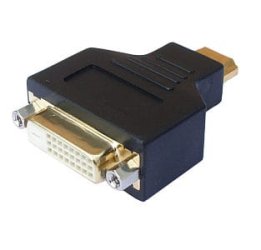
Yeah, unfortunately this is what my solution looked like at the end of the day. Edit actually that's a picture of the female dvi adapter my bad... you get the idea though.
 

Attachments

  • dvi-to-hdmi.jpg
    dvi-to-hdmi.jpg
    7.7 KB · Views: 1,761

My Computer My Computer

Computer Manufacturer/Model Number
Insane hobo technologies. ;-)
OS
Windows 7 x64
CPU
Intel i7 2600k
Motherboard
Asrock z68 extreme 4 gen 3
Memory
G.skill Ripjaw 16gigs @ 1866
Graphics Card(s)
Nvidia gtx580 (evga)
Sound Card
Integrated HD audio + hdmi
Monitor(s) Displays
24" ASUS widescreen + 42" insignia
Screen Resolution
1080p (1920x1080)
Hard Drives
128 Samsung 830
256 Samsung 840
3 x 1tb storage drive (various)
1 western digital 1tb (eSATA)
1 Seagate 1tb (eSATA)
PSU
1 kilowatt SLI/Crossfire rated Silverstone modular
Case
NZXT Phantom + additional 220 fan
Cooling
Zalmann
Keyboard
Microsoft wireless 3000 (v2)
Mouse
MS - wireless 5000 (bluetrack)
Internet Speed
depends on if you ask me or my provider.
Other Info
The above information is provided as is, and the author assumes no responsibility for issues it may cause with your sanity or fanboyism.
I tried that with the same result. It seems that neither the HDMI to the HDTV nor the single link DVI-D to my other monitor will work in Windows 7 with this new graphic card. It was working fine with Vista. I had to upgrade as Vista just kept crashing on me. I've been trying to find a solution for this for days now can someone please help me.
 

My Computer My Computer

Computer Manufacturer/Model Number
Compaq-Presario SR5027UK
OS
Windows 7 Ultimate 32 bit
CPU
Intel(R) Pentium(R) D CPU 3.00GHz
Motherboard
Intel 82801GB/GR (ICH7/ICH7R)
Memory
2 x 1GB DDR2 SDRAM
Graphics Card(s)
Radeon HD 4350
Sound Card
Realtek High Definition Audio
Monitor(s) Displays
LG 32" LCD HD TV and LG Flatron L194WT
Hard Drives
C Compaq NTFS 140GB
D Recovery NTFS 5GB
J Storage NTFS 37 GB
I'm going to suggest you head over to the amd / ati forums here.
I just don't have a massive amount of experience with various multiple display set ups. Most of it comes from my own set up, and what works for me is apparently not working for you.
It would be best to go where people are die hard on the subject. Since no one else is chiming in here, and I've given you what little input I could on the subject.
It could be something as simple as a eyefinity component you're missing or something.
 

My Computer My Computer

Computer Manufacturer/Model Number
Insane hobo technologies. ;-)
OS
Windows 7 x64
CPU
Intel i7 2600k
Motherboard
Asrock z68 extreme 4 gen 3
Memory
G.skill Ripjaw 16gigs @ 1866
Graphics Card(s)
Nvidia gtx580 (evga)
Sound Card
Integrated HD audio + hdmi
Monitor(s) Displays
24" ASUS widescreen + 42" insignia
Screen Resolution
1080p (1920x1080)
Hard Drives
128 Samsung 830
256 Samsung 840
3 x 1tb storage drive (various)
1 western digital 1tb (eSATA)
1 Seagate 1tb (eSATA)
PSU
1 kilowatt SLI/Crossfire rated Silverstone modular
Case
NZXT Phantom + additional 220 fan
Cooling
Zalmann
Keyboard
Microsoft wireless 3000 (v2)
Mouse
MS - wireless 5000 (bluetrack)
Internet Speed
depends on if you ask me or my provider.
Other Info
The above information is provided as is, and the author assumes no responsibility for issues it may cause with your sanity or fanboyism.
A couple of questions:

1. Have you tried the HDMI by itself?
2. Do you get a signal?

If YES, IMO it's a software/setup issue. In either CCC or in Windows (right click desktop>screen resolution) you need to set the display option to "duplicate display".

If NO, IMO it's a faulty HDMI connector on your VGA. RMA your card.

If the above doesn't work:

Does your TV support the same resolution as your monitor?

ex. If your monitor is set to 2560x1660 yet your TV can support 1920x1080 max, then you will not get a signal on your TV. You will then need to lower your monitor res to 1920x1080 or lower.

I've had experience with BOTH situations.

I hope this helps.

Good luck.
 

My Computer My Computer

Computer Manufacturer/Model Number
N/A
OS
Windows 7 Ultimate x64
CPU
Intel i7 [email protected]
Motherboard
Asus Maximus IV Extreme-Z
Memory
G Skill DDR3 12800 DDR3 RipJaws 16Gb
Graphics Card(s)
EVGA GTX480 Tri SLI
Sound Card
SoundBlaster X-Fi Surround 5.1 Pro
Monitor(s) Displays
3 * Dell U2711
Screen Resolution
7680x1440
Hard Drives
2 * OCZ Vertex 3 120Gb
4 * Seagate Barracuda XT 2Tb
1 * WD Caviar Black 1Tb
PSU
Silverstone ST1500
Case
Corsair Obsidian 800D
Cooling
Koolance CPU-360 : Koolance VID-480 : Koolance 360x3 + 120x1
Keyboard
Microsoft Sidewinder X4
Mouse
Logitech G1 Optical
Internet Speed
100Mb
Back
Top