HDMI output from PC to TV not working anymore.

drw89

New member
Local time
11:47 AM
Messages
2
I've been using an HDMI cable to connect my pc (win7 home premium 64bit, nvidia GeForce G210 video card) to my Panasonic HDTV for over 2 years. As of not so long ago (can't remember exactly when, it was around May probably) the PC and TV couldn't connect anymore.
At first i thought it was my HDMI cable that died, but I bought a new one and that didn't work either. I've tried all the HDMI inputs on my TV, downloading the latest drivers for my video card and went through all the menu's on my tv looking for settings that might turn off the HDMI functions, but without any luck.

It's driving me crazy because I haven't changed anything!

I hope somebody can help me.

Regards, drw
 

My Computer My Computer

At a glance

Windows 7 Ultimate x64
OS
Windows 7 Ultimate x64
If you have a Input button on the TV remote use it. See if you have the proper selection. Example: HDMI 1, HDMI 2, VGA, Component 1, ect.
 

My Computer My Computer

At a glance

Windows 10 Pro. 64/ version 1709 Windows 7 Pr...Intel i7-6800K @ 4.3Corsair Platinum 16 gig @2400EVGA GTX 1070 OC
Computer type
PC/Desktop
Computer Manufacturer/Model Number
Home made Desktop
OS
Windows 10 Pro. 64/ version 1709 Windows 7 Pro/64
CPU
Intel i7-6800K @ 4.3
Motherboard
ASUS X-99 Deluxe II
Memory
Corsair Platinum 16 gig @2400
Graphics Card(s)
EVGA GTX 1070 OC
Monitor(s) Displays
Asus 27" LED LCD/VE278Q
Screen Resolution
1920-1080 or 1280-720 HDMI
Hard Drives
INTEL SSD 730-240 Gb Sata 3.0/
PSU
EVGA Platium 1200W
Case
Phanteks Luxe Tempered Glass 8 fans/ one radiator
Cooling
XSPC/ Water Cooled CPU
Keyboard
Das 4 Professional
Mouse
Logitech M705/MX Anywhere 2-S
Internet Speed
100 mbits
Antivirus
Microsoft Security Essentials/ Malwarebytes Premium 3.0/ SAS
Browser
I.E. 11 default/Firefox/ ISP Time Warner Cable/Spectrum
Other Info
LG BluRay Burner/
Sound system-KLipsch-THX/
Icy Dock ssd Hot Swap bays.
If you mean the button that selects which input to select, yes I'm 100% sure I'm always selecting the right channel/input.

The connection from my pc to the tv has ALWAYS worked properly, but just stopped doing so one day.
 

My Computer My Computer

At a glance

Windows 7 Ultimate x64
OS
Windows 7 Ultimate x64
The reason I mentioned it is because mine will change without me telling it to change at times.
 

My Computer My Computer

At a glance

Windows 10 Pro. 64/ version 1709 Windows 7 Pr...Intel i7-6800K @ 4.3Corsair Platinum 16 gig @2400EVGA GTX 1070 OC
Computer type
PC/Desktop
Computer Manufacturer/Model Number
Home made Desktop
OS
Windows 10 Pro. 64/ version 1709 Windows 7 Pro/64
CPU
Intel i7-6800K @ 4.3
Motherboard
ASUS X-99 Deluxe II
Memory
Corsair Platinum 16 gig @2400
Graphics Card(s)
EVGA GTX 1070 OC
Monitor(s) Displays
Asus 27" LED LCD/VE278Q
Screen Resolution
1920-1080 or 1280-720 HDMI
Hard Drives
INTEL SSD 730-240 Gb Sata 3.0/
PSU
EVGA Platium 1200W
Case
Phanteks Luxe Tempered Glass 8 fans/ one radiator
Cooling
XSPC/ Water Cooled CPU
Keyboard
Das 4 Professional
Mouse
Logitech M705/MX Anywhere 2-S
Internet Speed
100 mbits
Antivirus
Microsoft Security Essentials/ Malwarebytes Premium 3.0/ SAS
Browser
I.E. 11 default/Firefox/ ISP Time Warner Cable/Spectrum
Other Info
LG BluRay Burner/
Sound system-KLipsch-THX/
Icy Dock ssd Hot Swap bays.
I just registered here because many here seem to be having Windows 7 HDMI problems..... Mine is not the exactly the same but through some automated update I can no longer output 5.1 over HDMI. It always worked perfect then something automated f-----kd it up. I have lots of things to do but I have probably have spent 8 hours of Googling on this new drivers everywhere etc. OK I'll list my config.... Crosshair V Formula AMD FX 8150 8-Core 32 Gig Mem Win 7 SP1. I miss my lossless 5.1 FLAC files. You can create them using Logic at 192K.
 

My Computer My Computer

At a glance

W7 Pro 64BitAMD FX 8150 8-Core32 GigRadeon HD6450
Computer Manufacturer/Model Number
Republic of Gamers Crosshair V Formula
OS
W7 Pro 64Bit
CPU
AMD FX 8150 8-Core
Motherboard
Republic of Gamers Crosshair V Formula
Memory
32 Gig
Graphics Card(s)
Radeon HD6450
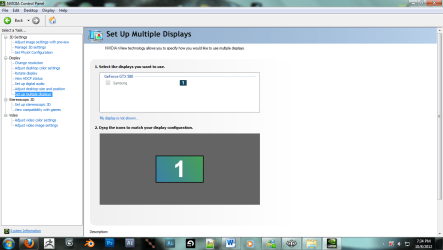
take a look at you nvidia control panel (right click on desktop and click "NVIDIA Control Panel") and make sure that your monitor is checked under the proper output on your video card......also try lowering your screen resolution, it may be unsupported by the tv/monitor you're using.
 

Attachments

  • Untitled.png
    Untitled.png
    57.5 KB · Views: 90

My Computer My Computer

At a glance

Microsoft Windows 7 Professional 64-bit 7601 ...Intel(R) Core(TM) i7-3970x CPU @ 3.50GHz 4.00GhzTotal: 12.00 GBNVIDIA/EVGA GeForce GTX 690
Computer type
PC/Desktop
Computer Manufacturer/Model Number
Custom PC
OS
Microsoft Windows 7 Professional 64-bit 7601 Multiprocessor Free Service Pack 1
CPU
Intel(R) Core(TM) i7-3970x CPU @ 3.50GHz 4.00Ghz
Motherboard
Gigabyte Technology X79-UP4
Memory
Total: 12.00 GB
Graphics Card(s)
NVIDIA/EVGA GeForce GTX 690
Sound Card
motherboard
Monitor(s) Displays
Acer HN274Hbmiiid Black
Screen Resolution
1920 x 1080 x 32 bits (4294967296 colors) @ 120 Hz
Hard Drives
X2 Western Digital WD Black WD4001FAEX 4TB
PSU
Corsair AX1200
Case
coolermaster HAFX
Cooling
Intel Thermal Solution RTS2011LC
Keyboard
RAZER DeathStalker
Mouse
Wacom Tablet Intuos 4
Internet Speed
DSL 256k
Antivirus
Kaspersky
Browser
Firefox
System Restore!

HDMI connection between PC and TV suddenly stopped working after being unplugged. Bought a new HDMI cable, which did nothing, putzed around with drivers and reboots and many forums - finally a system restore back to a date prior to problem finally solved the problem. Just go to the Start button and search for "system restore."
 

My Computer My Computer

At a glance

Windows 7 x64
Computer type
PC/Desktop
OS
Windows 7 x64
Oh dear...

My PC doesn't read any TVs or monitors, I can't see anything the PC is doing. How could I access the required options? What should I do?:cry:
 

My Computer My Computer

At a glance

Windows 7 UltimateIntel i7UnsureNVIDIA GT 730
Computer type
PC/Desktop
Computer Manufacturer/Model Number
custom build
OS
Windows 7 Ultimate
CPU
Intel i7
Motherboard
msi PRO Series, Z170A PC MATE
Memory
Unsure
Graphics Card(s)
NVIDIA GT 730
Hard Drives
1 terabyte Hardrive
227Gig SSD
Antivirus
BitDefeander
Browser
Chrome
My PC doesn't read any TVs or monitors, I can't see anything the PC is doing. How could I access the required options? What should I do?:cry:

A few questions first. (And I apologise if these seem a little academic.)

1. Have you tried booting in safe mode?

2. Have you tried removing the gpu and just using the onboard graphics (that is if this is an option).

3. Have you tried plugging it into a regular PC monitor?

I had a similar issue with an old NVIDIA card once. It turned out to be the gpu. These simple tasks might help eliminate some of the variables. Often times it can be something as simple as this. If you can get it to boot in safe mode on a standard pc monitor you'll be able to do a system restore.
 

My Computers My Computers

  • At a glance

    Windows 7 Ultimate, Windows 8.1 Pro, Linux Mi...INTEL 6900KCORSAIR DOMINATOR PLATINUM 128GBEVGA GTX 1070 FTW
    Computer type
    PC/Desktop
    Computer Manufacturer/Model Number
    ASUS CUSTOM BUILD IN THERMALTAKE LEVEL 10 GT CASE
    OS
    Windows 7 Ultimate, Windows 8.1 Pro, Linux Mint/Cinnimon (Triple Boot)
    CPU
    INTEL 6900K
    Motherboard
    X99-E WS USB 3.1
    Memory
    CORSAIR DOMINATOR PLATINUM 128GB
    Graphics Card(s)
    EVGA GTX 1070 FTW
    Sound Card
    Onboard Crystal Sound - very nice ;)
    Monitor(s) Displays
    SAMSUNG 4K 28"
    Screen Resolution
    3140 x 2160 - A little extreme. Need to change it.
    Hard Drives
    1) LSI LOGICAL VOLUME RAID 10 (250 GBX4) SSD ARRAY
    2) INTEL RAID 0 KINGSTON (2) SSD ARRAY
    3) INTEL RAID 1 SEAGATE (2) 1TB ARRAY (secured backup)
    4) INTEL RAID 1 SEAGATE HYBRID (2) (secure secured backup)
    5) AHCI SEAGATE 3TB (1) BACKUP & STORAGE (back
    PSU
    CORSAIR HX 1000i
    Case
    THERMAL TAKE LEVEL 10 GT
    Cooling
    NOCTUA TOWER COOLING - PUSH/PULL
    Keyboard
    LOGITECH PRODIGY (One day I'll get a real keyboard.)
    Mouse
    LOGITECH (One day I'll get a real mouse.)
    Internet Speed
    300 Gb down 12 up Intel(R) I210 Gigabit Network Connection
    Antivirus
    several - Network implementing vs from other PCs - ask me
    Browser
    Mostly FireFox these days
    Other Info
    NOT ENOUGH ROOM TO LIST ALL HARD DRIVES HERE. Cuts me off at 5. Did you know that if you run a network you can scan your PC for viruses via other PCs using several different virus scanners? No virus scanner gets it all. This is narrows down the window for contracting a virus. By using multiple operating systems you can use different virus scanners with no risk of conflict.
  • Antivirus
    KASPERSKY
Back
Top