Solved [HELP]ASUS X50N Coprocessor Driver

scirocco

New member
Local time
11:16 PM
Messages
8
Hi Guys! I'm having an issue with a Coprocessor which gives an Error 28 and has no drivers installed for it.
My laptop is an ASUS X50N Series with AMD Turion X2 X64 Processor, as M/B it says it's a F5N, and Graphic : nVIDIA GeForce 7000M

Ive tried installing the latest driver from the nvidia website, but that doesnt fix my error. Also on the ASUS website I didnt find anything useful, only some bios update stuff and user manuals.

It would be great if you could help. Thank you!
 

My Computer

OS
Windows 7 Ultimate X64
Hi Guys! I'm having an issue with a Coprocessor which gives an Error 28 and has no drivers installed for it.
My laptop is an ASUS X50N Series with AMD Turion X2 X64 Processor, as M/B it says it's a F5N, and Graphic : nVIDIA GeForce 7000M

Ive tried installing the latest driver from the nvidia website, but that doesnt fix my error. Also on the ASUS website I didnt find anything useful, only some bios update stuff and user manuals.

It would be great if you could help. Thank you!

Hi scirocco , Welcome to the forums , Reinstall the chipset drivers for your laptop from the asus website ;)
 

My Computer

Computer type
PC/Desktop
Computer Manufacturer/Model Number
self build
OS
win 7 ultimate32bit, Win8.1pro wmc 32bit
CPU
amd phenom x4 9600
Motherboard
asus m2n32-sli deluxe
Memory
corsair twinxs 2x2gb
Graphics Card(s)
2x nvidia 1gb 8500gt
Sound Card
onboard
Monitor(s) Displays
23" PB Viseo 233d
Screen Resolution
1920x1080
Hard Drives
maxtor sata 500gb
maxtor sata 320gb
fujitsu sata200gb
PSU
oryxx tornado 750w
Case
thermaltake xaser lll
Cooling
artic freezer64 pro + 7 case fans
thanks for the fast reply. the reason I adressed to you guys is that I reach a dead end when going to the ASUS website

I get here

ASUSTeK Computer Inc. -Support- Drivers and Download F5N

and here are no chipset drivers.

what am I doing wrong?
scirocco try here ASUSTeK Computer Inc. -Support- Drivers and Download F5N only vista drivers are available so install in compatibility mode ;)
inthe OS box select the operating system for win vista then you will see all the drivers available
 
Last edited:

My Computer

Computer type
PC/Desktop
Computer Manufacturer/Model Number
self build
OS
win 7 ultimate32bit, Win8.1pro wmc 32bit
CPU
amd phenom x4 9600
Motherboard
asus m2n32-sli deluxe
Memory
corsair twinxs 2x2gb
Graphics Card(s)
2x nvidia 1gb 8500gt
Sound Card
onboard
Monitor(s) Displays
23" PB Viseo 233d
Screen Resolution
1920x1080
Hard Drives
maxtor sata 500gb
maxtor sata 320gb
fujitsu sata200gb
PSU
oryxx tornado 750w
Case
thermaltake xaser lll
Cooling
artic freezer64 pro + 7 case fans
Right!! I was searching desperately for Win7 64 bit, that's why I wasnt finding anything :D

Cheers mate!
 

My Computer

OS
Windows 7 Ultimate X64
Right!! I was searching desperately for Win7 64 bit, that's why I wasnt finding anything :D

Cheers mate!
You're very welcome , Enjoy your stay on the forums take time to visit the tutorial section ,It has a wealth of information available ;)
 

My Computer

Computer type
PC/Desktop
Computer Manufacturer/Model Number
self build
OS
win 7 ultimate32bit, Win8.1pro wmc 32bit
CPU
amd phenom x4 9600
Motherboard
asus m2n32-sli deluxe
Memory
corsair twinxs 2x2gb
Graphics Card(s)
2x nvidia 1gb 8500gt
Sound Card
onboard
Monitor(s) Displays
23" PB Viseo 233d
Screen Resolution
1920x1080
Hard Drives
maxtor sata 500gb
maxtor sata 320gb
fujitsu sata200gb
PSU
oryxx tornado 750w
Case
thermaltake xaser lll
Cooling
artic freezer64 pro + 7 case fans
sorry, still having trouble with it.

I finally managed to start the setup application under Windows XP Service Pack 2 Compatibility (Vista and 7 Didnt work) but I keep getting this error: You are running a 32bit version of nvidia uninstaller on a 64 bit system (binary type I386). Wrong version of uninstaller. Uninstaller exits now. I bypass the errors, says it completed installation, asks me to restart, I restart, and when I come back the coprocessor error is still there.
 

My Computer

OS
Windows 7 Ultimate X64
You have 64 bit Windows and unfortunately Asus only has that for 32 bit. With that said your laptop has a Nvidia chipset in it, 610/7000M. No promises as it is for the Nvidia desktop chipsets but you can try this,

NVIDIA Nforce 15.53 WHQL Windows 7 64-bit download from Guru3D.com

which may or may not install. It may in that I had a look at the INF's in both it and the one from Asus, and some of the device IDs from the Asus driver are in the reference Nvidia driver. If yours happens to be one of those that is in it, then it should install no problem.

If it doesn't install then it might be possible to get it to install by adding the rest of the device IDs from the Asus driver to the reference driver.
 

My Computer

Computer type
PC/Desktop
Computer Manufacturer/Model Number
Me
OS
Win 7 Ultimate x64
CPU
FX-8350 @ 4.6 GHz so far
Motherboard
Asus M5A97 EVO
Memory
ADATA XPG V1 Series Black 8GB DDR3 1600
Graphics Card(s)
Sapphire R9 270x Dual-X
Sound Card
Xonar DGX w/ Corsair Vengence 1300
Monitor(s) Displays
Acer S232HL Abid
Screen Resolution
1920x1080
Hard Drives
120 GB OCZ Vertex 3
500 GB Seagate 7200.12
PSU
Antec Earthwatts 650W Green
Case
Antec Three Hundred
Cooling
Cooler Master 212 EVO
Keyboard
Logitech G510
Mouse
Logitech G500s
Internet Speed
35000/3000
Hi there! The setup you supplied gives the following error : The nVIDIA Setup Program could not locate any drivers that are compatible with your current hardware. Setup will now exit.

Meanwhile I also tried installing the one from ASUS, under compatibility with XP SP2 in SAFE MODE, but that failed as well

What now?
 

My Computer

OS
Windows 7 Ultimate X64
The reason the one from Asus failed is that it is for 32 bit only and you have 64 bit Windows, and you cannot install 32 bit drivers (especially chipset drivers) on a 64 bit operating system.

As for the one from Nvidia failing, that one was hot or miss. There is one thing to try that may get it to install. Start with,

1. Open Windows Explorer and see if there is a Nvidia folder there; should be C:\Nvidia. If it is go to step 3, if not go to step 2 first.

2. If you don't have it or something similar download and install this, 7-Zip , and use it to extract the downloaded Nvidia driver file.

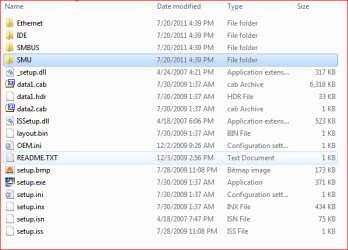
3. In the Nvidia folder or the one you manually extracted from step 2 you should have the following showing,

nvchipset.PNG

4. Download this, View attachment nfsmb64.zip and extract it. Inside are the two INF files needed that I added the device IDs from the Asus driver to, that should then allow it to install on yours.

5. In the extracted Nvidia folder open the SMBUS folder and replace the nfsmb64.inf with the one from above. Do the same in the SMU folder with smuc64.inf.

6. Now try installing it again.
 

My Computer

Computer type
PC/Desktop
Computer Manufacturer/Model Number
Me
OS
Win 7 Ultimate x64
CPU
FX-8350 @ 4.6 GHz so far
Motherboard
Asus M5A97 EVO
Memory
ADATA XPG V1 Series Black 8GB DDR3 1600
Graphics Card(s)
Sapphire R9 270x Dual-X
Sound Card
Xonar DGX w/ Corsair Vengence 1300
Monitor(s) Displays
Acer S232HL Abid
Screen Resolution
1920x1080
Hard Drives
120 GB OCZ Vertex 3
500 GB Seagate 7200.12
PSU
Antec Earthwatts 650W Green
Case
Antec Three Hundred
Cooling
Cooler Master 212 EVO
Keyboard
Logitech G510
Mouse
Logitech G500s
Internet Speed
35000/3000
Finally Solved! Thank you so much buddy! You kinda lost me there where you said to add the device IDs to the reference drivers :D Many thanks for doing this for me! Ill save the archieve you made if I end up needing it later.

Also I was wondering, does this coprocessor driver have any input related to performance?

What does it do? Does it make some kind of link between the two processors, sharing tasks between them or what?

And what if I didnt have this installed? The two processors would work independently from one another?
 

My Computer

OS
Windows 7 Ultimate X64
You're very welcome.

From what I can see it is primarily a Nvidia chipset specific thing that crops up from time, and only tends to show up when the specific chipset isn't fully recognized but the native Windows driver. Not even really sure as to what part of the chipset it is, or how it would affect performance.

Other than it disappearing from Device Manager after getting the driver installed, did you happen to notice what it may have changed to? Pretty sure once the driver is installed the name for it either changes the name of it, or it just sort of disappears from the list.
 

My Computer

Computer type
PC/Desktop
Computer Manufacturer/Model Number
Me
OS
Win 7 Ultimate x64
CPU
FX-8350 @ 4.6 GHz so far
Motherboard
Asus M5A97 EVO
Memory
ADATA XPG V1 Series Black 8GB DDR3 1600
Graphics Card(s)
Sapphire R9 270x Dual-X
Sound Card
Xonar DGX w/ Corsair Vengence 1300
Monitor(s) Displays
Acer S232HL Abid
Screen Resolution
1920x1080
Hard Drives
120 GB OCZ Vertex 3
500 GB Seagate 7200.12
PSU
Antec Earthwatts 650W Green
Case
Antec Three Hundred
Cooling
Cooler Master 212 EVO
Keyboard
Logitech G510
Mouse
Logitech G500s
Internet Speed
35000/3000
LATER EDIT:
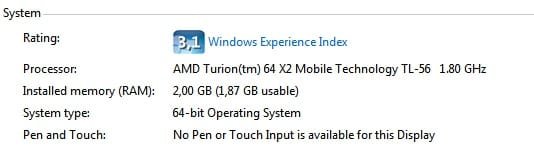
It disappeared from the list, but when I ran a new assessement it gave 0.2 more under Desktop performance under Aero. I don't know if this driver did it, but something definately improved my rating.
It could allow task sharing between the two processors. Who knows. It's definately for the best.


what do you think about these scores?
 

Attachments

  • Score.jpg
    Score.jpg
    6 KB · Views: 1,356
  • System.jpg
    System.jpg
    11.5 KB · Views: 85
Last edited:

My Computer

OS
Windows 7 Ultimate X64
Back
Top