Help - Can’t get computer to properly start up

Buckalou

New member
Member
Local time
5:26 AM
Messages
84
Help - Can’t get computer to properly start up

I’m having major issues unfortunately. My PC was on, went into sleep mode and I couldn’t get it to wake up. I clicked mouse, pressed keyboard, and eventually tried pressing and holding power button to shut down. When I pressed and held power button all it did was keep trying to wake it up from sleep not shut it down. I then unplugged and plugged it back in and now it powers on but no video is displaying - nothing. I can’t get anything to display and I also tried plugging in another monitor just in case which didn’t do anything. Please help no clue what the issue could be or why this is happening. Thanks.
 

My Computer

OS
Windows 7 x64
1. What is the pc? you havent filled in your specs

2. How are posting here - have you got another pc?

3. did you try detaching the hd then see if you get a video signal and can get into bios?
 

My Computers

System One System Two

  • Computer type
    PC/Desktop
    OS
    7 X64
    CPU
    i5 8400
    Motherboard
    gigabyte b365m ds3h
    Memory
    2x8gb 3200mhz
    Hard Drives
    various
    PSU
    pure power 11 400w cm
    Case
    Coolermaster
    Cooling
    cryorig m9i
  • Computer type
    PC/Desktop
    OS
    7x64
    CPU
    g5400
    Motherboard
    ga b365m ds3h
    Memory
    8gb ddr4 2400
    PSU
    xfx pro 450w
1. What is the pc? you havent filled in your specs

2. How are posting here - have you got another pc?

3. did you try detaching the hd then see if you get a video signal and can get into bios?

1. not sure what my exact specs it’s windows 7 64 bit I believe.

2. Posting on phone no other PC, may have access to laptop.

3. Didn’t try this yet. Is this difficult to do? Not too savvy on how to do this.
 

My Computer

OS
Windows 7 x64
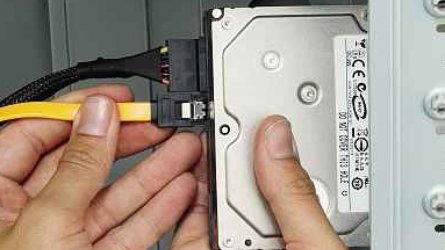
Open the case and there will be two leads plugged into the back of the hard drive. Unplug them.

The top one in the pic is the power cable. Unplug it

The bottom one in the pic is the data cable - you dont really need to unplug the data cable for the moment.

hdd-connection-guide-1.jpg


hdd-plug-in-sata-data-cable.jpg
 
Last edited:

My Computers

System One System Two

  • Computer type
    PC/Desktop
    OS
    7 X64
    CPU
    i5 8400
    Motherboard
    gigabyte b365m ds3h
    Memory
    2x8gb 3200mhz
    Hard Drives
    various
    PSU
    pure power 11 400w cm
    Case
    Coolermaster
    Cooling
    cryorig m9i
  • Computer type
    PC/Desktop
    OS
    7x64
    CPU
    g5400
    Motherboard
    ga b365m ds3h
    Memory
    8gb ddr4 2400
    PSU
    xfx pro 450w
Open the case and there will be two leads plugged into the back of the hard drive. Unplug them.

i have 2 hard drives installed in this PC. How do I tell which one is the main one? I assume top and first one will be one with OS on it? Also what are leads and all I need to do is unplug them and try to power up computer? When I unplug them do I need to have power supply unplugged?
 

My Computer

OS
Windows 7 x64
When I unplug them do I need to have power supply unplugged?

unplug the machine from the wall socket

open the case

unplug the power cable from the back of each hd.

You dont need to unplug the hd data cables for the moment.

plug the machine into the wall socket again

If you can get video and into bios after doing that, you know there is a problem with one of the hd.

So plug the power cable back into one of the hd and turn the pc on again. That way, you will find out which one.

- - - Updated - - -

If you have the same problem after unplugging the hds ( and any other peripherals - printers, external disks, cdrom drive, graphics card - assuming your cpu has onboard graphics ) then there is either an issue with monitor, the ram,the video out socket you are using, the psu, or the motherboard itself.

- - - Updated - - -

Have to go, try the hds first, then somebody will be able to help. Or I will be back tomorrow
 

My Computers

System One System Two

  • Computer type
    PC/Desktop
    OS
    7 X64
    CPU
    i5 8400
    Motherboard
    gigabyte b365m ds3h
    Memory
    2x8gb 3200mhz
    Hard Drives
    various
    PSU
    pure power 11 400w cm
    Case
    Coolermaster
    Cooling
    cryorig m9i
  • Computer type
    PC/Desktop
    OS
    7x64
    CPU
    g5400
    Motherboard
    ga b365m ds3h
    Memory
    8gb ddr4 2400
    PSU
    xfx pro 450w

My Computers

System One System Two

  • Computer type
    PC/Desktop
    Computer Manufacturer/Model Number
    custom build
    OS
    Windows 7 HP 64
    CPU
    i5 6600K - 800MHz to 4200MHz
    Motherboard
    GA-Z170-HD3P
    Memory
    4+4G GSkill DDR4 3000
    Graphics Card(s)
    IG - Intel 530
    Monitor(s) Displays
    Samsung 226BW
    Screen Resolution
    1680x1050
    Hard Drives
    (1) -1 SM951 – 128GB M.2 AHCI PCIe SSD drive for Windows 7 and Lubuntu
    (2) -1 WD SATA 3 - 1T for Data
    (3) -1 WD SATA 3 - 1T for backup
    PSU
    Thermaltake 450W TR2 gold
    Keyboard
    Old and good Chicony mechanical keyboard
    Mouse
    Logitech mX performance - 9 buttons (had to disable some)
    Internet Speed
    500Mb/s
    Browser
    Firefox 64
    Other Info
    TinyWall firewall
  • Computer type
    Laptop
    System Manufacturer/Model Number
    Asus Q550LF
    OS
    Windows 7 Pro
    CPU
    i7-4500U 800MHz to 3.0GHz
    Motherboard
    Asus Q550LF
    Memory
    (4+4)G DDR3 1600
    Graphics Card(s)
    IG intel 4400 + NVIDIA GeForce GT 745M
    Sound Card
    Realtek
    Monitor(s) Displays
    LG Display LP156WF4-SPH1
    Screen Resolution
    1920 x 1080
    Hard Drives
    BX500 120G SSD for Windows and programs +
    1T HDD for data
    Internet Speed
    500 Mb/s
    Browser
    Firefox
    Other Info
    TinyWall firewall
Back
Top