
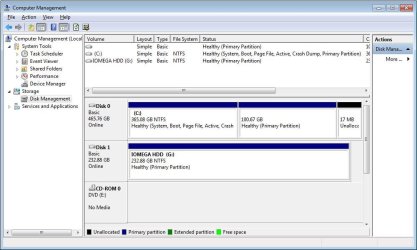
I have Win7-64bit installed on my C: primary partition and several of the principal apps which I use already installed and working as well.  The C: drive currently has three partitions:
-The first (365G NTFS) healthy primary one has the OS, data files, and everything else.
-The second (100G ???) healthy primary partition has no assigned drive letter. This
was origially space reserved for installing XP-Pro (just in case..:sarc:.)
-The third (17MB ???) Unallocated (not sure how it got left over.)
This is running nicely and backed up to external IOMEGA HD with Win7 Backup,and
Restore disk created.
I also have the full Win7 Home Premium 3-install disk which I plan to use for two other PC's in-house.
Without reinstalling any SW (if possible) I'm considering installing a new (160G ?) HD, set it up as the primary boot/OS drive and move Win7 onto it. Then change existing drive to D:.
Also then keep installed apps either on "new" C: drive with the OS (would bigger one be good idea?) or on renamed D:, and data files, pics, etc on separate drive - either with apps or third drive (NOT the IOMEGA, which is for backups)
What is the best way to proceed? Does having the OS, apps and data files on separate drives give a performance advantage? (Seems like def easier to image for B/U)
I"ll try to post a pic of my current Disk Management window if I can figure out how...
The C: drive currently has three partitions:-The first (365G NTFS) healthy primary one has the OS, data files, and everything else.
-The second (100G ???) healthy primary partition has no assigned drive letter. This
was origially space reserved for installing XP-Pro (just in case..:sarc:.)
-The third (17MB ???) Unallocated (not sure how it got left over.)
This is running nicely and backed up to external IOMEGA HD with Win7 Backup,and
Restore disk created.
I also have the full Win7 Home Premium 3-install disk which I plan to use for two other PC's in-house.
Without reinstalling any SW (if possible) I'm considering installing a new (160G ?) HD, set it up as the primary boot/OS drive and move Win7 onto it. Then change existing drive to D:.
Also then keep installed apps either on "new" C: drive with the OS (would bigger one be good idea?) or on renamed D:, and data files, pics, etc on separate drive - either with apps or third drive (NOT the IOMEGA, which is for backups)
What is the best way to proceed? Does having the OS, apps and data files on separate drives give a performance advantage? (Seems like def easier to image for B/U)
I"ll try to post a pic of my current Disk Management window if I can figure out how...
Attachments
My Computer
At a glance
Windows7 64bitIntel Pentium Dual Core E52004G - Kingston 2x2G DDR2 PC2-6400 800MHzMSI R4670-2D512 PCIe, 512MB
- Computer Manufacturer/Model Number
- Custom
- OS
- Windows7 64bit
- CPU
- Intel Pentium Dual Core E5200
- Motherboard
- ASUS P5Q SE Plus
- Memory
- 4G - Kingston 2x2G DDR2 PC2-6400 800MHz
- Graphics Card(s)
- MSI R4670-2D512 PCIe, 512MB
- Sound Card
- on MB
- Monitor(s) Displays
- Dell E171FPb LCD on IOGEAR KVM switch
- Screen Resolution
- 1280x1024
- Hard Drives
- Seagate 500GB Barracuda 7200
- Case
- Antec
- Cooling
- Case fan & processor fan
- Keyboard
- Logitech wireless on IOGEAR KVM switch
- Mouse
- Logitech wireless on IOGEAR KVM switch
- Internet Speed
- Cable 17M down 2M up


