Solved Help finding some icons that I would like to change

Raiderman

New member
Local time
8:58 AM
Messages
24
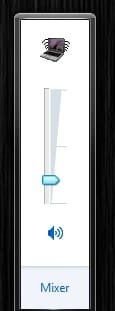
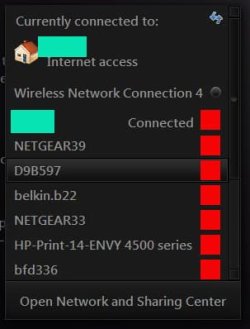
As the title states, I am looking for a few icons that have eluded my detection. I have Iconsext, resource hacker, icofx, and a multitude of other utilities. Maybe these icons are not accessible, but thought I would ask the knowledgeable folks here. First is the little blue speaker icon in the volume popup, and the other is the wifi signal strength in the wireless popup. If anyone has some ideas, let me know.

See attached images
 

Attachments

  • Untitled.jpg
    Untitled.jpg
    4.4 KB · Views: 30
  • wifi.jpg
    wifi.jpg
    14.4 KB · Views: 31

My Computer My Computer

At a glance

Windows 7 Ultimate 64bitIntel Core I7
Computer type
Laptop
Computer Manufacturer/Model Number
Toshiba Qosmio
OS
Windows 7 Ultimate 64bit
CPU
Intel Core I7
Should be

Volume icon
SndVol.exe in both C:\Windows\System32 and C:\Windows\SysWOW64

Wi-Fi icon
wlanmm.dll in both C:\Windows\System32 and C:\Windows\SysWOW64

Jerry
 

My Computer My Computer

At a glance

Win 7 Pro x64 / Win 10 ProIntel(R) Core(TM) i7-3630QM CPU @ 2.40GHz12 GB(1) Intel(R) HD Graphics 4000 (2) NVIDIA GeFo...
Computer type
Laptop
Computer Manufacturer/Model Number
Sager NP9170
OS
Win 7 Pro x64 / Win 10 Pro
CPU
Intel(R) Core(TM) i7-3630QM CPU @ 2.40GHz
Motherboard
CLEVO P170EM
Memory
12 GB
Graphics Card(s)
(1) Intel(R) HD Graphics 4000 (2) NVIDIA GeForce GTX 675M
Sound Card
(1) Realtek High Definition Audio (2) Intel(R) Display Aud
Monitor(s) Displays
17.3
Screen Resolution
1920x1080
Hard Drives
(1) Samsung 860 EVO 500GB(OS) (1) Samsung 860 EVO 500GB(Data)
Keyboard
Backlite
Antivirus
MSE, Malwarebytes Pro
Browser
Firefox
Other Info
DESKTOP: Custom-built.
OS: Win 10 Pro x64.
CASE: Rosewill R5.
CPU: Intel I5 4670K CPU @ 3.40GHz.
CPU COOLER: Cool Master Hyper 212 EVO.
MOTHERBOARD: Asus Z87-A.
MEMORY: Kingston HyperX 2x4 GB.
GPU: Nvidia Geforce 650 TI.
PSU: Corsair TX750.
DRIVES: (1) Samsung 840 120 GB SSD (2) Western Digital blue 500 GB 7200 RPM.
I have changed all of those, but has no affect. Already done
 

Attachments

  • iconsext.jpg
    iconsext.jpg
    56.6 KB · Views: 3
Last edited:

My Computer My Computer

At a glance

Windows 7 Ultimate 64bitIntel Core I7
Computer type
Laptop
Computer Manufacturer/Model Number
Toshiba Qosmio
OS
Windows 7 Ultimate 64bit
CPU
Intel Core I7
I'm sorry, it should be in the pnidui.dll in both C:\Windows\System32 and C:\Windows\SysWOW64

Jerry
 

My Computer My Computer

At a glance

Win 7 Pro x64 / Win 10 ProIntel(R) Core(TM) i7-3630QM CPU @ 2.40GHz12 GB(1) Intel(R) HD Graphics 4000 (2) NVIDIA GeFo...
Computer type
Laptop
Computer Manufacturer/Model Number
Sager NP9170
OS
Win 7 Pro x64 / Win 10 Pro
CPU
Intel(R) Core(TM) i7-3630QM CPU @ 2.40GHz
Motherboard
CLEVO P170EM
Memory
12 GB
Graphics Card(s)
(1) Intel(R) HD Graphics 4000 (2) NVIDIA GeForce GTX 675M
Sound Card
(1) Realtek High Definition Audio (2) Intel(R) Display Aud
Monitor(s) Displays
17.3
Screen Resolution
1920x1080
Hard Drives
(1) Samsung 860 EVO 500GB(OS) (1) Samsung 860 EVO 500GB(Data)
Keyboard
Backlite
Antivirus
MSE, Malwarebytes Pro
Browser
Firefox
Other Info
DESKTOP: Custom-built.
OS: Win 10 Pro x64.
CASE: Rosewill R5.
CPU: Intel I5 4670K CPU @ 3.40GHz.
CPU COOLER: Cool Master Hyper 212 EVO.
MOTHERBOARD: Asus Z87-A.
MEMORY: Kingston HyperX 2x4 GB.
GPU: Nvidia Geforce 650 TI.
PSU: Corsair TX750.
DRIVES: (1) Samsung 840 120 GB SSD (2) Western Digital blue 500 GB 7200 RPM.
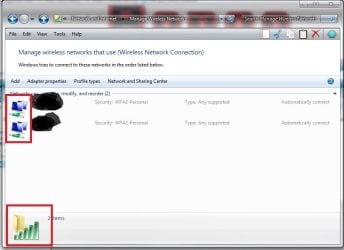
Changed those already too. Taskbar wifi changes, but not in the pop up. Rebuilding icon cache does nothing. There are several other icons, that I have changed also, that have not taken, I dont know why.
 

Attachments

  • pnui.jpg
    pnui.jpg
    57.6 KB · Views: 1
  • task.jpg
    task.jpg
    2.8 KB · Views: 17
  • netshare.jpg
    netshare.jpg
    44.3 KB · Views: 1

My Computer My Computer

At a glance

Windows 7 Ultimate 64bitIntel Core I7
Computer type
Laptop
Computer Manufacturer/Model Number
Toshiba Qosmio
OS
Windows 7 Ultimate 64bit
CPU
Intel Core I7
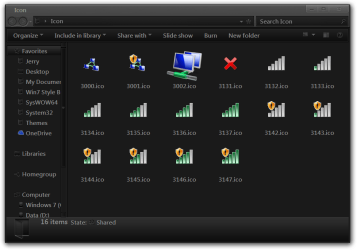
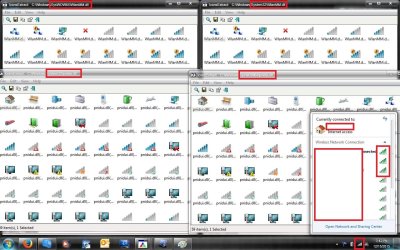
The icons for the Manage Network window is in the wlanpref.dll in both C:\Windows\System32 and C:\Windows\SysWOW64


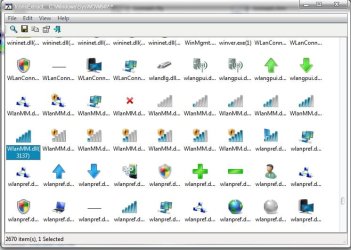
Wi-Fi icon for the pop-up window should be (look at screenshot)
wlanmm.dll in both C:\Windows\System32 and C:\Windows\SysWOW64

Jerry

Icon.png
 

My Computer My Computer

At a glance

Win 7 Pro x64 / Win 10 ProIntel(R) Core(TM) i7-3630QM CPU @ 2.40GHz12 GB(1) Intel(R) HD Graphics 4000 (2) NVIDIA GeFo...
Computer type
Laptop
Computer Manufacturer/Model Number
Sager NP9170
OS
Win 7 Pro x64 / Win 10 Pro
CPU
Intel(R) Core(TM) i7-3630QM CPU @ 2.40GHz
Motherboard
CLEVO P170EM
Memory
12 GB
Graphics Card(s)
(1) Intel(R) HD Graphics 4000 (2) NVIDIA GeForce GTX 675M
Sound Card
(1) Realtek High Definition Audio (2) Intel(R) Display Aud
Monitor(s) Displays
17.3
Screen Resolution
1920x1080
Hard Drives
(1) Samsung 860 EVO 500GB(OS) (1) Samsung 860 EVO 500GB(Data)
Keyboard
Backlite
Antivirus
MSE, Malwarebytes Pro
Browser
Firefox
Other Info
DESKTOP: Custom-built.
OS: Win 10 Pro x64.
CASE: Rosewill R5.
CPU: Intel I5 4670K CPU @ 3.40GHz.
CPU COOLER: Cool Master Hyper 212 EVO.
MOTHERBOARD: Asus Z87-A.
MEMORY: Kingston HyperX 2x4 GB.
GPU: Nvidia Geforce 650 TI.
PSU: Corsair TX750.
DRIVES: (1) Samsung 840 120 GB SSD (2) Western Digital blue 500 GB 7200 RPM.
Then something is not working then. I have searched for icons in the Windows folder, which includes syswow, and sys32, and I get some obscure entries with original icons. I will post another screenshot showing this.
 

Attachments

  • sys3264.jpg
    sys3264.jpg
    155.5 KB · Views: 2

My Computer My Computer

At a glance

Windows 7 Ultimate 64bitIntel Core I7
Computer type
Laptop
Computer Manufacturer/Model Number
Toshiba Qosmio
OS
Windows 7 Ultimate 64bit
CPU
Intel Core I7
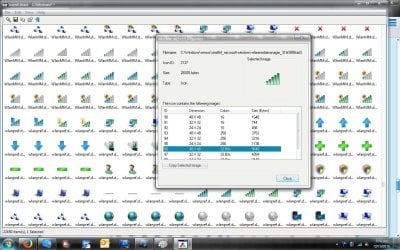
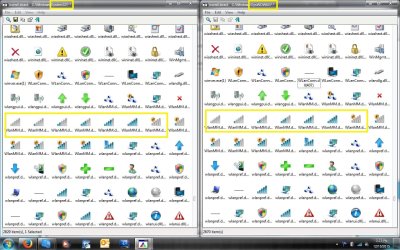
These are the obscure entries. There are 4 entries for every Icon, two in syswow, and sys32
 

Attachments

  • all.jpg
    all.jpg
    146 KB · Views: 3

My Computer My Computer

At a glance

Windows 7 Ultimate 64bitIntel Core I7
Computer type
Laptop
Computer Manufacturer/Model Number
Toshiba Qosmio
OS
Windows 7 Ultimate 64bit
CPU
Intel Core I7
I don't quite understand what you mean by obscurity entries, but looking at your photo it shows you're in the wrong folder.

Jerry
Capture.PNG
 

My Computer My Computer

At a glance

Win 7 Pro x64 / Win 10 ProIntel(R) Core(TM) i7-3630QM CPU @ 2.40GHz12 GB(1) Intel(R) HD Graphics 4000 (2) NVIDIA GeFo...
Computer type
Laptop
Computer Manufacturer/Model Number
Sager NP9170
OS
Win 7 Pro x64 / Win 10 Pro
CPU
Intel(R) Core(TM) i7-3630QM CPU @ 2.40GHz
Motherboard
CLEVO P170EM
Memory
12 GB
Graphics Card(s)
(1) Intel(R) HD Graphics 4000 (2) NVIDIA GeForce GTX 675M
Sound Card
(1) Realtek High Definition Audio (2) Intel(R) Display Aud
Monitor(s) Displays
17.3
Screen Resolution
1920x1080
Hard Drives
(1) Samsung 860 EVO 500GB(OS) (1) Samsung 860 EVO 500GB(Data)
Keyboard
Backlite
Antivirus
MSE, Malwarebytes Pro
Browser
Firefox
Other Info
DESKTOP: Custom-built.
OS: Win 10 Pro x64.
CASE: Rosewill R5.
CPU: Intel I5 4670K CPU @ 3.40GHz.
CPU COOLER: Cool Master Hyper 212 EVO.
MOTHERBOARD: Asus Z87-A.
MEMORY: Kingston HyperX 2x4 GB.
GPU: Nvidia Geforce 650 TI.
PSU: Corsair TX750.
DRIVES: (1) Samsung 840 120 GB SSD (2) Western Digital blue 500 GB 7200 RPM.
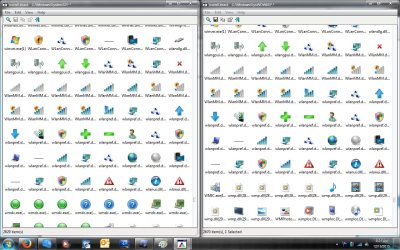
When I do a search in the windows folder using Iconsext, these extras show up. You will notice that the regular sys32 and syswow icons are already changed. I was wondering if these icons were cached somewhere other than the icon cache, and causing them not to show up correctly. I have run delete iconcache.bat several times also. The problem is that although I have the modified icons installed in the correct dll's, they are still not changing in the areas I want them changed. The image above is using Iconsext in c:\Windows, not C;Windows\system32, or C:\Windows\syswow64.
 

My Computer My Computer

At a glance

Windows 7 Ultimate 64bitIntel Core I7
Computer type
Laptop
Computer Manufacturer/Model Number
Toshiba Qosmio
OS
Windows 7 Ultimate 64bit
CPU
Intel Core I7
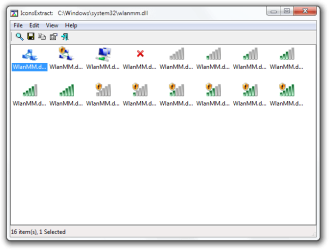
I have never use that program but I just tried it and I put in the exact location of the .dll see the screenshot and went right to it.
C:\Windows\System32\wlanmm.dll

Jerry
Search For Icons.png

IconsExtract   CWindowssystem32wlanmm.dll.png
 

My Computer My Computer

At a glance

Win 7 Pro x64 / Win 10 ProIntel(R) Core(TM) i7-3630QM CPU @ 2.40GHz12 GB(1) Intel(R) HD Graphics 4000 (2) NVIDIA GeFo...
Computer type
Laptop
Computer Manufacturer/Model Number
Sager NP9170
OS
Win 7 Pro x64 / Win 10 Pro
CPU
Intel(R) Core(TM) i7-3630QM CPU @ 2.40GHz
Motherboard
CLEVO P170EM
Memory
12 GB
Graphics Card(s)
(1) Intel(R) HD Graphics 4000 (2) NVIDIA GeForce GTX 675M
Sound Card
(1) Realtek High Definition Audio (2) Intel(R) Display Aud
Monitor(s) Displays
17.3
Screen Resolution
1920x1080
Hard Drives
(1) Samsung 860 EVO 500GB(OS) (1) Samsung 860 EVO 500GB(Data)
Keyboard
Backlite
Antivirus
MSE, Malwarebytes Pro
Browser
Firefox
Other Info
DESKTOP: Custom-built.
OS: Win 10 Pro x64.
CASE: Rosewill R5.
CPU: Intel I5 4670K CPU @ 3.40GHz.
CPU COOLER: Cool Master Hyper 212 EVO.
MOTHERBOARD: Asus Z87-A.
MEMORY: Kingston HyperX 2x4 GB.
GPU: Nvidia Geforce 650 TI.
PSU: Corsair TX750.
DRIVES: (1) Samsung 840 120 GB SSD (2) Western Digital blue 500 GB 7200 RPM.
Yes Jerry, thats the directory I have changed, along with every dll I can find that has green wireless signal icons. Look at my 3rd or 4th post. You will see blue signal meter icons, but it is not changing them in the pop up.
 

My Computer My Computer

At a glance

Windows 7 Ultimate 64bitIntel Core I7
Computer type
Laptop
Computer Manufacturer/Model Number
Toshiba Qosmio
OS
Windows 7 Ultimate 64bit
CPU
Intel Core I7
The icons for the signal meter on the taskbar and the icons in the pop-up are in two different .dlls, did you changing icons in the wlanmm.dll in both C:\Windows\System32 and C:\Windows\SysWOW64

There's no need for the large font in your last post unless you have poor vision.

Jerry
 

My Computer My Computer

At a glance

Win 7 Pro x64 / Win 10 ProIntel(R) Core(TM) i7-3630QM CPU @ 2.40GHz12 GB(1) Intel(R) HD Graphics 4000 (2) NVIDIA GeFo...
Computer type
Laptop
Computer Manufacturer/Model Number
Sager NP9170
OS
Win 7 Pro x64 / Win 10 Pro
CPU
Intel(R) Core(TM) i7-3630QM CPU @ 2.40GHz
Motherboard
CLEVO P170EM
Memory
12 GB
Graphics Card(s)
(1) Intel(R) HD Graphics 4000 (2) NVIDIA GeForce GTX 675M
Sound Card
(1) Realtek High Definition Audio (2) Intel(R) Display Aud
Monitor(s) Displays
17.3
Screen Resolution
1920x1080
Hard Drives
(1) Samsung 860 EVO 500GB(OS) (1) Samsung 860 EVO 500GB(Data)
Keyboard
Backlite
Antivirus
MSE, Malwarebytes Pro
Browser
Firefox
Other Info
DESKTOP: Custom-built.
OS: Win 10 Pro x64.
CASE: Rosewill R5.
CPU: Intel I5 4670K CPU @ 3.40GHz.
CPU COOLER: Cool Master Hyper 212 EVO.
MOTHERBOARD: Asus Z87-A.
MEMORY: Kingston HyperX 2x4 GB.
GPU: Nvidia Geforce 650 TI.
PSU: Corsair TX750.
DRIVES: (1) Samsung 840 120 GB SSD (2) Western Digital blue 500 GB 7200 RPM.
I did some texting and the icons for the popup is wlanmm.dll in both C:\Windows\System32 and C:\Windows\SysWOW64

Jerry
wifi.JPG
 

My Computer My Computer

At a glance

Win 7 Pro x64 / Win 10 ProIntel(R) Core(TM) i7-3630QM CPU @ 2.40GHz12 GB(1) Intel(R) HD Graphics 4000 (2) NVIDIA GeFo...
Computer type
Laptop
Computer Manufacturer/Model Number
Sager NP9170
OS
Win 7 Pro x64 / Win 10 Pro
CPU
Intel(R) Core(TM) i7-3630QM CPU @ 2.40GHz
Motherboard
CLEVO P170EM
Memory
12 GB
Graphics Card(s)
(1) Intel(R) HD Graphics 4000 (2) NVIDIA GeForce GTX 675M
Sound Card
(1) Realtek High Definition Audio (2) Intel(R) Display Aud
Monitor(s) Displays
17.3
Screen Resolution
1920x1080
Hard Drives
(1) Samsung 860 EVO 500GB(OS) (1) Samsung 860 EVO 500GB(Data)
Keyboard
Backlite
Antivirus
MSE, Malwarebytes Pro
Browser
Firefox
Other Info
DESKTOP: Custom-built.
OS: Win 10 Pro x64.
CASE: Rosewill R5.
CPU: Intel I5 4670K CPU @ 3.40GHz.
CPU COOLER: Cool Master Hyper 212 EVO.
MOTHERBOARD: Asus Z87-A.
MEMORY: Kingston HyperX 2x4 GB.
GPU: Nvidia Geforce 650 TI.
PSU: Corsair TX750.
DRIVES: (1) Samsung 840 120 GB SSD (2) Western Digital blue 500 GB 7200 RPM.
I replied on my phone, and did not realize the font was so big. I have changed icons in all the dll's. So there must be another program I have installed that is conflicting. I have customizer god installed also, I will take a look at that.
 

Attachments

  • dir.jpg
    dir.jpg
    161.9 KB · Views: 2

My Computer My Computer

At a glance

Windows 7 Ultimate 64bitIntel Core I7
Computer type
Laptop
Computer Manufacturer/Model Number
Toshiba Qosmio
OS
Windows 7 Ultimate 64bit
CPU
Intel Core I7
The only way I could get pniudi to take the new icon, was to use customizer god, I have changed everything in every dll, and pniui.dll and a few others are not taking the new icon. This screenshot was taken with everything restored. Note the stock wifi signal meters.
 

Attachments

  • everything.jpg
    everything.jpg
    154.5 KB · Views: 2

My Computer My Computer

At a glance

Windows 7 Ultimate 64bitIntel Core I7
Computer type
Laptop
Computer Manufacturer/Model Number
Toshiba Qosmio
OS
Windows 7 Ultimate 64bit
CPU
Intel Core I7

My Computer My Computer

At a glance

Win 7 Pro x64 / Win 10 ProIntel(R) Core(TM) i7-3630QM CPU @ 2.40GHz12 GB(1) Intel(R) HD Graphics 4000 (2) NVIDIA GeFo...
Computer type
Laptop
Computer Manufacturer/Model Number
Sager NP9170
OS
Win 7 Pro x64 / Win 10 Pro
CPU
Intel(R) Core(TM) i7-3630QM CPU @ 2.40GHz
Motherboard
CLEVO P170EM
Memory
12 GB
Graphics Card(s)
(1) Intel(R) HD Graphics 4000 (2) NVIDIA GeForce GTX 675M
Sound Card
(1) Realtek High Definition Audio (2) Intel(R) Display Aud
Monitor(s) Displays
17.3
Screen Resolution
1920x1080
Hard Drives
(1) Samsung 860 EVO 500GB(OS) (1) Samsung 860 EVO 500GB(Data)
Keyboard
Backlite
Antivirus
MSE, Malwarebytes Pro
Browser
Firefox
Other Info
DESKTOP: Custom-built.
OS: Win 10 Pro x64.
CASE: Rosewill R5.
CPU: Intel I5 4670K CPU @ 3.40GHz.
CPU COOLER: Cool Master Hyper 212 EVO.
MOTHERBOARD: Asus Z87-A.
MEMORY: Kingston HyperX 2x4 GB.
GPU: Nvidia Geforce 650 TI.
PSU: Corsair TX750.
DRIVES: (1) Samsung 840 120 GB SSD (2) Western Digital blue 500 GB 7200 RPM.
Yes, I have....several times. I use Deleteiconcache.bat.
 

My Computer My Computer

At a glance

Windows 7 Ultimate 64bitIntel Core I7
Computer type
Laptop
Computer Manufacturer/Model Number
Toshiba Qosmio
OS
Windows 7 Ultimate 64bit
CPU
Intel Core I7
Use Windows Explorer and go to C:\Windows\System32 and copy the wlanmm.dll and pniudi.dll and zip them up and post here and I will look at them.

Jerry
 

My Computer My Computer

At a glance

Win 7 Pro x64 / Win 10 ProIntel(R) Core(TM) i7-3630QM CPU @ 2.40GHz12 GB(1) Intel(R) HD Graphics 4000 (2) NVIDIA GeFo...
Computer type
Laptop
Computer Manufacturer/Model Number
Sager NP9170
OS
Win 7 Pro x64 / Win 10 Pro
CPU
Intel(R) Core(TM) i7-3630QM CPU @ 2.40GHz
Motherboard
CLEVO P170EM
Memory
12 GB
Graphics Card(s)
(1) Intel(R) HD Graphics 4000 (2) NVIDIA GeForce GTX 675M
Sound Card
(1) Realtek High Definition Audio (2) Intel(R) Display Aud
Monitor(s) Displays
17.3
Screen Resolution
1920x1080
Hard Drives
(1) Samsung 860 EVO 500GB(OS) (1) Samsung 860 EVO 500GB(Data)
Keyboard
Backlite
Antivirus
MSE, Malwarebytes Pro
Browser
Firefox
Other Info
DESKTOP: Custom-built.
OS: Win 10 Pro x64.
CASE: Rosewill R5.
CPU: Intel I5 4670K CPU @ 3.40GHz.
CPU COOLER: Cool Master Hyper 212 EVO.
MOTHERBOARD: Asus Z87-A.
MEMORY: Kingston HyperX 2x4 GB.
GPU: Nvidia Geforce 650 TI.
PSU: Corsair TX750.
DRIVES: (1) Samsung 840 120 GB SSD (2) Western Digital blue 500 GB 7200 RPM.
As soon as I copied those two files to my desktop, I checked them with resource hacker, and they both have stock icons? When I browse to system32, resource hacker shows my modified icons? Or when I browse them with Iconsext, it show the modified icons as well. So let me modify those two and replace them....Seems strange that resource hacker would show my modified icons.
 

My Computer My Computer

At a glance

Windows 7 Ultimate 64bitIntel Core I7
Computer type
Laptop
Computer Manufacturer/Model Number
Toshiba Qosmio
OS
Windows 7 Ultimate 64bit
CPU
Intel Core I7
Back
Top