I would like to change date format to, e.g.,2014/01/12 or 20140112

hill0093

New member
Local time
4:48 AM
Messages
1
I would like to change date format to, e.g.,2014/01/12 or 20140112 at least for the command prompt screen.
It seems that this should be a simple item, but I cannot find out how to do it.
I would like to have it everywhere, but that might be too much.
The main reason is for sortability of copied lists, but it is also more readable.
We have used the 8 character format 20140112, and 20140112235959 for all of our data for decades.
Now we go to quadiseconds which is the limit of the double precision mantissa (irrelevant here).
The command prompt screen is relevant to me now.
 

My Computer My Computer

At a glance

Windows 7 Ultimate x64i78 GB
Computer type
Laptop
Computer Manufacturer/Model Number
HP
OS
Windows 7 Ultimate x64
CPU
i7
Memory
8 GB
Hard Drives
700 GB
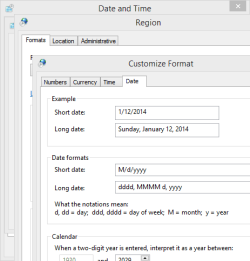
The option to change the format is to click on the date/time in the notification area (lower right), then click on change date/time. Then click on change calendar settings. You can change the format in the next panel that comes up.
 

Attachments

  • date capture.PNG
    date capture.PNG
    7.6 KB · Views: 13

My Computer My Computer

At a glance

Windows 10 64 bitIntel i7 6700K16GB Corsair DominatorIntel CPU Graphics
Computer type
PC/Desktop
Computer Manufacturer/Model Number
My Own Build
OS
Windows 10 64 bit
CPU
Intel i7 6700K
Motherboard
ASUS ROG Maximus VIII Hero
Memory
16GB Corsair Dominator
Graphics Card(s)
Intel CPU Graphics
Sound Card
RealTek
Monitor(s) Displays
27" Dell S2719dgf
Screen Resolution
2560X1440
Hard Drives
1 TB Samsung 850 EVO SSD for Win 10 Pro
500GB Samsung 850 EVO SSD for Win 10 Insider
2 TB drive for backup
PSU
EVGA Supernova 750G2
Case
BeQuiet Silent Base 600
Cooling
Deepcool Captain 120EX
Keyboard
Microsoft Wireless 2000
Mouse
Microsoft wireless
Internet Speed
100 MB/sec (Cable)
Antivirus
Microsoft Defender and Malwarebytes
Browser
Edge/Firefox
Other Info
Cakewalk (Sonar) by BandLab and Studio One 4.1 Pro recording studio software. MOTU 896Mk3 Hybrid recording interface, Frontier Tranzport wireless control unit, Behringer X-Touch Control Surface.
Five USB connected optical drives for CD Audio production using Nero BurningROM
Hi Hill, welcome to the Seven forums.

Here's how:
  1. Control Panel > Region and language
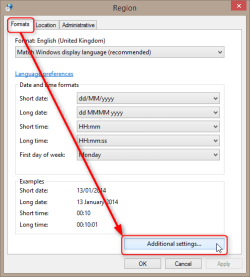
  2. Formats tab > Additional settings:
    2014-01-13_00h13_50.png
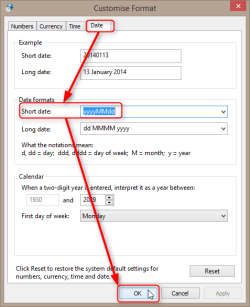
  3. Date tab, change short date, in your case it should be yyyyMMdd to get 20140113, yyyy-MM-dd to get 2014-01-13:
    2014-01-13_00h15_14.png
  4. Click OK to save settings
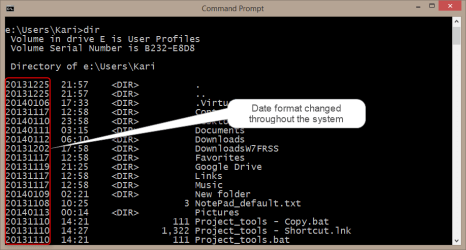
That's it. The short date format is now changed:
2014-01-13_00h16_45.png
Kari
 

My Computer My Computer

At a glance

Windows 10 Pro x64 EN-GB1.6 GHz Intel Core i7-720QM Processor6 GBATI Mobility Radeon HD 5850 Graphics
Computer type
Laptop
Computer Manufacturer/Model Number
HP ENVY 17-1150eg
OS
Windows 10 Pro x64 EN-GB
CPU
1.6 GHz Intel Core i7-720QM Processor
Memory
6 GB
Graphics Card(s)
ATI Mobility Radeon HD 5850 Graphics
Sound Card
Beats sound system with integrated subwoofer
Monitor(s) Displays
17" laptop display, 22" LED and 32" Full HD TV through HDMI
Screen Resolution
1600*900 (1), 1920*1080 (2&3)
Hard Drives
Internal: 2 x 500 GB SATA Hard Disk Drive 7200 rpm
External: 2TB for backups, 3TB USB3 network drive for media
Cooling
As Envy runs a bit warm, I have it on a Cooler Master pad
Keyboard
Logitech diNovo Media Desktop Laser (bluetooth)
Mouse
Logitech Performance Mouse MX
Internet Speed
50/10 Mbps VDSL
Antivirus
Windows Defender 4.3.9431.0
Browser
Maxthon 3.5.2., IE11
Back
Top