Help! Gargantuan windows folder 113GB.

ERP426

New member
Local time
8:30 AM
Messages
2
So. I have a custom built computer, to which I have a 120GB SSD as the C:/ The only thing on this SSD is the OS and related operating files. Everything else gets loaded onto my 2tb HDD, as D:/
The SSD has existed since the computer's first start up, and was brand new.
I found today that the C:/ wasn't ever a part of the defragmentation schedule I had set up, so I ran it today, It made 26 passes and, and is now left at 56% fragmentation. (which was its original Analysis)
I've seen some other "giant windows folder" threads, but nothing that got even close to the number I'm at.
Any ideas? I can't run updates because there isn't any space on the SSD.
 

My Computer My Computer

Computer type
PC/Desktop
Computer Manufacturer/Model Number
Custom build
OS
Windows 7 Ultimate 64bit
CPU
Intel i3
Motherboard
MSI z87g43
Memory
10Gb
Graphics Card(s)
XFX 260x (x2)
Hard Drives
120GB SSD
2TB HDD
Antivirus
AVG
Browser
Chrome

My Computer My Computer

Computer Manufacturer/Model Number
HP Media Center
OS
Windows 7 32 bit
CPU
AMD 5200+ dual core
Memory
2 GB
Graphics Card(s)
NVidia GeForce 6150SE 128 MB
Monitor(s) Displays
CRT
Screen Resolution
1280x1024
Hard Drives
500 GB Sata internal :

SIIG USB 3.0 docking stations w/WD Caviar Black 6 Gb/s drives
Keyboard
PS/2
Mouse
PS/2 Wheel Mouse
Other Info
SIIG USB 3.0 PCIexpress card.
Did you make an image of the system drive? It is a good idea to use a program like Macrium Reflect to back up the system to an image file on an external or USB stick.

You can get many free image backup utilities here:
Free Hard Disk Backup and Restore, Hard Disk Image and Cloning Utilities (thefreecountry.com)

I have never had my system partition on SSD so I will let someone with experience try to fix it up for you.

No, I didn't. I did get a disc clean up program that took care of a lot, So now I'm down to 37Gb, but that still seems high for an OS file.
 

My Computer My Computer

Computer type
PC/Desktop
Computer Manufacturer/Model Number
Custom build
OS
Windows 7 Ultimate 64bit
CPU
Intel i3
Motherboard
MSI z87g43
Memory
10Gb
Graphics Card(s)
XFX 260x (x2)
Hard Drives
120GB SSD
2TB HDD
Antivirus
AVG
Browser
Chrome

My Computer My Computer

Computer type
PC/Desktop
Computer Manufacturer/Model Number
Ignatz Special; 4 speed manual gearbox; factory air conditioning; one of one
OS
Windows 7 Home Premium SP1, 64-bit
CPU
Intel Skylake i5-6600K, not overclocked
Motherboard
AsRock Z170M Extreme 4, micro ATX
Memory
8 GB HyperX DDR4-2666 (2 x 4 GB)
Graphics Card(s)
none; graphics are integrated on CPU
Sound Card
onboard: Realtek ALC1150; external: USB Behringer UF0-202
Monitor(s) Displays
Dell S2340M 23 inch IPS
Screen Resolution
1600 x 900
Hard Drives
System: Crucial MX100 series SSD, 128 GB;
Data: Samsung Spinpoint 103SJ, 1 TB;
Backup: WD Caviar Green WD30EZRX-00D8PB0, 3 TB
PSU
Rosewill SilentNight 500 watt fanless, semi-modular
Case
Antec Solo II
Cooling
Noctua NH-U12S; Noctua F12 intake, Noctua S12A exhaust
Keyboard
Microsoft 200 6JH-00001 USB
Mouse
Dell or Microsoft optical wired; USB
Antivirus
Microsoft Security Essentials and Malwarebytes Premium
Browser
Pale Moon
Other Info
All fans PWM; speeds at idle: CPU circa 500 rpm; intake circa 600 rpm; exhaust circa 600 rpm; CPU temps 27 idle and 47 C load in a warm room (27 C/81 F) when running Intel Extreme Tuning Utility stress test.
First off no manufactures of SSD's recommend ever defragging their SSD's.
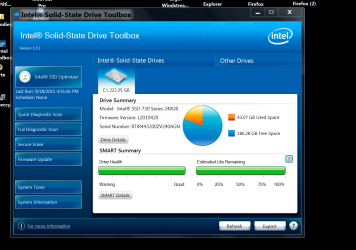
What brand of SSD do you have and does that brand have a tool box for checking your SSD.

Example.

Intel Tool Box.PNG


When you install Windows 7 on a SSD Windows will turn off Defrag for the SSD as default.
 

My Computer My Computer

Computer type
PC/Desktop
Computer Manufacturer/Model Number
Home made Desktop
OS
Windows 10 Pro. 64/ version 1709 Windows 7 Pro/64
CPU
Intel i7-6800K @ 4.3
Motherboard
ASUS X-99 Deluxe II
Memory
Corsair Platinum 16 gig @2400
Graphics Card(s)
EVGA GTX 1070 OC
Monitor(s) Displays
Asus 27" LED LCD/VE278Q
Screen Resolution
1920-1080 or 1280-720 HDMI
Hard Drives
INTEL SSD 730-240 Gb Sata 3.0/
PSU
EVGA Platium 1200W
Case
Phanteks Luxe Tempered Glass 8 fans/ one radiator
Cooling
XSPC/ Water Cooled CPU
Keyboard
Das 4 Professional
Mouse
Logitech M705/MX Anywhere 2-S
Internet Speed
100 mbits
Antivirus
Microsoft Security Essentials/ Malwarebytes Premium 3.0/ SAS
Browser
I.E. 11 default/Firefox/ ISP Time Warner Cable/Spectrum
Other Info
LG BluRay Burner/
Sound system-KLipsch-THX/
Icy Dock ssd Hot Swap bays.
Back
Top