
Solved 29GB Windows folder, able to shrink?

ProfPepper

New member
Local time
3:07 PM
Messages
23
Hey, I've noticed my Windows folder has been bloating, is there any way to reduce it further?


I've already done Windows Update cleaner in the Disk Cleaner and cleared all my caches.


I've even done some potentially dodgy stuff like manually cleaning my DriverStore.


Is there anything else I can do? I'm open to different things.


No I'm not deleting system32.


Thanks :D
 

My Computer

Computer type
PC/Desktop
OS
Windows 7 Home Premium 64-bit
CPU
Intel i5-3570K
Motherboard
ASUS P8Z77-V-LX
Memory
8GB
Graphics Card(s)
GTX 670
Hard Drives
3TB WD Green
1TB WD Blue
60GB Intel 330 SSD
Antivirus
Avast
Browser
Firefox
Hi ProfPepper,

Hey, I've noticed my Windows folder has been bloating, is there any way to reduce it further?

Without having any precise or further information, it is difficult to say exactly what you are hoping to achieve. You could backup old files that you don't use that often to an external HDD/USB for example.

I've even done some potentially dodgy stuff like manually cleaning my DriverStore.

That doesn't sound good!

Is there anything else I can do? I'm open to different things.

You could use the portable version of WinDirStat [FREE] from here => WinDirStat. It will give you an overview of all the folders on a drive, and the space they use. You can even alter the view to show by file type.

You could also try TreeSize [FREE] from here => TreeSize Free. It will tell you what folders and files are using up your space.

There are obviously others that do the same thing!

I hope this helps!
 

My Computer

Computer type
Laptop
Computer Manufacturer/Model Number
Fujitsu LIFEBOOK
OS
Win 7 HP SP1 64-bit Vista HB SP2 32-bit Linux Mint 18.3
CPU
Intel(R) Pentium(R) CPU P6200 @ 2.13GHz
Motherboard
FUJITSU FJNBB06
Memory
4.00 GB
Graphics Card(s)
Intel(R) Graphics Media Accelerator HD
Sound Card
[1] Realtek High Definition Audio [2] Intel(R) Display Audio
Screen Resolution
1366 x 768 x 32 bits (4294967296 colors) @ 59 Hz
Hard Drives
TOSHIBA MK5076GSX
Antivirus
AVG FREE
29 GB is certainly not a large Windows operating system. Of course it does depend on how many other software programs you have installed & how large your personal data files might be.

It seems that you have done what most of us do to reduce the overhead in random file accumulation, such as clearing browser history etc.. Do not attempt to remove any Windows Operating System files as that will very likely kill system.

What Paul Black has suggested will certainly help you.
 

My Computer

Computer type
PC/Desktop
Computer Manufacturer/Model Number
Self built using existing case
OS
Windows 7 Home Premium 64 bit sp1
CPU
Intel i5 3570 3.4Ghz Ivy Bridge SKT 1155 quad core
Motherboard
Gigabyte Z77-HD3 SKT 1155 2xSata 3, 4x USB 3.0
Memory
G-Skill Rip Jaws 16Gb (8x2) DDR3 -1600 PC3 12800 CL 10 red
Graphics Card(s)
Gigabyte NVIDIA GT610 1Gb DDR3 810/1200 PCI-E 2.0 Silent
Sound Card
NVIDIA High Definition & Realtech High Definition Audio
Monitor(s) Displays
2 x Philips 226V4L 16:9 aspect ratio
Screen Resolution
1920 x 1080 HD
Hard Drives
Samsung 840 Pro 256gb SSD, SATA 3.
Hitachi Touro Portable 1tb, USB 3.0 HDD used for image b/ups.
PSU
Corsair VS450
Case
Codeng
Cooling
PSU fan & CPU fan
Keyboard
Logitech
Mouse
Logitech Wireless trackball M570
Internet Speed
Wireless 3G. 3mg down & 550kb up.
Antivirus
Bitdefender Internet Security 2020
Browser
Opera (Current Version) & Firefox
Other Info
MS Office 2013 Pro. Davis weather station software. MGE Nova 600 avr UPS.
Hi Ranger4. Out of curiousity, what does the 29 GB mean?

I wonder what ProfPepper meant by Windows "folder?"
 

My Computer

Computer type
Laptop
Computer Manufacturer/Model Number
Dell M6500 Precision Work Station
OS
Windows 7 Pro SP1 64 bit
Memory
8 GB
Screen Resolution
1920x
Internet Speed
30 Mbps
Antivirus
Norton Security
Browser
IE 11
wither2. 29 GB is 29 Gigabytes & it indicates the number of bytes on the hard drive. I assume ProfPepper referring to "folder" means the size of his Windows 7 operating system, as a folder with 29 GB in it would certainly be a very big single file.

This Wikipedia website might help explain megabytes & gigabytes for you.

Gigabyte - Wikipedia
 

My Computer

Computer type
PC/Desktop
Computer Manufacturer/Model Number
Self built using existing case
OS
Windows 7 Home Premium 64 bit sp1
CPU
Intel i5 3570 3.4Ghz Ivy Bridge SKT 1155 quad core
Motherboard
Gigabyte Z77-HD3 SKT 1155 2xSata 3, 4x USB 3.0
Memory
G-Skill Rip Jaws 16Gb (8x2) DDR3 -1600 PC3 12800 CL 10 red
Graphics Card(s)
Gigabyte NVIDIA GT610 1Gb DDR3 810/1200 PCI-E 2.0 Silent
Sound Card
NVIDIA High Definition & Realtech High Definition Audio
Monitor(s) Displays
2 x Philips 226V4L 16:9 aspect ratio
Screen Resolution
1920 x 1080 HD
Hard Drives
Samsung 840 Pro 256gb SSD, SATA 3.
Hitachi Touro Portable 1tb, USB 3.0 HDD used for image b/ups.
PSU
Corsair VS450
Case
Codeng
Cooling
PSU fan & CPU fan
Keyboard
Logitech
Mouse
Logitech Wireless trackball M570
Internet Speed
Wireless 3G. 3mg down & 550kb up.
Antivirus
Bitdefender Internet Security 2020
Browser
Opera (Current Version) & Firefox
Other Info
MS Office 2013 Pro. Davis weather station software. MGE Nova 600 avr UPS.
To be honest, updates in general are more bloat than what you really need and WILL fill your HDD with garbage. The only updates one only really needs are the critical updates, and maybe some others here and there that might fix an issue.
 

My Computer

Computer type
PC/Desktop
OS
Windows 7 Ultimate x64
wither2. 29 GB is 29 Gigabytes & it indicates the number of bytes on the hard drive. I assume ProfPepper referring to "folder" means the size of his Windows 7 operating system, as a folder with 29 GB in it would certainly be a very big single file.

This Wikipedia website might help explain megabytes & gigabytes for you.

Gigabyte - Wikipedia

I asked a stupid question. :( The 29 GB came from the title of this thread and I failed to pay attention.
I asked my second question because he said Windows folder and that could be the C:\Windows folder. If that were the case, he could empty the Temp folder in that path. If he's referring to another folder such as the C:\users\"his user name"\AppData\Local\ folder, he could empty the Temp folder there.

Best way to clean those folders is to run the Disk Cleanup utility in Accessories, System Tools on his C: drive. When it says how much space it can recover, check the boxes for Temporary Files and Recycle Bin. Let it run. When done, reboot.
 
Last edited:

My Computer

Computer type
Laptop
Computer Manufacturer/Model Number
Dell M6500 Precision Work Station
OS
Windows 7 Pro SP1 64 bit
Memory
8 GB
Screen Resolution
1920x
Internet Speed
30 Mbps
Antivirus
Norton Security
Browser
IE 11
No worries, we all misread things occasionally. If you reread his original Post it says he has already run Win Disc Clean Up & a few other things as well.

We will have to wait until he responds again.
 

My Computer

Computer type
PC/Desktop
Computer Manufacturer/Model Number
Self built using existing case
OS
Windows 7 Home Premium 64 bit sp1
CPU
Intel i5 3570 3.4Ghz Ivy Bridge SKT 1155 quad core
Motherboard
Gigabyte Z77-HD3 SKT 1155 2xSata 3, 4x USB 3.0
Memory
G-Skill Rip Jaws 16Gb (8x2) DDR3 -1600 PC3 12800 CL 10 red
Graphics Card(s)
Gigabyte NVIDIA GT610 1Gb DDR3 810/1200 PCI-E 2.0 Silent
Sound Card
NVIDIA High Definition & Realtech High Definition Audio
Monitor(s) Displays
2 x Philips 226V4L 16:9 aspect ratio
Screen Resolution
1920 x 1080 HD
Hard Drives
Samsung 840 Pro 256gb SSD, SATA 3.
Hitachi Touro Portable 1tb, USB 3.0 HDD used for image b/ups.
PSU
Corsair VS450
Case
Codeng
Cooling
PSU fan & CPU fan
Keyboard
Logitech
Mouse
Logitech Wireless trackball M570
Internet Speed
Wireless 3G. 3mg down & 550kb up.
Antivirus
Bitdefender Internet Security 2020
Browser
Opera (Current Version) & Firefox
Other Info
MS Office 2013 Pro. Davis weather station software. MGE Nova 600 avr UPS.
I agree we need to hear from him.

I don't know what "Windows Update cleaner in the Disk Cleaner is."
 

My Computer

Computer type
Laptop
Computer Manufacturer/Model Number
Dell M6500 Precision Work Station
OS
Windows 7 Pro SP1 64 bit
Memory
8 GB
Screen Resolution
1920x
Internet Speed
30 Mbps
Antivirus
Norton Security
Browser
IE 11
Wither 2 If you run Win Disc Clean Up using Run as Administrator, & observe the files it is cleaning up you should see one that says Windows Update Clean Up & if you haven't run it for awhile it could amount to hundreds of megabytes or more.

To run Win Disc Clean Up, right click on the Icon & from the menu select Run as Administrator.
 

My Computer

Computer type
PC/Desktop
Computer Manufacturer/Model Number
Self built using existing case
OS
Windows 7 Home Premium 64 bit sp1
CPU
Intel i5 3570 3.4Ghz Ivy Bridge SKT 1155 quad core
Motherboard
Gigabyte Z77-HD3 SKT 1155 2xSata 3, 4x USB 3.0
Memory
G-Skill Rip Jaws 16Gb (8x2) DDR3 -1600 PC3 12800 CL 10 red
Graphics Card(s)
Gigabyte NVIDIA GT610 1Gb DDR3 810/1200 PCI-E 2.0 Silent
Sound Card
NVIDIA High Definition & Realtech High Definition Audio
Monitor(s) Displays
2 x Philips 226V4L 16:9 aspect ratio
Screen Resolution
1920 x 1080 HD
Hard Drives
Samsung 840 Pro 256gb SSD, SATA 3.
Hitachi Touro Portable 1tb, USB 3.0 HDD used for image b/ups.
PSU
Corsair VS450
Case
Codeng
Cooling
PSU fan & CPU fan
Keyboard
Logitech
Mouse
Logitech Wireless trackball M570
Internet Speed
Wireless 3G. 3mg down & 550kb up.
Antivirus
Bitdefender Internet Security 2020
Browser
Opera (Current Version) & Firefox
Other Info
MS Office 2013 Pro. Davis weather station software. MGE Nova 600 avr UPS.
Thanks. I never heard of Win Disc Clean Up. I've always used the Windows utility that I mentioned above. Doesn't require a command prompt and it works like a champ.
 

My Computer

Computer type
Laptop
Computer Manufacturer/Model Number
Dell M6500 Precision Work Station
OS
Windows 7 Pro SP1 64 bit
Memory
8 GB
Screen Resolution
1920x
Internet Speed
30 Mbps
Antivirus
Norton Security
Browser
IE 11
Just one point to keep in mind with Disc Clean Up, is that it does not actually remove the cleaned up items until you reboot the computer & if there is a lot of junk to remove it will notify you with a message similar to what you get when the computer restarts after installing Windows Updates.
 

My Computer

Computer type
PC/Desktop
Computer Manufacturer/Model Number
Self built using existing case
OS
Windows 7 Home Premium 64 bit sp1
CPU
Intel i5 3570 3.4Ghz Ivy Bridge SKT 1155 quad core
Motherboard
Gigabyte Z77-HD3 SKT 1155 2xSata 3, 4x USB 3.0
Memory
G-Skill Rip Jaws 16Gb (8x2) DDR3 -1600 PC3 12800 CL 10 red
Graphics Card(s)
Gigabyte NVIDIA GT610 1Gb DDR3 810/1200 PCI-E 2.0 Silent
Sound Card
NVIDIA High Definition & Realtech High Definition Audio
Monitor(s) Displays
2 x Philips 226V4L 16:9 aspect ratio
Screen Resolution
1920 x 1080 HD
Hard Drives
Samsung 840 Pro 256gb SSD, SATA 3.
Hitachi Touro Portable 1tb, USB 3.0 HDD used for image b/ups.
PSU
Corsair VS450
Case
Codeng
Cooling
PSU fan & CPU fan
Keyboard
Logitech
Mouse
Logitech Wireless trackball M570
Internet Speed
Wireless 3G. 3mg down & 550kb up.
Antivirus
Bitdefender Internet Security 2020
Browser
Opera (Current Version) & Firefox
Other Info
MS Office 2013 Pro. Davis weather station software. MGE Nova 600 avr UPS.
29 GB is certainly not a large Windows operating system. .


I think I need to stop being so meticulous about free space, just worried it will eat up my 60GB SSD eventually!


Anyway, thanks for the help. Just making sure there isn't anything else I can do :-)
 

My Computer

Computer type
PC/Desktop
OS
Windows 7 Home Premium 64-bit
CPU
Intel i5-3570K
Motherboard
ASUS P8Z77-V-LX
Memory
8GB
Graphics Card(s)
GTX 670
Hard Drives
3TB WD Green
1TB WD Blue
60GB Intel 330 SSD
Antivirus
Avast
Browser
Firefox
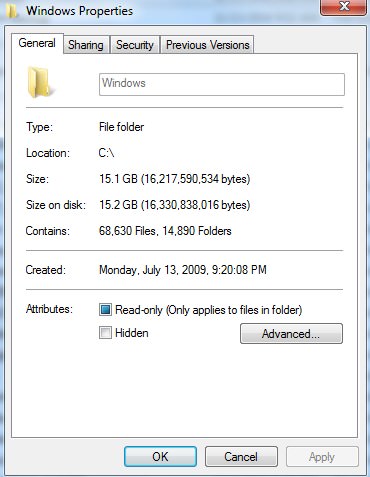
My Windows folder.

6jumPLI.jpg


It's those damn updates I told you about. I don't even use them, but you should at least install just the critical updates. The rest are just bloat and can and will muck your system up.

If you use a fairly decent anti-virus with Sandboxie for your browser, and scan all downloads at Virus Total, you're pretty much good to go. I don't even use an anti-virus on both my laptop and gaming desktop. Even if I do get some funny business I can always pull out my clone and clone back like hardly anything changed. I make a clone of both computers about once a month. So of course anything on the drive during that time frame would be lost. Except I do encrypt and use CloudBerry to upload certain important files to a private Amazon S3 account.
 

My Computer

Computer type
PC/Desktop
OS
Windows 7 Ultimate x64
ProfPepper. You could look at installing the free version of Ccleaner & run that occasionally. Otherwise be content with things as they are. Of course the drive will gradually fill up as you add data & new software, which is quite normal. It is also a very good policy to make regular image back ups of the Operating System drive, so in the event of a drive failure or a virus attack you have a fairly up to date image you can install, to get back into operation in a matter of 15 to 20 minutes or so.

I do an image back up once a week & on the few occasions I have had to use it, it has been a very quick operation.

A good free imaging system is Macrium Reflect & it can be downloaded from here:

Macrium Software | Macrium Reflect Free
 

My Computer

Computer type
PC/Desktop
Computer Manufacturer/Model Number
Self built using existing case
OS
Windows 7 Home Premium 64 bit sp1
CPU
Intel i5 3570 3.4Ghz Ivy Bridge SKT 1155 quad core
Motherboard
Gigabyte Z77-HD3 SKT 1155 2xSata 3, 4x USB 3.0
Memory
G-Skill Rip Jaws 16Gb (8x2) DDR3 -1600 PC3 12800 CL 10 red
Graphics Card(s)
Gigabyte NVIDIA GT610 1Gb DDR3 810/1200 PCI-E 2.0 Silent
Sound Card
NVIDIA High Definition & Realtech High Definition Audio
Monitor(s) Displays
2 x Philips 226V4L 16:9 aspect ratio
Screen Resolution
1920 x 1080 HD
Hard Drives
Samsung 840 Pro 256gb SSD, SATA 3.
Hitachi Touro Portable 1tb, USB 3.0 HDD used for image b/ups.
PSU
Corsair VS450
Case
Codeng
Cooling
PSU fan & CPU fan
Keyboard
Logitech
Mouse
Logitech Wireless trackball M570
Internet Speed
Wireless 3G. 3mg down & 550kb up.
Antivirus
Bitdefender Internet Security 2020
Browser
Opera (Current Version) & Firefox
Other Info
MS Office 2013 Pro. Davis weather station software. MGE Nova 600 avr UPS.
Back
Top