Help: How do I determine my graphics card?

RockstarWizkidd

New member
Local time
11:32 AM
Messages
1
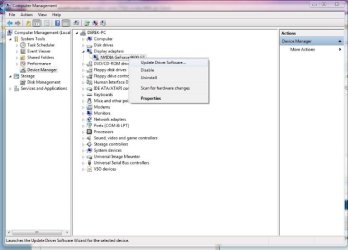
I wasn't expecting this to be such a problem, or I would have checked beforehand, but I just upgraded to windows 7 from vista. I need to change the drivers from the stock VGA adapter to my GPU. However I'm having difficulty, because I can't remember what my card is except that it's nVidia. I'm positive it's either an nForce or Quadro. However, I can't check my system because my it comes up as the windows 7 VGA adapter. It also appears that many people are having problems updating their driver from the default, so I have no way of knowing if my driver won't update or if I have the wrong driver. Just wondering if anyone has any thoughts.
 

My Computer My Computer

Computer Manufacturer/Model Number
Dell Latitude D830
OS
Windows 7

Attachments

  • device.JPG
    device.JPG
    42.5 KB · Views: 672

My Computer My Computer

Computer type
PC/Desktop
Computer Manufacturer/Model Number
Self Built
OS
Win 10 Pro x64
CPU
Intel I5-2500K @3.3GHz
Motherboard
Asrock P67 Extreme4
Memory
16GB G.Skill Ripjaws X (4x4GB)
Graphics Card(s)
EVGA GeForce 750 Ti SC 2GB
Sound Card
ASUS Xonar DG 5.1 Channels 24-bit 96KHz PCI Interface Sound
Monitor(s) Displays
auria eq2367
Screen Resolution
1920 x 1080
Hard Drives
250GB Samsung 850 EVO SSD
1TB WD Blue
1TB Hitachi
PSU
SeaSonic X 650W 80 Plus Gold
Case
Corsair Obsidian 750D
Cooling
Corsair H60, Three 140mm case fans
Keyboard
Logitech Wireless Keyboard K520
Mouse
Logitech Wireless Mouse M310
Internet Speed
Wave Broadband ~ 100 dn 5 up
Antivirus
Windows Defender, Malwarebytes Premium
Browser
Edge, IE11, Chrome
Other Info
Laptop specs: HP g7-1365dx /
CPU: AMD A6-3420M APU with Radeon(tm) HD Graphics /
RAM: Crucial 8Gb (2x4Gb) /
SSD: Crucial M4-CT128M4SSD2 ATA Device/ FW 000F /
GFX: AMD Radeon HD 6520G /
OS: Windows 10 Pro x64
The best thing to do is simply go to Dell's website and search for your laptop model. I had a quick look and there's 3 options of graphic cards your laptop comes with: Nvidia Quadro 140M, Nvidia Quadro 135M or Intel Graphic Accelerator X3100.

As you're sure you have an Nvidia, it'll be one of the Quadros. If you want to know exactly you could download a program like Speccy and see if that tells you exactly, but you could also just go to Nvidia's website and download the drivers for Quadro netbook NVS series. The drivers for the 140M should also cover the 135M graphic card.

Or you could just update it through Windows, go to device manager and right click on the VGA adapter and go to properties then update.
 

My Computer My Computer

Computer type
PC/Desktop
Computer Manufacturer/Model Number
Custom Built
OS
Windows 8.1 Pro x64
CPU
Intel Core i7 4790k
Motherboard
MSI Z97S Krait Edition
Memory
8GB Corsair Dominator 1600MHz
Graphics Card(s)
MSI TwinFrozr GeForce GTX770
Sound Card
ASUS Xonar DX/XD 7.1
Monitor(s) Displays
Dell 24" S2409W + Dell 20" E207WFP
Screen Resolution
1920x1080 + 1680x1050
Hard Drives
1x 120GB OCZ Agility 3, 1x 750GB Western Digital Caviar Black, 1x 1TB Western Digital Caviar Blue
PSU
Corsair HX850 modular
Case
Fractal Design Define R4
Cooling
Corsair H60 w/ twin Corsair SP120 fans
Keyboard
Logitech G510S Keyboard
Mouse
Logitech G500S Laser Mouse
Internet Speed
40Mbps
Antivirus
Microsoft Security Essentials
Browser
Google Chrome
Other Info
LG Blu-Ray player

My Computer My Computer

Computer type
PC/Desktop
Computer Manufacturer/Model Number
Acer M5641
OS
Windows 7 Home Premium 64bit
CPU
Q6600
Motherboard
Nvidia MCP73PV
Memory
4GB.
Graphics Card(s)
Sapphire Vapor-X 5750
Sound Card
XFI Extreem music
Monitor(s) Displays
Acer X223W
Screen Resolution
1680x1050
Hard Drives
WD10 02FAEX
WD64 00AAKS
PSU
stock 450w
Case
acer
Cooling
stock
Keyboard
Microsoft Digital Media Pro.
Mouse
Logitech MX620
Internet Speed
49.51Mbs down 4.98Mbs up 17.6ms ping
Antivirus
MSE
Browser
Waterfox
Other Info
Shaw Cable
Netgear R6200

My Computer My Computer

Computer type
PC/Desktop
Computer Manufacturer/Model Number
Custom Built
OS
Windows 8.1 Pro x64
CPU
Intel Core i7 4790k
Motherboard
MSI Z97S Krait Edition
Memory
8GB Corsair Dominator 1600MHz
Graphics Card(s)
MSI TwinFrozr GeForce GTX770
Sound Card
ASUS Xonar DX/XD 7.1
Monitor(s) Displays
Dell 24" S2409W + Dell 20" E207WFP
Screen Resolution
1920x1080 + 1680x1050
Hard Drives
1x 120GB OCZ Agility 3, 1x 750GB Western Digital Caviar Black, 1x 1TB Western Digital Caviar Blue
PSU
Corsair HX850 modular
Case
Fractal Design Define R4
Cooling
Corsair H60 w/ twin Corsair SP120 fans
Keyboard
Logitech G510S Keyboard
Mouse
Logitech G500S Laser Mouse
Internet Speed
40Mbps
Antivirus
Microsoft Security Essentials
Browser
Google Chrome
Other Info
LG Blu-Ray player
Similar problem

Hi, sorry for my English.

I have a similar problem: I ant to identify my graphic card for downloading and installing the correct drivers.

The solutions already posted didn't work.

If I go on Device Manager -> Display adapters it told me Standard VGA Graphics Adapter

I have the same results from any program that I tried to run to identify my hardware (like Speccy, GPU-Z Video card GPU Information Utility etc)

Unluckily, after many moving, I cant find any more the paper with all the data about the assembled custom build PC that i bought some years ago.

System specification:

Computer type
PC/Desktop

Computer Manufacturer/Model Number
Custom build

OS
Windows 7 Ultimate 64-bit SP1

CPU
AMD Athlon II X3 455 - Rana 45nm Technology

Motherboard
ASUSTeK Computer INC. M5A78L (AM3R2)

RAM
4.00GB Dual-Channel DDR3 @ 669MHz (9-9-9-24)

Hard Drive
465GB Western Digital WDC WD5000AAKX-001CA0 ATA Device (SATA)

Graphics Card(s)
???
 

My Computer My Computer

Computer type
PC/Desktop
Computer Manufacturer/Model Number
Custom build
OS
Windows 7 Ultimate 64-bit SP1
CPU
AMD Athlon II X3 455 - Rana 45nm Technology
Motherboard
ASUSTeK Computer INC. M5A78L (AM3R2)
Memory
RAM 4.00GB Dual-Channel DDR3 @ 669MHz (9-9-9-24)
Graphics Card(s)
???
Hard Drives
465GB Western Digital WDC WD5000AAKX-001CA0 ATA Device (SATA)
Antivirus
AVG AntiVirus Free Edition 2015
Browser
Chrome

My Computer My Computer

Computer Manufacturer/Model Number
W530-3630QM1
OS
windows 7 home 64bit
CPU
INTEL-CORE I7
Memory
16GB
Hard Drives
750GB
Browser
Chrome
It is most likely your graphics drivers aren't present. According to my research, your motherboard's on-board GPU has ATi Radeon HD 3000.
 

My Computer My Computer

Computer type
PC/Desktop
Computer Manufacturer/Model Number
ASUS X550ZE
OS
Windows 7 Home Premium 64-BIT
CPU
AMD A8 7200P
Motherboard
N/A
Memory
8GB 1600mhz
Graphics Card(s)
Radeon R5 (APU) + Radeon R5 M230 2GB Dual Graphics
Sound Card
Realtek ALC269 with SonicMaster
Monitor(s) Displays
Laptop Display
Screen Resolution
1920 x 1080 @60hz
Hard Drives
WDC WD50 00LPVX-80V0TT0 (500GB)
PSU
Laptop Charger
Mouse
ARMAGGEDON TEXTRON SCORPION 7
Internet Speed
100 mbps DOWN / 50 mbps UP
Antivirus
Windows Defender
Browser
Mozzila FireFox, Valve Steam in-game internet browser
If you show VGA for your video in Windows' device manager, you have the default NO video card driver installed, which is a horrific performance hit.

Manufacturer's web site or GPU-Z/Speccy applications should show you the truth under the hood. [as already said]

If it's a desktop, you can unplug the power to the case and open it up and physically look, and CLEAN it out while in there, since it's likely been a while if ever. [dust]

Soron, in the future please start you own threads, this one was 4 years old.
 

My Computer My Computer

Computer type
PC/Desktop
Computer Manufacturer/Model Number
Self Built Custom
OS
Windows 7 Ultimate Retail Box (64-bit installed) + Service Pack 1
CPU
AMD FX-8350 CPU v1.15 (or 1.0F) BIOS was required!
Motherboard
MSI 890FXA-GD70
Memory
8G CAS-7 G-Skill DDR3 @1333 (2 fours) [mobo nonOC max rec'd]
Graphics Card(s)
Radeon HD 7950 [3 gigs of GDDR5] MSI Twin Frozr model
Sound Card
Realtek High Definition Audio (onboard mobo, ALC-889 chip)
Monitor(s) Displays
2 WS LED Monitors: One LG One Viewsonic
Screen Resolution
1920 by 1080
Hard Drives
SSD for OS: Samsung 840 Pro
SSD for VM and utilities: Adata SX900
7200 RPM SATA HDs for the rest: Hitachi and Seagate
PSU
Corsair TX850 - 850W max, in service since August 2010.
Case
Thermaltake Armor A90
Cooling
Thermaltake Spin Q CPU Cooler, in service since August 2010
Keyboard
Logitech G11
Mouse
Logitech M310 Wireless
Internet Speed
100 Megabit broadband supposedly upgraded from 50 (Cable)
Antivirus
Bitdefender Internet Security 2014 suite
Browser
Pale Moon 64-bit main, also IceDragon, Opera, and Maxthon.
Other Info
CompTIA A+ certified (220-800 series) in July 2013.
Back
Top