Help!!I get stutters in every game.

Sunehildeep

New member
Local time
3:49 AM
Messages
14
i get stutters in every game i have and buy. they are like freezes less than a second for every 2-3 seconds.help please.when i had my previous gpu-zotac nvidia geforce 8400gs everything was working smooth without stutter.now my gpu is gainward nvidia geforce gt 610 and i have stutters in every game even in low end games.i can play cod bo II at highest settings. all my games have high fps but below 50fps. why am i having these stutters and please i beg you not to tell me to upgrade. here in our country everything is very much costly and i am not that rich. please help!!
 

My Computer My Computer

Computer type
PC/Desktop
OS
Microsoft Windows 7 Ultimate 32-bit 7600 Multiprocessor Free
CPU
Intel(R) Pentium(R) Dual CPU E2200 @ 2.20GHz
Motherboard
LORD ELECTRONICS CO.,LTD. 945GM ICH7 Series
Memory
4.00 GB
Graphics Card(s)
Gainward NVIDIA GeForce GT 610
Sound Card
(1) High Definition Audio Device (2) Realtek High Definiti
Screen Resolution
1600 x 900 x 32 bits (4294967296 colors) @ 60 Hz
Hard Drives
Hitachi HDP725025GLA380 ATA Device
Antivirus
-
Browser
Google Chrome
Power supply details?
Have you tried a fresh windows install?
 

My Computer My Computer

Computer type
PC/Desktop
Computer Manufacturer/Model Number
Custom Build
OS
Windows 7 Ultimate x64
CPU
Intel Core [email protected] GHz(the bottleneck)
Motherboard
Gigabyte H61m- S1
Memory
8 GB @ 1333
Graphics Card(s)
XFX AMD Radeon hd 7970
Monitor(s) Displays
Samsung SyncMaster S19B150 (47cm)
Screen Resolution
1366*768
Hard Drives
Seagate Barracuda 500GB (ST500DM002)
Seagate Barracuda 1TB (ST1000DM003)
PSU
Antec VP650P V2
Case
Corsair Carbide 500R (I'm lovin it)
Cooling
(Stock-cpu)+(4x120mm case fans)
Keyboard
Logitech MK200(Very Basic)
Mouse
Dragonwar Thor(3200 dpi cheap gaming mouse)
Antivirus
Kaspersy Internet Security
Browser
Mozilla Firefox
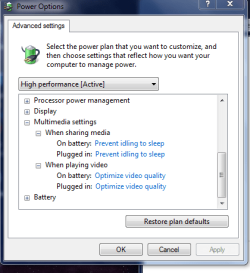
power settings

Are your power settings, like this if not give them a try

Roy
 

Attachments

  • power.PNG
    power.PNG
    14.5 KB · Views: 52

My Computer My Computer

Computer type
PC/Desktop
Computer Manufacturer/Model Number
medionl/Aspire 6930G/acer x55a
OS
W7 home premium 32bit/W7HP 64bit/w10 tp insider ring
CPU
E5300 dual core
Motherboard
medion MS7366
Memory
3gb
Graphics Card(s)
Nvidia Geforce 7100 Nforce 630i
Monitor(s) Displays
avixc
Internet Speed
n (isp resticted to 72)
Antivirus
mse/pands
Browser
palemoon
Other Info
Belkin Fd7050 n USB using Railink RT2870 drivers, more upto date

My Computer My Computer

Computer type
PC/Desktop
OS
Microsoft Windows 7 Ultimate 32-bit 7600 Multiprocessor Free
CPU
Intel(R) Pentium(R) Dual CPU E2200 @ 2.20GHz
Motherboard
LORD ELECTRONICS CO.,LTD. 945GM ICH7 Series
Memory
4.00 GB
Graphics Card(s)
Gainward NVIDIA GeForce GT 610
Sound Card
(1) High Definition Audio Device (2) Realtek High Definiti
Screen Resolution
1600 x 900 x 32 bits (4294967296 colors) @ 60 Hz
Hard Drives
Hitachi HDP725025GLA380 ATA Device
Antivirus
-
Browser
Google Chrome
did you install some new graphics drivers when you updated? it's a big leap from a 8400GS to a GT610, might be your CPU being a bottleneck, but we need to investigate all avenues first.
 

My Computer My Computer

Computer type
PC/Desktop
Computer Manufacturer/Model Number
Custom Build
OS
Windows 7 Ultimate x64 SP1
CPU
Intel Q6600 @ 2.6Ghz
Motherboard
Evga NF78-CK-132-A 3-Way SLI
Memory
4Gb DDR2 Corsair Dominator @ 800Mhz 5-5-5-15
Graphics Card(s)
EVGA 560 GTX SC FTW 1GB
Sound Card
Realtek HD 7.1 Audio, Plantronics GameCom780 7.1 Headset
Monitor(s) Displays
Dell S2409W
Screen Resolution
1920 x 1080
Hard Drives
SanDisk SDSSDHII-120G-G25 120GB SSD
Samsung 7200RPM 750Gb SATA
Samsung 850 EVO 120GB SSD
Western Digital Green 1TB 7200RPM
PSU
Xigmatek 750W Quad sli quad core 80% eff
Case
Antec 900 Gaming Case
Cooling
Zalman CNPS9700-NT NVIDIA Tritium
Keyboard
Logitech generic keyboard, MS wireless keyboard
Mouse
Razor Lachesis Banshee V2 Blue, 4000DPI, MS wireless mouse
Internet Speed
152Mb Virgin Media Fibre Optic
Antivirus
Microsoft Security Essentials
Browser
Google Chrome
Other Info
Wireless Gaming Receiver for Windows, Wireless Xbox 360 Pad
Yep, drivers seem like the most likely culprit to me. Is the new GPU all that was changed?
 

My Computer My Computer

Computer type
Laptop
Computer Manufacturer/Model Number
MSI GE72VR Apache Pro-416
OS
Windows 10x64 Build 1709
CPU
Intel i7 7700HQ Kaby Lake
Motherboard
Micro-Star Intl. MS-179B (U3C1)
Memory
16 GB DDR4 @2400
Graphics Card(s)
Nvidia Geforce GTX 1060
Screen Resolution
1920x1080 120Hz
Hard Drives
256 GB Nvme M.2 SSD

1TB HDD@7200
Cooling
Cooler Blast 4
Keyboard
Steel Series
Antivirus
Bit Defender Free
Browser
Edge
Some basics.

Do you have the CD/DVD that came with the video card. Their should be drivers there that will get you started.

I noticed your System Specs. You don't have your needed Windows 7 Updates.

Computer type PC/Desktop
OS Microsoft Windows 7 Ultimate 32-bit 7600 Multiprocessor Free
You don't have SP-1 7601.
You should get all needed Windows 7 Updates.

You also don't show a anti virus program.

Hard Drives Hitachi HDP725025GLA380 ATA Device
Antivirus -
Browser Google Chrome
These will also cause problems. These problems need to be taken care of.

Here is a tutorial by essenbe that will help with installing your video card driver.

http://www.sevenforums.com/tutorials/327414-nvidia-drivers-avoid-problems.html

If need be put your old video card back in and get your system ready for new hardware.
 

My Computer My Computer

Computer type
PC/Desktop
Computer Manufacturer/Model Number
Home made Desktop
OS
Windows 10 Pro. 64/ version 1709 Windows 7 Pro/64
CPU
Intel i7-6800K @ 4.3
Motherboard
ASUS X-99 Deluxe II
Memory
Corsair Platinum 16 gig @2400
Graphics Card(s)
EVGA GTX 1070 OC
Monitor(s) Displays
Asus 27" LED LCD/VE278Q
Screen Resolution
1920-1080 or 1280-720 HDMI
Hard Drives
INTEL SSD 730-240 Gb Sata 3.0/
PSU
EVGA Platium 1200W
Case
Phanteks Luxe Tempered Glass 8 fans/ one radiator
Cooling
XSPC/ Water Cooled CPU
Keyboard
Das 4 Professional
Mouse
Logitech M705/MX Anywhere 2-S
Internet Speed
100 mbits
Antivirus
Microsoft Security Essentials/ Malwarebytes Premium 3.0/ SAS
Browser
I.E. 11 default/Firefox/ ISP Time Warner Cable/Spectrum
Other Info
LG BluRay Burner/
Sound system-KLipsch-THX/
Icy Dock ssd Hot Swap bays.
Some basics.

Do you have the CD/DVD that came with the video card. Their should be drivers there that will get you started.

I noticed your System Specs. You don't have your needed Windows 7 Updates.

Computer type PC/Desktop
OS Microsoft Windows 7 Ultimate 32-bit 7600 Multiprocessor Free
You don't have SP-1 7601.
You should get all needed Windows 7 Updates.

You also don't show a anti virus program.

Hard Drives Hitachi HDP725025GLA380 ATA Device
Antivirus -
Browser Google Chrome
These will also cause problems. These problems need to be taken care of.

Here is a tutorial by essenbe that will help with installing your video card driver.

http://www.sevenforums.com/tutorials/327414-nvidia-drivers-avoid-problems.html

If need be put your old video card back in and get your system ready for new hardware.
hello. update: i now installed a fresh copy of win 8 and yes i have the cd which came with my video card and yes i downloaded some driver updater and updated all the drivers and then the stuttering reduced a lot but there is still stuttering. why didn't i got these stutters on nvidia 8400 gs
 

My Computer My Computer

Computer type
PC/Desktop
OS
Microsoft Windows 7 Ultimate 32-bit 7600 Multiprocessor Free
CPU
Intel(R) Pentium(R) Dual CPU E2200 @ 2.20GHz
Motherboard
LORD ELECTRONICS CO.,LTD. 945GM ICH7 Series
Memory
4.00 GB
Graphics Card(s)
Gainward NVIDIA GeForce GT 610
Sound Card
(1) High Definition Audio Device (2) Realtek High Definiti
Screen Resolution
1600 x 900 x 32 bits (4294967296 colors) @ 60 Hz
Hard Drives
Hitachi HDP725025GLA380 ATA Device
Antivirus
-
Browser
Google Chrome
Perhaps not an answer but I have always been one that thinks that everything must be always balanced. Perhaps there is a conflict between you adding a stronger more powerful video card and the CPU, RAM or Power Supply. Now that your video card is stronger, the CPU can't handle it and its struggling to cope.

Your system is pretty dated so my suggestion would be, before you start a game, close down anything that runs in the background that you will not use... ie: Messengers, outlook, office, browsers, etc.

Also, once you are in the Game Options, make sure your video resolution is the same as your native res (1600 x 900). Put everything on Low and one by one start opting for higher settings. Remember, it is better to have 25 to 30 FPS's with no stuttering than 60 with stutters.
 

My Computer My Computer

Computer type
PC/Desktop
Computer Manufacturer/Model Number
Custom Built... Intel/Nvidia/ASRock
OS
Windows 7 x64 (Ultimate)
CPU
Intel i5-4670K
Motherboard
ASRock Z87 Extreme 6
Memory
8GBs Ripjaws 2133Mhz
Graphics Card(s)
Asus GTX660 (2GBs)
Sound Card
Onboard Realtek HD
Monitor(s) Displays
Acer AL2216W
Screen Resolution
1680 x 1050
Hard Drives
Samsung 840 SSD 120GBs
Samsung 750GB 32MB cache
1.5 TB
PSU
PC Cooling 750w Silencer
Case
Thermaltake Spedo Advance
Cooling
Std Cooler
Keyboard
Logitech G15
Mouse
Logitech G9
Internet Speed
Comcast 20Mbit
Antivirus
Avast
Browser
Firefox
A GT 610 is a piece of junk and not remotely meant for gaming, at least try to find an MSI GTX 660 TF3, I`ve have one in my Gateway for years, it rocks.

You also need more memory for gaming, at least 8 GB if the motherboard supports at least 8, you also need to install 64 bit.

But that board is old and doesn`t look capable of that, can`t find any useful info on it. (Looks like it only supports 4 GB of DDR2)

Time to upgrade :) But if it has a PCI-Express slot, then at least put a decent card in it.

You also need to max out the CPU, they can be found on EBay cheap.

Gá aon tiománaithe duit!
 

Attachments

  • MSI GTX 660 TF3.jpg
    MSI GTX 660 TF3.jpg
    167.5 KB · Views: 2

My Computer My Computer

Computer type
PC/Desktop
Computer Manufacturer/Model Number
Skylake Special #666
OS
Windows 10 Pro x64
CPU
Intel Core i7 6700K
Motherboard
Asus Sabertooth Z170 Mark 1
Memory
GSkill TridentZ RGB 16GB 3600 16-16-16-36
Graphics Card(s)
EVGA GTX 980 Ti SC x2
Sound Card
Realtek High Definition
Monitor(s) Displays
AOC G2460PG
Screen Resolution
1920 x 1080 144Hz
Hard Drives
Samsung 860 Pro 256GB, Seagate Barracuda 4TB x2
PSU
EVGA 1000 P2, EVGA White Custom Braided Cables
Case
Corsair Vengeance C70 Gunmetal Black
Cooling
Corsair H100i v2, Corsair ML120 x2, Thermal Grizzly Kryonaut
Keyboard
Logitech G910 Orion Spectrum
Mouse
Logitech G700s
Internet Speed
Verizon Fios Quantum Gateway 75/75
Antivirus
Windows Defender, Malwarebytes Free 3.8.3
Browser
Chrome
Other Info
Corsair SP120 x4, LG Blu-ray Drive, Durabrand HT-395 100 Watt Dolby Digital Amp, Corsair H2100 Wireless 7.1 Headset
Gt 610 is more of a casual use graphics card, try lowering your resolution in game and adjust the graphics settings as well to see if it helps any.
 

My Computer My Computer

Computer type
PC/Desktop
Computer Manufacturer/Model Number
Custom
OS
Windows 7 x64 Professional
CPU
Intel i5-4690k
Motherboard
MSI Z97 Gaming 5
Memory
Corsair Vengeance Pro Series 16GB DDR3 1866mhz
Graphics Card(s)
R9 390 8GB
Monitor(s) Displays
24" Acer 3D monitor
Hard Drives
2TB Seagate HDD
120GB Adata SSD
PSU
750 watt
Case
Zalmann Z9
Cooling
Fan
Keyboard
Razer Deathstalker
Mouse
Anker Gaming Mouse
Internet Speed
20MB/S
Antivirus
AVG
Browser
Google Chrome
Back
Top