
Help in Regards to Third Party Themes-Link provided

GenAp

New member
Local time
12:47 PM
Messages
4
Hey! Just in advance, I want to thank any and everyone for posting in here trying to help me. It means a lot that you guys care enough to take out of your time to help me. ^^

Anyway, on into the issue.

Link to third party theme; [THEME WIN7] BLACK

I'm having some trouble with this third party theme. Now, hold up for a moment; I'm not a total noob at this; my computer is already fully patched with the universal theme patcher, and I technically DO have the theme in. However, my issue lies in changing the background pictures for the folders within "My Documents" and other areas.

What I want:
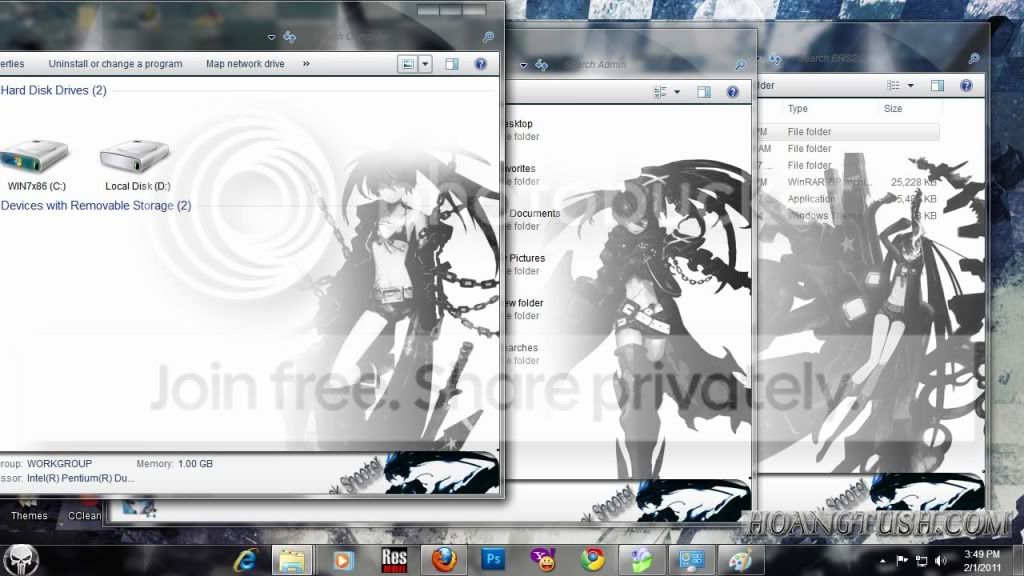
vnbweioweopfmwef.jpg


What I have on mine:

314z0hj.jpg


So yeah. I've tried using that Windows Theme Installer (v1.1), but apparently I just learned on this forum that it's just for x86 systems (Confirm please?). I've tried pulling up the ExplorerFrame.dll and Shell32.dll, most of the time where it just won't run it (Something about an unhandled exception) or something telling me a specific path is blocked, even though I'm running it as administrator (I can post the error pictures if you'd like). I've sometimes been able to get through with it and have it tell me to restart my computer, but unfortunately, over the past day alone, my laptop's been bricked 5 times (Explorer.exe won't run, shell32.dll missing and explorer.exe won't run) and I've had to system restore for each one. Not that big of a deal, but it's been getting annoying, and trying to talk to people through broken english ain't easy. You all seem like pros at this, so it's time for me to put my money where my mouth's at. Can you help me resolve this issue, oh legendary windows 7 experts? ^^ Please?
 

My Computer My Computer

At a glance

Windows 7 Home Premium 64bit
OS
Windows 7 Home Premium 64bit
Sorry if I have missed the point, but what's the actual issue you are facing?
 

My Computer My Computer

At a glance

Windows 7 Home Premium 64BitIntel(R) Core(TM) i7-2670QM CPU @ 2.20GHz8 GBNVIDIA GT540M
Computer Manufacturer/Model Number
Dell XPS 15 L502X
OS
Windows 7 Home Premium 64Bit
CPU
Intel(R) Core(TM) i7-2670QM CPU @ 2.20GHz
Motherboard
Dell
Memory
8 GB
Graphics Card(s)
NVIDIA GT540M
Hard Drives
750GB @ 7200 RPM
I'm trying to get the background image to display when the theme is installed on the various folder windows, for example, "My music", "My Documents", "C:" and so forth. Sorry if I wasn't clear enough!
 

My Computer My Computer

At a glance

Windows 7 Home Premium 64bit
OS
Windows 7 Home Premium 64bit
Post a screenshot of where the download link is on that page.
Jerry
 

My Computer My Computer

At a glance

Win 7 Pro x64 / Win 10 ProIntel(R) Core(TM) i7-3630QM CPU @ 2.40GHz12 GB(1) Intel(R) HD Graphics 4000 (2) NVIDIA GeFo...
Computer type
Laptop
Computer Manufacturer/Model Number
Sager NP9170
OS
Win 7 Pro x64 / Win 10 Pro
CPU
Intel(R) Core(TM) i7-3630QM CPU @ 2.40GHz
Motherboard
CLEVO P170EM
Memory
12 GB
Graphics Card(s)
(1) Intel(R) HD Graphics 4000 (2) NVIDIA GeForce GTX 675M
Sound Card
(1) Realtek High Definition Audio (2) Intel(R) Display Aud
Monitor(s) Displays
17.3
Screen Resolution
1920x1080
Hard Drives
(1) Samsung 860 EVO 500GB(OS) (1) Samsung 860 EVO 500GB(Data)
Keyboard
Backlite
Antivirus
MSE, Malwarebytes Pro
Browser
Firefox
Other Info
DESKTOP: Custom-built.
OS: Win 10 Pro x64.
CASE: Rosewill R5.
CPU: Intel I5 4670K CPU @ 3.40GHz.
CPU COOLER: Cool Master Hyper 212 EVO.
MOTHERBOARD: Asus Z87-A.
MEMORY: Kingston HyperX 2x4 GB.
GPU: Nvidia Geforce 650 TI.
PSU: Corsair TX750.
DRIVES: (1) Samsung 840 120 GB SSD (2) Western Digital blue 500 GB 7200 RPM.
[THEME WIN7] BLACK ROCK SHOOTER v2.zip

Sorry about that, they block download links to those who aren't registered on the site.

For installation, it may ask for a password, which is given in the 6 line terms and conditions given. Chances are the pass for installing, not downloading (There is no downloading pass) is HOANGTUSH.COM, but it's always good to read and verify this.
 

My Computer My Computer

At a glance

Windows 7 Home Premium 64bit
OS
Windows 7 Home Premium 64bit
I downloaded that theme and it is a application with a theme changer in it, I am not going to install that not knowing what it is sorry. I know if you searched on the net there is a Explorer window picture changer out there somewhere maybe you could try that or try to communicate with the theme maker.
Jerry
 

My Computer My Computer

At a glance

Win 7 Pro x64 / Win 10 ProIntel(R) Core(TM) i7-3630QM CPU @ 2.40GHz12 GB(1) Intel(R) HD Graphics 4000 (2) NVIDIA GeFo...
Computer type
Laptop
Computer Manufacturer/Model Number
Sager NP9170
OS
Win 7 Pro x64 / Win 10 Pro
CPU
Intel(R) Core(TM) i7-3630QM CPU @ 2.40GHz
Motherboard
CLEVO P170EM
Memory
12 GB
Graphics Card(s)
(1) Intel(R) HD Graphics 4000 (2) NVIDIA GeForce GTX 675M
Sound Card
(1) Realtek High Definition Audio (2) Intel(R) Display Aud
Monitor(s) Displays
17.3
Screen Resolution
1920x1080
Hard Drives
(1) Samsung 860 EVO 500GB(OS) (1) Samsung 860 EVO 500GB(Data)
Keyboard
Backlite
Antivirus
MSE, Malwarebytes Pro
Browser
Firefox
Other Info
DESKTOP: Custom-built.
OS: Win 10 Pro x64.
CASE: Rosewill R5.
CPU: Intel I5 4670K CPU @ 3.40GHz.
CPU COOLER: Cool Master Hyper 212 EVO.
MOTHERBOARD: Asus Z87-A.
MEMORY: Kingston HyperX 2x4 GB.
GPU: Nvidia Geforce 650 TI.
PSU: Corsair TX750.
DRIVES: (1) Samsung 840 120 GB SSD (2) Western Digital blue 500 GB 7200 RPM.
Sorry if I have missed the point, but what's the actual issue you are facing?

think he's talking about the image in the window page like when you open up my documents and has a background instead of plain white
 

My Computer My Computer

At a glance

Windows 10 64bitAMD Phenom II X4 925 (Deneb)(2.8GHz) OC 3.4GHzCorsair Vengeance DDR3 4GBX2 (8192MB)XFX HD 6870 1GB (OC)- 940MHz core, mem 1150MHz
Computer type
PC/Desktop
Computer Manufacturer/Model Number
custom build
OS
Windows 10 64bit
CPU
AMD Phenom II X4 925 (Deneb)(2.8GHz) OC 3.4GHz
Motherboard
M5A78L-MLX Plus
Memory
Corsair Vengeance DDR3 4GBX2 (8192MB)
Graphics Card(s)
XFX HD 6870 1GB (OC)- 940MHz core, mem 1150MHz
Monitor(s) Displays
Vizio 26' 1920x1080 / Acer 1336x768
Screen Resolution
1920x1080 60Hz /1336x768
Hard Drives
Kingston Digital 60GB SSDNow V300/500gb HDD Western Digital 7200rpm (/WD 160GB HDD 7200rpm
PSU
CORSAIR CX600 600w
Case
AZZA Orion 202 EVO
Cooling
cooler master hyper TX3 cpu cooler
Keyboard
Razer DeathStalker
Mouse
Logitech Optical Gaming Mouse G400
Antivirus
Defualt on win 10
Browser
Firefox
Other Info
cpu is overclocked in bios
I downloaded that theme and it is a application with a theme changer in it, I am not going to install that not knowing what it is sorry. I know if you searched on the net there is a Explorer window picture changer out there somewhere maybe you could try that or try to communicate with the theme maker.
Jerry

Well, I've used it and it's safe, and I could give you the website if you want, but you're not comfortable with it, which is alright. We all gotta respect boundaries here and there. Could you provide me with the link to this so called window changer, rather than leaving me with such an ambiguous term then?
 

My Computer My Computer

At a glance

Windows 7 Home Premium 64bit
OS
Windows 7 Home Premium 64bit

My Computer My Computer

At a glance

Win 7 Pro x64 / Win 10 ProIntel(R) Core(TM) i7-3630QM CPU @ 2.40GHz12 GB(1) Intel(R) HD Graphics 4000 (2) NVIDIA GeFo...
Computer type
Laptop
Computer Manufacturer/Model Number
Sager NP9170
OS
Win 7 Pro x64 / Win 10 Pro
CPU
Intel(R) Core(TM) i7-3630QM CPU @ 2.40GHz
Motherboard
CLEVO P170EM
Memory
12 GB
Graphics Card(s)
(1) Intel(R) HD Graphics 4000 (2) NVIDIA GeForce GTX 675M
Sound Card
(1) Realtek High Definition Audio (2) Intel(R) Display Aud
Monitor(s) Displays
17.3
Screen Resolution
1920x1080
Hard Drives
(1) Samsung 860 EVO 500GB(OS) (1) Samsung 860 EVO 500GB(Data)
Keyboard
Backlite
Antivirus
MSE, Malwarebytes Pro
Browser
Firefox
Other Info
DESKTOP: Custom-built.
OS: Win 10 Pro x64.
CASE: Rosewill R5.
CPU: Intel I5 4670K CPU @ 3.40GHz.
CPU COOLER: Cool Master Hyper 212 EVO.
MOTHERBOARD: Asus Z87-A.
MEMORY: Kingston HyperX 2x4 GB.
GPU: Nvidia Geforce 650 TI.
PSU: Corsair TX750.
DRIVES: (1) Samsung 840 120 GB SSD (2) Western Digital blue 500 GB 7200 RPM.
Back
Top