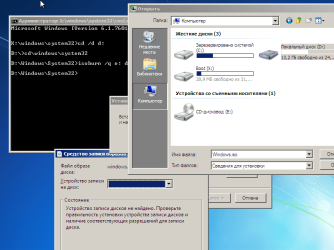
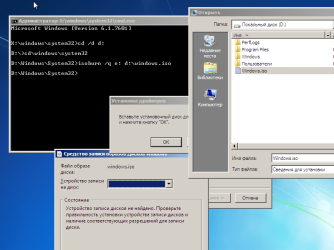
S serejka4902 New member Local time 4:58 AM Messages 4 Jun 30, 2017 #1 what it is necessary to make to burn iso through standard in boot? Attachments 2.png 45.7 KB · Views: 1 VirtualBox_7_01_07_2017_05_37_54.png 42.8 KB · Views: 1 My Computer My Computer At a glance Windows 7 Home Premium 32bitComputer typePC/DesktopOSWindows 7 Home Premium 32bit
SIW2 YTS GEEK Guru Gold Member SF Team Local time 10:58 AM Messages 16,797 Jun 30, 2017 #2 You will need to add the relevant files and registry entries to your winre/boot.wim. I linked to boot media(here) which has that function the last time you asked. My Computers My Computers System One System Two At a glance 7 X64i5 84002x8gb 3200mhz Computer typePC/DesktopOS7 X64CPUi5 8400Motherboardgigabyte b365m ds3hMemory2x8gb 3200mhzHard DrivesvariousPSUpure power 11 400w cmCaseCoolermasterCoolingcryorig m9i At a glance 7x64g54008gb ddr4 2400 Computer typePC/DesktopOS7x64CPUg5400Motherboardga b365m ds3hMemory8gb ddr4 2400PSUxfx pro 450w
You will need to add the relevant files and registry entries to your winre/boot.wim. I linked to boot media(here) which has that function the last time you asked.
S serejka4902 New member Thread Starter Local time 4:58 AM Messages 4 Jul 2, 2017 #3 This is not WinRE f8 while loading My Computer My Computer At a glance Windows 7 Home Premium 32bitComputer typePC/DesktopOSWindows 7 Home Premium 32bit
SIW2 YTS GEEK Guru Gold Member SF Team Local time 10:58 AM Messages 16,797 Jul 2, 2017 #4 You can extract boot.wim from the iso\sources folder. Rename boot.wim to winre.wim. Replace your existing winre.wim with the renamed boot.wim. My Computers My Computers System One System Two At a glance 7 X64i5 84002x8gb 3200mhz Computer typePC/DesktopOS7 X64CPUi5 8400Motherboardgigabyte b365m ds3hMemory2x8gb 3200mhzHard DrivesvariousPSUpure power 11 400w cmCaseCoolermasterCoolingcryorig m9i At a glance 7x64g54008gb ddr4 2400 Computer typePC/DesktopOS7x64CPUg5400Motherboardga b365m ds3hMemory8gb ddr4 2400PSUxfx pro 450w
You can extract boot.wim from the iso\sources folder. Rename boot.wim to winre.wim. Replace your existing winre.wim with the renamed boot.wim.
S serejka4902 New member Thread Starter Local time 4:58 AM Messages 4 Jul 3, 2017 #5 I need something that would just show up cdrom thanks My Computer My Computer At a glance Windows 7 Home Premium 32bitComputer typePC/DesktopOSWindows 7 Home Premium 32bit
SIW2 YTS GEEK Guru Gold Member SF Team Local time 10:58 AM Messages 16,797 Jul 3, 2017 #6 There is no such thing. The only way is to replace winre.wim with a more functional version. I explained how in my last post. My Computers My Computers System One System Two At a glance 7 X64i5 84002x8gb 3200mhz Computer typePC/DesktopOS7 X64CPUi5 8400Motherboardgigabyte b365m ds3hMemory2x8gb 3200mhzHard DrivesvariousPSUpure power 11 400w cmCaseCoolermasterCoolingcryorig m9i At a glance 7x64g54008gb ddr4 2400 Computer typePC/DesktopOS7x64CPUg5400Motherboardga b365m ds3hMemory8gb ddr4 2400PSUxfx pro 450w
There is no such thing. The only way is to replace winre.wim with a more functional version. I explained how in my last post.