Help! I've screwed up my XP partition

Run the EasyBCD diagnostics.

"ntldr is missing" can be fixed. make sure boot.ini, ntldr, and ntdetect.com are in the roots of both OS drives.


There is no reason now to copy the XP partition because a logical drive will dual boot with xp. Even converting it is risky and has bad results reported.
 
LOL - don't be too sure.

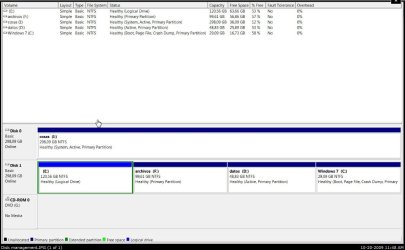
I am back and forth - haven't got time to catch up - just seen the screenie - does Diskmgmt still look like this?

DISK-2009-10-21_021522.jpg

If it does, then copy the 3 XP files Greg mentioned onto I and point Easybcd entry there.


EDIT: looks like the OP has gone to sleep.
 

My Computers My Computers

  • At a glance

    7 X64i5 84002x8gb 3200mhz
    Computer type
    PC/Desktop
    OS
    7 X64
    CPU
    i5 8400
    Motherboard
    gigabyte b365m ds3h
    Memory
    2x8gb 3200mhz
    Hard Drives
    various
    PSU
    pure power 11 400w cm
    Case
    Coolermaster
    Cooling
    cryorig m9i
  • At a glance

    7x64g54008gb ddr4 2400
    Computer type
    PC/Desktop
    OS
    7x64
    CPU
    g5400
    Motherboard
    ga b365m ds3h
    Memory
    8gb ddr4 2400
    PSU
    xfx pro 450w
Well then RDP into his machine and do it for him. It's call service beyond service.

Btw, is my name cleared?
 

My Computer My Computer

At a glance

Windows 7 Ultimate 64BitGenuineIntel Intel(R) Core(TM) DuoCore T2400 ...2.00 GBMobile Intel(R) 945 Express Chipset
Computer Manufacturer/Model Number
Lenovo ThinkPad T60
OS
Windows 7 Ultimate 64Bit
CPU
GenuineIntel Intel(R) Core(TM) DuoCore T2400 @ 1.83GHz
Motherboard
Intel(R) 82801G (ICH7 Family)
Memory
2.00 GB
Graphics Card(s)
Mobile Intel(R) 945 Express Chipset
Sound Card
SoundMAX Integrated Digital HD Audio
Monitor(s) Displays
ThinkPad Display
Screen Resolution
1400x1050
Hard Drives
100Gb SATA
Keyboard
Standard Keyboard
Mouse
HID-compliant Mouse
Internet Speed
Cable Broadband - 54Mbps
Other Info
Intel(R) PRO/1000 PL Network Connection
11a/b/g Wireless LAN Mini PCI Express Adapter
LOL - don't be too sure.

I am back and forth - haven't got time to catch up - just seen the screenie - does Diskmgmt still look like this?

View attachment 32208

If it does, then copy the 3 XP files Greg mentioned onto I and point Easybcd entry there.


EDIT: looks like the OP has gone to sleep.

He disconnected the cable to I: which was marked Active even tho its storage. This allowed Startup Repair to finally start up Win7. He wants to add XP to the dual boot.

I think he is sleeping or trying to move his XP to a primary partition as his last post says.
 
Thanks Greg,

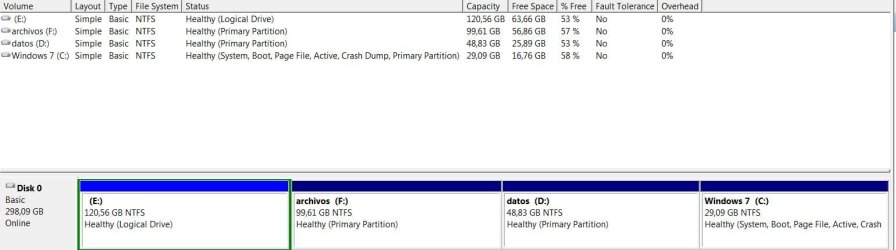
If the only thing he did was disconnect Disk 0 , then run startup repair - D will be "system" - that's where he needs to put the XP bootfiles and the bcd XP entry.

He will need to make sure boot.ini is pointing the right way.
 

My Computers My Computers

  • At a glance

    7 X64i5 84002x8gb 3200mhz
    Computer type
    PC/Desktop
    OS
    7 X64
    CPU
    i5 8400
    Motherboard
    gigabyte b365m ds3h
    Memory
    2x8gb 3200mhz
    Hard Drives
    various
    PSU
    pure power 11 400w cm
    Case
    Coolermaster
    Cooling
    cryorig m9i
  • At a glance

    7x64g54008gb ddr4 2400
    Computer type
    PC/Desktop
    OS
    7x64
    CPU
    g5400
    Motherboard
    ga b365m ds3h
    Memory
    8gb ddr4 2400
    PSU
    xfx pro 450w
Yup... sorry for the delay, but I also have to sleep sometimes... :)

I ran startup repair, and 7 is working but XP refuses to start. Here's a new disk management capture, just in case:

I tried the "recreate missing/deleted boot files" from EasyBCD, pointing it to drive C:, and it says that those files already exist. I did the same thing selecting drive E:, and it said this: "The store import operation has failed. The system cannot find the file specified".
 

Attachments

  • Disk2.jpg
    Disk2.jpg
    60.6 KB · Views: 11

My Computer My Computer

At a glance

XP (screwed up), 7
OS
XP (screwed up), 7

My Computers My Computers

  • At a glance

    7 X64i5 84002x8gb 3200mhz
    Computer type
    PC/Desktop
    OS
    7 X64
    CPU
    i5 8400
    Motherboard
    gigabyte b365m ds3h
    Memory
    2x8gb 3200mhz
    Hard Drives
    various
    PSU
    pure power 11 400w cm
    Case
    Coolermaster
    Cooling
    cryorig m9i
  • At a glance

    7x64g54008gb ddr4 2400
    Computer type
    PC/Desktop
    OS
    7x64
    CPU
    g5400
    Motherboard
    ga b365m ds3h
    Memory
    8gb ddr4 2400
    PSU
    xfx pro 450w
Using Easeus 3.0.1 here. Is 2.0 better?

Are boot.ini, ntldr, and ntdetect.com in the roots of both OS drives after showing hidden system files?

Would a simple repair install of Win7 (upgrade over itself) solve the issue by reconfiguring everything properly? I have used it as a lost resort to sort out boot issues successfully in the past.

If so, could he plug his data partition which was I: back in (if needed) so that it would be sorted out as well, assuming it isn't the active partition any longer and wouldn't bolix things up as it apparently did during the first install of 7?
 
Nope, I was using an old version, but I get the exact same results with 2.0 anyway.
 

My Computer My Computer

At a glance

XP (screwed up), 7
OS
XP (screwed up), 7
Using Easeus 3.0.1 here. Is 2.0 better?

Are boot.ini, ntldr, and ntdetect.com in the roots of both OS drives after showing hidden system files?

>They are in C:, but not in E:. Should I copy'em to E?

Would a simple repair install of Win7 (upgrade over itself) solve the issue by reconfiguring everything properly? I have used it as a lost resort to sort out boot issues successfully in the past.

>I'll try that next.

If so, could he plug his data partition which was I: back in (if needed) so that it would be sorted out as well, assuming it isn't the active partition any longer and wouldn't bolix things up as it apparently did during the first install of 7?

>Don't think I'll dare do that... I'll use a live linux disk to delete that boot folder before I try to access the drive with windows.
3char
 

My Computer My Computer

At a glance

XP (screwed up), 7
OS
XP (screwed up), 7
Using Easeus 3.0.1 here. Is 2.0 better?

Are boot.ini, ntldr, and ntdetect.com in the roots of both OS drives after showing hidden system files?

>They are in C:, but not in E:. Should I copy'em to E?

Yes, XP will not boot if those three files are not in its root.

If that doesn't fix it, then run the repair install (upgrade Win7 over itself) which should sort out everything now that the problem I: drive is not there.

However if you need that I: drive then I would hold off plugging it back in until the XP boot issue is fixed, then plug it in to see if it will behave as a data drive now that it is not the active drive. If not it may need surgery.
 
Last edited:
If the screenshot you posted 9 hours ago is still the same - d/l this .zip


View attachment xpbootfiles_DISK0_PART1.zip


Put the 3 files ( not the folder ) on the root of C.

Open Easybcd and Remove any XP entries.

Add a new XP entry - choose C as the drive.

Check your PM.
 

My Computers My Computers

  • At a glance

    7 X64i5 84002x8gb 3200mhz
    Computer type
    PC/Desktop
    OS
    7 X64
    CPU
    i5 8400
    Motherboard
    gigabyte b365m ds3h
    Memory
    2x8gb 3200mhz
    Hard Drives
    various
    PSU
    pure power 11 400w cm
    Case
    Coolermaster
    Cooling
    cryorig m9i
  • At a glance

    7x64g54008gb ddr4 2400
    Computer type
    PC/Desktop
    OS
    7x64
    CPU
    g5400
    Motherboard
    ga b365m ds3h
    Memory
    8gb ddr4 2400
    PSU
    xfx pro 450w
Put the 3 files ( not the folder ) on the root of C.

Open Easybcd and Remove any XP entries.

Add a new XP entry - choose C as the drive.

Check your PM.

Agreed. EasyBCD needs to reset and refresh the boot loader first.

Don't know why EasyBCD doesn't copy those files over. During XP/Vista dual boot days (seems like ages ago) that fix was the first sticky on their help forum.
 
Got some bad news... It finally works!! :p
Thanks a lot for your infinite patience
 

My Computer My Computer

At a glance

XP (screwed up), 7
OS
XP (screwed up), 7
Hey, enjoy Windows 7!

The future arrives tomorrow, and it is the best ever!
 
Well done for persevering .
 

My Computers My Computers

  • At a glance

    7 X64i5 84002x8gb 3200mhz
    Computer type
    PC/Desktop
    OS
    7 X64
    CPU
    i5 8400
    Motherboard
    gigabyte b365m ds3h
    Memory
    2x8gb 3200mhz
    Hard Drives
    various
    PSU
    pure power 11 400w cm
    Case
    Coolermaster
    Cooling
    cryorig m9i
  • At a glance

    7x64g54008gb ddr4 2400
    Computer type
    PC/Desktop
    OS
    7x64
    CPU
    g5400
    Motherboard
    ga b365m ds3h
    Memory
    8gb ddr4 2400
    PSU
    xfx pro 450w
Back
Top