Help me create a bootable USB

Bramsey88

New member
Local time
11:36 AM
Messages
4
Hello all, I'm really hoping someone can help me out- I have completely screwed up my little toshiba netbook and am trying to install windows 7 with an iOS on a bootable usb- how can I create that with my surface? Seeing as it doesn't have any optical drive (that I'm aware of) and I cannot download any programs to burn the ISO to the usb... PLEASE HELP! My surface is the only access I have to any computer system...
 

My Computer

Computer type
Laptop
Computer Manufacturer/Model Number
Toshiba
OS
Windows 7 home premium 32 bit
what is a surface? are you trying to re-install windows? did you boot into recovery mode?
 

My Computer

Computer type
PC/Desktop
Computer Manufacturer/Model Number
Dell Inspiron N5050
OS
Windows 7
CPU
i3 2.30GHz
Memory
6GB
Hard Drives
Partitioned
Antivirus
Comodo, Outpost
Browser
FireFox
A surface is a Microsoft tablet- but it runs on windows 8 rt which can't download any programs or anything- I wiped my netbook and I tried to create a bootable usb just by moving the ISO files on to the usb but that resulted in a installation screen loop---??? Don't know what to do now...
 

My Computer

Computer type
Laptop
Computer Manufacturer/Model Number
Toshiba
OS
Windows 7 home premium 32 bit
you can't just move them you have to burn/mount it as a Disc Image

try going to the library download a small Linux version burn iso to disc or usb then you can install an iso program and burn the windows image or just try Mounting the windows iso Linux would be an easier choice
 

My Computer

Computer type
PC/Desktop
Computer Manufacturer/Model Number
Dell Inspiron N5050
OS
Windows 7
CPU
i3 2.30GHz
Memory
6GB
Hard Drives
Partitioned
Antivirus
Comodo, Outpost
Browser
FireFox
How do I mount it?
 

My Computer

Computer type
Laptop
Computer Manufacturer/Model Number
Toshiba
OS
Windows 7 home premium 32 bit
right click the iso file or find a program how are you online if you have no other access?
 

My Computer

Computer type
PC/Desktop
Computer Manufacturer/Model Number
Dell Inspiron N5050
OS
Windows 7
CPU
i3 2.30GHz
Memory
6GB
Hard Drives
Partitioned
Antivirus
Comodo, Outpost
Browser
FireFox
I'm on my phone! Lol... I want to mount it to the usb instead of the virtual DVD drive... Any suggestions?
 

My Computer

Computer type
Laptop
Computer Manufacturer/Model Number
Toshiba
OS
Windows 7 home premium 32 bit

My Computer

Computer type
PC/Desktop
Computer Manufacturer/Model Number
Skylake Special #666
OS
Windows 10 Pro x64
CPU
Intel Core i7 6700K
Motherboard
Asus Sabertooth Z170 Mark 1
Memory
GSkill TridentZ RGB 16GB 3600 16-16-16-36
Graphics Card(s)
EVGA GTX 980 Ti SC x2
Sound Card
Realtek High Definition
Monitor(s) Displays
AOC G2460PG
Screen Resolution
1920 x 1080 144Hz
Hard Drives
Samsung 860 Pro 256GB, Seagate Barracuda 4TB x2
PSU
EVGA 1000 P2, EVGA White Custom Braided Cables
Case
Corsair Vengeance C70 Gunmetal Black
Cooling
Corsair H100i v2, Corsair ML120 x2, Thermal Grizzly Kryonaut
Keyboard
Logitech G910 Orion Spectrum
Mouse
Logitech G700s
Internet Speed
Verizon Fios Quantum Gateway 75/75
Antivirus
Windows Defender, Malwarebytes Free 3.8.3
Browser
Chrome
Other Info
Corsair SP120 x4, LG Blu-ray Drive, Durabrand HT-395 100 Watt Dolby Digital Amp, Corsair H2100 Wireless 7.1 Headset
   Information
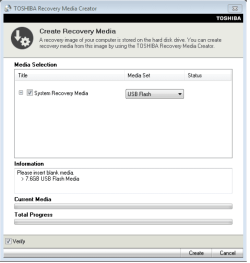
We always assume you have made your Recovery Disks using the OEM manufacturer's Recovery Media Creator app the first day you had your new PC.
& made the Startup Repair CD.
startup repair disc-create


Did you make the OEM manufacturer's Recovery Disks?


You can order Microsoft official OEM Recovery disks from your OEM manufacturer's website.


Toshiba USB.PNG

How to use Toshiba Recovery.
http://aps2.toshiba-tro.de/kb0/HTD7C02140000R01.htm
http://aps2.toshiba-tro.de/kb0/HTD1303440001R01.htm
You can order Toshiba Recovery disks from here:
https://www.csd.toshiba.com/cgi-bin/tais/support/jsp/serviceUnitVerification.jsp
 

My Computer

OS
ME/XP/Vista/Win7
Back
Top