Help me understand dual monitor

dru37

New member
Local time
7:34 AM
Messages
9
Based on my experimenting with dual monitors; it appears that you can 1) output the desktop to one monitor at a time, 2) output the desktop to both monitors simultaneously, or 3) use in 'extend' mode where the 2nd monitor extends the workspace of the desktop.

I would like to direct the output of one app to one of the monitors while the rest of the desktop continues to display on the primary monitor? In my case, I want to send the Windows Media Center output to my HDTV in another room via (a long) HDMI cable, while still using my desktop in my office.

I currently have a PNY GeForce 9400 GT video card.

Is this possible?
 

My Computer My Computer

At a glance

Windows 7PNY GeForce 9400 GT
Computer Manufacturer/Model Number
HP Pavilion a1640n
OS
Windows 7
Graphics Card(s)
PNY GeForce 9400 GT
When you extend the display, you just drag what you want to the desired screen and maximize it. Havent used media centre so dont know if its any different, but i drag everything across and maximize it. I currently use mine for photoshop, have the work area on 1 screen and the tools on the other. Hope this answers your question.
 

My Computer My Computer

At a glance

XP Pro waiting for Win 7 Home.AMD Athlon 64 X2 Dual Core 6000+4gbNvidia GeForce 7600 GS
Computer Manufacturer/Model Number
Me
OS
XP Pro waiting for Win 7 Home.
CPU
AMD Athlon 64 X2 Dual Core 6000+
Motherboard
Cant remember
Memory
4gb
Graphics Card(s)
Nvidia GeForce 7600 GS
Sound Card
Onboard
Monitor(s) Displays
2 x 19" crts
Hard Drives
1 x 300gb ide, 1 x 160gb sata, 1 x 250gb sata. 1tb sata to follow.
PSU
650w
Case
Cheap one.
Cooling
Hovercraft fans (sounds like it)
Hello Dru, welcome to the Seven Forums.

Like Safariman above told, use extended desktop mode and just drag WMC to the secondary display. When you maximize WMC it has a bad habit: it hijacks your mouse cursor. To get cursor back to the primary display you have to press Win-key and move cursor away from WMC display.

Kari
 

Attachments

  • WMC_dual_screen.jpg
    WMC_dual_screen.jpg
    257.2 KB · Views: 47

My Computer My Computer

At a glance

Windows 10 Pro x64 EN-GB1.6 GHz Intel Core i7-720QM Processor6 GBATI Mobility Radeon HD 5850 Graphics
Computer type
Laptop
Computer Manufacturer/Model Number
HP ENVY 17-1150eg
OS
Windows 10 Pro x64 EN-GB
CPU
1.6 GHz Intel Core i7-720QM Processor
Memory
6 GB
Graphics Card(s)
ATI Mobility Radeon HD 5850 Graphics
Sound Card
Beats sound system with integrated subwoofer
Monitor(s) Displays
17" laptop display, 22" LED and 32" Full HD TV through HDMI
Screen Resolution
1600*900 (1), 1920*1080 (2&3)
Hard Drives
Internal: 2 x 500 GB SATA Hard Disk Drive 7200 rpm
External: 2TB for backups, 3TB USB3 network drive for media
Cooling
As Envy runs a bit warm, I have it on a Cooler Master pad
Keyboard
Logitech diNovo Media Desktop Laser (bluetooth)
Mouse
Logitech Performance Mouse MX
Internet Speed
50/10 Mbps VDSL
Antivirus
Windows Defender 4.3.9431.0
Browser
Maxthon 3.5.2., IE11
Thank you, works a bit different than I had expected.

But this brought up another issue. I currently output audio from my desktop via a SB X-Fi Xtreme audio card to my harmon kardon Soundsticks. So the sound for monitor #2 still plays on my desktop, even though the video now shows only on the TV in the other room.
 

My Computer My Computer

At a glance

Windows 7PNY GeForce 9400 GT
Computer Manufacturer/Model Number
HP Pavilion a1640n
OS
Windows 7
Graphics Card(s)
PNY GeForce 9400 GT
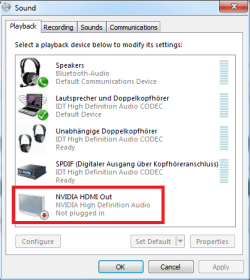
Can you find an HDMI out option in Playback Devices? Your GeForce card should IMO be able to carry audio signal.

Kari
 

Attachments

  • HDMI_out.png
    HDMI_out.png
    14.5 KB · Views: 17

My Computer My Computer

At a glance

Windows 10 Pro x64 EN-GB1.6 GHz Intel Core i7-720QM Processor6 GBATI Mobility Radeon HD 5850 Graphics
Computer type
Laptop
Computer Manufacturer/Model Number
HP ENVY 17-1150eg
OS
Windows 10 Pro x64 EN-GB
CPU
1.6 GHz Intel Core i7-720QM Processor
Memory
6 GB
Graphics Card(s)
ATI Mobility Radeon HD 5850 Graphics
Sound Card
Beats sound system with integrated subwoofer
Monitor(s) Displays
17" laptop display, 22" LED and 32" Full HD TV through HDMI
Screen Resolution
1600*900 (1), 1920*1080 (2&3)
Hard Drives
Internal: 2 x 500 GB SATA Hard Disk Drive 7200 rpm
External: 2TB for backups, 3TB USB3 network drive for media
Cooling
As Envy runs a bit warm, I have it on a Cooler Master pad
Keyboard
Logitech diNovo Media Desktop Laser (bluetooth)
Mouse
Logitech Performance Mouse MX
Internet Speed
50/10 Mbps VDSL
Antivirus
Windows Defender 4.3.9431.0
Browser
Maxthon 3.5.2., IE11
Back
Top