Solved Help me understand Libraries and where folders are actually located

Microslop

New member
Local time
5:25 PM
Messages
4
About a month ago I created a new Library. I gave the new library the generic name 'Audio' to distinguish it from 'Music' since I wanted somewhere to put my dictation notes, podcasts and recorded interviews and class lectures. I only have one or two music files under the 'Music' library and hardly ever use it.

A couple of weeks ago I had another music file and just happened to open the 'Music' library and noticed a folder that had the same files as one of the folders in the 'Audio' library. In fact, when I clicked open the folder in the 'Music' library, I noticed all the folders and sub-folders were exactly the same as the ones under the 'Audio' library. At first, I thought they were duplicate folders, but when I clicked on the 'Open folder location' of the Music folders, they were located as being under 'My Music'. So now I'm not sure what's going on since I never put the audio folders in the My Music folders.

So how did they get there? And why?

In the left navigation pane, the main folder in the Audio library I created has a (C: ) after the folder name. While the same (duplicate?) folder in the My Music folder (within the Music library) does not.

Questions:

1. Are these duplicate folders, or are they the same folders?

2. I only want my audio files in one place...the new library I named Audio. I don't want them duplicated or viewable in the Music library. I tried to delete them, but anything I do to the folders in one library happens to the folders in the other library. They seem to be linked, either that, or they are the same folder. How do I get rid of the audio folders in the Music library?

3. When a new library is created, and folders are placed under that new library, are those folders actually located there? Or are they located somewhere else, and merely viewable under the new library?

Thanks.
 

My Computer My Computer

At a glance

Windows 7 Home Premium 32 bit
Computer type
PC/Desktop
OS
Windows 7 Home Premium 32 bit
Libraries are 'jump points' to file types that are similarly associated. Five types of Library optimization are available from the properties. Music, Video, Documents, Pictures, and General files. Your files may be in C:\User\yourname\MP3s, but you add a jump point [shortcut] in the Music Library and it knows to handle the file as an audio file, etc. You can set how the files are accesed and viewed by setting the optimization type. Does that help?
 

My Computer My Computer

At a glance

Win7 Home Premium x64 W10Pro&HomeA12 9720p 4+8 TurionII M5206GB 8GBR7
Computer type
Laptop
Computer Manufacturer/Model Number
HP 17-ak0xx, dv7 3173nr
OS
Win7 Home Premium x64 W10Pro&Home
CPU
A12 9720p 4+8 TurionII M520
Motherboard
HP 3839
Memory
6GB 8GB
Graphics Card(s)
R7
Monitor(s) Displays
24" sa550
Screen Resolution
1600x900 1920x1080
Mouse
Logitechx2
Internet Speed
120Mb/s down 12up
Yes, the files are also in my username folder. The files types are .flac files.

So just by moving .flac files into the Audio library, Windows automatically assigns them to the My Music folder by default?
 

My Computer My Computer

At a glance

Windows 7 Home Premium 32 bit
Computer type
PC/Desktop
OS
Windows 7 Home Premium 32 bit
I don't understand....
 

My Computer My Computer

At a glance

Windows 7 Home Premium 32 bit
Computer type
PC/Desktop
OS
Windows 7 Home Premium 32 bit
Libraries are like creating a folder and then adding shortcuts inside it.
Note:
It is not exactly the same.

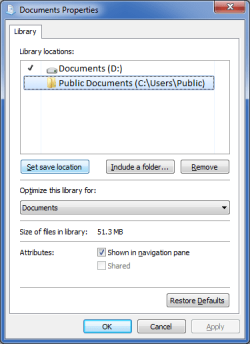
You can change the default save folder:

  • Right click on a Library (e.g. Documents)
  • Choose "Properties"
  • Click on the desired folder in the list
  • Click the "Set save location" button
If I wanted to change my default save location from "Documents" to "Public Documents", I would:

  • Highlight "Public Documents"
  • Click the "Set save location" button
Library Set Save Location.png
Note:
The tick indicates which folder is the default save location.
 

My Computer My Computer

At a glance

W7 Ultimate SP1, LM19.2 MATE, W10 Home 1703, ...AMD Phenom II x6 1100T, 3.3 GHz12GB DDR3 1333 G-Skill (4GB x 2), G-Skill (2G...NVIDIA GeForce GTX 660
Computer type
PC/Desktop
Computer Manufacturer/Model Number
n/a
OS
W7 Ultimate SP1, LM19.2 MATE, W10 Home 1703, W10 Pro 1703 VM, #All 64 bit
CPU
AMD Phenom II x6 1100T, 3.3 GHz
Motherboard
ASUS M4A88T-M/USB3 (AM3)
Memory
12GB DDR3 1333 G-Skill (4GB x 2), G-Skill (2GB x 2)
Graphics Card(s)
NVIDIA GeForce GTX 660
Sound Card
Realtek?
Monitor(s) Displays
Samsung S23B350
Screen Resolution
1920x1080
Hard Drives
WD Green 2TB (SATA), WD Green 3TB (SATA), WD Blue 4TB (SATA), WD Blue 6TB (SATA)
PSU
Cooler Master
Case
Antec GX300 Tower
Cooling
3x Antec TRICOOL 120mm Fans
Mouse
Wired Optical
Internet Speed
DSL
Antivirus
Avast
Browser
Pale Moon (64 bit)
Other Info
2018-12-27 Upgraded HDDs
2015-12-10 Upgraded case, graphics card, storage
2015-08-15 Upgraded motherboard & RAM
2015-07-15 Upgraded LM17.1 to LM17.2
You might have more control if you use Favorites rather than Libraries.
 

My Computer My Computer

At a glance

Linux Lite 3.2 x64; Windows 7, 8.1Core2Duo 2.46GB ddr2nVidia
Computer type
PC/Desktop
Computer Manufacturer/Model Number
dell precision t3400 tower
OS
Linux Lite 3.2 x64; Windows 7, 8.1
CPU
Core2Duo 2.4
Memory
6GB ddr2
Graphics Card(s)
nVidia
Hard Drives
120gb SSD, 1TB HD, 2TB HD; sata II
Internet Speed
12/2
Browser
Vivaldi, Slimjet (Chromium) x64
The idea behind my creating a New Library was to have those files and folders ONLY in that new library, and not in two or three other directories. I want my audio files only in my Audio library. Not in My Music, not in User, not in Favorites, not in Default, not in Public folders, etc.

It sounds like Libraries is just a way of viewing a group of existing files and folders that you custom group for that view. It's not really a location. All my original files and folders are actually located in the User directory. They are just being viewed from within other virtual directories. In other words, Libraries are not top-level directories with their own separate location (which I thought they were). That's why I see my audio files mirrored in other directories.

Would this be correct?
 

My Computer My Computer

At a glance

Windows 7 Home Premium 32 bit
Computer type
PC/Desktop
OS
Windows 7 Home Premium 32 bit
The idea behind my creating a New Library was to have those files and folders ONLY in that new library, and not in two or three other directories. I want my audio files only in my Audio library. Not in My Music, not in User, not in Favorites, not in Default, not in Public folders, etc.

It sounds like Libraries is just a way of viewing a group of existing files and folders that you custom group for that view. It's not really a location. All my original files and folders are actually located in the User directory. They are just being viewed from within other virtual directories. In other words, Libraries are not top-level directories with their own separate location (which I thought they were). That's why I see my audio files mirrored in other directories.

Would this be correct?

Yes.
 

My Computer My Computer

At a glance

Win 7 Ultimate 64 bitIntel i7-3930KKingston HyperX Genesis 32GB Kit (8x4GB Modul...MSI R7850 Twin Frozr 2GD5/OC Radeon HD 7850 2...
Computer type
PC/Desktop
Computer Manufacturer/Model Number
Custom Build
OS
Win 7 Ultimate 64 bit
CPU
Intel i7-3930K
Motherboard
ASUS P9X79 WS
Memory
Kingston HyperX Genesis 32GB Kit (8x4GB Modules) 1600MHz DDR
Graphics Card(s)
MSI R7850 Twin Frozr 2GD5/OC Radeon HD 7850 2GB 256-bit GDDR
Sound Card
Asus Xonar Essence STX
Monitor(s) Displays
3x Asus VG248QE 24", Vizio 32" TV
Screen Resolution
1920 x 1080, ?
Hard Drives
Samsung 128GB 840 Pro SSD (1),
Samsung 4TB 850 EVO SSDs (4)
Samsung 4TB 850 EVO SSDs (16) external backup drives used in 2.5" hot swap bays in the computer.
PSU
Corsair HX750w
Case
Antec Two Hundred v2 (modified)
Cooling
Cooler Master GeminII S524 120mm (fan replaced with a 140mm)
Keyboard
Logitech G510s
Mouse
Logitech M525 (two in use)
Internet Speed
=< 32Mbps down, 8Mbps up
Antivirus
AVAST!, MBAM, SAS, Spybot S&D (all but MBAM free) Glary Util
Browser
IE11
Other Info
LSI 9211-8i HBA card (8 SATA III ports), 2.5" & 3.5" Hot Swap Bays, HooToo HT-CR001 PCI-E to USB 3.0 Internal Hub + 6 Slot Card Reader, and LG Model CH12LS28 BD-ROM Optical Drive. Also, ScanSnap S1500 ADF duplexing scanner, Canon 9000F flat bed scanner, Corsair SP2500 2.1 speakers, Samsung CLP 415nw laser color printer, Cyberpower PP2200SW UPS
Back
Top