Help me with bluetooth peripheral device drivers?

sugar

New member
Local time
6:27 PM
Messages
6
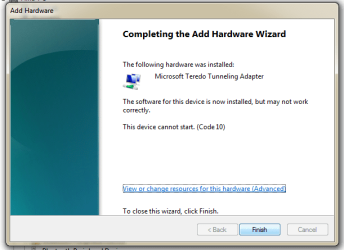
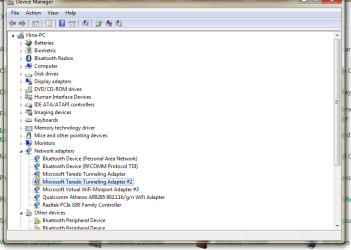
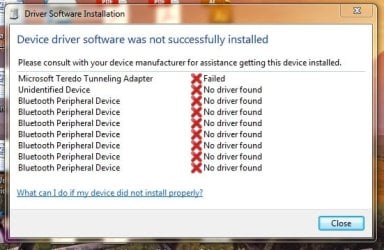
I need help with these drivers as I'm unable to update them online. During online search i came to one thread and followed his instructions. Boy my one device driver is done but don't know what to do with other bluetooth peripheral devices drivers. Also help me with microsoft teredo tunneling adapter driver as well.

OS: windows 7 professional 64bit


Thank you
 

Attachments
  • 123.jpg
    123.jpg
    79.9 KB · Views: 40
  • drivers.png
    drivers.png
    17.4 KB · Views: 40

My Computer

Computer type
Laptop
Computer Manufacturer/Model Number
HP
OS
windows 7 Professional 64bit
Hello Sugar and welcome 7forums! :)

Do you know the exact model of your HP laptop, we'll most likely find the Bluetooth Device driver.

And for the Teredo, try this:

Open up device manager, then click the action tab at the top and click add legacy hardware
then click next and next again it will then scan and find nothing click next on the screen after that.
Wait a minute and you will see a list of hardware appear, scroll down and choose network adapters then click next, then from the left column choose Microsoft then in the right hand column scroll down and choose Microsoft Teredo Tunneling Adapter, then click next and this will install it.

That was an answer on another support forum so it might and might not work for you.

Cheers, Boris :)
 

My Computer

Computer type
PC/Desktop
Computer Manufacturer/Model Number
Custom build
OS
Windows 7 Home Premium
CPU
i5-3570k
Motherboard
ASUS Sabertooth z77
Memory
16 GB DDR3 G Skill Sniper
Graphics Card(s)
GIGABYTE GeForce GTX 970 GV-N970WF3OC-4GD
Monitor(s) Displays
ASUS ROG PG278Q
Screen Resolution
2560x1440@60Hz/120Hz/144Hz
Hard Drives
56GB KINGSTON SVP200S37A60G
512GB Crucial MX100
1863GB Seagate ST2000DM001-1CH164
2795GB Seagate ST3000DM001-9YN166
PSU
Corsair GS800
Case
Storm Trooper Stryker White
Keyboard
Logitech G910 Orion Spark
Mouse
Logitech G502
Antivirus
MSE
Browser
Firefox/Chrome
Other Info
Logitech G633
Logitech Mouse Matt
Hello Sugar and welcome 7forums! :)

Do you know the exact model of your HP laptop, we'll most likely find the Bluetooth Device driver.

And for the Teredo, try this:

Open up device manager, then click the action tab at the top and click add legacy hardware
then click next and next again it will then scan and find nothing click next on the screen after that.
Wait a minute and you will see a list of hardware appear, scroll down and choose network adapters then click next, then from the left column choose Microsoft then in the right hand column scroll down and choose Microsoft Teredo Tunneling Adapter, then click next and this will install it.

That was an answer on another support forum so it might and might not work for you.

Cheers, Boris :)


Hello Boris

Thanks for the welcome and reply.
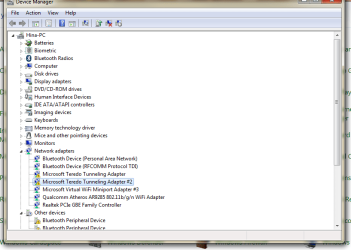
I followed that thread with given instructions for microsoft teredo tunneling adapter driver. but i got another microsoft teredo tunneling adapter device installed and unfortunately both are not working. I've attached screenshots.

Laptop model HP ProBook 4530s
 

Attachments

  • 123.png
    123.png
    62.2 KB · Views: 32
  • 456.png
    456.png
    79.9 KB · Views: 2

My Computer

Computer type
Laptop
Computer Manufacturer/Model Number
HP
OS
windows 7 Professional 64bit
Hello sugar sorry for the late reply but HP was down for maintenance so I couldn't check up on your laptop but while I was looking around on the internet I found out that you weren't the only one with problems concerning the Bluetooth, so please follow the answer that this question has:

probook 4530s bluetooth not working - HP Support Forum - 1636073

Cheers, Boris :)
 

My Computer

Computer type
PC/Desktop
Computer Manufacturer/Model Number
Custom build
OS
Windows 7 Home Premium
CPU
i5-3570k
Motherboard
ASUS Sabertooth z77
Memory
16 GB DDR3 G Skill Sniper
Graphics Card(s)
GIGABYTE GeForce GTX 970 GV-N970WF3OC-4GD
Monitor(s) Displays
ASUS ROG PG278Q
Screen Resolution
2560x1440@60Hz/120Hz/144Hz
Hard Drives
56GB KINGSTON SVP200S37A60G
512GB Crucial MX100
1863GB Seagate ST2000DM001-1CH164
2795GB Seagate ST3000DM001-9YN166
PSU
Corsair GS800
Case
Storm Trooper Stryker White
Keyboard
Logitech G910 Orion Spark
Mouse
Logitech G502
Antivirus
MSE
Browser
Firefox/Chrome
Other Info
Logitech G633
Logitech Mouse Matt
My bluetooth device is working fine. I'm only having issue with bluetooth peripheral devices drivers.
 

Attachments

  • 456.png
    456.png
    79.9 KB · Views: 2

My Computer

Computer type
Laptop
Computer Manufacturer/Model Number
HP
OS
windows 7 Professional 64bit
My bluetooth device is working fine. I'm only having issue with bluetooth peripheral devices drivers.
Yes it might be working fine for your needs but those yellow exclamation marks in your device manager is telling us another story. Because I'm quite certain that the peripheral device is connected to the bluetooth so either you have an older driver installed or then there is something wrong with the currently installed bluetooth device.

How often do you check for updates?

Also found this thread with another way of trying to get the Teredo working again:
http://answers.microsoft.com/en-us/...rcode-10/fe2a30a7-bb4e-49db-9e74-6800c5191604
Scroll down to Arya S Asok's answer and try his steps.
 

My Computer

Computer type
PC/Desktop
Computer Manufacturer/Model Number
Custom build
OS
Windows 7 Home Premium
CPU
i5-3570k
Motherboard
ASUS Sabertooth z77
Memory
16 GB DDR3 G Skill Sniper
Graphics Card(s)
GIGABYTE GeForce GTX 970 GV-N970WF3OC-4GD
Monitor(s) Displays
ASUS ROG PG278Q
Screen Resolution
2560x1440@60Hz/120Hz/144Hz
Hard Drives
56GB KINGSTON SVP200S37A60G
512GB Crucial MX100
1863GB Seagate ST2000DM001-1CH164
2795GB Seagate ST3000DM001-9YN166
PSU
Corsair GS800
Case
Storm Trooper Stryker White
Keyboard
Logitech G910 Orion Spark
Mouse
Logitech G502
Antivirus
MSE
Browser
Firefox/Chrome
Other Info
Logitech G633
Logitech Mouse Matt
Good news is there's no more that stupid yellow exclamation mark with teredo device:shock:

I just changed registry value to 0.

It worked :cool:
 

My Computer

Computer type
Laptop
Computer Manufacturer/Model Number
HP
OS
windows 7 Professional 64bit
Hey, glad you got it working!
 

My Computer

Computer type
PC/Desktop
Computer Manufacturer/Model Number
Custom build
OS
Windows 7 Home Premium
CPU
i5-3570k
Motherboard
ASUS Sabertooth z77
Memory
16 GB DDR3 G Skill Sniper
Graphics Card(s)
GIGABYTE GeForce GTX 970 GV-N970WF3OC-4GD
Monitor(s) Displays
ASUS ROG PG278Q
Screen Resolution
2560x1440@60Hz/120Hz/144Hz
Hard Drives
56GB KINGSTON SVP200S37A60G
512GB Crucial MX100
1863GB Seagate ST2000DM001-1CH164
2795GB Seagate ST3000DM001-9YN166
PSU
Corsair GS800
Case
Storm Trooper Stryker White
Keyboard
Logitech G910 Orion Spark
Mouse
Logitech G502
Antivirus
MSE
Browser
Firefox/Chrome
Other Info
Logitech G633
Logitech Mouse Matt

My Computer

Computer type
Laptop
Computer Manufacturer/Model Number
HP
OS
windows 7 Professional 64bit
Does it look like the same as last time, many yellow marks?

I think once you have gotten the correct drivers installed all the marks will disappear, have you tried to right click any of the Bluetooth entries and selected "Update device driver"?
 

My Computer

Computer type
PC/Desktop
Computer Manufacturer/Model Number
Custom build
OS
Windows 7 Home Premium
CPU
i5-3570k
Motherboard
ASUS Sabertooth z77
Memory
16 GB DDR3 G Skill Sniper
Graphics Card(s)
GIGABYTE GeForce GTX 970 GV-N970WF3OC-4GD
Monitor(s) Displays
ASUS ROG PG278Q
Screen Resolution
2560x1440@60Hz/120Hz/144Hz
Hard Drives
56GB KINGSTON SVP200S37A60G
512GB Crucial MX100
1863GB Seagate ST2000DM001-1CH164
2795GB Seagate ST3000DM001-9YN166
PSU
Corsair GS800
Case
Storm Trooper Stryker White
Keyboard
Logitech G910 Orion Spark
Mouse
Logitech G502
Antivirus
MSE
Browser
Firefox/Chrome
Other Info
Logitech G633
Logitech Mouse Matt
Does it look like the same as last time, many yellow marks?

I think once you have gotten the correct drivers installed all the marks will disappear, have you tried to right click any of the Bluetooth entries and selected "Update device driver"?


Yes, many times i tried to update but it's unable to find online.
 

My Computer

Computer type
Laptop
Computer Manufacturer/Model Number
HP
OS
windows 7 Professional 64bit

My Computer

Computer type
PC/Desktop
Computer Manufacturer/Model Number
Custom build
OS
Windows 7 Home Premium
CPU
i5-3570k
Motherboard
ASUS Sabertooth z77
Memory
16 GB DDR3 G Skill Sniper
Graphics Card(s)
GIGABYTE GeForce GTX 970 GV-N970WF3OC-4GD
Monitor(s) Displays
ASUS ROG PG278Q
Screen Resolution
2560x1440@60Hz/120Hz/144Hz
Hard Drives
56GB KINGSTON SVP200S37A60G
512GB Crucial MX100
1863GB Seagate ST2000DM001-1CH164
2795GB Seagate ST3000DM001-9YN166
PSU
Corsair GS800
Case
Storm Trooper Stryker White
Keyboard
Logitech G910 Orion Spark
Mouse
Logitech G502
Antivirus
MSE
Browser
Firefox/Chrome
Other Info
Logitech G633
Logitech Mouse Matt
You can install driver in Device manager. Besides, as for me I prefer to use driver program like Driver Talent to install drivers on Windows 7
 

My Computer

Computer type
PC/Desktop
OS
Windows 7 64bit
Back
Top