
Help me with Outlook Mail sidebar

JohnnyScience

New member
Power User
Local time
10:53 AM
Messages
889
Ok this thing is just a mess and nothing works right and theres just too much "junk"

I've attached an image of the mail box.

I only want to run one email out of here & that is the one I have in the favorites folder, the one also below Personal Folders

What is this Personal Folders?

Can I get rid of it.. it just seems to double up my mail box & make me less efficient by spending more time searching.

Why do all of my Sent Items show up under the Personal Folder Sent Items & not the main JohnnyScience one that I sent it from?

Why do I have

Send Later
Sent Items
Sent Messages

What is the difference between the last two? And I can delete the Send Later folder & it will work properly right?

Why is there nothing listed under Sent Items, but there are a bunch of old sporadic emails in Sent Messages?

Why is there a Trash AND a deleted messages?

The thing is, I cant even find the stuff I've deleted in any of the folders listed as this!

Whats with Bulk mail can I get rid of it?

Outlook as been so frustrating for me with these questions at hand.

Thanks.
 

My Computer My Computer

Computer Manufacturer/Model Number
Built it myself
OS
Windows 7 64 & Ubuntu 64
CPU
Intel Quad Core Q6600 2.40GHz
Motherboard
Asus
Memory
8g
Graphics Card(s)
Nvidia 9600 GT & 9800 GT
Sound Card
Turtle Beach 5.1
Monitor(s) Displays
Three 19" Dell's & one 46" Samsung 750

My Computer My Computer

Computer Manufacturer/Model Number
Dell XPS420
OS
Vista Ult 64 bit Seven Ult RTM x64
CPU
Intel Core2 Quad Q6600 2.40 gigahertz
Memory
Crucial Ballistix 4x2GB PC2 6400
Graphics Card(s)
NVIDIA GeForce 8600 GTS 256 MB
Sound Card
Creative SB X-Fi audio
Monitor(s) Displays
HP w2207 + HPvs15
Screen Resolution
1680x1050 + 1024x768
Hard Drives
2-WD5000AAKS-500 GB
WD5000AAV-500 GB external
Keyboard
Microsoft Comfort Curve
Mouse
MX Revolution
Other Info
Wacom Intuos 2 Graphics Tablet
Experience Index=5.5

Attachments

  • Untitled.png
    Untitled.png
    8.9 KB · Views: 25

My Computer My Computer

Computer Manufacturer/Model Number
Built it myself
OS
Windows 7 64 & Ubuntu 64
CPU
Intel Quad Core Q6600 2.40GHz
Motherboard
Asus
Memory
8g
Graphics Card(s)
Nvidia 9600 GT & 9800 GT
Sound Card
Turtle Beach 5.1
Monitor(s) Displays
Three 19" Dell's & one 46" Samsung 750
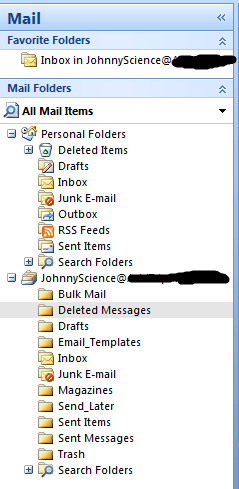
Sorry, but your pic isn't showing. My first thought is you created a new account, but didn't make it the default. An image of the navigation bar and the data files tab in account settings would help to clarify. Info on attaching snips here if needed: http://www.sevenforums.com/general-...ed-method-uploading-posting-screen-shots.html

Hey sorry my fault. Here is the screenshot:

PERSONAL FOLDER data files is the default created by Outlook.

This will remove the PERSONAL FOLDERS data file.

1) In Outllook - Go to FILE>DATA FILE MANAGEMENT.

2) Change your DEFAULT data file to the "JohnnyScience....." data file (SET AS DEAFAULT).

3) Restart Outlook.

4) Move anything you want to save from the PERSONAL FOLDERS data file "folders" to the proper JOHNNYSCIENCE.... data file folders.

5) Go to FILE>DATA FILE MANAGEMENT.

6) Select the PERSONAL FOLDERS data file. Make a note of WHERE it is located on the HDD and WHAT its actual file name is. Select REMOVE.

7) Exit Outllook. Navigate to the HDD location of the PERSONAL FOLDERS data file in step 6. It will be a HIDDEN file. You can now delete it if you wish.

As for:

Send Later
Sent Items
Sent Messages

AFAIK only the SENT ITEMS folder is a default Outllook creation. Did you create the others? It appears you have several "non-standard" mail folders. Do they have anything in them? You can probably delete them BUT if you want to test it you can rename them first and see if something "breaks". There are several Outllook OPTIONS that can specify what to do with mail messages either on receipt or on on being sent. Have you modified any of the defaults? In particular the "keep deleted messages" etc, etc...

P.S. Are you using the Outllook Connector with a Windows Live Account? Are you accessing a POP3 account and you are trying to mirror its mail folder structure? That can have a bearing on things.
 

My Computer My Computer

OS
XP Pro & Vista Home Premium (x86); Windows Ultimate 7600 x64 Retail
Sorry, but your pic isn't showing. My first thought is you created a new account, but didn't make it the default. An image of the navigation bar and the data files tab in account settings would help to clarify. Info on attaching snips here if needed: http://www.sevenforums.com/general-...ed-method-uploading-posting-screen-shots.html

Hey sorry my fault. Here is the screenshot:

PERSONAL FOLDER data files is the default created by Outlook.

This will remove the PERSONAL FOLDERS data file.

1) In Outllook - Go to FILE>DATA FILE MANAGEMENT.

2) Change your DEFAULT data file to the "JohnnyScience....." data file (SET AS DEAFAULT).

Set as default is ghosted out when I try to highlight the JohnnyScience profile?
 

My Computer My Computer

Computer Manufacturer/Model Number
Built it myself
OS
Windows 7 64 & Ubuntu 64
CPU
Intel Quad Core Q6600 2.40GHz
Motherboard
Asus
Memory
8g
Graphics Card(s)
Nvidia 9600 GT & 9800 GT
Sound Card
Turtle Beach 5.1
Monitor(s) Displays
Three 19" Dell's & one 46" Samsung 750
Hey sorry my fault. Here is the screenshot:

PERSONAL FOLDER data files is the default created by Outlook.

This will remove the PERSONAL FOLDERS data file.

1) In Outllook - Go to FILE>DATA FILE MANAGEMENT.

2) Change your DEFAULT data file to the "JohnnyScience....." data file (SET AS DEAFAULT).

Set as default is ghosted out when I try to highlight the JohnnyScience profile?

What "profile" in what window? This changes your DATA FILE.

1) In Outllook - Go to FILE>DATA FILE MANAGEMENT.

2) Change your DEFAULT data file to the "JohnnyScience....." data file (SET AS DEFAULT).

Edit: Make sure you have selected the "Data Files" tab in the Account Settings window that opens in step 1 above.
 
Last edited:

My Computer My Computer

OS
XP Pro & Vista Home Premium (x86); Windows Ultimate 7600 x64 Retail
PERSONAL FOLDER data files is the default created by Outlook.

This will remove the PERSONAL FOLDERS data file.

1) In Outllook - Go to FILE>DATA FILE MANAGEMENT.

2) Change your DEFAULT data file to the "JohnnyScience....." data file (SET AS DEAFAULT).

Set as default is ghosted out when I try to highlight the JohnnyScience profile?


What "profile" in what window? This changes your DATA FILE.

1) In Outllook - Go to FILE>DATA FILE MANAGEMENT.

2) Change your DEFAULT data file to the "JohnnyScience....." data file (SET AS DEFAULT).

Edit: Make sure you have selected the "Data Files" tab in the Account Settings window that opens in step 1 above.

Yes thats what I'm talking about. It is ghosted out for the JohnnyScience profile...
 

Attachments

  • Untitled9.png
    Untitled9.png
    18 KB · Views: 24

My Computer My Computer

Computer Manufacturer/Model Number
Built it myself
OS
Windows 7 64 & Ubuntu 64
CPU
Intel Quad Core Q6600 2.40GHz
Motherboard
Asus
Memory
8g
Graphics Card(s)
Nvidia 9600 GT & 9800 GT
Sound Card
Turtle Beach 5.1
Monitor(s) Displays
Three 19" Dell's & one 46" Samsung 750
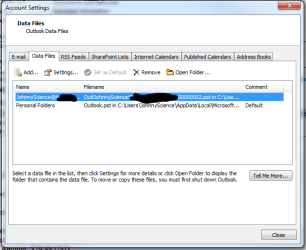
Set as default is ghosted out when I try to highlight the JohnnyScience profile?


What "profile" in what window? This changes your DATA FILE.

1) In Outllook - Go to FILE>DATA FILE MANAGEMENT.

2) Change your DEFAULT data file to the "JohnnyScience....." data file (SET AS DEFAULT).

Edit: Make sure you have selected the "Data Files" tab in the Account Settings window that opens in step 1 above.

Yes thats what I'm talking about. It is ghosted out for the JohnnyScience profile...

Hmmmmm..... I see what you mean..... most curious.....

How was the Johnny.....pst file created? It appears to have an odd name (the "0000002")It is possible that it is corrupted. I would try to run SCANPST on it.

Exit Outlook.

Show hiiden files so you can see the PST files.

Make a copy of the "Johnny...pst" file and rename the copy as a backup, just in case... :)

Then locate SCANPST.EXE in the Outlook Installation folder. In a typical 64 bit install it will be in "C:\Program Files (x86)\Microsoft Office\Office12".

Run SCANPST as an administrator and specify the suspect "Johnny.....pst" file and let it fix any errors.

Try again to set it as the default pst data file.

If the file still cannot be manipulated in the ordinary way I would try renaming it as it does appear to an odd name (you will have to remove the old name as a data file and add the new name as a data file).

Push comes to shove you can export the contents of the "bad" pst file out to a new pst file and then use (add) the new pst file as an Outlook data file and set that file as the default.

In any of the above steps KEEP YOUR BACKUP copy UNTOUCHED until you hav a cleaned up working PST data file that you are satisfied with.
 

My Computer My Computer

OS
XP Pro & Vista Home Premium (x86); Windows Ultimate 7600 x64 Retail
Back
Top