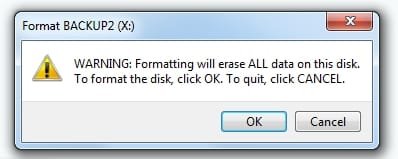
This is on my Dell Inspiron 15-3541 laptop, OS Win 7 Home 32bit. The HDD in question is a 500GB Sata laptop drive in an external case that plugs into the USB port.
I was working on putting a Windows password recovery prog on a USB flash drive and making the flash drive self booting. I am working on an Asus model X541NA laptop OS Win 10 home 64bit. I forgot the the windows 10 login password. And for some reason I can't get the Asus laptop to boot off the optical drive. I tried changing out the optical drive, it didn't do any good. The Asus laptop will boot from the HDD or a self booting USB flash drive. And I have been looking on the internet for a freeware windows password remove/reset prog that will work on Win 10. I found 1 prog that will work and I have tested it, the name is "PcUnlocker" but the demo version won't finish the unlock. I have to buy product code to unlock the prog. I was trying other password prog's. Making iso imagines then burning them to the USB drive as a self booting drive.
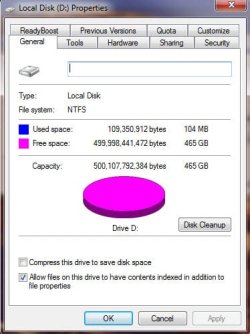
All of a sudden out of no where a Windows box came up saying "The D: drive needs to be re-formated" Windows has done that to me in the past and I just unplugged the USB cable then shut down the 5 volt power pack to the external case, wait about 30 seconds, turn on the 5 volt power pack back on and then plug in the USB cable and that fixes the problem and the D: drive comes back up. NOT this time. The drive came up formated but blank. NOT one single file. The drive was about half full. I use the D: drive to store prog install files, all the backup files for my web page are gone "still have the working files on the C: drive for that. And most of the Android prog's and files are on the C: drive. I have no clue what happen to the D: drive this time. It is unplugged and nothing has been written to the D: drive since this happen. I learned that lesson a long time ago. I was doing something back then with a USB drive and I accidentally reformated the D: drive without looking very close at the drive letter back then. This time I was watching the drive letter very closely. If there isn't a way to recover the drive. I can use the backups that I have and recover about 1/8 of what was on the drive.
Is there a prog that I can put on the D: HDD that will pop up "make a sound" and say "do you really want to format this drive" or won't let the format go on without entering a code or something?
It took a long time to recover from the last format of the D: drive, and some install files I have never been able to find because I can't remember the file names. I know what most of the files do. But there is so many out there to look at by subject.
The pictures bellow show the current state of the D: drive.
I was working on putting a Windows password recovery prog on a USB flash drive and making the flash drive self booting. I am working on an Asus model X541NA laptop OS Win 10 home 64bit. I forgot the the windows 10 login password. And for some reason I can't get the Asus laptop to boot off the optical drive. I tried changing out the optical drive, it didn't do any good. The Asus laptop will boot from the HDD or a self booting USB flash drive. And I have been looking on the internet for a freeware windows password remove/reset prog that will work on Win 10. I found 1 prog that will work and I have tested it, the name is "PcUnlocker" but the demo version won't finish the unlock. I have to buy product code to unlock the prog. I was trying other password prog's. Making iso imagines then burning them to the USB drive as a self booting drive.
All of a sudden out of no where a Windows box came up saying "The D: drive needs to be re-formated" Windows has done that to me in the past and I just unplugged the USB cable then shut down the 5 volt power pack to the external case, wait about 30 seconds, turn on the 5 volt power pack back on and then plug in the USB cable and that fixes the problem and the D: drive comes back up. NOT this time. The drive came up formated but blank. NOT one single file. The drive was about half full. I use the D: drive to store prog install files, all the backup files for my web page are gone "still have the working files on the C: drive for that. And most of the Android prog's and files are on the C: drive. I have no clue what happen to the D: drive this time. It is unplugged and nothing has been written to the D: drive since this happen. I learned that lesson a long time ago. I was doing something back then with a USB drive and I accidentally reformated the D: drive without looking very close at the drive letter back then. This time I was watching the drive letter very closely. If there isn't a way to recover the drive. I can use the backups that I have and recover about 1/8 of what was on the drive.
Is there a prog that I can put on the D: HDD that will pop up "make a sound" and say "do you really want to format this drive" or won't let the format go on without entering a code or something?
It took a long time to recover from the last format of the D: drive, and some install files I have never been able to find because I can't remember the file names. I know what most of the files do. But there is so many out there to look at by subject.
The pictures bellow show the current state of the D: drive.
Attachments

My Computer
At a glance
windows 7 home 32 bit, I just changed back fr...amc a6-6310, radon r4 graphics 1800mhz with 4...6.8gbnot sure off hand
- Computer type
- Laptop
- Computer Manufacturer/Model Number
- Dell Inspiron 3541
- OS
- windows 7 home 32 bit, I just changed back from 64 to 32bit
- CPU
- amc a6-6310, radon r4 graphics 1800mhz with 4 cores
- Memory
- 6.8gb
- Graphics Card(s)
- not sure off hand
- Sound Card
- not shure off hand
- Monitor(s) Displays
- built in lcd
- Screen Resolution
- 1366 x 768
- Hard Drives
- 1 500gb sata internal HDD and 1 250 gb's sata HDD in a USB external USB case.
- Keyboard
- Wifi with attached wifi mouse
- Internet Speed
- don't know
- Antivirus
- Zone Alarm
- Browser
- Firefox
- Other Info
- The gateway laptop model MD2614U died because a voltage regulator on the motherboard went poof. The Gateway laptop has been scraped.