Help on Windows Media Center and Mouse scrolling

bigboi1994

New member
Local time
8:59 AM
Messages
2
When i click on Windows Media Center a message comes up every time stating that "Windows Media Center has stopped working". Also my mouse pad is not scrolling up and down anymore, it use to work fine but now it doesn't scroll up or down on pages, i appreciate some help with the problems i am experiencing. I am running on Windows 7 Home Premium 32-bit, on a Toshiba Satellite L455D
 

My Computer My Computer

At a glance

Windows 7 Home Premium 32 bit
OS
Windows 7 Home Premium 32 bit
When i click on Windows Media Center a message comes up every time stating that "Windows Media Center has stopped working". Also my mouse pad is not scrolling up and down anymore, it use to work fine but now it doesn't scroll up or down on pages, i appreciate some help with the problems i am experiencing. I am running on Windows 7 Home Premium 32-bit, on a Toshiba Satellite L455D
Welcome to the Seven Forums
I may be able to help you with the mouse pad
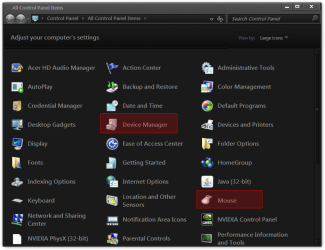
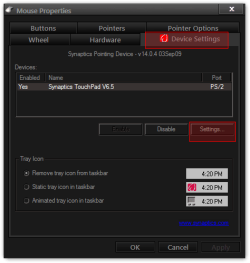
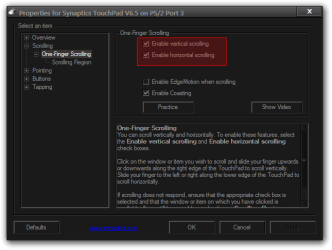
Open the Control Panel and click on Mouse, that will open up the Mouse Properties and choose Device Settings tab then click on Settings and check your scrolling settings (yours may look different than mine) see if they are enable.
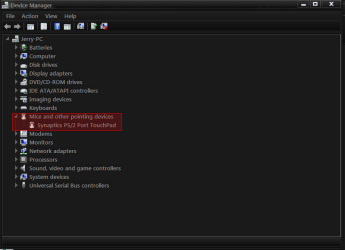
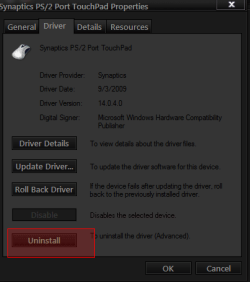
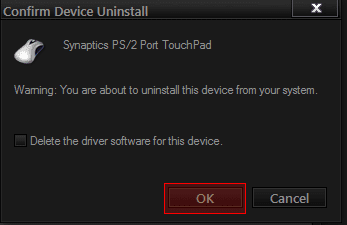
If that did not work go to Control Panel and click on Device Manager and look for Mice and other pointing devices and open it up double-click on your touch pad the property window will open click on Driver tab and choose uninstall a confirm device uninstall box will appear click on OK and close all Windows and restart your computer when it restarts it will try to load your drivers again now see if you can scroll now. If not go to Toshiba Support - Homepage and find your touchpad drivers and reinstall them.
Jerry
All Control Panel Items.png
Mouse Properties.png
Properties for Synaptics TouchPad V6.5 on PS2 Port 3.png
device.png
tp.png
tpp.png
 

My Computer My Computer

At a glance

Win 7 Pro x64 / Win 10 ProIntel(R) Core(TM) i7-3630QM CPU @ 2.40GHz12 GB(1) Intel(R) HD Graphics 4000 (2) NVIDIA GeFo...
Computer type
Laptop
Computer Manufacturer/Model Number
Sager NP9170
OS
Win 7 Pro x64 / Win 10 Pro
CPU
Intel(R) Core(TM) i7-3630QM CPU @ 2.40GHz
Motherboard
CLEVO P170EM
Memory
12 GB
Graphics Card(s)
(1) Intel(R) HD Graphics 4000 (2) NVIDIA GeForce GTX 675M
Sound Card
(1) Realtek High Definition Audio (2) Intel(R) Display Aud
Monitor(s) Displays
17.3
Screen Resolution
1920x1080
Hard Drives
(1) Samsung 860 EVO 500GB(OS) (1) Samsung 860 EVO 500GB(Data)
Keyboard
Backlite
Antivirus
MSE, Malwarebytes Pro
Browser
Firefox
Other Info
DESKTOP: Custom-built.
OS: Win 10 Pro x64.
CASE: Rosewill R5.
CPU: Intel I5 4670K CPU @ 3.40GHz.
CPU COOLER: Cool Master Hyper 212 EVO.
MOTHERBOARD: Asus Z87-A.
MEMORY: Kingston HyperX 2x4 GB.
GPU: Nvidia Geforce 650 TI.
PSU: Corsair TX750.
DRIVES: (1) Samsung 840 120 GB SSD (2) Western Digital blue 500 GB 7200 RPM.
Hi there, welcome to SevenForums.

Have you installed any addons for Media Centre? any Tuner apps? anything at all with MCE in the name?
 

My Computer My Computer

At a glance

Windows 10 Pro x64Intel Core i5 7400 @ 3.00GHz8GB 2133Mhz DDR4 (OEM supplied)Gygabyte Windforce GTX 1050Ti (Factory Overcl...
Computer type
PC/Desktop
Computer Manufacturer/Model Number
Medion Erazer (note to self: insert model number) - with custom additions
OS
Windows 10 Pro x64
CPU
Intel Core i5 7400 @ 3.00GHz
Motherboard
OEM supllied with PC
Memory
8GB 2133Mhz DDR4 (OEM supplied)
Graphics Card(s)
Gygabyte Windforce GTX 1050Ti (Factory Overclocked)
Sound Card
Realtek
Monitor(s) Displays
Acer Al1980 + HKC
Screen Resolution
1360*768(HKC) / 1280*1024(Acer)
Hard Drives
1TB Toshiba
1TB WD Caviar Green
120GB Samsung Evo 840
PSU
OEM supplied (no power rating on case)
Case
OEM Supplied
Cooling
Stock
Keyboard
Logitech Wireless
Mouse
Logitect Wireless
Internet Speed
40Mb/s Down 10Mb/s Up
Antivirus
Defender
Browser
Firefox
Thanks Bongo! I now can scroll with my mouse pad again, very much appreciated for the help. And to Severedsolo, i have not added any add ons or any other apps with MCE. Windows Media Center was working about three months ago and suddenly just stopped working
 

My Computer My Computer

At a glance

Windows 7 Home Premium 32 bit
OS
Windows 7 Home Premium 32 bit
Thanks Bongo! I now can scroll with my mouse pad again, very much appreciated for the help. And to Severedsolo, i have not added any add ons or any other apps with MCE. Windows Media Center was working about three months ago and suddenly just stopped working
:cool: Your Welcome help somebody can come up with a fix for your media Center.
Jerry
 

My Computer My Computer

At a glance

Win 7 Pro x64 / Win 10 ProIntel(R) Core(TM) i7-3630QM CPU @ 2.40GHz12 GB(1) Intel(R) HD Graphics 4000 (2) NVIDIA GeFo...
Computer type
Laptop
Computer Manufacturer/Model Number
Sager NP9170
OS
Win 7 Pro x64 / Win 10 Pro
CPU
Intel(R) Core(TM) i7-3630QM CPU @ 2.40GHz
Motherboard
CLEVO P170EM
Memory
12 GB
Graphics Card(s)
(1) Intel(R) HD Graphics 4000 (2) NVIDIA GeForce GTX 675M
Sound Card
(1) Realtek High Definition Audio (2) Intel(R) Display Aud
Monitor(s) Displays
17.3
Screen Resolution
1920x1080
Hard Drives
(1) Samsung 860 EVO 500GB(OS) (1) Samsung 860 EVO 500GB(Data)
Keyboard
Backlite
Antivirus
MSE, Malwarebytes Pro
Browser
Firefox
Other Info
DESKTOP: Custom-built.
OS: Win 10 Pro x64.
CASE: Rosewill R5.
CPU: Intel I5 4670K CPU @ 3.40GHz.
CPU COOLER: Cool Master Hyper 212 EVO.
MOTHERBOARD: Asus Z87-A.
MEMORY: Kingston HyperX 2x4 GB.
GPU: Nvidia Geforce 650 TI.
PSU: Corsair TX750.
DRIVES: (1) Samsung 840 120 GB SSD (2) Western Digital blue 500 GB 7200 RPM.
Back
Top