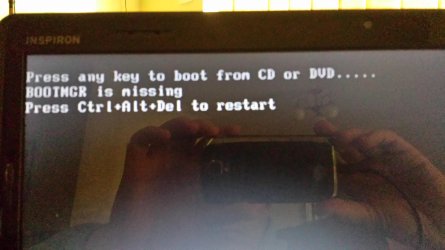
Solved Help please, bootmgr missing' and 'windows cannot find a system image'

jessemcm

New member
Local time
4:27 AM
Messages
22
Yep, Ive done a number on the laptop, just in time for the Australia 2014 Tax cut off. Any advice would be appreciated!

I tried to reinstall from my operting system disk and I guess I am a fish out of water here. I formatted or deleted the wrong spot along the way and now I'm having issues starting it.

I've followed an online thread advice, I've used the DBAN nuke to completely erase any corrupted boot files, but no joy.

I've made a copy of Hiren's and I can load up in the mini XP, but then I don't know the next step.

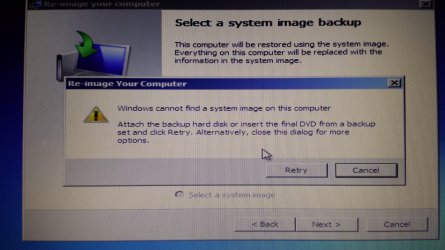
When I've tried to load of the operating system disk it keeps telling me 'windows cannot find a system image on this computer'.

I've tried rebooting of a System Repair Disk I made from a working windows 7 laptop but I get the same 'windows cannot find a system image on this computer' problem. Any suggestions short of throwing it into Sydney Harbour would be appreciated.
 

Attachments
  • 20140917_153443.jpg
    20140917_153443.jpg
    558.4 KB · Views: 3
Last edited:

My Computer

Computer type
Laptop
Computer Manufacturer/Model Number
dell
OS
window 7 home premium
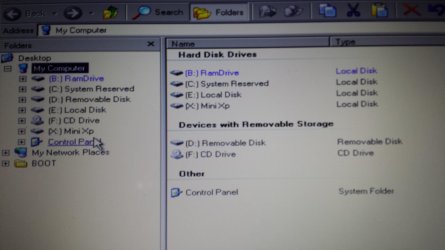
This is what I get when I run the minXP off Hirens.

So, I am assuming my partitions are the problem and am running partition magic. Currently I have drives as per the image.
 

Attachments

  • 20140917_152826.jpg
    20140917_152826.jpg
    554.6 KB · Views: 1
Last edited:

My Computer

Computer type
Laptop
Computer Manufacturer/Model Number
dell
OS
window 7 home premium
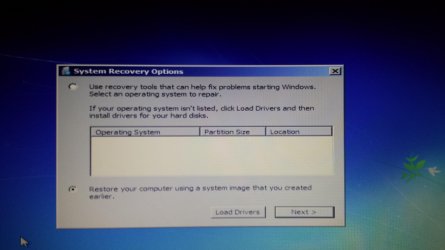
If I boot using the operting system disk and go through the enlish/keyboard options and select 'repair your computer option' I get this:
 

Attachments

  • 20140917_154127.jpg
    20140917_154127.jpg
    698.7 KB · Views: 1

My Computer

Computer type
Laptop
Computer Manufacturer/Model Number
dell
OS
window 7 home premium
SO there is no operarting system to repair using the recovery tools. So I've tried the following options, but that doesn't seem to be where I need to go.
 

Attachments

  • 1 (1).jpg
    1 (1).jpg
    1 MB · Views: 1
  • 1 (2).jpg
    1 (2).jpg
    1 MB · Views: 1

My Computer

Computer type
Laptop
Computer Manufacturer/Model Number
dell
OS
window 7 home premium
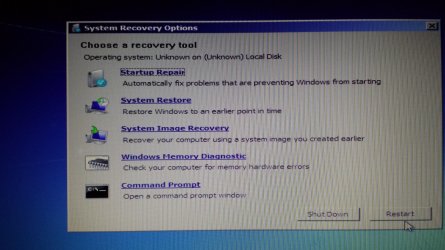
Now I've got this screen and startup repair sat it cannot repair this computer automatically.

System restore is not good as I don't have an operting system.

System image recovery is no good as windows cannot find a system image on the computer.

Windows memort diagnostic has an error preventing it from checking for memory problems.

So I am left with command prompt. NO CLUE HERE.

Any suggestions from out there?
 

Attachments

  • 20140917_155713.jpg
    20140917_155713.jpg
    1.1 MB · Views: 1

My Computer

Computer type
Laptop
Computer Manufacturer/Model Number
dell
OS
window 7 home premium
Is there any point to me burning a systems restore point from my wifes laptop (both windows 7 OS) and copying it across to mine when it is running using the Hirens miniXP. Will this work, seems way too easy.

Why would it not let me install an operating system on it?
 

My Computer

Computer type
Laptop
Computer Manufacturer/Model Number
dell
OS
window 7 home premium
The Syndey harbour option is looking good about now!

Not sure my next move other than drink this bottle of red wine.
 

My Computer

Computer type
Laptop
Computer Manufacturer/Model Number
dell
OS
window 7 home premium
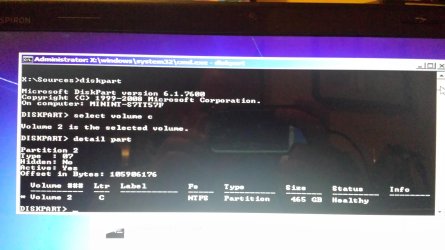
Don't select "startup repair" there now. Select "command prompt" instead. You enter a black kind of DOS window. Then do:
Code:
diskpart
select volume c
detail part

Post the output. Now you can type exit.
 

My Computer

Computer type
Laptop
Computer Manufacturer/Model Number
ACER ASPIRE 5742G
OS
Microsoft Windows 7 Home Premium 64-bits 7601 Multiprocessor Free Service Pack 1
CPU
Intel(R) Core(TM) i3 CPU M 370 @ 2.40GHz
Motherboard
Acer Aspire 5742G
Memory
4,00 GB
Graphics Card(s)
ATI Mobility Radeon HD 5400 Series
Sound Card
(1) AMD High Definition Audio Device (2) Realtek High Defi
Screen Resolution
1366 x 768 x 32 bits (4294967296 colors) @ 60 Hz
Hard Drives
WDC WD5000BEVT-22ZAT0
I tried to reinstall from my operting system disk and I guess I am a fish out of water here. I formatted or deleted the wrong spot along the way and now I'm having issues starting it.
Did you encounter any problems during reinstall of win7?
 

My Computer

Computer type
Laptop
Computer Manufacturer/Model Number
ACER ASPIRE 5742G
OS
Microsoft Windows 7 Home Premium 64-bits 7601 Multiprocessor Free Service Pack 1
CPU
Intel(R) Core(TM) i3 CPU M 370 @ 2.40GHz
Motherboard
Acer Aspire 5742G
Memory
4,00 GB
Graphics Card(s)
ATI Mobility Radeon HD 5400 Series
Sound Card
(1) AMD High Definition Audio Device (2) Realtek High Defi
Screen Resolution
1366 x 768 x 32 bits (4294967296 colors) @ 60 Hz
Hard Drives
WDC WD5000BEVT-22ZAT0
Yes, when trying to reinstall it is when I think I formatted the wrong drive and that is when I started getting error messages. I think the first error code I got was 'error code 0x80070017' but it was a week or so ago. That is the one I googled at the time so, I certainly had that one early in this ordeal, just not positive it was the first one.

Thanks for taking the time to look at it!
 

Attachments

  • 20140917_222949.jpg
    20140917_222949.jpg
    543.2 KB · Views: 1

My Computer

Computer type
Laptop
Computer Manufacturer/Model Number
dell
OS
window 7 home premium
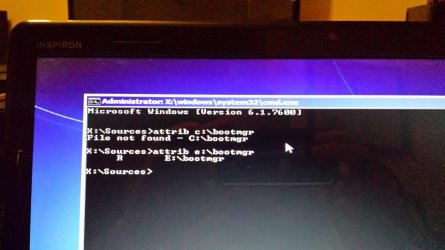
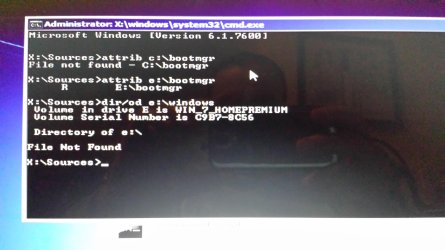
You must remember all you do. Especially if you're not experienced with installation. It's difficult to help people that tell half the truth. But let's continue. In command prompt:
Code:
attrib c:\bootmgr
attrib e:\bootmgr
post output

Code:
dir/od e:\windows
Do you see files? Old stuff? Or stuff just created?
Code:
dir/od e:\users
You see old or new stuff (look at the date)
 

My Computer

Computer type
Laptop
Computer Manufacturer/Model Number
ACER ASPIRE 5742G
OS
Microsoft Windows 7 Home Premium 64-bits 7601 Multiprocessor Free Service Pack 1
CPU
Intel(R) Core(TM) i3 CPU M 370 @ 2.40GHz
Motherboard
Acer Aspire 5742G
Memory
4,00 GB
Graphics Card(s)
ATI Mobility Radeon HD 5400 Series
Sound Card
(1) AMD High Definition Audio Device (2) Realtek High Defi
Screen Resolution
1366 x 768 x 32 bits (4294967296 colors) @ 60 Hz
Hard Drives
WDC WD5000BEVT-22ZAT0
'error code 0x80070017' =>this is usually cause by bad media.
Did the installation ended succesfully? Or it just broke in the middle?
 

My Computer

Computer type
Laptop
Computer Manufacturer/Model Number
ACER ASPIRE 5742G
OS
Microsoft Windows 7 Home Premium 64-bits 7601 Multiprocessor Free Service Pack 1
CPU
Intel(R) Core(TM) i3 CPU M 370 @ 2.40GHz
Motherboard
Acer Aspire 5742G
Memory
4,00 GB
Graphics Card(s)
ATI Mobility Radeon HD 5400 Series
Sound Card
(1) AMD High Definition Audio Device (2) Realtek High Defi
Screen Resolution
1366 x 768 x 32 bits (4294967296 colors) @ 60 Hz
Hard Drives
WDC WD5000BEVT-22ZAT0
Here is the first code part
 

Attachments

  • 20140917_224924.jpg
    20140917_224924.jpg
    594.5 KB · Views: 0

My Computer

Computer type
Laptop
Computer Manufacturer/Model Number
dell
OS
window 7 home premium
Hi, I really don't remember how far through I go with reinstalling it, but from the best of my memory not very far. I think I got into the bit where you see the C & D drives and some partitions, I formatted it without realising what I was doing and then the hurt began.
 

Attachments

  • 20140917_225310.jpg
    20140917_225310.jpg
    599.7 KB · Views: 0
  • 20140917_225518.jpg
    20140917_225518.jpg
    596.6 KB · Views: 0

My Computer

Computer type
Laptop
Computer Manufacturer/Model Number
dell
OS
window 7 home premium
'Do you see files? Old stuff? Or stuff just created?
Code:
dir/od e:\users
You see old or new stuff (look at the date)'

I'm not sure what I am looking for here, where will I see the date?
 

My Computer

Computer type
Laptop
Computer Manufacturer/Model Number
dell
OS
window 7 home premium
I see e:\windows (it's called E now... doesn't matter. Don't tell you why now). No windows folder at all!. No windows installation. It has bootmgr file.

"system reserved" is ACTIVE. It is the bootpartition. That should hold the bootmanager (bootmgr) but hasn't.

Reinstall did close to nothing! Let's start over.

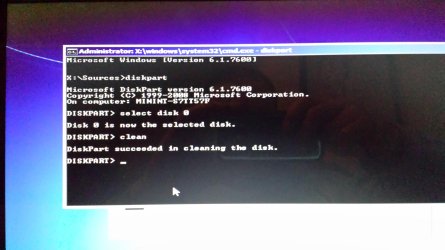
Code:
diskpart
select disk 0
clean

post screenshot. After that you can type exit. physical disk 0 (the internal physical disk drive) : it's partition table is now zeroed... so no partitions anymore. It's just totally empty.
 

My Computer

Computer type
Laptop
Computer Manufacturer/Model Number
ACER ASPIRE 5742G
OS
Microsoft Windows 7 Home Premium 64-bits 7601 Multiprocessor Free Service Pack 1
CPU
Intel(R) Core(TM) i3 CPU M 370 @ 2.40GHz
Motherboard
Acer Aspire 5742G
Memory
4,00 GB
Graphics Card(s)
ATI Mobility Radeon HD 5400 Series
Sound Card
(1) AMD High Definition Audio Device (2) Realtek High Defi
Screen Resolution
1366 x 768 x 32 bits (4294967296 colors) @ 60 Hz
Hard Drives
WDC WD5000BEVT-22ZAT0
Ok, here goes
 

Attachments

  • 20140917_230913.jpg
    20140917_230913.jpg
    572.6 KB · Views: 0

My Computer

Computer type
Laptop
Computer Manufacturer/Model Number
dell
OS
window 7 home premium

My Computer

Computer type
Laptop
Computer Manufacturer/Model Number
ACER ASPIRE 5742G
OS
Microsoft Windows 7 Home Premium 64-bits 7601 Multiprocessor Free Service Pack 1
CPU
Intel(R) Core(TM) i3 CPU M 370 @ 2.40GHz
Motherboard
Acer Aspire 5742G
Memory
4,00 GB
Graphics Card(s)
ATI Mobility Radeon HD 5400 Series
Sound Card
(1) AMD High Definition Audio Device (2) Realtek High Defi
Screen Resolution
1366 x 768 x 32 bits (4294967296 colors) @ 60 Hz
Hard Drives
WDC WD5000BEVT-22ZAT0

My Computer

Computer type
Laptop
Computer Manufacturer/Model Number
ACER ASPIRE 5742G
OS
Microsoft Windows 7 Home Premium 64-bits 7601 Multiprocessor Free Service Pack 1
CPU
Intel(R) Core(TM) i3 CPU M 370 @ 2.40GHz
Motherboard
Acer Aspire 5742G
Memory
4,00 GB
Graphics Card(s)
ATI Mobility Radeon HD 5400 Series
Sound Card
(1) AMD High Definition Audio Device (2) Realtek High Defi
Screen Resolution
1366 x 768 x 32 bits (4294967296 colors) @ 60 Hz
Hard Drives
WDC WD5000BEVT-22ZAT0
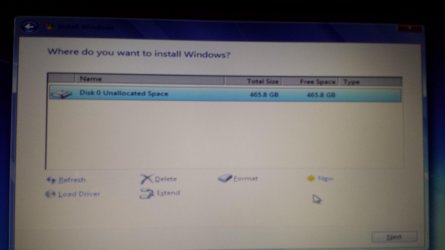
Ok, I'm here, what do I do about getting another drive? Shouldn't this be where I have a c-drive with 50 odd Gb and the rest on a D-drive?
 

Attachments

  • 20140917_231953.jpg
    20140917_231953.jpg
    483.7 KB · Views: 0

My Computer

Computer type
Laptop
Computer Manufacturer/Model Number
dell
OS
window 7 home premium
Back
Top