Help please. Intel Directx error 25

Alitron

New member
Local time
6:59 PM
Messages
27
I am attempting to run a game, whenever it runs it gives me the following message:
"Error 25: A crticial error has occured while initializing Direct3D."

I have tried several stuff, even the link below:
Intel 82865g Driver (Vista-Win7).zip - Windows Live

I have followed the first step, and I get a message saying that I already have the same driver.
Then I saw "William"'s comment in that website, and I saw how the uploader replyed. I did each and everything of it, but I get a strange message:
http://img840.imageshack.us/img840/5979/aaaaaaaaax.png

If I click no, it closes the windows normally.
If I click yes, it shows me the following message:
http://img826.imageshack.us/img826/4879/bbbbbbb.png

In that, if I use the "Continue Anyways", it continues, installs it succesfuly, and it asks for a computer restart. When I click yes, the computer loads up without any trouble, until it reaches the "Starting Windows", there it crashes and gives me a blue screen with some written stuff.

When I don't continue, it tells me that the windows encountered a problem.

None of the games are working, neither is any other program. The Direct3D, DirectDraw and Accelration are all unavaliable.

I request your help as fast as possible, it is very annoying.
 

My Computer

OS
Windows 7 Professional x32
Hello Alitron, welcome.

First off, open up device manager. Find your video device (would be helpful if you filled in your system specs), then right click and choose properties. Uninstall the driver, then restart the computer.
Then install the driver from the manufacturers website, and restart again.

Does that help at all?

Also, can you post your minidumps? They are located at C:/Windows/Minidumps.
Dump files - Upload to Seven Forums - Windows 7 Forums

~Lordbob
 

My Computer

Computer Manufacturer/Model Number
Hera
OS
Windows 7 Ultimate x64, Mint 9
CPU
Intel i5-2500k
Motherboard
ASUS P8P67 Pro
Memory
2x 4Gb Corsair VENGEANCE DDR3-1600
Graphics Card(s)
NVidia GeForce N260GTX Twin Frozr
Sound Card
Realtek HD OnBoard Audio
Monitor(s) Displays
ASUS 24" Monitor
Screen Resolution
1920x1080
Hard Drives
G.SKILL Phoenix Series 60GB SATA II MLC Internal Solid State Drive (SSD)
SAMSUNG Spinpoint F3R 1TB 7200 RPM 32MB Cache SATA II
PSU
Cooler Master Real Power Pro 750W
Case
Cooler Master Haf 932
Cooling
Fans
Keyboard
Razer Tarantula
Mouse
Razer Lachesis
Internet Speed
not fast enough
Hello, I would do these steps, but I fear that the files might not work and I wouldn't be able to restore my windows to save it. But, I will do it.

I will sure upload these.
 

My Computer

OS
Windows 7 Professional x32
Hello, I would do these steps, but I fear that the files might not work and I wouldn't be able to restore my windows to save it. But, I will do it.
It won't affect your files at all...

~Lordbob
 

My Computer

Computer Manufacturer/Model Number
Hera
OS
Windows 7 Ultimate x64, Mint 9
CPU
Intel i5-2500k
Motherboard
ASUS P8P67 Pro
Memory
2x 4Gb Corsair VENGEANCE DDR3-1600
Graphics Card(s)
NVidia GeForce N260GTX Twin Frozr
Sound Card
Realtek HD OnBoard Audio
Monitor(s) Displays
ASUS 24" Monitor
Screen Resolution
1920x1080
Hard Drives
G.SKILL Phoenix Series 60GB SATA II MLC Internal Solid State Drive (SSD)
SAMSUNG Spinpoint F3R 1TB 7200 RPM 32MB Cache SATA II
PSU
Cooler Master Real Power Pro 750W
Case
Cooler Master Haf 932
Cooling
Fans
Keyboard
Razer Tarantula
Mouse
Razer Lachesis
Internet Speed
not fast enough
I've done it, I un-installed, but when the system run up it gave me a ballon telling me that something was installed. Speaking of which, there was no change at all, except the resolution of the screen. The game is still not working, though.
 

My Computer

OS
Windows 7 Professional x32
I've done it, I un-installed, but when the system run up it gave me a ballon telling me that something was installed. Speaking of which, there was no change at all, except the resolution of the screen. The game is still not working, though.
Ok, that means you successfully uninstalled the driver. Can you download and install the one from your manufacturer now?

~Lordbob
 

My Computer

Computer Manufacturer/Model Number
Hera
OS
Windows 7 Ultimate x64, Mint 9
CPU
Intel i5-2500k
Motherboard
ASUS P8P67 Pro
Memory
2x 4Gb Corsair VENGEANCE DDR3-1600
Graphics Card(s)
NVidia GeForce N260GTX Twin Frozr
Sound Card
Realtek HD OnBoard Audio
Monitor(s) Displays
ASUS 24" Monitor
Screen Resolution
1920x1080
Hard Drives
G.SKILL Phoenix Series 60GB SATA II MLC Internal Solid State Drive (SSD)
SAMSUNG Spinpoint F3R 1TB 7200 RPM 32MB Cache SATA II
PSU
Cooler Master Real Power Pro 750W
Case
Cooler Master Haf 932
Cooling
Fans
Keyboard
Razer Tarantula
Mouse
Razer Lachesis
Internet Speed
not fast enough
I did that, it gave me the same warnings.
 

My Computer

OS
Windows 7 Professional x32
Hi

Have you tried updating your motherboard drivers - chipset etc?
Also download and update your directx files then re-try installing the card drivers.

Keep us posted :)

Regards
 

My Computer

Computer Manufacturer/Model Number
Custom
OS
Win7 HP (x64)/Win7 Ultimate (x64)
CPU
Core i7 920
Motherboard
Intel X58
Memory
6 x 2GB Corsair XMS3
Graphics Card(s)
CF HD4890
Sound Card
Asus Xonar
Monitor(s) Displays
Dell 2408WFP
Screen Resolution
1920 x 1200
Hard Drives
2 x 150GB WDC Velociraptors (Raid 0)
1 x 1TB Seagate
1 x 1.5TB Seagate
PSU
Corsair HX1000W
Case
Antec 1200
Keyboard
Razer Lycosa/N52te
Mouse
Razer Lachesis
Aww, do I have to update my motherboard/chipset? That is the only thing I am not willing to do.

I think I have the latest DirectX, but I am going to install that one, again.

Thanks to both of you.
 

My Computer

OS
Windows 7 Professional x32
Uhm, where do I install the DirectX, again?
 

My Computer

OS
Windows 7 Professional x32
Hi

Have you tried updating your motherboard drivers - chipset etc?
Also download and update your directx files then re-try installing the card drivers.

Keep us posted :)

Regards
The link in the quote should work.
 

My Computer

OS
Windows 7 Ultimate x64 SP1
CPU
Intel Core i3 530 2.93 Ghz Clarkdale
Motherboard
ASRock P55 PRO/USB3 LGA 1156
Memory
4 GB OCZ DDR3 1600 (PC12800) Low Voltage Desktop Memory
Graphics Card(s)
Nvidia GeForce GTX 550 Ti with 1 GB of RAM
Sound Card
Realtek HD ALC892
Monitor(s) Displays
20'' eMachines E202HDbmd Glare Panel Widescreen
Screen Resolution
1600 x 900
Hard Drives
Western Digital 1 TB Caviar Black Edition (7200 RPM) SATA
Hitachi Deskstar 500 GB (7200 RPM) SATA
Samsung SpinPoint 400 GB (7200 RPM) SATA
PSU
Rosewill Xtreme Series RX750-D-B ATX12V v2.2 & EPS12V (750W)
Case
Cooler Master Centurion 534 RC-534-KKN2-GP Mid-Tower
Cooling
Standard Case Fans and Stock CPU Heatsink
Keyboard
Microsoft Wireless Optical Desktop Elite
Mouse
Microsoft Wireless Optical Desktop Elite
Internet Speed
7.1 Mbps Verizon DSL
  1. Create a folder on your desktop - name it direct x
  2. Move the downloaded file into the folder
  3. Extract the file within the folder
  4. Search within the extracted file for 'DXSETUP.EXE"
  5. Double-click and install (may require admin credentials if you on a standard user account)
  6. Follow the prompts until install is completed
Regards
 

My Computer

Computer Manufacturer/Model Number
Custom
OS
Win7 HP (x64)/Win7 Ultimate (x64)
CPU
Core i7 920
Motherboard
Intel X58
Memory
6 x 2GB Corsair XMS3
Graphics Card(s)
CF HD4890
Sound Card
Asus Xonar
Monitor(s) Displays
Dell 2408WFP
Screen Resolution
1920 x 1200
Hard Drives
2 x 150GB WDC Velociraptors (Raid 0)
1 x 1TB Seagate
1 x 1.5TB Seagate
PSU
Corsair HX1000W
Case
Antec 1200
Keyboard
Razer Lycosa/N52te
Mouse
Razer Lachesis
Damn dudes, I installed it, yet no change at all.
 

My Computer

OS
Windows 7 Professional x32
Have you reinstalled your video-card driver?
 

My Computer

Computer Manufacturer/Model Number
Custom
OS
Win7 HP (x64)/Win7 Ultimate (x64)
CPU
Core i7 920
Motherboard
Intel X58
Memory
6 x 2GB Corsair XMS3
Graphics Card(s)
CF HD4890
Sound Card
Asus Xonar
Monitor(s) Displays
Dell 2408WFP
Screen Resolution
1920 x 1200
Hard Drives
2 x 150GB WDC Velociraptors (Raid 0)
1 x 1TB Seagate
1 x 1.5TB Seagate
PSU
Corsair HX1000W
Case
Antec 1200
Keyboard
Razer Lycosa/N52te
Mouse
Razer Lachesis
Uhm, you mean the one on the first post?
If yes, then yeah I did.

If no, damn sorry, I don't know much in such stuff, can I have a link or something?
 

My Computer

OS
Windows 7 Professional x32
You have an Intel 865 Video Card (at least according to the original post). If you're not sure, use HWInfo32 to find out (http://www.hwinfo.com/). Have any games ever worked for you in Windows 7? Also, what do you see when you check the Display Adapters within Device Manager?
 

My Computer

OS
Windows 7 Ultimate x64 SP1
CPU
Intel Core i3 530 2.93 Ghz Clarkdale
Motherboard
ASRock P55 PRO/USB3 LGA 1156
Memory
4 GB OCZ DDR3 1600 (PC12800) Low Voltage Desktop Memory
Graphics Card(s)
Nvidia GeForce GTX 550 Ti with 1 GB of RAM
Sound Card
Realtek HD ALC892
Monitor(s) Displays
20'' eMachines E202HDbmd Glare Panel Widescreen
Screen Resolution
1600 x 900
Hard Drives
Western Digital 1 TB Caviar Black Edition (7200 RPM) SATA
Hitachi Deskstar 500 GB (7200 RPM) SATA
Samsung SpinPoint 400 GB (7200 RPM) SATA
PSU
Rosewill Xtreme Series RX750-D-B ATX12V v2.2 & EPS12V (750W)
Case
Cooler Master Centurion 534 RC-534-KKN2-GP Mid-Tower
Cooling
Standard Case Fans and Stock CPU Heatsink
Keyboard
Microsoft Wireless Optical Desktop Elite
Mouse
Microsoft Wireless Optical Desktop Elite
Internet Speed
7.1 Mbps Verizon DSL
It tells me;
Standard VGA Graphics Adapter
 

My Computer

OS
Windows 7 Professional x32
Okay, that indicates you need a driver for your video card. Now, have you tried HWInfo32 to confirm what video card or at least video chipset you have? (Link was posted in my previous post) A screenshot would be helpful or at least copying and pasting what it mentions about video.
 

My Computer

OS
Windows 7 Ultimate x64 SP1
CPU
Intel Core i3 530 2.93 Ghz Clarkdale
Motherboard
ASRock P55 PRO/USB3 LGA 1156
Memory
4 GB OCZ DDR3 1600 (PC12800) Low Voltage Desktop Memory
Graphics Card(s)
Nvidia GeForce GTX 550 Ti with 1 GB of RAM
Sound Card
Realtek HD ALC892
Monitor(s) Displays
20'' eMachines E202HDbmd Glare Panel Widescreen
Screen Resolution
1600 x 900
Hard Drives
Western Digital 1 TB Caviar Black Edition (7200 RPM) SATA
Hitachi Deskstar 500 GB (7200 RPM) SATA
Samsung SpinPoint 400 GB (7200 RPM) SATA
PSU
Rosewill Xtreme Series RX750-D-B ATX12V v2.2 & EPS12V (750W)
Case
Cooler Master Centurion 534 RC-534-KKN2-GP Mid-Tower
Cooling
Standard Case Fans and Stock CPU Heatsink
Keyboard
Microsoft Wireless Optical Desktop Elite
Mouse
Microsoft Wireless Optical Desktop Elite
Internet Speed
7.1 Mbps Verizon DSL
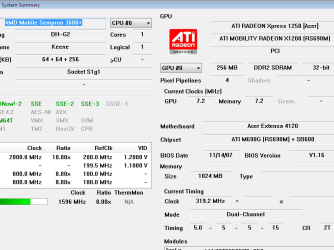
Check the attachment, it contains a pic of the HWinfo.
 

Attachments

  • ati.png
    ati.png
    12.6 KB · Views: 15

My Computer

OS
Windows 7 Professional x32
Try these drivers from the ATI Website as they are for your video card: ATI Catalystâ„¢ Legacy Display Driver.

If that doesn't work, just go to AMD.com | Support & Downloads, then click on "Download Graphics Drivers". Choose Integrated Motherboard Graphics and the Radeon Xpress 1250 Series and choose Vista 32-bit. I am aware you have 7 32-bit but the Vista 32-bit driver will work just fine. After that, download the Catalyst 10.2 driver and install it. You do not need to run it in compatibility mode as it should work natively without issues. Let us know if this gets you up and running and if not, what errors you receive.

For future reference, you have an ATI Radeon Xpress 1250 Integrated Video Card.
 

My Computer

OS
Windows 7 Ultimate x64 SP1
CPU
Intel Core i3 530 2.93 Ghz Clarkdale
Motherboard
ASRock P55 PRO/USB3 LGA 1156
Memory
4 GB OCZ DDR3 1600 (PC12800) Low Voltage Desktop Memory
Graphics Card(s)
Nvidia GeForce GTX 550 Ti with 1 GB of RAM
Sound Card
Realtek HD ALC892
Monitor(s) Displays
20'' eMachines E202HDbmd Glare Panel Widescreen
Screen Resolution
1600 x 900
Hard Drives
Western Digital 1 TB Caviar Black Edition (7200 RPM) SATA
Hitachi Deskstar 500 GB (7200 RPM) SATA
Samsung SpinPoint 400 GB (7200 RPM) SATA
PSU
Rosewill Xtreme Series RX750-D-B ATX12V v2.2 & EPS12V (750W)
Case
Cooler Master Centurion 534 RC-534-KKN2-GP Mid-Tower
Cooling
Standard Case Fans and Stock CPU Heatsink
Keyboard
Microsoft Wireless Optical Desktop Elite
Mouse
Microsoft Wireless Optical Desktop Elite
Internet Speed
7.1 Mbps Verizon DSL
Back
Top