HELP! Problems installing service pack 1

hallu

New member
Local time
1:36 PM
Messages
5
Hello, good evening to everyone.

I'm new on this forum and I'm asking for help hope you guys can help me out.

I'm having problems installing service pack 1 on a windows 7 home premium pc desktop.

I can download and install it but when I press to restart the pc to apply the changes computer will restart doing
10 % applying changes and it restart. After reboot windows start up to continue apply the changes and it gives error, failure error etc.. and revert the changes always.

I dont know what can I do to fix it.

things I already did:
- turn off firewall
- stop/start windows update service, removing temporary files from c:windows/softwaredistribution/download

I'll appreciate some help from the experts here.

Thanks in advance.

Best regards,
hallu
 

My Computer

Computer type
PC/Desktop
OS
Windows 7 Home Premium x64
Hi

Welcome to Sevenforums!

I'll try to help you!
Need to see some logs.
Would you please download SFCFix.exe
Place it on your desktop, right-click and run as administrator
Please post log when it appears.
Thank you,
Snick
 

My Computer

Computer type
PC/Desktop
Computer Manufacturer/Model Number
HP Desktop & Compaq Laptop
OS
Win 10 x64, Linux Lite, Win 7 x64, BlackArch, & Kali
Hard Drives
Samsung 850 Pro 256Gb,
Hitachi HDD 1Tb,
Crucial MX SSD 250Gb
Segate 3Tb USB 3.0 Ext. Backup HDD
Internet Speed
150Mbps dn, 20Mbps up
Antivirus
Avast Free, Malwarebytes Anti-Exploit & Anti-Ransomware
Browser
Firefox, Chrome, Opera, & VPN

My Computers

System One System Two

  • Computer type
    PC/Desktop
    OS
    7 X64
    CPU
    i5 8400
    Motherboard
    gigabyte b365m ds3h
    Memory
    2x8gb 3200mhz
    Hard Drives
    various
    PSU
    pure power 11 400w cm
    Case
    Coolermaster
    Cooling
    cryorig m9i
  • Computer type
    PC/Desktop
    OS
    7x64
    CPU
    g5400
    Motherboard
    ga b365m ds3h
    Memory
    8gb ddr4 2400
    PSU
    xfx pro 450w
Hi

Welcome to Sevenforums!

I'll try to help you!
Need to see some logs.
Would you please download SFCFix.exe
Place it on your desktop, right-click and run as administrator
Please post log when it appears.
Thank you,
Snick

Hi there Snick, here it is:

SFCFix version 3.0.2.1 by niemiro.
Start time: 2020-07-06 21:33:44.924
Microsoft Windows 7 - amd64
Not using a script file.


AutoAnalysis::
SUMMARY: No corruptions were detected.
AutoAnalysis:: directive completed successfully.


Successfully processed all directives.
SFCFix version 3.0.2.1 by niemiro has completed.
Currently storing 0 datablocks.
Finish time: 2020-07-06 21:34:39.487
----------------------EOF-----------------------

Thank you for your reply!
 

My Computer

Computer type
PC/Desktop
OS
Windows 7 Home Premium x64
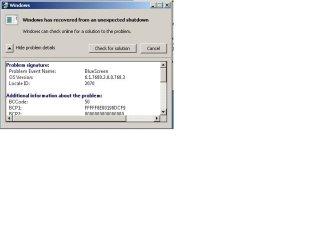
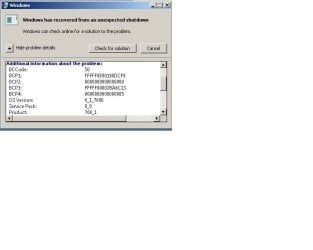
I forgot to mention that I'm having BSOD's too.

here are some screenshots about the problem:

BSOD.jpg

BSOD1.jpg

BSOD2.jpg
 

My Computer

Computer type
PC/Desktop
OS
Windows 7 Home Premium x64

My Computer

Computer type
PC/Desktop
OS
Windows 7 Home Premium x64
hallu,

SFC scan good

I agree with SIW2 Repair Install is the way to go. I do them all the time, piece of cake.

Detailed instructions with videos Repair Windows Without Reformatting.docx

If you don't have a Win7 ISO or DVD with SP1 & you don't want to download from the link I provided, (I understand why you may not) I can help you with that too.

Snick
 
Last edited:

My Computer

Computer type
PC/Desktop
Computer Manufacturer/Model Number
HP Desktop & Compaq Laptop
OS
Win 10 x64, Linux Lite, Win 7 x64, BlackArch, & Kali
Hard Drives
Samsung 850 Pro 256Gb,
Hitachi HDD 1Tb,
Crucial MX SSD 250Gb
Segate 3Tb USB 3.0 Ext. Backup HDD
Internet Speed
150Mbps dn, 20Mbps up
Antivirus
Avast Free, Malwarebytes Anti-Exploit & Anti-Ransomware
Browser
Firefox, Chrome, Opera, & VPN
I'm checking it and it seems a bit complicated to do it.. :/


It is very easy. There is nothing simpler.
 

My Computers

System One System Two

  • Computer type
    PC/Desktop
    OS
    7 X64
    CPU
    i5 8400
    Motherboard
    gigabyte b365m ds3h
    Memory
    2x8gb 3200mhz
    Hard Drives
    various
    PSU
    pure power 11 400w cm
    Case
    Coolermaster
    Cooling
    cryorig m9i
  • Computer type
    PC/Desktop
    OS
    7x64
    CPU
    g5400
    Motherboard
    ga b365m ds3h
    Memory
    8gb ddr4 2400
    PSU
    xfx pro 450w

My Computer

Computer type
PC/Desktop
Computer Manufacturer/Model Number
HP Desktop & Compaq Laptop
OS
Win 10 x64, Linux Lite, Win 7 x64, BlackArch, & Kali
Hard Drives
Samsung 850 Pro 256Gb,
Hitachi HDD 1Tb,
Crucial MX SSD 250Gb
Segate 3Tb USB 3.0 Ext. Backup HDD
Internet Speed
150Mbps dn, 20Mbps up
Antivirus
Avast Free, Malwarebytes Anti-Exploit & Anti-Ransomware
Browser
Firefox, Chrome, Opera, & VPN
hallu

After repair install run UpdatePack7R2 to download an up to date Simplix file.

Simplix is a single file (880MB) that contain all updates since Win 7 released up to date. It has all security and non security updates without the trash (telemetry and tracking). Very good.

Then run WU manually to find updates for Office etc and decide witch one to install.
 

My Computer

Computer type
PC/Desktop
Computer Manufacturer/Model Number
HP Desktop & Compaq Laptop
OS
Win 10 x64, Linux Lite, Win 7 x64, BlackArch, & Kali
Hard Drives
Samsung 850 Pro 256Gb,
Hitachi HDD 1Tb,
Crucial MX SSD 250Gb
Segate 3Tb USB 3.0 Ext. Backup HDD
Internet Speed
150Mbps dn, 20Mbps up
Antivirus
Avast Free, Malwarebytes Anti-Exploit & Anti-Ransomware
Browser
Firefox, Chrome, Opera, & VPN
Back
Top