

- Local time
- 11:50 AM
- Messages
- 529
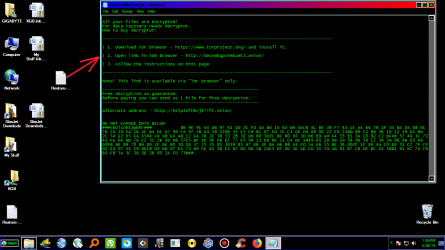
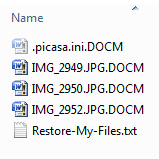
You would think that with more than 20 years experience I would have control. But No.. I`m cocky I know.. Here's were I stand. My system has 3 dedicated HDD. And The boot Drive is SSD. So. Me and the wife went out. And when we came back the desktop had changed. See Image. I opening this file you see and I`m thinking YA Shite! I made an image of my system a week ago so I shut my system down.. Disconnected all my HDD drives. Connected my HDD with the image of my system and booted up. I using Easeus Todo Backup and it ran flawlessly.. So I shut down and reconnected my other drives and booted up. What I found is that all the files no matter what the extension is are all changed to .DOCM. Except for the SSD boot drive.. For example see the image.. So the question! How to change all the file extensions on all 3 drive! I`m looking around myself.. HELP!
Attachments

My Computer
At a glance
Windows 10 Pro 64 bitAMD FX 9590 8 Core Black EditionCorsair Vengeance 16GB DDR3AMD Radeon (TM) R9 380 Gaming Series
- Computer type
- PC/Desktop
- Computer Manufacturer/Model Number
- Custom Built By Me.
- OS
- Windows 10 Pro 64 bit
- CPU
- AMD FX 9590 8 Core Black Edition
- Motherboard
- MSI 990FXA GAMING (MS-7893)
- Memory
- Corsair Vengeance 16GB DDR3
- Graphics Card(s)
- AMD Radeon (TM) R9 380 Gaming Series
- Sound Card
- AMD High Definition
- Monitor(s) Displays
- Samsung 32" 60Hz 4ms Curved PLS LED
- Screen Resolution
- 1920 X 1080
- Hard Drives
- C: 223 GB SSD = E: 465 GB HDD = F: 931 GB HDD = G: 149 GB HDD = H: 931 GB HDD
- PSU
- EVGA Supernova NEX750B 750W ATX EPS12V 80PLUS Bronze
- Case
- Cool Master
- Cooling
- Noctua NH-D15 Premium Cooler with 2x NF-A15 PWM 140mm Fan
- Internet Speed
- Fiber Optic: Download 332.7 Mbps / Upload 331.5 Mbps
- Antivirus
- Windows Defender
- Browser
- Slimjet (64bit)
 I`ll check in the morning. If there`s no posting! I`m blowing it all away.


 Thanks man. I think I am going to try it.


