
- Local time
- 11:12 AM
- Messages
- 21
jumanji Here's where I'm at. So I'm doing the first one, Backup BS, because it confirmed the boot sector is bad but the backup is ok and can therefore be used to copy over it, correct?
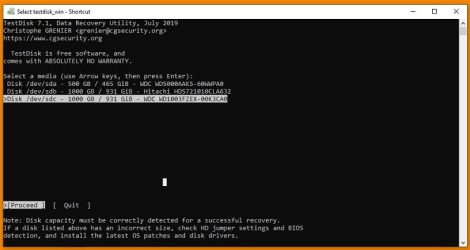
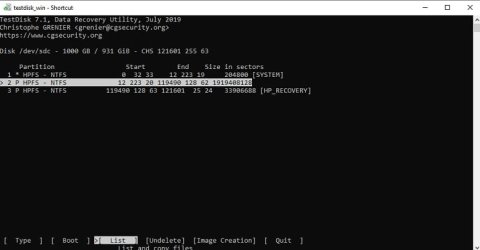
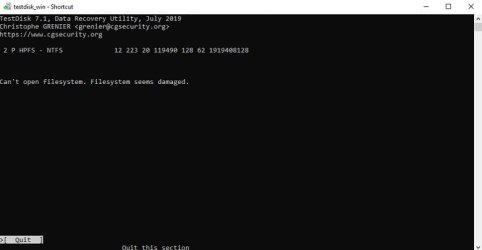
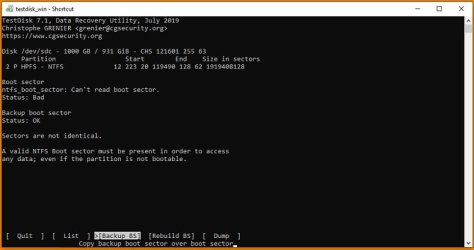
- - - Updated - - -
Okay, it said it couldn't write over it. Should I then try to Rebuild the sector instead?

- - - Updated - - -
I'm attempting to copy my files off before I try rebuild.
- - - Updated - - -
File copy is going well so far. No fails yet and relatively quick depending on file size/number. I hid alternate streams before selecting and I'm focused on the essential documents that can't be replaced first. Fingers always crossed too!
Question: I have some mp4 video files that need to be copied as well but noticed unlike my other docs, the name of the same mp4 file appears multiple times. Is that just how the data for that format is broken up so I have to copy all instances of that name for the entire thing to be recovered?
- - - Updated - - -
Trying to copy all instances of the same file name for an mp4 slowed the process down. I stopped and tried only copying the first instance of each file name that has a number next to it instead of just 0 to see if the copied file would be complete.
They seem fine so far. Resuming file copy this way. Once I'm done backing up all of the important files, I'll go back to the Rebuild boot sector to post screenshots of that again.
- - - Updated - - -
Okay, it said it couldn't write over it. Should I then try to Rebuild the sector instead?
- - - Updated - - -
I'm attempting to copy my files off before I try rebuild.
- - - Updated - - -
File copy is going well so far. No fails yet and relatively quick depending on file size/number. I hid alternate streams before selecting and I'm focused on the essential documents that can't be replaced first. Fingers always crossed too!
Question: I have some mp4 video files that need to be copied as well but noticed unlike my other docs, the name of the same mp4 file appears multiple times. Is that just how the data for that format is broken up so I have to copy all instances of that name for the entire thing to be recovered?
- - - Updated - - -
Trying to copy all instances of the same file name for an mp4 slowed the process down. I stopped and tried only copying the first instance of each file name that has a number next to it instead of just 0 to see if the copied file would be complete.
They seem fine so far. Resuming file copy this way. Once I'm done backing up all of the important files, I'll go back to the Rebuild boot sector to post screenshots of that again.
My Computers
-
At a glance
Win 7 64 Bit- OS
- Win 7 64 Bit
-
- Computer type
- PC/Desktop

 )
)

