Help removing old Windows & Users folder without breaking anything!

jimdandy

New member
Member
Local time
2:54 AM
Messages
29
Help removing old Windows & Users folder without breaking anything!

Hey Guys!

I know this has been brought up time after time but I've read several threads and it seems like the approach is slightly different depending on the computer configuration. If anyone has time to give me some basic guidance I'd be most appreciative! I'll try to supply all the info requested on other similar threads to make this easier.

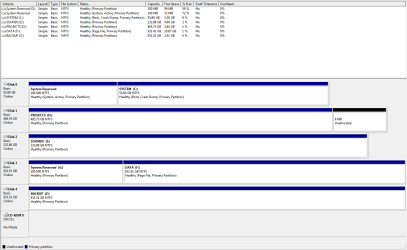
Here is my current configuration (feel free to laugh at how full my drives are!):
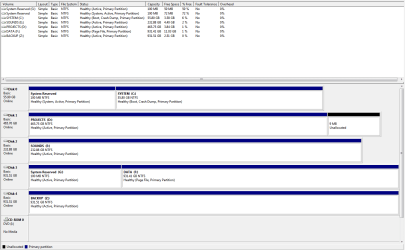
Disk Management Capture - 2012 12 07.PNG


Scenario: I bought a new SSD (DISK 0) and installed a fresh copy of Windows 7 on it. I left the old copy of Windows 7 on the original system drive (DISK 3) in case any of the programs I use for work had problems when re-authorising licenses etc. that way I could just go back to my old setup to get work done.

Before installing Windows 7 on the SSD I switched the hard drives around physically, I put the SSD on DISK 0 and the old system drive on DISK 3. I'm 95% sure I had the old system drive (DISK 3) connected when I installed Windows 7 onto the new SSD (DISK 0).

Basically I want to:

1) Remove the old Windows folder on DISK 3. I've taken ownership of it as per this tutorial but I must be doing something wrong as now it's telling me I need permission from myself?
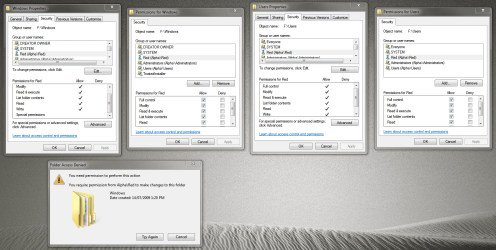
Folder Permissions Capture 2 - 2012 12 07.PNG


2) Remove the old Windows folder on DISK 3. Same issue as with the Windows folder.

3) Remove the 'System Reserved' partition (G) from DISK 3. I think I know how to do this but I'm not sure if it's safe to do so with my setup. How do I check if my boot files are on DISK 0 where they should be and not on DISK 3? Also, once I get rid of this partition can/should I then expand the other partition to take up that 100MB?


Unfortunately the data in the F drive on DISK 3 is important and I don't have any other drives to move that data to so that I can format the F drive. Hopefully it is possible to achieve what I have asked above without formatting the F drive?

Again, any help would be most appreciated! Thank you in advance.. :)
 

My Computer

OS
Windows 7 Ultimate x64
CPU
AMD Phenom 9550
Motherboard
Asus
Memory
8GB
Graphics Card(s)
Nvidia Geforce GTS 450
Sound Card
Tascam FW-1804
Monitor(s) Displays
Multiple
Screen Resolution
1920x1080
Hard Drives
Many
PSU
Coolermaster
Case
Antec 4u Rack
Keyboard
Microsoft Wireless
Mouse
Microsoft Wireless
Internet Speed
Fast
You need to set G: inactive and see if C: will boot. It should. If not just run your disc to do a startup repair.

You should be able to delete it then.

By the way, all this should be done using a partition wizard boot cd. Safer, Easier, Faster.

http://partitionwizard.com/partition-wizard-bootable-cd.html

You can`t move your files over to the backup 931 gig temporarily ?
 

My Computer

Computer type
PC/Desktop
Computer Manufacturer/Model Number
Skylake Special #666
OS
Windows 10 Pro x64
CPU
Intel Core i7 6700K
Motherboard
Asus Sabertooth Z170 Mark 1
Memory
GSkill TridentZ RGB 16GB 3600 16-16-16-36
Graphics Card(s)
EVGA GTX 980 Ti SC x2
Sound Card
Realtek High Definition
Monitor(s) Displays
AOC G2460PG
Screen Resolution
1920 x 1080 144Hz
Hard Drives
Samsung 860 Pro 256GB, Seagate Barracuda 4TB x2
PSU
EVGA 1000 P2, EVGA White Custom Braided Cables
Case
Corsair Vengeance C70 Gunmetal Black
Cooling
Corsair H100i v2, Corsair ML120 x2, Thermal Grizzly Kryonaut
Keyboard
Logitech G910 Orion Spectrum
Mouse
Logitech G700s
Internet Speed
Verizon Fios Quantum Gateway 75/75
Antivirus
Windows Defender, Malwarebytes Free 3.8.3
Browser
Chrome
Other Info
Corsair SP120 x4, LG Blu-ray Drive, Durabrand HT-395 100 Watt Dolby Digital Amp, Corsair H2100 Wireless 7.1 Headset

My Computer

Computer type
Laptop
Computer Manufacturer/Model Number
ACER ASPIRE 5742G
OS
Microsoft Windows 7 Home Premium 64-bits 7601 Multiprocessor Free Service Pack 1
CPU
Intel(R) Core(TM) i3 CPU M 370 @ 2.40GHz
Motherboard
Acer Aspire 5742G
Memory
4,00 GB
Graphics Card(s)
ATI Mobility Radeon HD 5400 Series
Sound Card
(1) AMD High Definition Audio Device (2) Realtek High Defi
Screen Resolution
1366 x 768 x 32 bits (4294967296 colors) @ 60 Hz
Hard Drives
WDC WD5000BEVT-22ZAT0
You need to set G: inactive and see if C: will boot. It should. If not just run your disc to do a startup repair.

You should be able to delete it then.

By the way, all this should be done using a partition wizard boot cd. Safer, Easier, Faster.

Partition Wizard Bootable CD allows user to manage partition directly with partition manager bootable CD.

Thanks AddRAM! I'll give this a try. I don't have a CD drive (the one in my screenshot must be a virtual drive), is using Partition Wizard off a USB drive acceptable?


You can`t move your files over to the backup 931 gig temporarily ?

The backup drive is 99% full! :o

As soon as I can afford it a new internal drive and a new external backup drive are on the shopping list! :)
 

My Computer

OS
Windows 7 Ultimate x64
CPU
AMD Phenom 9550
Motherboard
Asus
Memory
8GB
Graphics Card(s)
Nvidia Geforce GTS 450
Sound Card
Tascam FW-1804
Monitor(s) Displays
Multiple
Screen Resolution
1920x1080
Hard Drives
Many
PSU
Coolermaster
Case
Antec 4u Rack
Keyboard
Microsoft Wireless
Mouse
Microsoft Wireless
Internet Speed
Fast

My Computer

OS
Windows 7 Ultimate x64
CPU
AMD Phenom 9550
Motherboard
Asus
Memory
8GB
Graphics Card(s)
Nvidia Geforce GTS 450
Sound Card
Tascam FW-1804
Monitor(s) Displays
Multiple
Screen Resolution
1920x1080
Hard Drives
Many
PSU
Coolermaster
Case
Antec 4u Rack
Keyboard
Microsoft Wireless
Mouse
Microsoft Wireless
Internet Speed
Fast
I didn`t even notice all the others were active, it`s late !!

Why in the world are they marked active :sarc:

Run the command line and post a new shot of disk mgt.

Fix that 9 MB unallocated while you`re at it.

You can always install partition wizard.
 

My Computer

Computer type
PC/Desktop
Computer Manufacturer/Model Number
Skylake Special #666
OS
Windows 10 Pro x64
CPU
Intel Core i7 6700K
Motherboard
Asus Sabertooth Z170 Mark 1
Memory
GSkill TridentZ RGB 16GB 3600 16-16-16-36
Graphics Card(s)
EVGA GTX 980 Ti SC x2
Sound Card
Realtek High Definition
Monitor(s) Displays
AOC G2460PG
Screen Resolution
1920 x 1080 144Hz
Hard Drives
Samsung 860 Pro 256GB, Seagate Barracuda 4TB x2
PSU
EVGA 1000 P2, EVGA White Custom Braided Cables
Case
Corsair Vengeance C70 Gunmetal Black
Cooling
Corsair H100i v2, Corsair ML120 x2, Thermal Grizzly Kryonaut
Keyboard
Logitech G910 Orion Spectrum
Mouse
Logitech G700s
Internet Speed
Verizon Fios Quantum Gateway 75/75
Antivirus
Windows Defender, Malwarebytes Free 3.8.3
Browser
Chrome
Other Info
Corsair SP120 x4, LG Blu-ray Drive, Durabrand HT-395 100 Watt Dolby Digital Amp, Corsair H2100 Wireless 7.1 Headset
I didn`t even notice all the others were active, it`s late !!

Why in the world are they marked active :sarc:

Run the command line and post a new shot of disk mgt.

Fix that 9 MB unallocated while you`re at it.

You can always install partition wizard.

Thanks AddRAM, here's an updated screenshot:

Disk Management Capture 2 - 2012 12 07.PNG


* To fix that unallocated 9MB do I extend the partition (drive D)?

* It seems it's definitely safe for me to delete the G drive now also?

* Finally, after using Diskpart to set the drives as inactive as suggested by Kaktussoft I restarted the computer. I then went to try again to remove the Windows and Users folder from the F drive but got the same message as the second screenshot in my OP. Am I doing something wrong or missing something?

Thanks again for any help guys!
 

My Computer

OS
Windows 7 Ultimate x64
CPU
AMD Phenom 9550
Motherboard
Asus
Memory
8GB
Graphics Card(s)
Nvidia Geforce GTS 450
Sound Card
Tascam FW-1804
Monitor(s) Displays
Multiple
Screen Resolution
1920x1080
Hard Drives
Many
PSU
Coolermaster
Case
Antec 4u Rack
Keyboard
Microsoft Wireless
Mouse
Microsoft Wireless
Internet Speed
Fast
Yes.

Yes.

Not sure. Who is Alpha/Red, the users on that install ?

Have you tried taking ownership of the files ?
 

My Computer

Computer type
PC/Desktop
Computer Manufacturer/Model Number
Skylake Special #666
OS
Windows 10 Pro x64
CPU
Intel Core i7 6700K
Motherboard
Asus Sabertooth Z170 Mark 1
Memory
GSkill TridentZ RGB 16GB 3600 16-16-16-36
Graphics Card(s)
EVGA GTX 980 Ti SC x2
Sound Card
Realtek High Definition
Monitor(s) Displays
AOC G2460PG
Screen Resolution
1920 x 1080 144Hz
Hard Drives
Samsung 860 Pro 256GB, Seagate Barracuda 4TB x2
PSU
EVGA 1000 P2, EVGA White Custom Braided Cables
Case
Corsair Vengeance C70 Gunmetal Black
Cooling
Corsair H100i v2, Corsair ML120 x2, Thermal Grizzly Kryonaut
Keyboard
Logitech G910 Orion Spectrum
Mouse
Logitech G700s
Internet Speed
Verizon Fios Quantum Gateway 75/75
Antivirus
Windows Defender, Malwarebytes Free 3.8.3
Browser
Chrome
Other Info
Corsair SP120 x4, LG Blu-ray Drive, Durabrand HT-395 100 Watt Dolby Digital Amp, Corsair H2100 Wireless 7.1 Headset
* To fix that unallocated 9MB do I extend the partition (drive D)?=>yes do it

* It seems it's definitely safe for me to delete the G drive now also?=>yes do it
 

My Computer

Computer type
Laptop
Computer Manufacturer/Model Number
ACER ASPIRE 5742G
OS
Microsoft Windows 7 Home Premium 64-bits 7601 Multiprocessor Free Service Pack 1
CPU
Intel(R) Core(TM) i3 CPU M 370 @ 2.40GHz
Motherboard
Acer Aspire 5742G
Memory
4,00 GB
Graphics Card(s)
ATI Mobility Radeon HD 5400 Series
Sound Card
(1) AMD High Definition Audio Device (2) Realtek High Defi
Screen Resolution
1366 x 768 x 32 bits (4294967296 colors) @ 60 Hz
Hard Drives
WDC WD5000BEVT-22ZAT0

Are you logged on as user RED on computer ALPHA? Do you have administrator priviliges?
Does system,admistrator,user etc have any DENY access in folder Windows?
 

My Computer

Computer type
Laptop
Computer Manufacturer/Model Number
ACER ASPIRE 5742G
OS
Microsoft Windows 7 Home Premium 64-bits 7601 Multiprocessor Free Service Pack 1
CPU
Intel(R) Core(TM) i3 CPU M 370 @ 2.40GHz
Motherboard
Acer Aspire 5742G
Memory
4,00 GB
Graphics Card(s)
ATI Mobility Radeon HD 5400 Series
Sound Card
(1) AMD High Definition Audio Device (2) Realtek High Defi
Screen Resolution
1366 x 768 x 32 bits (4294967296 colors) @ 60 Hz
Hard Drives
WDC WD5000BEVT-22ZAT0
Not sure. Who is Alpha/Red, the users on that install ?

Yep. Alpha/Red is the only user account on this computer.

Have you tried taking ownership of the files ?

Yep. I used this tutorial. It seems to work when I use it on the Users and Windows folder on F drive. I can see the word 'Success' flash by in the command prompt, and the phrase '...now owned by "Alpha/Red"'.

Are you logged on as user RED on computer ALPHA? Do you have administrator priviliges?

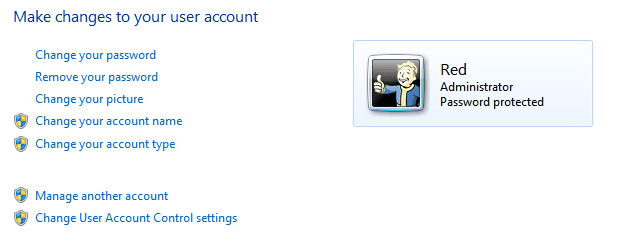
Yep. I'm sure that I have admin privileges, it's the only user account. Here's a screenshot if that helps:

User Accounts Capture - 2012 12 07.PNG


Does system,admistrator,user etc have any DENY access in folder Windows?

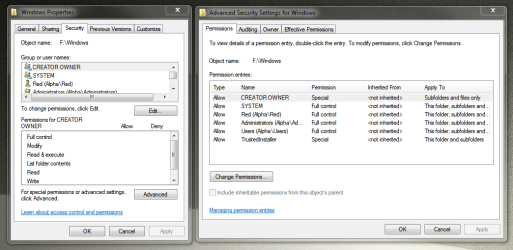
No. Every 'group or username' seems to have full access with the exception of 'Special Permissions'. The only 'group or username' that doesn't have full access is the 'CREATOR OWNER' account and the 'TrustedInstaller' account that each only appear on the Windows folder permissions.

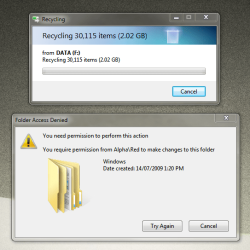
Here's the message I get when I try to delete Windows or Users from the F drive:

Folder Access Denied Capture - 2012 12 07.PNG


:confused:
 

My Computer

OS
Windows 7 Ultimate x64
CPU
AMD Phenom 9550
Motherboard
Asus
Memory
8GB
Graphics Card(s)
Nvidia Geforce GTS 450
Sound Card
Tascam FW-1804
Monitor(s) Displays
Multiple
Screen Resolution
1920x1080
Hard Drives
Many
PSU
Coolermaster
Case
Antec 4u Rack
Keyboard
Microsoft Wireless
Mouse
Microsoft Wireless
Internet Speed
Fast
right click F:\windows , properties, tab security->advanced
Post screenshot
tab owner. Post screenshot as well
 

My Computer

Computer type
Laptop
Computer Manufacturer/Model Number
ACER ASPIRE 5742G
OS
Microsoft Windows 7 Home Premium 64-bits 7601 Multiprocessor Free Service Pack 1
CPU
Intel(R) Core(TM) i3 CPU M 370 @ 2.40GHz
Motherboard
Acer Aspire 5742G
Memory
4,00 GB
Graphics Card(s)
ATI Mobility Radeon HD 5400 Series
Sound Card
(1) AMD High Definition Audio Device (2) Realtek High Defi
Screen Resolution
1366 x 768 x 32 bits (4294967296 colors) @ 60 Hz
Hard Drives
WDC WD5000BEVT-22ZAT0
right click F:\windows , properties, tab security->advanced
Post screenshot
tab owner. Post screenshot as well

Thanks Kaktussoft, here we go:

Permissions Capture - 2012 12 07.PNG

Owner Capture - 2012 12 07.PNG
 

My Computer

OS
Windows 7 Ultimate x64
CPU
AMD Phenom 9550
Motherboard
Asus
Memory
8GB
Graphics Card(s)
Nvidia Geforce GTS 450
Sound Card
Tascam FW-1804
Monitor(s) Displays
Multiple
Screen Resolution
1920x1080
Hard Drives
Many
PSU
Coolermaster
Case
Antec 4u Rack
Keyboard
Microsoft Wireless
Mouse
Microsoft Wireless
Internet Speed
Fast
Try to delete some folders in f:\windows (some random one)
Try to delete some files in f:\windows (some random one)
Works?? if not

Create a file and folder in f:\windows. Works? Delete them, works?
 

My Computer

Computer type
Laptop
Computer Manufacturer/Model Number
ACER ASPIRE 5742G
OS
Microsoft Windows 7 Home Premium 64-bits 7601 Multiprocessor Free Service Pack 1
CPU
Intel(R) Core(TM) i3 CPU M 370 @ 2.40GHz
Motherboard
Acer Aspire 5742G
Memory
4,00 GB
Graphics Card(s)
ATI Mobility Radeon HD 5400 Series
Sound Card
(1) AMD High Definition Audio Device (2) Realtek High Defi
Screen Resolution
1366 x 768 x 32 bits (4294967296 colors) @ 60 Hz
Hard Drives
WDC WD5000BEVT-22ZAT0
In elevated command prompt:
Code:
[COLOR=red]become owner of everything under f:\windows[/COLOR]
takeown  /f  f:\windows  /r  /d  Y
[COLOR=red]reset the permissions. includes subfolders[/COLOR]
icacls  f:\windows\*  /reset  /t  /c  /l  /q
[COLOR=red]set permission to inherete. includes subfolders[/COLOR]
icacls  f:\windows\*  /inheritance:e  /t  /c  /l  /q
Works? any errors?
 
Last edited:

My Computer

Computer type
Laptop
Computer Manufacturer/Model Number
ACER ASPIRE 5742G
OS
Microsoft Windows 7 Home Premium 64-bits 7601 Multiprocessor Free Service Pack 1
CPU
Intel(R) Core(TM) i3 CPU M 370 @ 2.40GHz
Motherboard
Acer Aspire 5742G
Memory
4,00 GB
Graphics Card(s)
ATI Mobility Radeon HD 5400 Series
Sound Card
(1) AMD High Definition Audio Device (2) Realtek High Defi
Screen Resolution
1366 x 768 x 32 bits (4294967296 colors) @ 60 Hz
Hard Drives
WDC WD5000BEVT-22ZAT0
In elevated command prompt:
Code:
[COLOR=red]become owner of everything under f:\windows[/COLOR]
takeown  /f  f:\windows  /r  /d  Y
[COLOR=red]reset the permissions. includes subfolders[/COLOR]
icacls  f:\windows\*  /reset  /t  /c  /l  /q
[COLOR=red]set permission to inherete. includes subfolders[/COLOR]
icacls  f:\windows\*  /inheritance:e  /t  /c  /l  /q
Works? any errors?
did it fix the problem?
 

My Computer

Computer type
Laptop
Computer Manufacturer/Model Number
ACER ASPIRE 5742G
OS
Microsoft Windows 7 Home Premium 64-bits 7601 Multiprocessor Free Service Pack 1
CPU
Intel(R) Core(TM) i3 CPU M 370 @ 2.40GHz
Motherboard
Acer Aspire 5742G
Memory
4,00 GB
Graphics Card(s)
ATI Mobility Radeon HD 5400 Series
Sound Card
(1) AMD High Definition Audio Device (2) Realtek High Defi
Screen Resolution
1366 x 768 x 32 bits (4294967296 colors) @ 60 Hz
Hard Drives
WDC WD5000BEVT-22ZAT0
Might this be a case for EVERYONE?

Add the EVERYONE object with full control to the security for F:\Windows and F:\Users - populate subfolders and files.

Might work.

Bill
 

My Computer

Computer type
Laptop
Computer Manufacturer/Model Number
HP Pavilion dv6-6c10us
OS
x64 (6.3.9600) Win8.1 Pro & soon dual boot x64 (6.1.7601) Win7_SP1 HomePrem
CPU
AMD A6-3420M APU with Radeon(tm) HD Graphics
Motherboard
Hewlett-Packard 1805
Memory
6.00 GB
Graphics Card(s)
AMD Radeon(TM) HD 6520G
Sound Card
(1) AMD High Definition Audio Device (2) IDT High Definiti
Monitor(s) Displays
HP W2072a 20" LCD (1600 x 900) @ 60 Hz
Screen Resolution
1366 x 768 x 32 bits (4294967296 colors) @ 60 Hz
Hard Drives
ST640LM0 00 HM641JI SATA Disk Device
Keyboard
Logitech k520 wireless KB
Mouse
Logitech m320 wireless mouse (bundled with KB)
Internet Speed
15/5 | 54 MB Wireless 'n'
Antivirus
Realtime: Defender or Avast | On-demand: Malwarebytes, ESET
Browser
IE 11 on Win8, IE 10 on win 7
Other Info
Media: [Gimp, Audacity, VLC] || Comm: [WEmail 2012, Skype] || Productivity: [OpenOffice,| Textpad] || Utils: [Sysinternals, cCleaner, Speccy, Defraggler]
Might this be a case for EVERYONE?

Add the EVERYONE object with full control to the security for F:\Windows and F:\Users - populate subfolders and files.

Might work.

Bill
Better do: Take ownership for F:\Windows and F:\Users - populate subfolders and files first. And populate the permissions as well. So remove the excplicit permissions and inheret them only.

Full access to EVERYONE is not enough! There can be be DENY permissions (although very unlikely)
 
Last edited:

My Computer

Computer type
Laptop
Computer Manufacturer/Model Number
ACER ASPIRE 5742G
OS
Microsoft Windows 7 Home Premium 64-bits 7601 Multiprocessor Free Service Pack 1
CPU
Intel(R) Core(TM) i3 CPU M 370 @ 2.40GHz
Motherboard
Acer Aspire 5742G
Memory
4,00 GB
Graphics Card(s)
ATI Mobility Radeon HD 5400 Series
Sound Card
(1) AMD High Definition Audio Device (2) Realtek High Defi
Screen Resolution
1366 x 768 x 32 bits (4294967296 colors) @ 60 Hz
Hard Drives
WDC WD5000BEVT-22ZAT0
In elevated command prompt:
Code:
[COLOR=red]become owner of everything under f:\windows[/COLOR]
takeown  /f  f:\windows  /r  /d  Y
[COLOR=red]reset the permissions. includes subfolders[/COLOR]
icacls  f:\windows\*  /reset  /t  /c  /l  /q
[COLOR=red]set permission to inherete. includes subfolders[/COLOR]
icacls  f:\windows\*  /inheritance:e  /t  /c  /l  /q
Works? any errors?

Kaktussoft, I think you've done it!! Thankyou so much. :)

Windows folder is gone and I'm in the process of repeating the process with the Users folder as I type. Thanks for sharing your ninja command prompt moves!

I think I must have good karma after helping out lots of people on audio forums! Thanks again to AddRAM, Kaktussoft and Slartybart.. hopefully some other forum members can gain something from this thread too!

:)
 

My Computer

OS
Windows 7 Ultimate x64
CPU
AMD Phenom 9550
Motherboard
Asus
Memory
8GB
Graphics Card(s)
Nvidia Geforce GTS 450
Sound Card
Tascam FW-1804
Monitor(s) Displays
Multiple
Screen Resolution
1920x1080
Hard Drives
Many
PSU
Coolermaster
Case
Antec 4u Rack
Keyboard
Microsoft Wireless
Mouse
Microsoft Wireless
Internet Speed
Fast
In elevated command prompt:
Code:
[COLOR=red]become owner of everything under f:\windows[/COLOR]
takeown  /f  f:\windows  /r  /d  Y
[COLOR=red]reset the permissions. includes subfolders[/COLOR]
icacls  f:\windows\*  /reset  /t  /c  /l  /q
[COLOR=red]set permission to inherete. includes subfolders[/COLOR]
icacls  f:\windows\*  /inheritance:e  /t  /c  /l  /q
Works? any errors?

Kaktussoft, I think you've done it!! Thankyou so much. :)

Windows folder is gone and I'm in the process of repeating the process with the Users folder as I type. Thanks for sharing your ninja command prompt moves!

I think I must have good karma after helping out lots of people on audio forums! Thanks again to AddRAM, Kaktussoft and Slartybart.. hopefully some other forum members can gain something from this thread too!

:)
Glad you solved it. You could have done it yourself using windows explorer GUI!


My commands only did:
  • take ownership of everything in f:\windows
  • delete all explicit permissions on the files
  • activate inherentence.
Probably most of the files did actually delete on first try(?)
You forgot to populate ownership to files/subfolders(?)
You forgot to populate permissions to files/subfolders(?)

that's why I gave you the cryptic commands.

Why not simply format F?
 

My Computer

Computer type
Laptop
Computer Manufacturer/Model Number
ACER ASPIRE 5742G
OS
Microsoft Windows 7 Home Premium 64-bits 7601 Multiprocessor Free Service Pack 1
CPU
Intel(R) Core(TM) i3 CPU M 370 @ 2.40GHz
Motherboard
Acer Aspire 5742G
Memory
4,00 GB
Graphics Card(s)
ATI Mobility Radeon HD 5400 Series
Sound Card
(1) AMD High Definition Audio Device (2) Realtek High Defi
Screen Resolution
1366 x 768 x 32 bits (4294967296 colors) @ 60 Hz
Hard Drives
WDC WD5000BEVT-22ZAT0
Back
Top