Solved Help requested / needed to secure data on a public network

George Gretton

New member
Local time
10:07 PM
Messages
6
Hello there Seven Forums,

I used to work in a Home Network situation supported by a Router, but now I am on a Private Network in an office block that I share with many others.

I have a networked desktop PC called G79, and a networked Laptop called G81 that serves as my server for all of my data files, that I take with me when I am out and about.
---
G81 has two Shares as seen from G79,

“George on G81 (\\G81) (G: )”, which is “Users\George” on G81,

and

“Outlook Files (\\G81\George on G81) (O: )”, which is “Users\George\Outlook files” on G81.
---
G79 has a single Share as seen from G81,

“Backup of G81 George (\\G79) (B: )”, which is “Users\Backup of G81 George” on G79.
---
So when I am in my office I work on my G79 desktop with a big screen and decent keyboard, and access G: for all my data files, which have been disentangled from the poxy “My Documents”, and I separately access my Outlook files using O:.

In terms of local backups, when I have finished on G79 I back up, from G81, my critical directories on G81 Users\George to the backup Share B: on G79, and I also back them up to an external USB drive.
---
To make it all work I have had to set the Share User Permissions to “Everyone” for “Read/Write” in respect of all 3 Shares, and Codd alone knows who else on the network has access to all of my precious data. There’s some commercially very sensitive data there!
---
I now have Window 7 Professional on both systems, and I want to create a User to add to the Share User Permissions instead of “Everyone”, so that I and only I can access the 3 Shares.
--
Can you outline my route forward?

Yours, George
 

My Computer

Computer type
PC/Desktop
Computer Manufacturer/Model Number
HP Pavilion Desktop, Toshiba Satellite Laptop
OS
Windows 7 Professional
CPU
Recent and up to date
Motherboard
Don't know
Memory
Can't remeber
Graphics Card(s)
Don't know
Hard Drives
Don't know
Antivirus
MSE
Browser
Chrome
In a workgroup environment you can only do user based share permissions if the username and password credentials are the same across all machines.

For example if you only what the user - Josh - to access the share then I would have to create the same username and password on all machines that will access that share in order for the share permissions to allow them.

For example I would create a local user account on all machines with the credentials of that user:

Username - Josh

Password - {Password of username}

   Note
You must use a password however secure it is! Also the local user account can be a standard or Administrator account


____________________________________

Another method would be to turn on password protected sharing on the machine that is acting as the server. This tutorial will show you how - http://www.sevenforums.com/tutorials/185429-password-protected-sharing-turn-off-windows-7-a.html

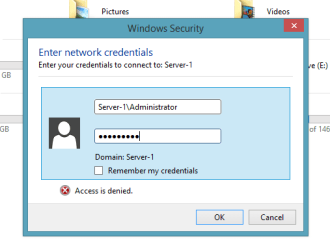
Upon compeltion all you need to do is setup the local user account that you wish to allow access to that share on the server and then from any machine when you access that share you should be prompted to enter a username and password. When prompted remember to enter the computer name first and then the user. If authentication is successful you will either be denied or granted access based on the share permissions set.

For example the following show how to authorise yourself as the Administrator for the local machine:

Authentication for Admin share.PNG

Hopefully this will help you in securing your peer to peer sharing ;)

Josh :)
 

My Computer

Computer type
PC/Desktop
Computer Manufacturer/Model Number
Custom Built
OS
Windows 7 Professional x64 SP1 ; Windows Server 2012 R2 Standard
CPU
Intel Core i5 2400 @ 3.10GHz
Motherboard
Foxconn H67MP-S/-V/H67MP
Memory
8.0GB DDR3 @ 665MHz (2GBx4)
Graphics Card(s)
AMD Radeon HD 6870
Sound Card
Realtek High Definition Audio
Monitor(s) Displays
AOC 2243W & SMB1930NW
Screen Resolution
1440x900 & 1920x1080
Hard Drives
977GB Seagate ST31000524AS ATA Drive (SATA)
250GB WD iSCSI attached Drive
PSU
750W Gaming PSU
Case
Novatech Night
Cooling
Fan
Keyboard
Dell Standard PS/2 Keyboard
Mouse
R.A.T 07 Gaming Mouse
Internet Speed
Download: 10 Mbps Ping: 30ms Upload: 0.81 Mbps
Browser
Google Chrome
Other Info
Optiarc DVD RW AD-5260S ATA Device
Hello Josh, thank you!

Consider that I will explore away with what you say when I have digested it. It's in my pipe, ready for smoking.....

What I have already digested is that I am "George" on both machines, but NOT password protected, and that somehow the overall system distinguishes George (G79) from George (G81), although I can't immediately remember where that shows up.

What I DON'T want to have to do is to enter my password every time the bell strikes.

I'll be back.......with how I get on.

Yours, George
 

My Computer

Computer type
PC/Desktop
Computer Manufacturer/Model Number
HP Pavilion Desktop, Toshiba Satellite Laptop
OS
Windows 7 Professional
CPU
Recent and up to date
Motherboard
Don't know
Memory
Can't remeber
Graphics Card(s)
Don't know
Hard Drives
Don't know
Antivirus
MSE
Browser
Chrome
That is the issue with the peer to peer sharing is because the system is distinguishes the local user account with the computer. Essentially you fool the machine by using the same username and password on all machines.

If you don't wish to re-enter the credentials every time you connect to the share then you can simply check the 'Remember my credentials' box to save the credentials with the currently logged on account ;)

Hope This Helps,
Josh :)
 

My Computer

Computer type
PC/Desktop
Computer Manufacturer/Model Number
Custom Built
OS
Windows 7 Professional x64 SP1 ; Windows Server 2012 R2 Standard
CPU
Intel Core i5 2400 @ 3.10GHz
Motherboard
Foxconn H67MP-S/-V/H67MP
Memory
8.0GB DDR3 @ 665MHz (2GBx4)
Graphics Card(s)
AMD Radeon HD 6870
Sound Card
Realtek High Definition Audio
Monitor(s) Displays
AOC 2243W & SMB1930NW
Screen Resolution
1440x900 & 1920x1080
Hard Drives
977GB Seagate ST31000524AS ATA Drive (SATA)
250GB WD iSCSI attached Drive
PSU
750W Gaming PSU
Case
Novatech Night
Cooling
Fan
Keyboard
Dell Standard PS/2 Keyboard
Mouse
R.A.T 07 Gaming Mouse
Internet Speed
Download: 10 Mbps Ping: 30ms Upload: 0.81 Mbps
Browser
Google Chrome
Other Info
Optiarc DVD RW AD-5260S ATA Device
We seem to be there, Josh!

I have taken all the required steps, removed the "Everyone" User Permission from the Shares, and now, having entered my password at boot time, all is sweetness and light! A Thousand thanks!

I didn't even have to set any "Remember my password" flag. My Shares are all immediately available as before, when I was accessing them via "Everyone".

In the Advanced settings for networking neck of the woods I set BOTH Home AND Public settings to needing a password.

I can across an interesting anachronism in the process, even in Windows 7;

"To avoid losing data in the future, ask George to make a password reset floppy disk."

I note that I now realise that I probably did not need up upgrade to Windows 7 Professional (2 @ £120 odd) to achieve this result, but then I needed to get to a stage on the back of that to ask a good question that you could answer. Win some, lose some!

-----

Now that I have got to what I think is a secure position, and being a jaundiced and world-weary type, I want to check things out from other PC's on the network.

I want to test my security by trying to break it form an external perspective. I will be able to test from the Receptionist's PC, or from that of one of the two (twin) owners of the business.

But first I need to know how to see other shares on the network from my own PC, before I can try to see my own three shares from somebody else's.

I previously had my PC's talking to each other when I was in the security of a purely and literal home network based on a router, and when I set them up in this new private network they seemed to find each other again automatically.

I found how to search for printers on my new / current network (and surprisingly, only found my own printer at its newly allocated IP address, and nobody else's), but how do I search the network for other people's systems and shares within those systems?

I emphasise that I want to do this NOT to break into other peoples' systems, but so as to ensure that others can't break into mine.

So how do I get one of my Windows 7 PCs to search the network for other systems and then shares?

Yours, with thanks again, George
 

My Computer

Computer type
PC/Desktop
Computer Manufacturer/Model Number
HP Pavilion Desktop, Toshiba Satellite Laptop
OS
Windows 7 Professional
CPU
Recent and up to date
Motherboard
Don't know
Memory
Can't remeber
Graphics Card(s)
Don't know
Hard Drives
Don't know
Antivirus
MSE
Browser
Chrome
The credentials will be cached until next reboot if you didn't select the remember my credentials option. If there are only usernames in the share permission then no one is getting access to it but the users specified.

Shares on other machines could be hidden by many different reasons. One obvious reason is if a machine is not in the same workgroup as the host then you will not see its share. That beign said it still doesn't prevent you from accessing it via the UNC path (\\computer\share). Please ensure that all machines are in the same workgroup - http://www.sevenforums.com/tutorials/51711-workgroup-name-view-change.html

Also the network tab is limited to the broadcast domain. Meaning you will only be able to see machines that are on the connected switch or wireless network. If you have multiple of routers and subnets as well as any VPN clients then these will not show up in the network tab.

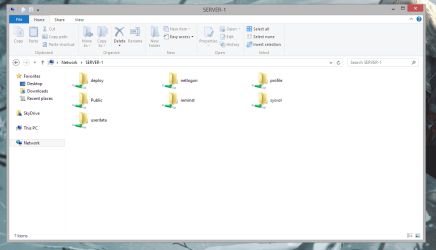
If you are concerned about who can see your share then you can hide it from view by putting a '$' at the end of the share name. For example this machine has a share 'ADMIN$' but from the view of the client it is not visible in the network tab.

Server Share.PNG

client share.PNG

Hope This Helps,
Josh :)
 

My Computer

Computer type
PC/Desktop
Computer Manufacturer/Model Number
Custom Built
OS
Windows 7 Professional x64 SP1 ; Windows Server 2012 R2 Standard
CPU
Intel Core i5 2400 @ 3.10GHz
Motherboard
Foxconn H67MP-S/-V/H67MP
Memory
8.0GB DDR3 @ 665MHz (2GBx4)
Graphics Card(s)
AMD Radeon HD 6870
Sound Card
Realtek High Definition Audio
Monitor(s) Displays
AOC 2243W & SMB1930NW
Screen Resolution
1440x900 & 1920x1080
Hard Drives
977GB Seagate ST31000524AS ATA Drive (SATA)
250GB WD iSCSI attached Drive
PSU
750W Gaming PSU
Case
Novatech Night
Cooling
Fan
Keyboard
Dell Standard PS/2 Keyboard
Mouse
R.A.T 07 Gaming Mouse
Internet Speed
Download: 10 Mbps Ping: 30ms Upload: 0.81 Mbps
Browser
Google Chrome
Other Info
Optiarc DVD RW AD-5260S ATA Device
Hello again Josh,

I'm really getting stuck into this now!

I've discovered a Heavenly download called "Advanced IP Scanner", which gives a bare network view of what is going on on the network; this has the signs for me of a benevolent rather than malicious bit of software.

As a result I can now see the full glory / horror of my unprotected shares, of historical origin, including a whole drive.

If I have created a Share via Properties, do you know how I can then remove the share?

Yours, George
 

My Computer

Computer type
PC/Desktop
Computer Manufacturer/Model Number
HP Pavilion Desktop, Toshiba Satellite Laptop
OS
Windows 7 Professional
CPU
Recent and up to date
Motherboard
Don't know
Memory
Can't remeber
Graphics Card(s)
Don't know
Hard Drives
Don't know
Antivirus
MSE
Browser
Chrome
Don't worry drives are normally shared but are hidden and restricted local Administrators only. The image I posted above shows that the C: and F: drive is shared but are restricted from any user who is not and Administrator on that machine.

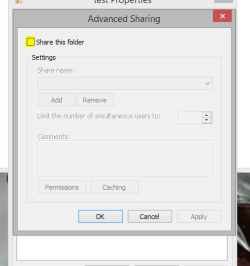
To un-share a folder you go to the same place you created the share and just uncheck the box:

unshare.PNG

   Note
A drive will not be shown as shared even thought it is a hidden share


I am not familiar with this application so I can't suggest anything but this is my assumption that it is picking up hidden Administrative shares.

Josh :)
 

My Computer

Computer type
PC/Desktop
Computer Manufacturer/Model Number
Custom Built
OS
Windows 7 Professional x64 SP1 ; Windows Server 2012 R2 Standard
CPU
Intel Core i5 2400 @ 3.10GHz
Motherboard
Foxconn H67MP-S/-V/H67MP
Memory
8.0GB DDR3 @ 665MHz (2GBx4)
Graphics Card(s)
AMD Radeon HD 6870
Sound Card
Realtek High Definition Audio
Monitor(s) Displays
AOC 2243W & SMB1930NW
Screen Resolution
1440x900 & 1920x1080
Hard Drives
977GB Seagate ST31000524AS ATA Drive (SATA)
250GB WD iSCSI attached Drive
PSU
750W Gaming PSU
Case
Novatech Night
Cooling
Fan
Keyboard
Dell Standard PS/2 Keyboard
Mouse
R.A.T 07 Gaming Mouse
Internet Speed
Download: 10 Mbps Ping: 30ms Upload: 0.81 Mbps
Browser
Google Chrome
Other Info
Optiarc DVD RW AD-5260S ATA Device
Hello one last time Josh,

I'm there! What a clean situation.

No Homegroup

No Shared Printers (just the one printer accessed via IP Address from both PCs)

Public folder sharing turned off

Public printer sharing turned off

Password protection turned on

One password protected share on G79

Two Password protected shares on G81

And I'll check next week that NOBODY can now get at ANY of my files.

Very many thanks. I now just need to get my SCO Unix Server connected......

Yours, George
 

My Computer

Computer type
PC/Desktop
Computer Manufacturer/Model Number
HP Pavilion Desktop, Toshiba Satellite Laptop
OS
Windows 7 Professional
CPU
Recent and up to date
Motherboard
Don't know
Memory
Can't remeber
Graphics Card(s)
Don't know
Hard Drives
Don't know
Antivirus
MSE
Browser
Chrome
No worries, I am glad it is sorted :)

Can't help with the UNIX sever, not my area

Josh :)
 

My Computer

Computer type
PC/Desktop
Computer Manufacturer/Model Number
Custom Built
OS
Windows 7 Professional x64 SP1 ; Windows Server 2012 R2 Standard
CPU
Intel Core i5 2400 @ 3.10GHz
Motherboard
Foxconn H67MP-S/-V/H67MP
Memory
8.0GB DDR3 @ 665MHz (2GBx4)
Graphics Card(s)
AMD Radeon HD 6870
Sound Card
Realtek High Definition Audio
Monitor(s) Displays
AOC 2243W & SMB1930NW
Screen Resolution
1440x900 & 1920x1080
Hard Drives
977GB Seagate ST31000524AS ATA Drive (SATA)
250GB WD iSCSI attached Drive
PSU
750W Gaming PSU
Case
Novatech Night
Cooling
Fan
Keyboard
Dell Standard PS/2 Keyboard
Mouse
R.A.T 07 Gaming Mouse
Internet Speed
Download: 10 Mbps Ping: 30ms Upload: 0.81 Mbps
Browser
Google Chrome
Other Info
Optiarc DVD RW AD-5260S ATA Device
Post script; I then got the SCO server networked as well!

More by sense of smell, and I can't get the Host Name to get updated, but I can get at it now via Reflections from my desktop.

A good day's work!

Thanks again,

George
 

My Computer

Computer type
PC/Desktop
Computer Manufacturer/Model Number
HP Pavilion Desktop, Toshiba Satellite Laptop
OS
Windows 7 Professional
CPU
Recent and up to date
Motherboard
Don't know
Memory
Can't remeber
Graphics Card(s)
Don't know
Hard Drives
Don't know
Antivirus
MSE
Browser
Chrome
Back
Top