HELP seagate 2tb external reached full capacity now doesn`t open

majd

New member
Local time
12:46 PM
Messages
16
yesterday i was extracting a file from a .rar file from the hard disk so in the middle of the extraction all froze !! so i remembered that there was no place on the hard disk left so i unplugged it , a few seconds later i plug it in to find that it the hard disk is inaccessible !! so i tried so many programs like :EASEUS Partition Master 9.1.0 Professional Edition(needed 156 hours to scan ) , and MiniTool Partition Wizard Home Edition (which told me it was a bad disk and full ) . i open disk management and there its said the hard disk was EMPTY(which gave me a mini-heart attack) and that it is online and healthy but i couldn't access it !! so now am waiting for EASEUS Partition Master 9.1.0 Professional Edition to finish its 156 hours which i know might not work but i have hope !!! so if anybody could help me it would be great !!

i really need help guys please !! i have files that i can`t replace !!
 

My Computer My Computer

At a glance

Windows 7 Ultimate x64
OS
Windows 7 Ultimate x64
Right now, please do not run any Check Disk operation.

If you have important data to recover, that should be your first priority.

You said that you ran Partition Wizard. What exactly did you do with it?

Did you try Partition Recovery Wizard in it?

If you did not, then do as follows.

Plug-in your external drive and check it in Windows Disk Management.

If it appears as RAW, then run Partition Wizard and follow the process under the heading Recovery with Partition Wizard: SanDisk Cruzer Blade 16GB in the thread http://www.sevenforums.com/software...ive-turned-raw-partition-wizard-testdisk.html

Check whether you can recover the partition and gain access to the disk.
 

My Computer My Computer

At a glance

Windows 7 Home Premium 32 bit
OS
Windows 7 Home Premium 32 bit
let show u some screenhots

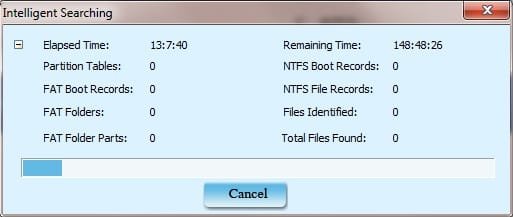
yes i used partition recovery , its been 13 hours it needs 150 hours see the screenshot
and MiniTool Partition Wizard Home Edition see the screenshot
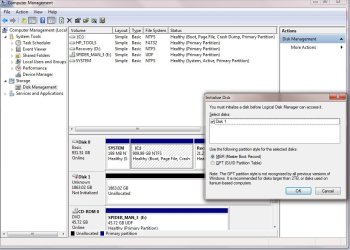
and i am afraid to touch anything in disk managment see the screenshot
so any help ??
should i follow the instruction of the page u gave me
 

Attachments

  • disk.jpg
    disk.jpg
    14.7 KB · Views: 4
  • disk 2.jpg
    disk 2.jpg
    133.7 KB · Views: 5
  • disk 3.jpg
    disk 3.jpg
    92 KB · Views: 4

My Computer My Computer

At a glance

Windows 7 Ultimate x64
OS
Windows 7 Ultimate x64
i just want to know the right steps !! any wrong button i press might lead in loss of data !! i am gonna buy a new hard disk soon so i need this to keep working so i could move the files there !!
 

My Computer My Computer

At a glance

Windows 7 Ultimate x64
OS
Windows 7 Ultimate x64
Ohoy! Disk Management shows not initialised and Partition Wizard shows boldly a bad disk. Something I have not seen/heard. Don't do anything now.

The thread I had referenced is not relevant in this case. So just forget about it.

Let us wait for some ideas from other experts here.

In the meanwhile you can download Seatools for DOS and burn it to a CD/pendrive and boot from it.

Check what Seatools finds and whether it can repair it. SeaTools for DOS | Seagate

Please read all the instructions and any documentation on how to use it.

Now on to other experts. (jumanji does not know all. :))
 

My Computer My Computer

At a glance

Windows 7 Home Premium 32 bit
OS
Windows 7 Home Premium 32 bit
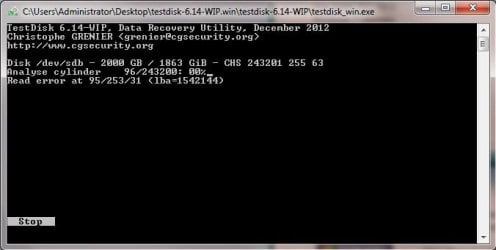
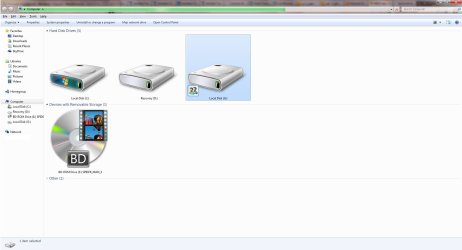
i actually started testdisk and it is checking or analysing something here is the screenshot !! and btw the hard disk is showen in my computer (its G) here are some screenshots !!!
 

Attachments

  • disk 4.jpg
    disk 4.jpg
    22.6 KB · Views: 2
  • disk 5.jpg
    disk 5.jpg
    78.9 KB · Views: 3

My Computer My Computer

At a glance

Windows 7 Ultimate x64
OS
Windows 7 Ultimate x64
and i still have the disk management open !!! do i press cancel or ok ?
 

My Computer My Computer

At a glance

Windows 7 Ultimate x64
OS
Windows 7 Ultimate x64
and do i stop EASEUS Data Recovery Wizard Professional 5.5.1 from scanning !! it sill hasn`t done anything still 147 hours it keep going up and down !!
 

My Computer My Computer

At a glance

Windows 7 Ultimate x64
OS
Windows 7 Ultimate x64
If you are using Test Disk exercise caution.

Go step by step exactly as under Recovery with TestDisk: SanDisk Cruzer Blade 16GB. After you press QUICK SEARCH and then Y, what is the screen you get? Post the screenshot. If the partition is not identified correctly, then you have to do a deep search.

Test Disk is safe as long as you do not give a write command. You can repeat any number of times. But everytime you quit the program, you have to safely remove the HDD, plug it in again and start Test Disk. Otherwise it may indicate Read errors.

In any case, I would halt any recovery process till you run Seatools and find that the disk is serviceable. What puts the spoke here is the bad disk announcement by Partition Wizard.

EDIT:I am hitting the sack now. So I won't be here and no response from me for the next 10 hours. Hope other experts chip in to help you.
 

My Computer My Computer

At a glance

Windows 7 Home Premium 32 bit
OS
Windows 7 Home Premium 32 bit
testdisk now is still analysing when its done and after i press Y !! i will post a screenshot !! but it might take all day !! i will post the picture tomorrow or late at night !!
 

My Computer My Computer

At a glance

Windows 7 Ultimate x64
OS
Windows 7 Ultimate x64
1. Please do not run many disk applications at the same time. ( You seem to be doing that since you mentioned EaseUs )

2. Your external disk in your screenshot post #6 seems to have a drive letter G, but your earlier screenshot of Windows Disk Management showed no drive letter. I would think you are doing too many things at the same time and as a result we are not getting the correct picture.

3. Advise:

Run only one disk application at a time.

Remove sharing of your external drive.

Remove any discs from your optical drive.

4. Please let us know whether other USB devices function as they should.

5. Connect your external drive to another PC and check its status.

I am afraid we have to perhaps start the whole exercise afresh.
 
Last edited:

My Computer My Computer

At a glance

Windows 7 Home Premium 32 bit
OS
Windows 7 Home Premium 32 bit
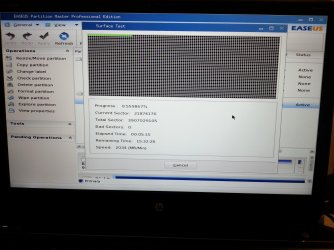
Ur right i was doing 2 applications at the same time but i later found out it was slowing down the process so i checked everything agin it showed the same result !! I downloaded a bootable easeus partition master and i was able to check partition !! I did a surface test but it kept freezing at 0.56 on sector 21874176 !!! And i was able to explorer the partition and see all my files !!
 

My Computer My Computer

At a glance

Windows 7 Ultimate x64
OS
Windows 7 Ultimate x64
and it says i have 14 gb free space
 

Attachments

  • 20130116_122800.jpg
    20130116_122800.jpg
    544.6 KB · Views: 9

My Computer My Computer

At a glance

Windows 7 Ultimate x64
OS
Windows 7 Ultimate x64
its frozen
 

My Computer My Computer

At a glance

Windows 7 Ultimate x64
OS
Windows 7 Ultimate x64
Back
Top