Solved Help Selecting SSD for PC

Yes I DO have the product key, but have had trouble in the past with preloaded OEM's software!

Well, if you have a standard Windows disk, you won't get any pre-loaded OEM software.

Do you have a standard Windows 7 disk?

Or some type of Gateway Windows 7 disk?

Or something else?
 

My Computer

Computer type
PC/Desktop
Computer Manufacturer/Model Number
Ignatz Special; 4 speed manual gearbox; factory air conditioning; one of one
OS
Windows 7 Home Premium SP1, 64-bit
CPU
Intel Skylake i5-6600K, not overclocked
Motherboard
AsRock Z170M Extreme 4, micro ATX
Memory
8 GB HyperX DDR4-2666 (2 x 4 GB)
Graphics Card(s)
none; graphics are integrated on CPU
Sound Card
onboard: Realtek ALC1150; external: USB Behringer UF0-202
Monitor(s) Displays
Dell S2340M 23 inch IPS
Screen Resolution
1600 x 900
Hard Drives
System: Crucial MX100 series SSD, 128 GB;
Data: Samsung Spinpoint 103SJ, 1 TB;
Backup: WD Caviar Green WD30EZRX-00D8PB0, 3 TB
PSU
Rosewill SilentNight 500 watt fanless, semi-modular
Case
Antec Solo II
Cooling
Noctua NH-U12S; Noctua F12 intake, Noctua S12A exhaust
Keyboard
Microsoft 200 6JH-00001 USB
Mouse
Dell or Microsoft optical wired; USB
Antivirus
Microsoft Security Essentials and Malwarebytes Premium
Browser
Pale Moon
Other Info
All fans PWM; speeds at idle: CPU circa 500 rpm; intake circa 600 rpm; exhaust circa 600 rpm; CPU temps 27 idle and 47 C load in a warm room (27 C/81 F) when running Intel Extreme Tuning Utility stress test.
Have two win7 disks, the one that came with the Gateway (Win7 Home Premium 64 bit) which probably has bloatware on it.
Then I purchased a (Win7 Professional) for my backup PC that maybe an OEM as well, because it states "Intended for distribution with a new computer" on it.
It's been a few years since I've installed these OS's but they both worked at the time.
If I were to have buy a new copy, whats best? I keep seeing download versions and "System builder versions? I would want the disk as well as a working product key at a reasonable price!
There's a lot of good deals, but many of them look fishy!

Thanks
N2
 

My Computer

Computer type
PC/Desktop
Computer Manufacturer/Model Number
Gateway GT 5676
OS
Windows 7 Home premium 64bit SP 1
CPU
AMD Phenom Quad Core 9600 2.3 GHz
Motherboard
4006272R - Foxconn (Bengal) RS780 Motherboard
Memory
8GB of DDR2
Graphics Card(s)
Integrated ATI Radeon HD 3200 video /Sapphire Radeon HD 3470
Sound Card
Integrated ALC888S HD codec 7.1
Monitor(s) Displays
19" Samsung SyncMaster
Screen Resolution
1440x900
Hard Drives
One Internal Samsung 500GB SSD 850EVO
One Internal 320 GB 7200 RPM SATA II hard drives
One Toshiba 1TB External
PSU
Ultra LSP 650W
Case
Gateway 5-Bay uATX Computer Case (Carbon Fiber)
Cooling
CPU - Arctic Cooler Freezer 64
Keyboard
HP
Mouse
Logitech Laser
Internet Speed
Down 54.0Mbps Up 5.8Mbps Charter (Spectrum)
Antivirus
avast Pro
Browser
FireFox 40.02
Hi,
I don't believe Gateway and others have figured out how to load all of the bloatware on 1 disk :)
Unless there are 2 disks in that package ?

Same computer it should work still.
 

My Computer

Computer type
PC/Desktop
Computer Manufacturer/Model Number
Custom assembled by me :}
OS
Win-7-Pro64bit 7-H-Prem-64bit
CPU
i7-5930K 2nd i9-9940x both water blocked VRM's too
Motherboard
ASUS SABERTOOTH X99 2nd ASUS x299 Apex
Memory
Trident-z 3200C14 2nd Trident-z 3600C16
Graphics Card(s)
EVGA 1080ti ftw3 2nd Titan Xp both water blocked
Sound Card
Built-in Realtek
Monitor(s) Displays
1-AOC G2460PG 24"G-Sync 144Hz/ 2nd 1-ASUS VG248QE 24" 144Hz
Screen Resolution
1920 x 1080 144Hz
Hard Drives
2-Samsung M.2 Evo & Evo Plus
2-Samsung 850 EVO 500GB SSD's/ 3-2.5 W.D. Black 1tb-&3-1tb/3-3.5 WD Black 1tb hdd's
PSU
EVGA SuperNOVA 1000-P2 2nd 1200-P2
Case
2-Corsair Obsidian Series 450D Black ATX Mid Tower
Cooling
Custom water loops
Keyboard
Logitech G710+/ 2nd Logitech G910
Mouse
2-RedDragon M901 Perdition 16400 dpi Gaming mouse = wired
Internet Speed
Comcast Ping 19ms 89.31mbps download speed 6.12mbps upload
Antivirus
Malwarebytes Pro/ Superantispyware Pro
Browser
FireFox & Pale moon
Other Info
2nd ASUS X299 Apex/Intel i9-9940x with Custom water loop/7H-Prem-x64/Corsair 450D case/Ram Trident-z 3600C16 4x8gb / Samsung970Evo plus 500gb SSD/Dual ssd EZ swap evo/PSU EVGA SuperNova 1200w-P2 80+Platinum/GPU Titan Xp /8-ML-140 on push-pull on 2-280GTX rads
Does the PC that will get the SSD still have the original Gateway motherboard?

Do you have any intentions of maybe replacing the motherboard in the future? Or not unless it fails completely?

Why are you considering a new copy of Windows?
 

My Computer

Computer type
PC/Desktop
Computer Manufacturer/Model Number
Ignatz Special; 4 speed manual gearbox; factory air conditioning; one of one
OS
Windows 7 Home Premium SP1, 64-bit
CPU
Intel Skylake i5-6600K, not overclocked
Motherboard
AsRock Z170M Extreme 4, micro ATX
Memory
8 GB HyperX DDR4-2666 (2 x 4 GB)
Graphics Card(s)
none; graphics are integrated on CPU
Sound Card
onboard: Realtek ALC1150; external: USB Behringer UF0-202
Monitor(s) Displays
Dell S2340M 23 inch IPS
Screen Resolution
1600 x 900
Hard Drives
System: Crucial MX100 series SSD, 128 GB;
Data: Samsung Spinpoint 103SJ, 1 TB;
Backup: WD Caviar Green WD30EZRX-00D8PB0, 3 TB
PSU
Rosewill SilentNight 500 watt fanless, semi-modular
Case
Antec Solo II
Cooling
Noctua NH-U12S; Noctua F12 intake, Noctua S12A exhaust
Keyboard
Microsoft 200 6JH-00001 USB
Mouse
Dell or Microsoft optical wired; USB
Antivirus
Microsoft Security Essentials and Malwarebytes Premium
Browser
Pale Moon
Other Info
All fans PWM; speeds at idle: CPU circa 500 rpm; intake circa 600 rpm; exhaust circa 600 rpm; CPU temps 27 idle and 47 C load in a warm room (27 C/81 F) when running Intel Extreme Tuning Utility stress test.
Yes, Gateway Has original motherboard, will only need new OS software if original COA doesn't work. Will only replace motherboard if it fails.
 

My Computer

Computer type
PC/Desktop
Computer Manufacturer/Model Number
Gateway GT 5676
OS
Windows 7 Home premium 64bit SP 1
CPU
AMD Phenom Quad Core 9600 2.3 GHz
Motherboard
4006272R - Foxconn (Bengal) RS780 Motherboard
Memory
8GB of DDR2
Graphics Card(s)
Integrated ATI Radeon HD 3200 video /Sapphire Radeon HD 3470
Sound Card
Integrated ALC888S HD codec 7.1
Monitor(s) Displays
19" Samsung SyncMaster
Screen Resolution
1440x900
Hard Drives
One Internal Samsung 500GB SSD 850EVO
One Internal 320 GB 7200 RPM SATA II hard drives
One Toshiba 1TB External
PSU
Ultra LSP 650W
Case
Gateway 5-Bay uATX Computer Case (Carbon Fiber)
Cooling
CPU - Arctic Cooler Freezer 64
Keyboard
HP
Mouse
Logitech Laser
Internet Speed
Down 54.0Mbps Up 5.8Mbps Charter (Spectrum)
Antivirus
avast Pro
Browser
FireFox 40.02
Yes, Gateway Has original motherboard, will only need new OS software if original COA doesn't work. Will only replace motherboard if it fails.

Certainly should work if the "original COA" is taken directly from the sticker on the Gateway and if the disk you are using for the install is in fact the one that shipped with the PC from the factory and not a disk that you obtained later, after the Gateway was purchased.

What is your partitioning plan for the SSD and what is your backup plan in general, after you get the SSD installed?

What do you intend to do with those two 320 GB drives you now have?
 

My Computer

Computer type
PC/Desktop
Computer Manufacturer/Model Number
Ignatz Special; 4 speed manual gearbox; factory air conditioning; one of one
OS
Windows 7 Home Premium SP1, 64-bit
CPU
Intel Skylake i5-6600K, not overclocked
Motherboard
AsRock Z170M Extreme 4, micro ATX
Memory
8 GB HyperX DDR4-2666 (2 x 4 GB)
Graphics Card(s)
none; graphics are integrated on CPU
Sound Card
onboard: Realtek ALC1150; external: USB Behringer UF0-202
Monitor(s) Displays
Dell S2340M 23 inch IPS
Screen Resolution
1600 x 900
Hard Drives
System: Crucial MX100 series SSD, 128 GB;
Data: Samsung Spinpoint 103SJ, 1 TB;
Backup: WD Caviar Green WD30EZRX-00D8PB0, 3 TB
PSU
Rosewill SilentNight 500 watt fanless, semi-modular
Case
Antec Solo II
Cooling
Noctua NH-U12S; Noctua F12 intake, Noctua S12A exhaust
Keyboard
Microsoft 200 6JH-00001 USB
Mouse
Dell or Microsoft optical wired; USB
Antivirus
Microsoft Security Essentials and Malwarebytes Premium
Browser
Pale Moon
Other Info
All fans PWM; speeds at idle: CPU circa 500 rpm; intake circa 600 rpm; exhaust circa 600 rpm; CPU temps 27 idle and 47 C load in a warm room (27 C/81 F) when running Intel Extreme Tuning Utility stress test.
Well, if If I go with the 500GB Crucial SSD for my Primary drive, (Not knowing a lot about Partitioning) we had discussed one option of just mounting a fresh install of Win7 and storing data there as well. So no partitions, just the 500GB SSD with Win7 and data.

I could use the other on-board 320GB SATA HDD drive for backups or extra storage.

I generally just image the C: drive once a week utilizing Macrium to an external HDD, and when it start's getting full, delete older backups.

The old primary 320GB replaced by the SSD (believed to be bad) will be junked out.

I generally use this pc for surfing the web, email, some photo editing and household record keeping, so I don't generate large amounts of data. It just always made sense to backup the whole C: assuring I had a OS and data backup in 1. the complete C: drive backup is usually about 92.9GB
While were still talking about this computer, I keep getting bugged to upgrade to Win10, I have seen 8 and to me, it looks more suited to touch screens? I didn't care for it and stuck with Win7, what about Win10? is it worth messing with or is it similar to 8?
 

My Computer

Computer type
PC/Desktop
Computer Manufacturer/Model Number
Gateway GT 5676
OS
Windows 7 Home premium 64bit SP 1
CPU
AMD Phenom Quad Core 9600 2.3 GHz
Motherboard
4006272R - Foxconn (Bengal) RS780 Motherboard
Memory
8GB of DDR2
Graphics Card(s)
Integrated ATI Radeon HD 3200 video /Sapphire Radeon HD 3470
Sound Card
Integrated ALC888S HD codec 7.1
Monitor(s) Displays
19" Samsung SyncMaster
Screen Resolution
1440x900
Hard Drives
One Internal Samsung 500GB SSD 850EVO
One Internal 320 GB 7200 RPM SATA II hard drives
One Toshiba 1TB External
PSU
Ultra LSP 650W
Case
Gateway 5-Bay uATX Computer Case (Carbon Fiber)
Cooling
CPU - Arctic Cooler Freezer 64
Keyboard
HP
Mouse
Logitech Laser
Internet Speed
Down 54.0Mbps Up 5.8Mbps Charter (Spectrum)
Antivirus
avast Pro
Browser
FireFox 40.02
see comments in bold

Well, if If I go with the 500GB Crucial SSD for my Primary drive, (Not knowing a lot about Partitioning) we had discussed one option of just mounting a fresh install of Win7 and storing data there as well. So no partitions, just the 500GB SSD with Win7 and data.

Nothing wrong with that. But you have only 93 GB grand total space used, so maybe a 240 GB SSD would be OK if your data is growing slowly?


I could use the other on-board 320GB SATA HDD drive for backups or extra storage.

Extra storage for what? What else could you possibly have beyond the 93 GB? Stuff from some other PC?

Backup space sounds like a good use for it, leaving it as an internal.


I generally just image the C: drive once a week utilizing Macrium to an external HDD, and when it start's getting full, delete older backups.

After you get the new SSD, I'd image it to the internal 320. And periodically copy everything on the internal 320 to the external as a second backup. The 320 internal backup will be faster than the external drive.


The old primary 320GB replaced by the SSD (believed to be bad) will be junked out.

OK

I generally use this pc for surfing the web, email, some photo editing and household record keeping, so I don't generate large amounts of data. It just always made sense to backup the whole C: assuring I had a OS and data backup in 1. the complete C: drive backup is usually about 92.9GB

Nothing wrong with that strategy if you have all data on C, not on a separate partition.

Are you making an image of System Reserved as well as C?

Have you ever done a Macrium restore? It can be confusing, so I'd urge you to familiarize yourself with it for test purposes so when disaster does strike you won't be wondering what to do next.

Maybe use the sick 320 as a destination to restore to as a test to learn on, after you get the new install on the SSD?


While were still talking about this computer, I keep getting bugged to upgrade to Win10, I have seen 8 and to me, it looks more suited to touch screens? I didn't care for it and stuck with Win7, what about Win10? is it worth messing with or is it similar to 8?

Yes 8 is more suited to touch screens. Win 10 is kind of in-between 7 and 8 on that score. No over-riding reason to worry about it now. The "free upgrade" is available till next July and you can always buy it outright any time you want.

If you did want to go to 10, the procedure would be to install 7 on the SSD, activate it, and then do the "free upgrade" from that to 10. You could NOT put the free upgrade to 10 on an empty hard drive.


My Computer

Computer type
PC/Desktop
Computer Manufacturer/Model Number
Ignatz Special; 4 speed manual gearbox; factory air conditioning; one of one
OS
Windows 7 Home Premium SP1, 64-bit
CPU
Intel Skylake i5-6600K, not overclocked
Motherboard
AsRock Z170M Extreme 4, micro ATX
Memory
8 GB HyperX DDR4-2666 (2 x 4 GB)
Graphics Card(s)
none; graphics are integrated on CPU
Sound Card
onboard: Realtek ALC1150; external: USB Behringer UF0-202
Monitor(s) Displays
Dell S2340M 23 inch IPS
Screen Resolution
1600 x 900
Hard Drives
System: Crucial MX100 series SSD, 128 GB;
Data: Samsung Spinpoint 103SJ, 1 TB;
Backup: WD Caviar Green WD30EZRX-00D8PB0, 3 TB
PSU
Rosewill SilentNight 500 watt fanless, semi-modular
Case
Antec Solo II
Cooling
Noctua NH-U12S; Noctua F12 intake, Noctua S12A exhaust
Keyboard
Microsoft 200 6JH-00001 USB
Mouse
Dell or Microsoft optical wired; USB
Antivirus
Microsoft Security Essentials and Malwarebytes Premium
Browser
Pale Moon
Other Info
All fans PWM; speeds at idle: CPU circa 500 rpm; intake circa 600 rpm; exhaust circa 600 rpm; CPU temps 27 idle and 47 C load in a warm room (27 C/81 F) when running Intel Extreme Tuning Utility stress test.
ignatzatsonic, Your probably right the smaller drive may be the way to go, it will save some money.
I don't quite understand your question (Are you making an image of System Reserved as well as C?)
When I make a Macrium image I select C: and image that whole drive.

If I understood partitioning and how program files were stored better, I would like to be able to partition just enough space on the primary drive for the Win7 OS, then have additional programs and data stored on the remainder of the primary.
I could image the partition that had the OS on it separately and it would be like a fresh install if the OS went buggy.
But I don't understand enough about all this to be that crafty, so I just backup everything.
 

My Computer

Computer type
PC/Desktop
Computer Manufacturer/Model Number
Gateway GT 5676
OS
Windows 7 Home premium 64bit SP 1
CPU
AMD Phenom Quad Core 9600 2.3 GHz
Motherboard
4006272R - Foxconn (Bengal) RS780 Motherboard
Memory
8GB of DDR2
Graphics Card(s)
Integrated ATI Radeon HD 3200 video /Sapphire Radeon HD 3470
Sound Card
Integrated ALC888S HD codec 7.1
Monitor(s) Displays
19" Samsung SyncMaster
Screen Resolution
1440x900
Hard Drives
One Internal Samsung 500GB SSD 850EVO
One Internal 320 GB 7200 RPM SATA II hard drives
One Toshiba 1TB External
PSU
Ultra LSP 650W
Case
Gateway 5-Bay uATX Computer Case (Carbon Fiber)
Cooling
CPU - Arctic Cooler Freezer 64
Keyboard
HP
Mouse
Logitech Laser
Internet Speed
Down 54.0Mbps Up 5.8Mbps Charter (Spectrum)
Antivirus
avast Pro
Browser
FireFox 40.02
A little information so we understand thing correctly.

Drives have numbers. Partitions have letters.

A (C) partition can be and should be on Drive (0)
It can be allocated the complete Drive or a separate partition on the drive.

Example:

Disc Management.JPG

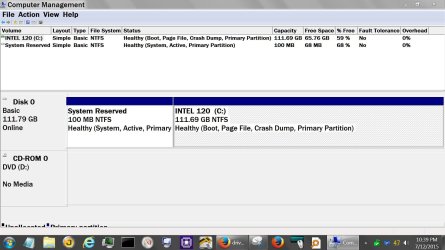
Disk (0) has a Reserve Partition with out a a letter as it should be.
Disc (0) also has a (C) partition with Windows 7 installed and all other data and programs. My choice at this time.

If and when I need another partition I can create one and give it a partition letter, Example: (F) partition on Disk (0).

Using these key words (Drive/Partition) correctly makes thing easier to understand for those trying to help.
 

My Computer

Computer type
PC/Desktop
Computer Manufacturer/Model Number
Home made Desktop
OS
Windows 10 Pro. 64/ version 1709 Windows 7 Pro/64
CPU
Intel i7-6800K @ 4.3
Motherboard
ASUS X-99 Deluxe II
Memory
Corsair Platinum 16 gig @2400
Graphics Card(s)
EVGA GTX 1070 OC
Monitor(s) Displays
Asus 27" LED LCD/VE278Q
Screen Resolution
1920-1080 or 1280-720 HDMI
Hard Drives
INTEL SSD 730-240 Gb Sata 3.0/
PSU
EVGA Platium 1200W
Case
Phanteks Luxe Tempered Glass 8 fans/ one radiator
Cooling
XSPC/ Water Cooled CPU
Keyboard
Das 4 Professional
Mouse
Logitech M705/MX Anywhere 2-S
Internet Speed
100 mbits
Antivirus
Microsoft Security Essentials/ Malwarebytes Premium 3.0/ SAS
Browser
I.E. 11 default/Firefox/ ISP Time Warner Cable/Spectrum
Other Info
LG BluRay Burner/
Sound system-KLipsch-THX/
Icy Dock ssd Hot Swap bays.
see comments in bold

Your probably right the smaller drive may be the way to go, it will save some money.

OK; pretty much your choice. The price difference isn't a lot. You just have to gauge how fast your total space requirements will grow. I'm guessing under 10 GB a year, which makes 500 GB pretty tough to justify.

I don't quite understand your question (Are you making an image of System Reserved as well as C?)
When I make a Macrium image I select C: and image that whole drive.

C isn't a drive.

It's a partition.

Maybe it's the only partition on the drive. Maybe it isn't.

Analogy with a carton of cigarettes:

The outer carton is the drive. The individual packs of cigarettes are partitions. The individual cigarettes are files and folders. You can have a carton with 1 huge pack or a bunch of smaller packs. The carton alone is pretty much useless.

Do you or don't you have a System Reserved partition?

If you do, it almost certainly contains your boot files and would be have to be imaged if you want to restore successfully.

If you don't, then your boot files are elsewhere, probably on the C partition. In which case, you would need to image C only.

So---you should post a screen shot of Windows Disk Management so we can see what's going on with the current installation---or at least look at Windows Disk Management yourself. If you have a System Reserved partition, it probably is flagged as "system" and "active". Yes or no?

You can certainly make ONE image file containing BOTH C and System Reserved. Maybe that's what you've been doing. I don't know. But you say "I select C", which makes me wonder.


If I understood partitioning and how program files were stored better, I would like to be able to partition just enough space on the primary drive for the Win7 OS, then have additional programs and data stored on the remainder of the primary.

That's rarely a good idea. You rarely would want to put programs and Windows on separate partitions---particularly in your situation where space is not an issue.

It MIGHT be a good idea to put Windows and all programs on C and all data on another partition on the same drive, but it's NOT necessary. It would make your C images smaller since C would have no data files. That's a slight advantage.

And if your C partition (Windows) became fouled up, you could restore just C and System Reserved, not data. That can be an advantage.

Imagine this situation:

September 1: you've got the SSD, with C and System Reserved. Your data is on C somewhere.

September 4: you make an image of C and System Reserved with Macrium.

September 6: you develop a bunch of new data--picture of your cat, whatever. Those pix are on C.

September 8: your Windows installation goes haywire, so you restore the Macrium image from September 4.

Guess what: the pictures of your cat are gone because they were not part of the image you made on Sept 4.

If the pictures had been on a separate data partition, then the restoration of the September 4 image would not have affected your data at all---because all you restored was Windows (C and System Reserved), not the data partition.

You can work around that problem if you had separate data backups made after September 6, which you certainly should have and which is why the separate data partition thing is not required. It's just convenient.


You don't want to make C "just right in size" and then find out 2 years later that it's too small and that can be tough to estimate. Windows grows over time, just through updates.


I could image the partition that had the OS on it separately and it would be like a fresh install if the OS went buggy.
But I don't understand enough about all this to be that crafty, so I just backup everything.

No problem IF IF IF IF you are backing up ALL ALL ALL partitions on that hard drive, not just C.

 

My Computer

Computer type
PC/Desktop
Computer Manufacturer/Model Number
Ignatz Special; 4 speed manual gearbox; factory air conditioning; one of one
OS
Windows 7 Home Premium SP1, 64-bit
CPU
Intel Skylake i5-6600K, not overclocked
Motherboard
AsRock Z170M Extreme 4, micro ATX
Memory
8 GB HyperX DDR4-2666 (2 x 4 GB)
Graphics Card(s)
none; graphics are integrated on CPU
Sound Card
onboard: Realtek ALC1150; external: USB Behringer UF0-202
Monitor(s) Displays
Dell S2340M 23 inch IPS
Screen Resolution
1600 x 900
Hard Drives
System: Crucial MX100 series SSD, 128 GB;
Data: Samsung Spinpoint 103SJ, 1 TB;
Backup: WD Caviar Green WD30EZRX-00D8PB0, 3 TB
PSU
Rosewill SilentNight 500 watt fanless, semi-modular
Case
Antec Solo II
Cooling
Noctua NH-U12S; Noctua F12 intake, Noctua S12A exhaust
Keyboard
Microsoft 200 6JH-00001 USB
Mouse
Dell or Microsoft optical wired; USB
Antivirus
Microsoft Security Essentials and Malwarebytes Premium
Browser
Pale Moon
Other Info
All fans PWM; speeds at idle: CPU circa 500 rpm; intake circa 600 rpm; exhaust circa 600 rpm; CPU temps 27 idle and 47 C load in a warm room (27 C/81 F) when running Intel Extreme Tuning Utility stress test.
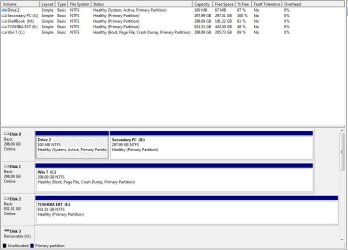
Here's what Disc Management Shows:
 

Attachments

  • Disc Man.JPG
    Disc Man.JPG
    111.4 KB · Views: 2

My Computer

Computer type
PC/Desktop
Computer Manufacturer/Model Number
Gateway GT 5676
OS
Windows 7 Home premium 64bit SP 1
CPU
AMD Phenom Quad Core 9600 2.3 GHz
Motherboard
4006272R - Foxconn (Bengal) RS780 Motherboard
Memory
8GB of DDR2
Graphics Card(s)
Integrated ATI Radeon HD 3200 video /Sapphire Radeon HD 3470
Sound Card
Integrated ALC888S HD codec 7.1
Monitor(s) Displays
19" Samsung SyncMaster
Screen Resolution
1440x900
Hard Drives
One Internal Samsung 500GB SSD 850EVO
One Internal 320 GB 7200 RPM SATA II hard drives
One Toshiba 1TB External
PSU
Ultra LSP 650W
Case
Gateway 5-Bay uATX Computer Case (Carbon Fiber)
Cooling
CPU - Arctic Cooler Freezer 64
Keyboard
HP
Mouse
Logitech Laser
Internet Speed
Down 54.0Mbps Up 5.8Mbps Charter (Spectrum)
Antivirus
avast Pro
Browser
FireFox 40.02
Quite a mess.

You don't have System Reserved, but your boot files are on "Drive 2" on disk 0

C is on disk 1.

An image of C alone will NOT restore Windows. It wouldn't boot.

If you disconnected disc 0, or it failed, you couldn't boot today.

So, the Macrium images you have been making, if they are of disk 1 or C, aren't doing you much good.

Thank your lucky stars that you have not had a drive failure. YET.

This probably happened because you had more than one drive connected the last time you install Windows.

It's fixable by using "EasyBCD", a free downloadable application. There is a tutorial on this site.

You need to get this sobered up pronto, before thinking about an SSD.

EasyBCD will copy your boot files from your "Drive 2" to C. When that's done and the C partition is marked "active" in Disk Management, you can then delete "Drive 2".

At that point, your disc 1, with only C, should boot with NO other drives connected. Until then, it won't.

It's not a complicated job.

Here's the tutorial:

http://www.sevenforums.com/tutorials/209885-bootmgr-move-c-easybcd.html

Ask questions if confused. I've never used it, but many on this site have.
 

My Computer

Computer type
PC/Desktop
Computer Manufacturer/Model Number
Ignatz Special; 4 speed manual gearbox; factory air conditioning; one of one
OS
Windows 7 Home Premium SP1, 64-bit
CPU
Intel Skylake i5-6600K, not overclocked
Motherboard
AsRock Z170M Extreme 4, micro ATX
Memory
8 GB HyperX DDR4-2666 (2 x 4 GB)
Graphics Card(s)
none; graphics are integrated on CPU
Sound Card
onboard: Realtek ALC1150; external: USB Behringer UF0-202
Monitor(s) Displays
Dell S2340M 23 inch IPS
Screen Resolution
1600 x 900
Hard Drives
System: Crucial MX100 series SSD, 128 GB;
Data: Samsung Spinpoint 103SJ, 1 TB;
Backup: WD Caviar Green WD30EZRX-00D8PB0, 3 TB
PSU
Rosewill SilentNight 500 watt fanless, semi-modular
Case
Antec Solo II
Cooling
Noctua NH-U12S; Noctua F12 intake, Noctua S12A exhaust
Keyboard
Microsoft 200 6JH-00001 USB
Mouse
Dell or Microsoft optical wired; USB
Antivirus
Microsoft Security Essentials and Malwarebytes Premium
Browser
Pale Moon
Other Info
All fans PWM; speeds at idle: CPU circa 500 rpm; intake circa 600 rpm; exhaust circa 600 rpm; CPU temps 27 idle and 47 C load in a warm room (27 C/81 F) when running Intel Extreme Tuning Utility stress test.

My Computer

Computer type
PC/Desktop
Computer Manufacturer/Model Number
Custom assembled by me :}
OS
Win-7-Pro64bit 7-H-Prem-64bit
CPU
i7-5930K 2nd i9-9940x both water blocked VRM's too
Motherboard
ASUS SABERTOOTH X99 2nd ASUS x299 Apex
Memory
Trident-z 3200C14 2nd Trident-z 3600C16
Graphics Card(s)
EVGA 1080ti ftw3 2nd Titan Xp both water blocked
Sound Card
Built-in Realtek
Monitor(s) Displays
1-AOC G2460PG 24"G-Sync 144Hz/ 2nd 1-ASUS VG248QE 24" 144Hz
Screen Resolution
1920 x 1080 144Hz
Hard Drives
2-Samsung M.2 Evo & Evo Plus
2-Samsung 850 EVO 500GB SSD's/ 3-2.5 W.D. Black 1tb-&3-1tb/3-3.5 WD Black 1tb hdd's
PSU
EVGA SuperNOVA 1000-P2 2nd 1200-P2
Case
2-Corsair Obsidian Series 450D Black ATX Mid Tower
Cooling
Custom water loops
Keyboard
Logitech G710+/ 2nd Logitech G910
Mouse
2-RedDragon M901 Perdition 16400 dpi Gaming mouse = wired
Internet Speed
Comcast Ping 19ms 89.31mbps download speed 6.12mbps upload
Antivirus
Malwarebytes Pro/ Superantispyware Pro
Browser
FireFox & Pale moon
Other Info
2nd ASUS X299 Apex/Intel i9-9940x with Custom water loop/7H-Prem-x64/Corsair 450D case/Ram Trident-z 3600C16 4x8gb / Samsung970Evo plus 500gb SSD/Dual ssd EZ swap evo/PSU EVGA SuperNova 1200w-P2 80+Platinum/GPU Titan Xp /8-ML-140 on push-pull on 2-280GTX rads
N2:

Couple of things to add:

You should make a Macrium image file of your "Drive 2" and store it with your other Macrium images----before fiddling with EasyBCD. If you do that, then I'd think you COULD restore Windows if you had to.

Secondly:

You need to copy Boot Manager to another DRIVE, not just to a different partition on the SAME DRIVE.

I just looked at the EasyBCD web site about that procedure. Here's what it says:

"If the partition which is to take over control of the boot is on a different HDD from the current boot partition, you will also need to change your BIOS to put the new drive before the old one in the boot sequence, otherwise the old (untouched) boot files will continue to be in control. This obviously does not apply if the two partitions share a HDD. The switch of the “active” status will do everything needed in that case."

So, you'll need to get into your BIOS to change the boot sequence after you use EasyBCD.

Here is their tutorial:

https://neosmart.net/wiki/easybcd/basics/changing-the-boot-partition/
 

My Computer

Computer type
PC/Desktop
Computer Manufacturer/Model Number
Ignatz Special; 4 speed manual gearbox; factory air conditioning; one of one
OS
Windows 7 Home Premium SP1, 64-bit
CPU
Intel Skylake i5-6600K, not overclocked
Motherboard
AsRock Z170M Extreme 4, micro ATX
Memory
8 GB HyperX DDR4-2666 (2 x 4 GB)
Graphics Card(s)
none; graphics are integrated on CPU
Sound Card
onboard: Realtek ALC1150; external: USB Behringer UF0-202
Monitor(s) Displays
Dell S2340M 23 inch IPS
Screen Resolution
1600 x 900
Hard Drives
System: Crucial MX100 series SSD, 128 GB;
Data: Samsung Spinpoint 103SJ, 1 TB;
Backup: WD Caviar Green WD30EZRX-00D8PB0, 3 TB
PSU
Rosewill SilentNight 500 watt fanless, semi-modular
Case
Antec Solo II
Cooling
Noctua NH-U12S; Noctua F12 intake, Noctua S12A exhaust
Keyboard
Microsoft 200 6JH-00001 USB
Mouse
Dell or Microsoft optical wired; USB
Antivirus
Microsoft Security Essentials and Malwarebytes Premium
Browser
Pale Moon
Other Info
All fans PWM; speeds at idle: CPU circa 500 rpm; intake circa 600 rpm; exhaust circa 600 rpm; CPU temps 27 idle and 47 C load in a warm room (27 C/81 F) when running Intel Extreme Tuning Utility stress test.

My Computer

Computer type
PC/Desktop
Computer Manufacturer/Model Number
Gateway GT 5676
OS
Windows 7 Home premium 64bit SP 1
CPU
AMD Phenom Quad Core 9600 2.3 GHz
Motherboard
4006272R - Foxconn (Bengal) RS780 Motherboard
Memory
8GB of DDR2
Graphics Card(s)
Integrated ATI Radeon HD 3200 video /Sapphire Radeon HD 3470
Sound Card
Integrated ALC888S HD codec 7.1
Monitor(s) Displays
19" Samsung SyncMaster
Screen Resolution
1440x900
Hard Drives
One Internal Samsung 500GB SSD 850EVO
One Internal 320 GB 7200 RPM SATA II hard drives
One Toshiba 1TB External
PSU
Ultra LSP 650W
Case
Gateway 5-Bay uATX Computer Case (Carbon Fiber)
Cooling
CPU - Arctic Cooler Freezer 64
Keyboard
HP
Mouse
Logitech Laser
Internet Speed
Down 54.0Mbps Up 5.8Mbps Charter (Spectrum)
Antivirus
avast Pro
Browser
FireFox 40.02
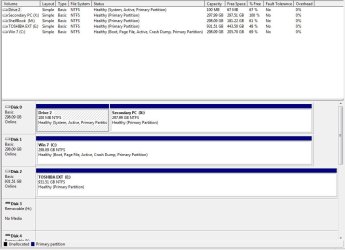
I'm not sure that accomplished anything.

Note that C is still not marked as "system", just as it was before you used EasyBCD.

You'd need to get C marked as "system".

Maybe you did not operate EasyBCD correctly?

Maybe you need to go into your BIOS and change the boot sequence?

I'm not sure myself.

Did you see my post 35?

I'd make a Macrium image of your "Drive 2" partition.

You can forget about EasyBCD and this procedure IF:

1: You want to take a chance that your drive won't fail before you get the SSD installed.

or

2: The image I asked you to make of "Drive 2" will allow you to restore Windows if your drive fails at noon tomorrow. You'd restore both images: Drive 2 and C.
 

My Computer

Computer type
PC/Desktop
Computer Manufacturer/Model Number
Ignatz Special; 4 speed manual gearbox; factory air conditioning; one of one
OS
Windows 7 Home Premium SP1, 64-bit
CPU
Intel Skylake i5-6600K, not overclocked
Motherboard
AsRock Z170M Extreme 4, micro ATX
Memory
8 GB HyperX DDR4-2666 (2 x 4 GB)
Graphics Card(s)
none; graphics are integrated on CPU
Sound Card
onboard: Realtek ALC1150; external: USB Behringer UF0-202
Monitor(s) Displays
Dell S2340M 23 inch IPS
Screen Resolution
1600 x 900
Hard Drives
System: Crucial MX100 series SSD, 128 GB;
Data: Samsung Spinpoint 103SJ, 1 TB;
Backup: WD Caviar Green WD30EZRX-00D8PB0, 3 TB
PSU
Rosewill SilentNight 500 watt fanless, semi-modular
Case
Antec Solo II
Cooling
Noctua NH-U12S; Noctua F12 intake, Noctua S12A exhaust
Keyboard
Microsoft 200 6JH-00001 USB
Mouse
Dell or Microsoft optical wired; USB
Antivirus
Microsoft Security Essentials and Malwarebytes Premium
Browser
Pale Moon
Other Info
All fans PWM; speeds at idle: CPU circa 500 rpm; intake circa 600 rpm; exhaust circa 600 rpm; CPU temps 27 idle and 47 C load in a warm room (27 C/81 F) when running Intel Extreme Tuning Utility stress test.
Unfortunately I ran EasyBCD before imaging Drive 2, just tried to make image of drive2 but it's like nothing's there, it imaged almost instantly.
 

My Computer

Computer type
PC/Desktop
Computer Manufacturer/Model Number
Gateway GT 5676
OS
Windows 7 Home premium 64bit SP 1
CPU
AMD Phenom Quad Core 9600 2.3 GHz
Motherboard
4006272R - Foxconn (Bengal) RS780 Motherboard
Memory
8GB of DDR2
Graphics Card(s)
Integrated ATI Radeon HD 3200 video /Sapphire Radeon HD 3470
Sound Card
Integrated ALC888S HD codec 7.1
Monitor(s) Displays
19" Samsung SyncMaster
Screen Resolution
1440x900
Hard Drives
One Internal Samsung 500GB SSD 850EVO
One Internal 320 GB 7200 RPM SATA II hard drives
One Toshiba 1TB External
PSU
Ultra LSP 650W
Case
Gateway 5-Bay uATX Computer Case (Carbon Fiber)
Cooling
CPU - Arctic Cooler Freezer 64
Keyboard
HP
Mouse
Logitech Laser
Internet Speed
Down 54.0Mbps Up 5.8Mbps Charter (Spectrum)
Antivirus
avast Pro
Browser
FireFox 40.02
It's tiny. I'd expect it to be very fast. A second or two at most.

Can you find it on whatever drive you saved it to??

If so, it likely was a success.

Can you boot with your Disc 0 containing "Drive 2" disconnected? I'd guess you cannot.
 

My Computer

Computer type
PC/Desktop
Computer Manufacturer/Model Number
Ignatz Special; 4 speed manual gearbox; factory air conditioning; one of one
OS
Windows 7 Home Premium SP1, 64-bit
CPU
Intel Skylake i5-6600K, not overclocked
Motherboard
AsRock Z170M Extreme 4, micro ATX
Memory
8 GB HyperX DDR4-2666 (2 x 4 GB)
Graphics Card(s)
none; graphics are integrated on CPU
Sound Card
onboard: Realtek ALC1150; external: USB Behringer UF0-202
Monitor(s) Displays
Dell S2340M 23 inch IPS
Screen Resolution
1600 x 900
Hard Drives
System: Crucial MX100 series SSD, 128 GB;
Data: Samsung Spinpoint 103SJ, 1 TB;
Backup: WD Caviar Green WD30EZRX-00D8PB0, 3 TB
PSU
Rosewill SilentNight 500 watt fanless, semi-modular
Case
Antec Solo II
Cooling
Noctua NH-U12S; Noctua F12 intake, Noctua S12A exhaust
Keyboard
Microsoft 200 6JH-00001 USB
Mouse
Dell or Microsoft optical wired; USB
Antivirus
Microsoft Security Essentials and Malwarebytes Premium
Browser
Pale Moon
Other Info
All fans PWM; speeds at idle: CPU circa 500 rpm; intake circa 600 rpm; exhaust circa 600 rpm; CPU temps 27 idle and 47 C load in a warm room (27 C/81 F) when running Intel Extreme Tuning Utility stress test.
I show two macrium files backed up, The C: @ 52.0 GB and the "Drive2 @ 11.6 MB.
 

My Computer

Computer type
PC/Desktop
Computer Manufacturer/Model Number
Gateway GT 5676
OS
Windows 7 Home premium 64bit SP 1
CPU
AMD Phenom Quad Core 9600 2.3 GHz
Motherboard
4006272R - Foxconn (Bengal) RS780 Motherboard
Memory
8GB of DDR2
Graphics Card(s)
Integrated ATI Radeon HD 3200 video /Sapphire Radeon HD 3470
Sound Card
Integrated ALC888S HD codec 7.1
Monitor(s) Displays
19" Samsung SyncMaster
Screen Resolution
1440x900
Hard Drives
One Internal Samsung 500GB SSD 850EVO
One Internal 320 GB 7200 RPM SATA II hard drives
One Toshiba 1TB External
PSU
Ultra LSP 650W
Case
Gateway 5-Bay uATX Computer Case (Carbon Fiber)
Cooling
CPU - Arctic Cooler Freezer 64
Keyboard
HP
Mouse
Logitech Laser
Internet Speed
Down 54.0Mbps Up 5.8Mbps Charter (Spectrum)
Antivirus
avast Pro
Browser
FireFox 40.02
Back
Top