
Solved Need Help Selecting from Installation Options in a Missing Update DL

Efdy

New member
Member
VIP
Local time
8:25 PM
Messages
137
Location
USA
Hello. Thanks for reading. It finally occurred to me to also run that Microsoft Baseline Security Analyzer on my older desktop computer with Windows 7 Home Premium 32-bit (Pentium 4). System Specs are included here at the end of my system specs for the newer PC. Here is a screenshot of what the MBSA results show for the missing update.
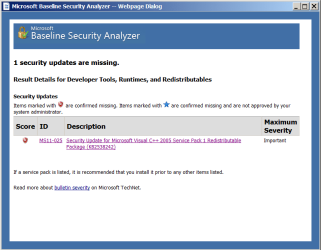
Screenshot 01 - MS11-025 Baseline Security Analyzer Results.png

I went to this page at Update Catalog and downloaded the one with the same description as in the MBSA scan results because no download was offered on the page one of those hyperlinks in the MBSA scan results leads to, and the other linked to a web page that no longer exists.
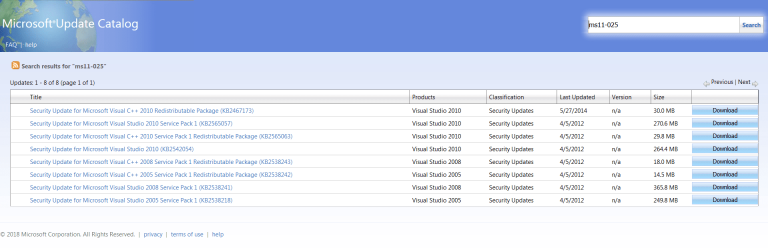
Screenshot 02 - Update Catalog ms11-025.png

And this is a screenshot of the contents of the folder that downloaded from Update Catalog.
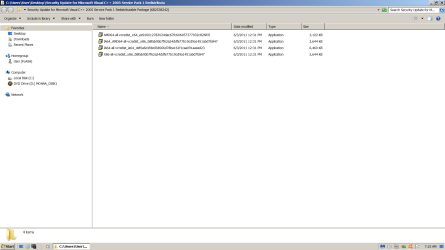
Screenshot 03 - MS11-025 KB2538242 Download Contents.png

Does anyone know which of that I am supposed to install for the Windows 7 Home Premium 32-bit desktop PC? I'm only supposed to try to install one of them, right? Thank you.
 

My Computer

Computer type
PC/Desktop
Computer Manufacturer/Model Number
I do not know. It was put together with separately purchased parts.
OS
Windows 7 Ultimate 64-bit SP1
CPU
Intel Core i5-3570K
Motherboard
ASUS P8Z77-V PRO
Memory
Corsair Vengeance Blue 4x8 GB
Graphics Card(s)
Nvidia GTX 1060
Sound Card
M-Audio Delta 1010LT
Monitor(s) Displays
2 Asus VS247H-P 23.6-Inch LED-Lit LCD monitors
Screen Resolution
1920x1080
Hard Drives
Western Digital WD1002FAEX Caviar Black 1TB SATA III
(no SSD)
My Passport Ultra external hard drive 2TB
PSU
CORSAIR RM650 650W 80 PLUS GOLD Full Modular PSU
Case
Corsair Obsidian Series Black 550D Mid Tower
Cooling
Zalman CNPS9500AT CPU Cooler
Keyboard
Azio Large Print Tri-Color Backlit Wired Keyboard (KB505U)
Mouse
Logitech Gaming Mouse G300
Internet Speed
6-8Mbps down, 2Mbps up
Antivirus
Malwarebytes Premium
Browser
IE, Firefox, Chrome
Other Info
2nd PC: Dell Dimension 4600
OS: Windows 7 Home Premium 32-bit SP1
PSU: EVGA 500W 80+ thingo
CPU: Intel Pentium 4
RAM: 3.00 GB Dual Channel DDR @ 199MHz
MB: Dell 02Y832
GPU: 512MB Nvidia GeForce 6200
HDD: 465GB WDC WD5000AAKS-00A7B2 ATA (SATA)
Opt Drive: HL-DT-ST DVD-ROM GDR8162B ATA Device
Opt Drive: TSSTcorp CD-RW TS-H292C ATA Device
Audio: Creative SB Live
Monitor: Asus-VS247H-P
For 32-Bit installations you need to install the x86 installer.
 

My Computer

Computer type
PC/Desktop
Computer Manufacturer/Model Number
Custom Build
OS
Win 7 Ultimate, Win 8.1 Pro, Linux Mint 19 Cinnamon (All 64-Bit)
CPU
Intel i5 4690K
Motherboard
Gigabyte Z97X-UD3H
Memory
Corsair Vengeance LP 32GB DDR3
Graphics Card(s)
MSI GTX 1060 GAMING X 6GB
Sound Card
Onboard
Hard Drives
Samsung 850 EVO 250GB SSD (x2)
Samsung 860 EVO 1TB SSD (x2)
Crucial MX300 525GB SSD
WD Blue 2TB 5400rpm Intellipark Disabled (x2)
PSU
Corsair HX750i
Case
Phanteks Enthoo Pro
Cooling
CM Hyper 212 EVO on CPU, Noctua Redux NF-P14S 1500rpm (x6)
Keyboard
Corsair K70 RGB LUX
Mouse
Corsair Sabre RGB
Antivirus
Avast Free, MalwareBytes, SAS & CryptoPrevent
Browser
Chrome
Other Info
StarTech PEXESAT322I 2 Port PCI-E SATA Card
ASUS PCE-AC56 Dual-band AC1300 Wireless Card
Akasa FC.Six Manual Fan Controller
And a Partridge in a Pear Tree!
For 32-Bit installations you need to install the x86 installer.

Is that the fourth/last/bottom one in the list that begins with X86? I just want to make sure because one of the other ones says X86 in the name. Thank you for helping me.
 

My Computer

Computer type
PC/Desktop
Computer Manufacturer/Model Number
I do not know. It was put together with separately purchased parts.
OS
Windows 7 Ultimate 64-bit SP1
CPU
Intel Core i5-3570K
Motherboard
ASUS P8Z77-V PRO
Memory
Corsair Vengeance Blue 4x8 GB
Graphics Card(s)
Nvidia GTX 1060
Sound Card
M-Audio Delta 1010LT
Monitor(s) Displays
2 Asus VS247H-P 23.6-Inch LED-Lit LCD monitors
Screen Resolution
1920x1080
Hard Drives
Western Digital WD1002FAEX Caviar Black 1TB SATA III
(no SSD)
My Passport Ultra external hard drive 2TB
PSU
CORSAIR RM650 650W 80 PLUS GOLD Full Modular PSU
Case
Corsair Obsidian Series Black 550D Mid Tower
Cooling
Zalman CNPS9500AT CPU Cooler
Keyboard
Azio Large Print Tri-Color Backlit Wired Keyboard (KB505U)
Mouse
Logitech Gaming Mouse G300
Internet Speed
6-8Mbps down, 2Mbps up
Antivirus
Malwarebytes Premium
Browser
IE, Firefox, Chrome
Other Info
2nd PC: Dell Dimension 4600
OS: Windows 7 Home Premium 32-bit SP1
PSU: EVGA 500W 80+ thingo
CPU: Intel Pentium 4
RAM: 3.00 GB Dual Channel DDR @ 199MHz
MB: Dell 02Y832
GPU: 512MB Nvidia GeForce 6200
HDD: 465GB WDC WD5000AAKS-00A7B2 ATA (SATA)
Opt Drive: HL-DT-ST DVD-ROM GDR8162B ATA Device
Opt Drive: TSSTcorp CD-RW TS-H292C ATA Device
Audio: Creative SB Live
Monitor: Asus-VS247H-P
Hi, yes the bottom one is the one you need to install. Ignore any that say IA64 as those are for Itanium based 64-Bit processors.
 

My Computer

Computer type
PC/Desktop
Computer Manufacturer/Model Number
Custom Build
OS
Win 7 Ultimate, Win 8.1 Pro, Linux Mint 19 Cinnamon (All 64-Bit)
CPU
Intel i5 4690K
Motherboard
Gigabyte Z97X-UD3H
Memory
Corsair Vengeance LP 32GB DDR3
Graphics Card(s)
MSI GTX 1060 GAMING X 6GB
Sound Card
Onboard
Hard Drives
Samsung 850 EVO 250GB SSD (x2)
Samsung 860 EVO 1TB SSD (x2)
Crucial MX300 525GB SSD
WD Blue 2TB 5400rpm Intellipark Disabled (x2)
PSU
Corsair HX750i
Case
Phanteks Enthoo Pro
Cooling
CM Hyper 212 EVO on CPU, Noctua Redux NF-P14S 1500rpm (x6)
Keyboard
Corsair K70 RGB LUX
Mouse
Corsair Sabre RGB
Antivirus
Avast Free, MalwareBytes, SAS & CryptoPrevent
Browser
Chrome
Other Info
StarTech PEXESAT322I 2 Port PCI-E SATA Card
ASUS PCE-AC56 Dual-band AC1300 Wireless Card
Akasa FC.Six Manual Fan Controller
And a Partridge in a Pear Tree!
Okay. Thank you again for all the help.
 

My Computer

Computer type
PC/Desktop
Computer Manufacturer/Model Number
I do not know. It was put together with separately purchased parts.
OS
Windows 7 Ultimate 64-bit SP1
CPU
Intel Core i5-3570K
Motherboard
ASUS P8Z77-V PRO
Memory
Corsair Vengeance Blue 4x8 GB
Graphics Card(s)
Nvidia GTX 1060
Sound Card
M-Audio Delta 1010LT
Monitor(s) Displays
2 Asus VS247H-P 23.6-Inch LED-Lit LCD monitors
Screen Resolution
1920x1080
Hard Drives
Western Digital WD1002FAEX Caviar Black 1TB SATA III
(no SSD)
My Passport Ultra external hard drive 2TB
PSU
CORSAIR RM650 650W 80 PLUS GOLD Full Modular PSU
Case
Corsair Obsidian Series Black 550D Mid Tower
Cooling
Zalman CNPS9500AT CPU Cooler
Keyboard
Azio Large Print Tri-Color Backlit Wired Keyboard (KB505U)
Mouse
Logitech Gaming Mouse G300
Internet Speed
6-8Mbps down, 2Mbps up
Antivirus
Malwarebytes Premium
Browser
IE, Firefox, Chrome
Other Info
2nd PC: Dell Dimension 4600
OS: Windows 7 Home Premium 32-bit SP1
PSU: EVGA 500W 80+ thingo
CPU: Intel Pentium 4
RAM: 3.00 GB Dual Channel DDR @ 199MHz
MB: Dell 02Y832
GPU: 512MB Nvidia GeForce 6200
HDD: 465GB WDC WD5000AAKS-00A7B2 ATA (SATA)
Opt Drive: HL-DT-ST DVD-ROM GDR8162B ATA Device
Opt Drive: TSSTcorp CD-RW TS-H292C ATA Device
Audio: Creative SB Live
Monitor: Asus-VS247H-P
I should have known it wouldn't be that easy.

Baseline Security Analyzer results for my Windows 7 Home Premium desktop PC showed three missing updates. One was the update from February 2018 that makes time zone and daylight saving time (DST) changes in Windows for Namibia and the Turks and Caicos Islands which I hid on both desktop PCs thinking I don't care if my computers know what time it is in Namibia (I decided to install it anyway like on the Windows 7 64-bit PC, but I haven't yet), and two updates from years ago. One of which installed easily. The other one turned out to be one of those security updates many people had problems trying to install in 2011.

I downloaded the MS11-052 (KB2538242) update from Microsoft Update Catalog and tried to install it without looking for any information like this about it. When it was installing on my computer, there was a progress bar thing. When the progress bar got full, the little window showing the progress bar and installation communication with me closed. There was no prompt to restart the PC. I waited for a while to see if that was it, opened Task Manager, and saw the CPU usage was resting at 0%.

I looked in Windows Update History. The other update was at the top of the list of installed updates there. MS11-052 (KB2538242) was not there at all. I opened Installed Updates. The other missing update that was installed was there, but not MS11-052 (KB2538242). I restarted the computer, looked in System Restore. The restore point created by my computer says: "Installed Microsoft Visual C++ Redistributable". The previous restore point is the one I made just before trying to install this update after installing the other update that was missing.

That's what happened, and that's what those three places say on the computer. This update was released, or whatever, years before I installed Windows 7 on my computers. I don't know if I already have some kind of later version of this security patch installed in a subsequent update. Like I said, the Baseline Security Analyzer found this update missing.

One thing that was said about it in message baords was this: "I contacted a Microsoft free support tech because this is a security update. He advised me that KB2538242 is defective and will be replaced in two weeks. The correct thing to do is hide it and later you can unhide it again then it should disappear from the install list." June 17, 2011

Here is a hyperlink to some Microsoft information pages about the update.

Published: April 12, 2011 | Updated: March 13, 2012
https://support.microsoft.com/en-us...he-security-update-for-visual-c-2005-sp1-redi

Published June 14. 2011
https://docs.microsoft.com/en-us/security-updates/SecurityBulletins/2011/ms11-025

The only files I found to download of this update both have the same time stamp, or whatever, in Properties>Digital Signatures tab: May 17, 2011 1:16:45 PM. I only tried one of them. I just figured they were both the same thing.

Can anyone suggest what to do? Should I restore my computer to before I tried to install it? I made a restore point myself before clicking to install the update after installing the other missing one that installed normally.

Thank you for reading this.
 
Last edited:

My Computer

Computer type
PC/Desktop
Computer Manufacturer/Model Number
I do not know. It was put together with separately purchased parts.
OS
Windows 7 Ultimate 64-bit SP1
CPU
Intel Core i5-3570K
Motherboard
ASUS P8Z77-V PRO
Memory
Corsair Vengeance Blue 4x8 GB
Graphics Card(s)
Nvidia GTX 1060
Sound Card
M-Audio Delta 1010LT
Monitor(s) Displays
2 Asus VS247H-P 23.6-Inch LED-Lit LCD monitors
Screen Resolution
1920x1080
Hard Drives
Western Digital WD1002FAEX Caviar Black 1TB SATA III
(no SSD)
My Passport Ultra external hard drive 2TB
PSU
CORSAIR RM650 650W 80 PLUS GOLD Full Modular PSU
Case
Corsair Obsidian Series Black 550D Mid Tower
Cooling
Zalman CNPS9500AT CPU Cooler
Keyboard
Azio Large Print Tri-Color Backlit Wired Keyboard (KB505U)
Mouse
Logitech Gaming Mouse G300
Internet Speed
6-8Mbps down, 2Mbps up
Antivirus
Malwarebytes Premium
Browser
IE, Firefox, Chrome
Other Info
2nd PC: Dell Dimension 4600
OS: Windows 7 Home Premium 32-bit SP1
PSU: EVGA 500W 80+ thingo
CPU: Intel Pentium 4
RAM: 3.00 GB Dual Channel DDR @ 199MHz
MB: Dell 02Y832
GPU: 512MB Nvidia GeForce 6200
HDD: 465GB WDC WD5000AAKS-00A7B2 ATA (SATA)
Opt Drive: HL-DT-ST DVD-ROM GDR8162B ATA Device
Opt Drive: TSSTcorp CD-RW TS-H292C ATA Device
Audio: Creative SB Live
Monitor: Asus-VS247H-P
Hi Edfy,
Would you please attach a copy of
WindowsUpdate.log
to your next post. You can copy and paste into the searchbox after you click the Start ORB lower-left corner of screen.
 

My Computer

Computer type
PC/Desktop
Computer Manufacturer/Model Number
HP Desktop & Compaq Laptop
OS
Win 10 x64, Linux Lite, Win 7 x64, BlackArch, & Kali
Hard Drives
Samsung 850 Pro 256Gb,
Hitachi HDD 1Tb,
Crucial MX SSD 250Gb
Segate 3Tb USB 3.0 Ext. Backup HDD
Internet Speed
150Mbps dn, 20Mbps up
Antivirus
Avast Free, Malwarebytes Anti-Exploit & Anti-Ransomware
Browser
Firefox, Chrome, Opera, & VPN
Hello. Thank you for offering to try to help me. I will try to attach the WindowsUpdate log, and I forgot about the instructions for posting about Windows Update issues. I will also try to attach the CBS log and CheckSUR log. Installing System Update Readiness Tool is the most recent thing I did on that desktop PC, Blackie, the one with Windows 7 Home Premium 32-bit. And here is a screenshot of the results from sfc /scannow, which say "Windows Resource Protection did not find any integrity violations."

[Edit: I am pretty sure the WindowsUpdate log was zipped before installing System Update Readiness Tool. Sorry if that should have been done after that instead of before.]

Does someone know if there is an 8MB upload size limit (or other size limit) for attachments at SevenForums? (per NoelDP in a reply he posted to someone in August, 2014) I don't see some general information about that here. Is an upload for attachment size limit possibly or likely or certainly why I have not been able to upload zips containing the entire CBS folders while trying to deal with these Windows Update issues?

Thank you again for trying to help me.
 

Attachments

Last edited:

My Computer

Computer type
PC/Desktop
Computer Manufacturer/Model Number
I do not know. It was put together with separately purchased parts.
OS
Windows 7 Ultimate 64-bit SP1
CPU
Intel Core i5-3570K
Motherboard
ASUS P8Z77-V PRO
Memory
Corsair Vengeance Blue 4x8 GB
Graphics Card(s)
Nvidia GTX 1060
Sound Card
M-Audio Delta 1010LT
Monitor(s) Displays
2 Asus VS247H-P 23.6-Inch LED-Lit LCD monitors
Screen Resolution
1920x1080
Hard Drives
Western Digital WD1002FAEX Caviar Black 1TB SATA III
(no SSD)
My Passport Ultra external hard drive 2TB
PSU
CORSAIR RM650 650W 80 PLUS GOLD Full Modular PSU
Case
Corsair Obsidian Series Black 550D Mid Tower
Cooling
Zalman CNPS9500AT CPU Cooler
Keyboard
Azio Large Print Tri-Color Backlit Wired Keyboard (KB505U)
Mouse
Logitech Gaming Mouse G300
Internet Speed
6-8Mbps down, 2Mbps up
Antivirus
Malwarebytes Premium
Browser
IE, Firefox, Chrome
Other Info
2nd PC: Dell Dimension 4600
OS: Windows 7 Home Premium 32-bit SP1
PSU: EVGA 500W 80+ thingo
CPU: Intel Pentium 4
RAM: 3.00 GB Dual Channel DDR @ 199MHz
MB: Dell 02Y832
GPU: 512MB Nvidia GeForce 6200
HDD: 465GB WDC WD5000AAKS-00A7B2 ATA (SATA)
Opt Drive: HL-DT-ST DVD-ROM GDR8162B ATA Device
Opt Drive: TSSTcorp CD-RW TS-H292C ATA Device
Audio: Creative SB Live
Monitor: Asus-VS247H-P
First, let's tackle the CheckSUR log Avast errors. Usually happens when updating Avast from prior version with major revision. I had same issue!

Follow the steps in the hyperlink to where is says reinstall avast. At that point run SURT tool again and post CheckSUR.log, don't need others. I may have to provide you with SFCFix.txt script to remove any orphaned registry keys. If you simply complete all the steps the same errors will most likely repeat themselves. Did on my machine!

Clean Install of Avast:


https://goo.gl/4Ptzkf

Not advisable security practice to surf the web while Avast/AV is uninstalled! SevenForums is clean website! If you're paranoid, you can re-enable Windows Defender until you reinstall Avast. Click Start ORB (lower-left corner) in search-box type windows defender, popup, click here to turn it on, click OK.
I'll give your other uploads a look see, will take me a little while however. :cool:
 

My Computer

Computer type
PC/Desktop
Computer Manufacturer/Model Number
HP Desktop & Compaq Laptop
OS
Win 10 x64, Linux Lite, Win 7 x64, BlackArch, & Kali
Hard Drives
Samsung 850 Pro 256Gb,
Hitachi HDD 1Tb,
Crucial MX SSD 250Gb
Segate 3Tb USB 3.0 Ext. Backup HDD
Internet Speed
150Mbps dn, 20Mbps up
Antivirus
Avast Free, Malwarebytes Anti-Exploit & Anti-Ransomware
Browser
Firefox, Chrome, Opera, & VPN
Reviewed your submissions, search of logs, KB2538242 doesn't appear anywhere. I searched my WU.log and CBS.log, nothing either. I have all updates installed, except Silverlight. Don't believe you need to worry about that KB!
I ran MBSA on my computer with security updates checked, no missing updates.
Run Disk Cleanup, with check on:
Windows Update Cleanup
This should clear your MBSA report
I monitor my e-mail several times a day, will watch for your response on the Avast issue! Easy fix! :D
 
Last edited:

My Computer

Computer type
PC/Desktop
Computer Manufacturer/Model Number
HP Desktop & Compaq Laptop
OS
Win 10 x64, Linux Lite, Win 7 x64, BlackArch, & Kali
Hard Drives
Samsung 850 Pro 256Gb,
Hitachi HDD 1Tb,
Crucial MX SSD 250Gb
Segate 3Tb USB 3.0 Ext. Backup HDD
Internet Speed
150Mbps dn, 20Mbps up
Antivirus
Avast Free, Malwarebytes Anti-Exploit & Anti-Ransomware
Browser
Firefox, Chrome, Opera, & VPN
First, let's tackle the CheckSUR log Avast errors. Usually happens when updating Avast from prior version with major revision. I had same issue!

Follow the steps in the hyperlink to where is says reinstall avast. At that point run SURT tool again and post CheckSUR.log, don't need others. I may have to provide you with SFCFix.txt script to remove any orphaned registry keys. If you simply complete all the steps the same errors will most likely repeat themselves. Did on my machine!

Clean Install of Avast:


https://goo.gl/4Ptzkf

Not advisable security practice to surf the web while Avast/AV is uninstalled! SevenForums is clean website! If you're paranoid, you can re-enable Windows Defender until you reinstall Avast. Click Start ORB (lower-left corner) in search-box type windows defender, popup, click here to turn it on, click OK.
I'll give your other uploads a look see, will take me a little while however. :cool:

Thank you again for taking time to help me and for being so clear about things. At the moment I'm here on Flash, the Windows 7 Ultimate 64-bit desktop PC. This topic pertains to Blackie, the Windows 7 Home Premium 32-bit desktop PC. I followed the instructions provided on the web page about using the Avast Clear thing on Blackie. That went as described in the instructions. Avast is still not reinstalled and the Internet connection is still disabled.

The reason I am contacting you before proceeding further is that at the end of the uninstallation of Avast in Safe mode, a message advised that I have an incompatible anti-virus/anti-malware program installed and it said to remove it. It said the program is Malwarebytes.

I was using Avast Free and Malwarebytes Free on that PC, the version of Malwarebytes that doesn't provide real-time protection but only allows the user to run scans. In Action Center>Security>Installed spyware protection programs it says Malwarebytes On, Windows Defender Out of date. I just looked there recently, and I could swear it said Malwarebytes On, Avast On, and Windows Defender Off like it says on this computer, but maybe I'm remembering wrong.

Anyway, about twelve days ago, I thought I was updating Malwarebytes Free version on Blackie, the Windows 7 Home 32-bit PC this thread is dealing with, but I was actually accepting a free trial of the premium version of Malwarebytes. The trial ends in two days at which time Malwarebytes will revert to the free version without real-time protection. I don't know how to make Malwarebytes revert to the free version now instead before reinstalling Avast if I should do that or if I should wait for Malwarebytes to revert to the free version without real-time protection before reinstalling Avast or if I should try to switch off real-time protection in Malwarbytes before reinstalling Avast or if I should uninstall Malwarebytes before reinstalling Avast and not use both Malwarebytes and Avast or just leave Malwarebytes as it is with protection all switched on and reinstall Avast. I wanted to ask you before doing anything.

[Edit: Should I just install Security Essentials and use that by itself?]
 

My Computer

Computer type
PC/Desktop
Computer Manufacturer/Model Number
I do not know. It was put together with separately purchased parts.
OS
Windows 7 Ultimate 64-bit SP1
CPU
Intel Core i5-3570K
Motherboard
ASUS P8Z77-V PRO
Memory
Corsair Vengeance Blue 4x8 GB
Graphics Card(s)
Nvidia GTX 1060
Sound Card
M-Audio Delta 1010LT
Monitor(s) Displays
2 Asus VS247H-P 23.6-Inch LED-Lit LCD monitors
Screen Resolution
1920x1080
Hard Drives
Western Digital WD1002FAEX Caviar Black 1TB SATA III
(no SSD)
My Passport Ultra external hard drive 2TB
PSU
CORSAIR RM650 650W 80 PLUS GOLD Full Modular PSU
Case
Corsair Obsidian Series Black 550D Mid Tower
Cooling
Zalman CNPS9500AT CPU Cooler
Keyboard
Azio Large Print Tri-Color Backlit Wired Keyboard (KB505U)
Mouse
Logitech Gaming Mouse G300
Internet Speed
6-8Mbps down, 2Mbps up
Antivirus
Malwarebytes Premium
Browser
IE, Firefox, Chrome
Other Info
2nd PC: Dell Dimension 4600
OS: Windows 7 Home Premium 32-bit SP1
PSU: EVGA 500W 80+ thingo
CPU: Intel Pentium 4
RAM: 3.00 GB Dual Channel DDR @ 199MHz
MB: Dell 02Y832
GPU: 512MB Nvidia GeForce 6200
HDD: 465GB WDC WD5000AAKS-00A7B2 ATA (SATA)
Opt Drive: HL-DT-ST DVD-ROM GDR8162B ATA Device
Opt Drive: TSSTcorp CD-RW TS-H292C ATA Device
Audio: Creative SB Live
Monitor: Asus-VS247H-P
Didn't say anything about downloading M$ Security Essentials and installing it, nor do I recommend using it.

Did you type windows defender in the searchbox and choose to enable it? If you only access SevenForums you don't have to bother, it's a clean, no-malware site.

FYI: If you open the Malwarebytes console (GUI) their should be an option to end free trial.

Run SURT again, and post the CheckSUR.log. You can open the log with notepad. Scroll down to the very end, if there are no entries that are missing or not repaired you can re-install Avast and run SURT again. If no missing or un-repaired entries, you're good to go.

Your prior CheckSUR.log indicated there were a couple errors that were not fixed (f) followed by (fix) means the error was corrected. Avast Clear will most probably not remove them & will require a short SFCFix.txt script to run with SFCFix.exe to remove the errors.
 

My Computer

Computer type
PC/Desktop
Computer Manufacturer/Model Number
HP Desktop & Compaq Laptop
OS
Win 10 x64, Linux Lite, Win 7 x64, BlackArch, & Kali
Hard Drives
Samsung 850 Pro 256Gb,
Hitachi HDD 1Tb,
Crucial MX SSD 250Gb
Segate 3Tb USB 3.0 Ext. Backup HDD
Internet Speed
150Mbps dn, 20Mbps up
Antivirus
Avast Free, Malwarebytes Anti-Exploit & Anti-Ransomware
Browser
Firefox, Chrome, Opera, & VPN
Hello. Thank you for the reply. Here is the CheckSUR log from after Avast was uninstalled and Avast Clear run in Safe mode before reinstalling Avast.

Didn't say anything about downloading M$ Security Essentials and installing it, nor do I recommend using it.

I was just curious if you thought it might be better for me to use Security Essentials by itself instead of Avast and Malwarebytes together. Thank you for your answer about it. I appreciate the advice.

Did you type windows defender in the searchbox and choose to enable it?

I don't recall doing that. No wonder I started getting definition updates for Defender. I switched Defender back off.

Thank you again for helping me.
 

Attachments

My Computer

Computer type
PC/Desktop
Computer Manufacturer/Model Number
I do not know. It was put together with separately purchased parts.
OS
Windows 7 Ultimate 64-bit SP1
CPU
Intel Core i5-3570K
Motherboard
ASUS P8Z77-V PRO
Memory
Corsair Vengeance Blue 4x8 GB
Graphics Card(s)
Nvidia GTX 1060
Sound Card
M-Audio Delta 1010LT
Monitor(s) Displays
2 Asus VS247H-P 23.6-Inch LED-Lit LCD monitors
Screen Resolution
1920x1080
Hard Drives
Western Digital WD1002FAEX Caviar Black 1TB SATA III
(no SSD)
My Passport Ultra external hard drive 2TB
PSU
CORSAIR RM650 650W 80 PLUS GOLD Full Modular PSU
Case
Corsair Obsidian Series Black 550D Mid Tower
Cooling
Zalman CNPS9500AT CPU Cooler
Keyboard
Azio Large Print Tri-Color Backlit Wired Keyboard (KB505U)
Mouse
Logitech Gaming Mouse G300
Internet Speed
6-8Mbps down, 2Mbps up
Antivirus
Malwarebytes Premium
Browser
IE, Firefox, Chrome
Other Info
2nd PC: Dell Dimension 4600
OS: Windows 7 Home Premium 32-bit SP1
PSU: EVGA 500W 80+ thingo
CPU: Intel Pentium 4
RAM: 3.00 GB Dual Channel DDR @ 199MHz
MB: Dell 02Y832
GPU: 512MB Nvidia GeForce 6200
HDD: 465GB WDC WD5000AAKS-00A7B2 ATA (SATA)
Opt Drive: HL-DT-ST DVD-ROM GDR8162B ATA Device
Opt Drive: TSSTcorp CD-RW TS-H292C ATA Device
Audio: Creative SB Live
Monitor: Asus-VS247H-P
Awesome job Efdy,
I'll see if I have the missing manifests. Have 2 of 3
open zip folder and copy manifests to desktop
start orb, searchbox, type copy and paste
%windir%\temp\
if CheckSUR folder doesn't exist, create it, right-click choose new > folder, name it CheckSUR
copy and paste
attached manifest folder into
CheckSUR folder
run surt again
post CheckSUR.log
 

Attachments

My Computer

Computer type
PC/Desktop
Computer Manufacturer/Model Number
HP Desktop & Compaq Laptop
OS
Win 10 x64, Linux Lite, Win 7 x64, BlackArch, & Kali
Hard Drives
Samsung 850 Pro 256Gb,
Hitachi HDD 1Tb,
Crucial MX SSD 250Gb
Segate 3Tb USB 3.0 Ext. Backup HDD
Internet Speed
150Mbps dn, 20Mbps up
Antivirus
Avast Free, Malwarebytes Anti-Exploit & Anti-Ransomware
Browser
Firefox, Chrome, Opera, & VPN
copy and paste
attached manifest folder into
CheckSUR folder
run surt again
post CheckSUR.log

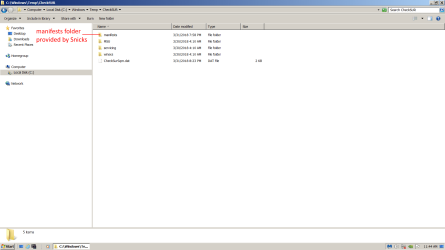
Hello. Here is a screenshot of where I put the manifests folder before running SURT again and a copy of CheckSUR log after running SURT after putting the manifests folder in the CheckSUR folder.
 

Attachments

  • CheckSUR.zip
    CheckSUR.zip
    789 bytes · Views: 3
  • Screenshot CheckSUR Folder.png
    Screenshot CheckSUR Folder.png
    72.8 KB · Views: 5

My Computer

Computer type
PC/Desktop
Computer Manufacturer/Model Number
I do not know. It was put together with separately purchased parts.
OS
Windows 7 Ultimate 64-bit SP1
CPU
Intel Core i5-3570K
Motherboard
ASUS P8Z77-V PRO
Memory
Corsair Vengeance Blue 4x8 GB
Graphics Card(s)
Nvidia GTX 1060
Sound Card
M-Audio Delta 1010LT
Monitor(s) Displays
2 Asus VS247H-P 23.6-Inch LED-Lit LCD monitors
Screen Resolution
1920x1080
Hard Drives
Western Digital WD1002FAEX Caviar Black 1TB SATA III
(no SSD)
My Passport Ultra external hard drive 2TB
PSU
CORSAIR RM650 650W 80 PLUS GOLD Full Modular PSU
Case
Corsair Obsidian Series Black 550D Mid Tower
Cooling
Zalman CNPS9500AT CPU Cooler
Keyboard
Azio Large Print Tri-Color Backlit Wired Keyboard (KB505U)
Mouse
Logitech Gaming Mouse G300
Internet Speed
6-8Mbps down, 2Mbps up
Antivirus
Malwarebytes Premium
Browser
IE, Firefox, Chrome
Other Info
2nd PC: Dell Dimension 4600
OS: Windows 7 Home Premium 32-bit SP1
PSU: EVGA 500W 80+ thingo
CPU: Intel Pentium 4
RAM: 3.00 GB Dual Channel DDR @ 199MHz
MB: Dell 02Y832
GPU: 512MB Nvidia GeForce 6200
HDD: 465GB WDC WD5000AAKS-00A7B2 ATA (SATA)
Opt Drive: HL-DT-ST DVD-ROM GDR8162B ATA Device
Opt Drive: TSSTcorp CD-RW TS-H292C ATA Device
Audio: Creative SB Live
Monitor: Asus-VS247H-P
Was I supposed to put the manifests you gave me in the CheckSUR folder without them being in the manifests folder or something? I guess I should just wait for your next post instead of guessing. It's just that the CheckSUR log from after putting the manifests folder in the CheckSUR folder and running SURT again says "CSI Manifest Missing Total count: 3" and then below that it says "Unavailable repair files:" after which it looks like two of the three it lists are the two manifests you gave me. Anyway, I haven't tried to do anything except look for the third manifest on the web using the other PC (the one I'm posting to this thread with). I have no idea where to get that stuff (manifests). Is that something a person goes and gets somewhere? LOL I feel so stupid.

Thanks again for helping me and for your patience.
 

My Computer

Computer type
PC/Desktop
Computer Manufacturer/Model Number
I do not know. It was put together with separately purchased parts.
OS
Windows 7 Ultimate 64-bit SP1
CPU
Intel Core i5-3570K
Motherboard
ASUS P8Z77-V PRO
Memory
Corsair Vengeance Blue 4x8 GB
Graphics Card(s)
Nvidia GTX 1060
Sound Card
M-Audio Delta 1010LT
Monitor(s) Displays
2 Asus VS247H-P 23.6-Inch LED-Lit LCD monitors
Screen Resolution
1920x1080
Hard Drives
Western Digital WD1002FAEX Caviar Black 1TB SATA III
(no SSD)
My Passport Ultra external hard drive 2TB
PSU
CORSAIR RM650 650W 80 PLUS GOLD Full Modular PSU
Case
Corsair Obsidian Series Black 550D Mid Tower
Cooling
Zalman CNPS9500AT CPU Cooler
Keyboard
Azio Large Print Tri-Color Backlit Wired Keyboard (KB505U)
Mouse
Logitech Gaming Mouse G300
Internet Speed
6-8Mbps down, 2Mbps up
Antivirus
Malwarebytes Premium
Browser
IE, Firefox, Chrome
Other Info
2nd PC: Dell Dimension 4600
OS: Windows 7 Home Premium 32-bit SP1
PSU: EVGA 500W 80+ thingo
CPU: Intel Pentium 4
RAM: 3.00 GB Dual Channel DDR @ 199MHz
MB: Dell 02Y832
GPU: 512MB Nvidia GeForce 6200
HDD: 465GB WDC WD5000AAKS-00A7B2 ATA (SATA)
Opt Drive: HL-DT-ST DVD-ROM GDR8162B ATA Device
Opt Drive: TSSTcorp CD-RW TS-H292C ATA Device
Audio: Creative SB Live
Monitor: Asus-VS247H-P
Patience is not a problem, helping is not a problem. Being cautious & asking questions is not a problem.

Avast Clear should have removed some of the offending manifests. Log looks similar, if not identical to previous. (weird)

Every time SURT tool runs, it generates a new CheckSUR.log. It looks similar, because this is on the end of log:

Customer Experience report successfully uploaded. Thank you for participating. For more information, see the Microsoft Customer Experience Improvement Program on the Microsoft web site.


please

Run the Uninstall Utility again and accept the reboot to safe mode

Reboot

logs will be located:

C:\Windows\Logs\CBS

Don't reinstall Avast until we correct SURT errors!

BTW: you can copy and paste C:\Windows\Logs\CBS into searchbox to expedite locating them.
zip/compress CBS.log & CheckSUR.log and attach please.
 
Last edited:

My Computer

Computer type
PC/Desktop
Computer Manufacturer/Model Number
HP Desktop & Compaq Laptop
OS
Win 10 x64, Linux Lite, Win 7 x64, BlackArch, & Kali
Hard Drives
Samsung 850 Pro 256Gb,
Hitachi HDD 1Tb,
Crucial MX SSD 250Gb
Segate 3Tb USB 3.0 Ext. Backup HDD
Internet Speed
150Mbps dn, 20Mbps up
Antivirus
Avast Free, Malwarebytes Anti-Exploit & Anti-Ransomware
Browser
Firefox, Chrome, Opera, & VPN
Avast Clear should have removed some of the offending manifests. Log looks similar, if not identical to previous. (weird)

It was a little different from the previous one, but nothing new was fixed (I guess).

From CheckSUR log March 31 12:19 pm after Avast Clear was run and then SURT was run again.

Found 11 errors
Fixed 4 errors
CSI Manifest Missing Total count: 3
CSI C Mark Deployment Missing Total count: 4
CSI Missing Winning Component Key Total count: 4
Fixed: CSI Missing Winning Component Key. Total count: 4

From CheckSUR log March 31 8:03 pm after the manifests folder provided by Snick was placed in the Windows\Temp\CheckSUR folder and SURT was run again.

Found 7 errors
CSI Manifest Missing Total count: 3
CSI C Mark Deployment Missing Total count: 4

The first CheckSUR log (03-30 4:12am) attached looked like this:

Found 64 errors
Fixed 49 errors
CSI Unexpected Failure Total count: 4
CSI Manifest Missing Total count: 3
CSI C Mark Deployment Missing Total count: 4
CSI F Mark Bad Type Total count: 45
Fixed: CSI F Mark Bad Type. Total count: 45
CSI F Mark Missing Total count: 4
Fixed: CSI F Mark Missing. Total count: 4
CSI Missing Winning Component Key Total count: 4

Run the Uninstall Utility again and accept the reboot to safe mode

Reboot

logs will be located:

C:\Windows\Logs\CBS

Don't reinstall Avast until we correct SURT errors!

BTW: you can copy and paste C:\Windows\Logs\CBS into searchbox to expedite locating them.
zip/compress CBS.log & CheckSUR.log and attach please.

Rgr on don't reinstall Avast till SURT errors are fixed. Avast has remained uninstalled since first uninstalled during our communication in this thread. I ran the Avast Clear thing again just now. Am I supposed to run SURT again before attaching CBS.log and CheckSUR.log per your latest instructions, because the CheckSUR.log there now is the same exact identical one as I uploaded last, but your instructions don't say to run SURT again after running Avast Clear again? Thanks.
 

My Computer

Computer type
PC/Desktop
Computer Manufacturer/Model Number
I do not know. It was put together with separately purchased parts.
OS
Windows 7 Ultimate 64-bit SP1
CPU
Intel Core i5-3570K
Motherboard
ASUS P8Z77-V PRO
Memory
Corsair Vengeance Blue 4x8 GB
Graphics Card(s)
Nvidia GTX 1060
Sound Card
M-Audio Delta 1010LT
Monitor(s) Displays
2 Asus VS247H-P 23.6-Inch LED-Lit LCD monitors
Screen Resolution
1920x1080
Hard Drives
Western Digital WD1002FAEX Caviar Black 1TB SATA III
(no SSD)
My Passport Ultra external hard drive 2TB
PSU
CORSAIR RM650 650W 80 PLUS GOLD Full Modular PSU
Case
Corsair Obsidian Series Black 550D Mid Tower
Cooling
Zalman CNPS9500AT CPU Cooler
Keyboard
Azio Large Print Tri-Color Backlit Wired Keyboard (KB505U)
Mouse
Logitech Gaming Mouse G300
Internet Speed
6-8Mbps down, 2Mbps up
Antivirus
Malwarebytes Premium
Browser
IE, Firefox, Chrome
Other Info
2nd PC: Dell Dimension 4600
OS: Windows 7 Home Premium 32-bit SP1
PSU: EVGA 500W 80+ thingo
CPU: Intel Pentium 4
RAM: 3.00 GB Dual Channel DDR @ 199MHz
MB: Dell 02Y832
GPU: 512MB Nvidia GeForce 6200
HDD: 465GB WDC WD5000AAKS-00A7B2 ATA (SATA)
Opt Drive: HL-DT-ST DVD-ROM GDR8162B ATA Device
Opt Drive: TSSTcorp CD-RW TS-H292C ATA Device
Audio: Creative SB Live
Monitor: Asus-VS247H-P
No problem, glad to be of assistance!
I just mentioned not reinstalling of Avast because the CheckSUR.log indicated problems, apparently it may be the same CheckSUR.log as previous (I boo boobed and didn't retain your prior logs). :oCheckSUR.log is temporary in temp folder and it disappears in a short period of time.
It takes what it takes to correct computer issues!
 

My Computer

Computer type
PC/Desktop
Computer Manufacturer/Model Number
HP Desktop & Compaq Laptop
OS
Win 10 x64, Linux Lite, Win 7 x64, BlackArch, & Kali
Hard Drives
Samsung 850 Pro 256Gb,
Hitachi HDD 1Tb,
Crucial MX SSD 250Gb
Segate 3Tb USB 3.0 Ext. Backup HDD
Internet Speed
150Mbps dn, 20Mbps up
Antivirus
Avast Free, Malwarebytes Anti-Exploit & Anti-Ransomware
Browser
Firefox, Chrome, Opera, & VPN
Hello. Thank you for the reply. Is this what I was meant to do?

1. Run Avast Clear again and restart the PC
2. Upload and attach CBS.log and CheckSUR.log

I ran Avast Clear again thinking I needed to look in the Windows\Temp folder for a CheckSUR.log like you said, but I don't see a CheckSUR.log anywhere in the Windows Temp folder including in the Windows\Temp\CheckSUR folder. Did you mean for me to run SURT again too and then upload the CBS.log and CheckSUR.log?

Oh. Sorry. I have been getting CheckSUR.log files to attach to posts from the Windows\Logs\CBS folder where I also get the CBS.log files to upload and attach.

Is Windows\Temp where a CheckSUR.log is created immediately after SURT is run? If so, then that would be why I was asking if you wanted me to run SURT again before uploading and attaching the CBS.log and CheckSUR.log files per your most recent instructions.

Your last instructions only say to run Avast Clear again, but don't mention running SURT again too before uploading and attaching the CBS.log and CheckSUR.log. It sounded kind of like you were saying to just run Avast Clear again but not SURT and then there would be a CheckSUR.log in the Windows\Temp folder. But can't find a CheckSUR.log file in the Windows\Temp folder after running only the Avast Clear utility.

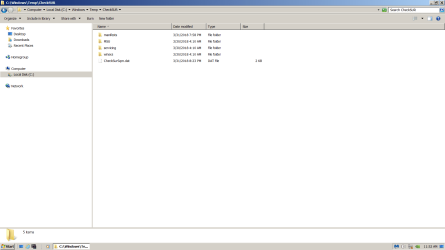
Screenshot shows Windows\Temp\CheckSUR folder immediately after running Avast Clear (uninstallation utility) and restarting the PC.
Screenshot CheckSUR folder 001.png

Do you see in these next two screenshots where I put the manifests folder you gave me and where there is another folder named Manifests?
Screenshot CheckSUR folder 002.png
Screenshot CheckSUR folder 003.png

I was just wondering because I'm ignorant about all this if it is possible that the two manifests in the manifests folder you gave me might have needed to be pasted into my Windows\Temp\CheckSUR\winsxs\Manifests folder, and because the manifests folder you gave me was placed in Windows\Temp\CheckSUR, that was why nothing changed when I ran SURT again after placing the manifests folder you gave me there.

I have to mow the lawn and all that. I will be back later today, Sunday. Would you please clarify if I am supposed to run SURT again before uploading and attaching the CBS.log and CheckSUR.log files. Otherwise I don't see where to get a CheckSUR.log to upload besides the one in Windows\Logs\CBS folder, which is the same CheckSUR.log report I uploaded last time after running SURT then.

Thank you again very much. I really appreciate the help. Sorry I got mixed up about what to do.
 

My Computer

Computer type
PC/Desktop
Computer Manufacturer/Model Number
I do not know. It was put together with separately purchased parts.
OS
Windows 7 Ultimate 64-bit SP1
CPU
Intel Core i5-3570K
Motherboard
ASUS P8Z77-V PRO
Memory
Corsair Vengeance Blue 4x8 GB
Graphics Card(s)
Nvidia GTX 1060
Sound Card
M-Audio Delta 1010LT
Monitor(s) Displays
2 Asus VS247H-P 23.6-Inch LED-Lit LCD monitors
Screen Resolution
1920x1080
Hard Drives
Western Digital WD1002FAEX Caviar Black 1TB SATA III
(no SSD)
My Passport Ultra external hard drive 2TB
PSU
CORSAIR RM650 650W 80 PLUS GOLD Full Modular PSU
Case
Corsair Obsidian Series Black 550D Mid Tower
Cooling
Zalman CNPS9500AT CPU Cooler
Keyboard
Azio Large Print Tri-Color Backlit Wired Keyboard (KB505U)
Mouse
Logitech Gaming Mouse G300
Internet Speed
6-8Mbps down, 2Mbps up
Antivirus
Malwarebytes Premium
Browser
IE, Firefox, Chrome
Other Info
2nd PC: Dell Dimension 4600
OS: Windows 7 Home Premium 32-bit SP1
PSU: EVGA 500W 80+ thingo
CPU: Intel Pentium 4
RAM: 3.00 GB Dual Channel DDR @ 199MHz
MB: Dell 02Y832
GPU: 512MB Nvidia GeForce 6200
HDD: 465GB WDC WD5000AAKS-00A7B2 ATA (SATA)
Opt Drive: HL-DT-ST DVD-ROM GDR8162B ATA Device
Opt Drive: TSSTcorp CD-RW TS-H292C ATA Device
Audio: Creative SB Live
Monitor: Asus-VS247H-P
Back
Top