help setting up network

edicus

New member
Local time
8:53 AM
Messages
54
I have a machine with Win XP that I want to network to wirelessly. On this machine I started the "homegroup" thing and asks about networking with other computers running Win 7. How do I network with an XP box?

Thanks!
 

My Computer

OS
vista home premium
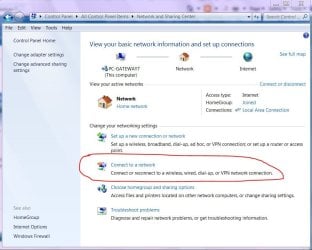
This should get you started. make sure you turn on network discovery.
networking.JPG
 

My Computer

Computer Manufacturer/Model Number
Gateway GT5692
OS
Windows 7 Ulti. x64
CPU
AMD Phenom 8450 triple-core 2.10 ghz
Memory
4GB
Graphics Card(s)
ATI Radion HD 3200
Monitor(s) Displays
Gateway FPD1775W
Screen Resolution
1280x720
Hard Drives
465.6613 Gibibytes
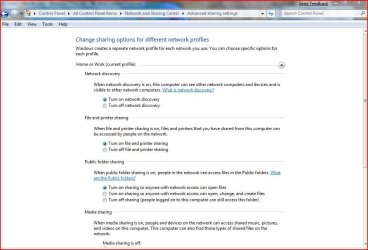
You can not homegroup with xp. to have a homegroup both pc's must be running win 7. on a home network you can have xp machines. Look here to make sure you have dicovery turned on.
advance.JPG
 

My Computer

Computer Manufacturer/Model Number
Gateway GT5692
OS
Windows 7 Ulti. x64
CPU
AMD Phenom 8450 triple-core 2.10 ghz
Memory
4GB
Graphics Card(s)
ATI Radion HD 3200
Monitor(s) Displays
Gateway FPD1775W
Screen Resolution
1280x720
Hard Drives
465.6613 Gibibytes

My Computer

Computer Manufacturer/Model Number
Self-Built
OS
Win 7 RTM 7600 Ultimate 64-bit
CPU
E8500 SLAPK Q814A161
Motherboard
Gigabyte EP35-DS3R
Memory
4GB Gskill PI PC2-8500CL5D
Graphics Card(s)
XFX 8800GTS Extreme 640MB
Sound Card
Creative X-Fi XtremeGamer
Monitor(s) Displays
Samsung 213T
Screen Resolution
1600x1200
Hard Drives
1 x Western Digital SATA 500GB
1 x Maxtor SATA 320GB
Case
Antec Nine Hundred
Cooling
CPU: Xigmatek HDT-S1283
Keyboard
Saitek Eclipse
Mouse
Trackman Marble
Internet Speed
6 Mbps down cable
My mistake!!! Please read this...

What I meant to say is network my pc's so I can access files on the XP machine FROM the Win 7 machine. As for connecting to the internet I can do that. I do NOT want my Win 7 box to be accessed from another computer, but I DO want the other computer to be accessed from the Win 7 machine.
 

My Computer

OS
vista home premium
What I meant to say is network my pc's so I can access files on the XP machine FROM the Win 7 machine. As for connecting to the internet I can do that. I do NOT want my Win 7 box to be accessed from another computer, but I DO want the other computer to be accessed from the Win 7 machine.

Read RustyFalcon post and do that tutorial!
 

My Computer

Computer Manufacturer/Model Number
Fujitsu Siemens
OS
XP SP2
CPU
Intel Celeron D 3.07 GHz
Motherboard
/
Memory
1GB
Graphics Card(s)
Nvidia GeForce 6200 SE 256mb
Sound Card
Realtek
Monitor(s) Displays
17 "
Screen Resolution
1280x1024
Hard Drives
160GB
Internet Speed
2mb
Read RustyFalcon post and do that tutorial!

I did that...unless I'm missing something that tutorial will set up my Win 7 box to share it's files with the XP box and I want it the other way around. I want the Win 7 system to access the XP system.
 

My Computer

OS
vista home premium
I did that...unless I'm missing something that tutorial will set up my Win 7 box to share it's files with the XP box and I want it the other way around. I want the Win 7 system to access the XP system.

So both PC's have same workgroup?
Did you runed Network Setup Wizard on XP machine?
You can see Xp machine when you go to My Computer/Network?
 

My Computer

Computer Manufacturer/Model Number
Fujitsu Siemens
OS
XP SP2
CPU
Intel Celeron D 3.07 GHz
Motherboard
/
Memory
1GB
Graphics Card(s)
Nvidia GeForce 6200 SE 256mb
Sound Card
Realtek
Monitor(s) Displays
17 "
Screen Resolution
1280x1024
Hard Drives
160GB
Internet Speed
2mb
So both PC's have same workgroup?
Did you runed Network Setup Wizard on XP machine?
You can see Xp machine when you go to My Computer/Network?

Someone said earlier that I cannot have workgroup on XP. I re-ran setup on XP and now it is working!

Thanks to everyone!!
 

My Computer

OS
vista home premium
I did that...unless I'm missing something that tutorial will set up my Win 7 box to share it's files with the XP box and I want it the other way around. I want the Win 7 system to access the XP system.

Just do as Rusty said but don't share your files,I mean just don't add any folder or files, but the public folder will still be seen, but you still have to turn it on.

Am I right Rusty ???
 

My Computer

Computer Manufacturer/Model Number
HP G60-230US
OS
Windows 7 Ultimate X64
CPU
Intel Pentium Dual-Core T4200 @ 2.0 GHz
Memory
4GB's
Graphics Card(s)
Mobile Intel 45 Express
Sound Card
Conexant High Definition SmartAudio 221
Monitor(s) Displays
16"
Screen Resolution
1366X768
Hard Drives
320GB
Mouse
Logitech M305
Internet Speed
Cable
Someone said earlier that I cannot have workgroup on XP. I re-ran setup on XP and now it is working!

Thanks to everyone!!

We're glad that we helped you!
 

My Computer

Computer Manufacturer/Model Number
Fujitsu Siemens
OS
XP SP2
CPU
Intel Celeron D 3.07 GHz
Motherboard
/
Memory
1GB
Graphics Card(s)
Nvidia GeForce 6200 SE 256mb
Sound Card
Realtek
Monitor(s) Displays
17 "
Screen Resolution
1280x1024
Hard Drives
160GB
Internet Speed
2mb
This is weird. I edited my last post that I actually do not have it working. I can see the other computer on my Win 7 machine but received an error that I was unable to access it. Don't know why the edit didn't save.

Anyway I'm at work now and will post the error message when I get home, so be prepared for that.:D
 

My Computer

OS
vista home premium
I'm pretty sure that 'workgroup' networking still works as it always did in Win 7. I have one computer at home that shares some folders and a printer with the others. The other computers are one Win 7 and one XP. Following the link I posted, I can access files are printers on all machines without using passwords.

Since this is true I would think that as long as the computers are all in the same workgroup, you could share folders from your XP machine to Win 7 machines as well, but I have not needed to do this myself.
 

My Computer

Computer Manufacturer/Model Number
Self-Built
OS
Win 7 RTM 7600 Ultimate 64-bit
CPU
E8500 SLAPK Q814A161
Motherboard
Gigabyte EP35-DS3R
Memory
4GB Gskill PI PC2-8500CL5D
Graphics Card(s)
XFX 8800GTS Extreme 640MB
Sound Card
Creative X-Fi XtremeGamer
Monitor(s) Displays
Samsung 213T
Screen Resolution
1600x1200
Hard Drives
1 x Western Digital SATA 500GB
1 x Maxtor SATA 320GB
Case
Antec Nine Hundred
Cooling
CPU: Xigmatek HDT-S1283
Keyboard
Saitek Eclipse
Mouse
Trackman Marble
Internet Speed
6 Mbps down cable
Back
Top