Help setting up Photoshop Bridge CC cache in alternate location

tim32225

New member
Local time
1:52 PM
Messages
3
I recently upgraded some computer hardware and did a clean install of Windows 7 Ultimate, 64 to SSD, along with just a few software titles that I am currently using (mainly Photoshop CC and Bridge CC). My intention is to set up my software and cache in a way that prevents my operating system from getting bloated and slowing down. It has been suggested that I move Bridge CC cache off the C drive because after only a few weeks, the cache file has already swelled to around 10 GB.

I had previously moved some of my user data folders to my F drive in hopes of keeping the operating system as compact as possible on the C drive. I did that by creating a USER DATA folder on the F drive, and then specifying within Windows to move certain files there (Downloads, Favorites, My Documents, My Music, My Pictures). Note that I do not store images from Photoshop in "My Pictures" but rather on my D Drive which contains a 12 years of Image files.

I hope to be able to keep the operating system small (and thereby have room to store more system images) when I periodically create a new one.

To move the Cache for Bridge CC off the C drive, I created a folder tree in my previously created "USER DATA" folder on the F drive. I named the folders in that tree the same as Bridge had named them by default on the C drive. Then I went into preferences in Bridge CC and pointed cache to the new folder location on my F drive. After closing and re-opening Bridge, I verified that it created some sub folders in the new location, so I know it is now using the new cache location.

I have several questions:

Can I now just delete the Bridge Cache folder that is located at the default location on the C Drive (which contains about 10 GB of data)?

I would like to make a system image periodically after significant changes or updates to software have occurred, and retain a library of system images to help me restore in the event I ever have a system failure. I plan to use the free version of "AMOEI Backupper" which I downloaded a few weeks ago and used to make my initial system image after the clean install.

Will moving Bridge cache to the F drive in any way inhibit a "system restore" from running if I make a system image now (after relocating the Cache folder) ?

Will moving any of the other user data folders mentioned above inhibit a "system restore" from running properly?

If anyone here sees obvious problems with this plan, please chime in and tell me where I am going wrong, and how I should proceed instead. I am a novice when it comes to both hardware and software, so things probably need to be explained to me at a basic level.

This is my first post here. Thanks in advance for any help and suggestions you can provide.
 

My Computer My Computer

At a glance

Windows 7 Ultimate 64-biti7-920OCZ ddr3 (12 gb)NVIDIA Quadro FX-1800
Computer type
PC/Desktop
Computer Manufacturer/Model Number
custom build
OS
Windows 7 Ultimate 64-bit
CPU
i7-920
Motherboard
EVGA X58 SLI
Memory
OCZ ddr3 (12 gb)
Graphics Card(s)
NVIDIA Quadro FX-1800
Hard Drives
Samsung SSD (model MZ-7TD250BW)
Two 4TB HGST NAS 7200rpm
One WD Velociraptor 10,000 rpm
Antivirus
Norton
Browser
IE 11
You can delete the old cache location with issue.
 

My Computer My Computer

At a glance

Windows 10 Pro (x64)Intel Core i7-3930K (3.2GHz - 4.5GHz)4x Samsung 4GB PC3-12800 DDR3 (16GB 1600MHz)Nvidia Geforce GTX 690
Computer type
PC/Desktop
Computer Manufacturer/Model Number
Alienware Aurora ALX R4
OS
Windows 10 Pro (x64)
CPU
Intel Core i7-3930K (3.2GHz - 4.5GHz)
Motherboard
Alienware Aurora-R4 x79
Memory
4x Samsung 4GB PC3-12800 DDR3 (16GB 1600MHz)
Graphics Card(s)
Nvidia Geforce GTX 690
Sound Card
SteelSeries Siberia Elite
Monitor(s) Displays
Dell UltraSharp U3011
Screen Resolution
2560x1600
Hard Drives
Samsung 850 Pro 256 GB, Seagate 1TB Desktop Hybrid HDD, 2x Western Digital 4TB Green HDD
PSU
875W Some Dell PSU <.<
Case
Alienware Aurora ALX
Cooling
Custom Liquid Cooling (EK CPU & GPU blocks) dual EK 480RAD
Keyboard
Logitech G710+ Mechanical
Mouse
Logitech G700s
Internet Speed
Verizon Fios (50 mbps average)
Other Info
Server: Intel NUC D54250WYK: i5-4250U, 16GB, 256 GB mSATA, Windows Server 2012 R2
Hi Tim welcome to sevenforums. I'm the one you've been talking to at DP Review.com (ADMint).

First off yes you could delete the folder on the main drive and all that will happen is that Adobe bride will have to re-build it again. What that means to you is files will open slowly at first, but once they're cached, they'll open more quickly. That's it.

If you've not done you can setup an alternate location for the cache files by going opening Bridge, clicking Edit, Preferences, click on Cache, click Choose, and choose a location of your choice...

Bridge Cache.PNG

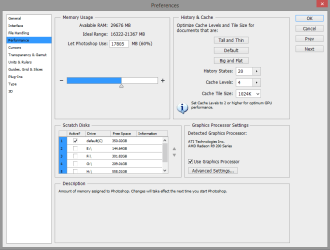
In Photoshop you can also move your cache files by opening Photoshop, click Edit, Preferences, click Performance, select a location you want, and de-select the drive you don't want to folder on, in this case "C" drive.

PS Cache.PNG

You'll need to restart both programs for the changes to take place.

Again, no harm will come from making these changes other than files initially opening slowly, but once cached, they should operate like they did on the default drives. And no, moving the locations will not inhibit a system restore.

Let us know if there are more questions.

And logicearth means without issue :)
 

My Computer My Computer

At a glance

Windows 10 ProIntel Core i7-4770K (3.5Ghz)32 gig Corsair Dominator Platinum (4x8Gig)Sapphire Tri-X R9 Fury
Computer type
PC/Desktop
Computer Manufacturer/Model Number
Custom built by me.
OS
Windows 10 Pro
CPU
Intel Core i7-4770K (3.5Ghz)
Motherboard
Gigabyte G1 Sniper 5 (F10 Bios)
Memory
32 gig Corsair Dominator Platinum (4x8Gig)
Graphics Card(s)
Sapphire Tri-X R9 Fury
Sound Card
Soundblaster ZXR
Monitor(s) Displays
NEC PA242W 24" LCD Monitor
Screen Resolution
1920 x 1200
Hard Drives
Primary - Samsung 850 Pro (512gig), Samsung 840 Pro (256gig), 2TB WD Caviar Black.
PSU
EVGA Supernova 1000 G2
Case
Cooler Master HAF X
Cooling
Corsair H100i with Corsair Air Series SP120 Quiet Fans
Keyboard
Logitech Wireless Wave
Mouse
Logitech Performance MX
Internet Speed
High Speed Cable
Antivirus
Norton Security
Browser
IE11
Other Info
Memory Timings - 1866MHz @ 9-9-9-27-1T @ 1.5 volts
Thank you sygnus21 for your detailed reply.

Before I posted here, I had already created a new Cache folder for Bridge on the F drive and verified that Bridge was using it by closing and re-opening Bridge. When I did that, Bridge created sub-folders in the new Cache folder, so I knew it worked.

After reading your reply, I went ahead and deleted the original Cache file on the C drive. This eliminated 10.5 gigs of data and brought the total usage on the 250 GB SSD back down to 42.5 GB.

For efficiency purposes and speed while using Photoshop, I was under the impression that it was ok to use the SSD as the scratch disk even though the software is also loaded there. You seem to be advising against that in your reply, so can you clarify that please?

I know back in the days before we had solid state drives, it was always advised to designate the scratch disk in a location other than the disk where Photoshop is installed. I thought that rule went away if a SSD is involved.

Thanks again for your help!
 

My Computer My Computer

At a glance

Windows 7 Ultimate 64-biti7-920OCZ ddr3 (12 gb)NVIDIA Quadro FX-1800
Computer type
PC/Desktop
Computer Manufacturer/Model Number
custom build
OS
Windows 7 Ultimate 64-bit
CPU
i7-920
Motherboard
EVGA X58 SLI
Memory
OCZ ddr3 (12 gb)
Graphics Card(s)
NVIDIA Quadro FX-1800
Hard Drives
Samsung SSD (model MZ-7TD250BW)
Two 4TB HGST NAS 7200rpm
One WD Velociraptor 10,000 rpm
Antivirus
Norton
Browser
IE 11
Hi Tim,

To clarify... being that you seemed so intent on keeping you disk usage very low and wanting to move the Bridge files, I provided instructions on moving them, and naturally assumed you also wanted to do the same with the PS scratch disk files, thus the instructions for that as well.

Yes, you are correct the PS will perform better with the disk files on the fastest drive and in that I would leave them on the SSD drive. To answer your broader question, I personally would leave the scratch disk on the SSD drive, which is what I'm doing. Same with my Bridge cache, though I don't use Bridge extensively.

To be honest I'm a bit confused as to why you need to keep your disk usage so low when you've got a 256gig SSD drive, and are only using 42.5gig out of the 256?

For reference, even though I've got a 512 SSD drive, my total disk usage is only 123gig, which easily could fit on my 256 SSD drive, and I'm not even managing my disk files that much. Example: my "Documents" folder is 13.6gig. I could easily move some of those files over to my 2TB hard drive.

If you've got another disk in your system, you could move some files not needing the speed of an SSD drive there. Example, I'm a gamer and have all my games on the 2TB hard drive. I've also got a backup SSD drive that I use as temp storage when working on photos.

I don't know how you use your PC, but I think you're worrying a bit too much about disk space usage.

Anyway, yes... do keep your scratch disk on the SSD drive.

Here's something you might want to look through for optimizing Photoshop: Optimize performance | Photoshop

Hope this helps :)
 

My Computer My Computer

At a glance

Windows 10 ProIntel Core i7-4770K (3.5Ghz)32 gig Corsair Dominator Platinum (4x8Gig)Sapphire Tri-X R9 Fury
Computer type
PC/Desktop
Computer Manufacturer/Model Number
Custom built by me.
OS
Windows 10 Pro
CPU
Intel Core i7-4770K (3.5Ghz)
Motherboard
Gigabyte G1 Sniper 5 (F10 Bios)
Memory
32 gig Corsair Dominator Platinum (4x8Gig)
Graphics Card(s)
Sapphire Tri-X R9 Fury
Sound Card
Soundblaster ZXR
Monitor(s) Displays
NEC PA242W 24" LCD Monitor
Screen Resolution
1920 x 1200
Hard Drives
Primary - Samsung 850 Pro (512gig), Samsung 840 Pro (256gig), 2TB WD Caviar Black.
PSU
EVGA Supernova 1000 G2
Case
Cooler Master HAF X
Cooling
Corsair H100i with Corsair Air Series SP120 Quiet Fans
Keyboard
Logitech Wireless Wave
Mouse
Logitech Performance MX
Internet Speed
High Speed Cable
Antivirus
Norton Security
Browser
IE11
Other Info
Memory Timings - 1866MHz @ 9-9-9-27-1T @ 1.5 volts
Thank you for the additional help.

The reason I probably seem paranoid about the operating system growing too much is that's what happened the last time around and it was taking up over 300gb of a 500gb spinner. I was trying to find a way to prevent that from happening again and did not realize until recently that I could locate the biggest culprit (Bridge Cache) on a different drive.

Further reasoning is a desire to keep the operating system relatively small so that any system images I make after software changes will be small enough that I can store several of them and have choices if I ever need to do a restore.

Last night I went ahead and deleted the original Bridge Cache folder on the C drive, but left the scratch disk designation on the SSD.

Thanks for the link to the Photoshop Optimization document. I had seen that document quite some time ago but I am reading it again now to see what other helpful information I can find. I have more options now with upgraded hardware and a clean install of the operating system, than I had before.

You have been very helpful, and I really appreciate it. :)
 

My Computer My Computer

At a glance

Windows 7 Ultimate 64-biti7-920OCZ ddr3 (12 gb)NVIDIA Quadro FX-1800
Computer type
PC/Desktop
Computer Manufacturer/Model Number
custom build
OS
Windows 7 Ultimate 64-bit
CPU
i7-920
Motherboard
EVGA X58 SLI
Memory
OCZ ddr3 (12 gb)
Graphics Card(s)
NVIDIA Quadro FX-1800
Hard Drives
Samsung SSD (model MZ-7TD250BW)
Two 4TB HGST NAS 7200rpm
One WD Velociraptor 10,000 rpm
Antivirus
Norton
Browser
IE 11
No problem. And now you know where to come if you need further help PC wise. And trust me, these guys here are good, and I've leaned a lot from them so you're in good hand, even If it's not me :D

Peace :cool:
 

My Computer My Computer

At a glance

Windows 10 ProIntel Core i7-4770K (3.5Ghz)32 gig Corsair Dominator Platinum (4x8Gig)Sapphire Tri-X R9 Fury
Computer type
PC/Desktop
Computer Manufacturer/Model Number
Custom built by me.
OS
Windows 10 Pro
CPU
Intel Core i7-4770K (3.5Ghz)
Motherboard
Gigabyte G1 Sniper 5 (F10 Bios)
Memory
32 gig Corsair Dominator Platinum (4x8Gig)
Graphics Card(s)
Sapphire Tri-X R9 Fury
Sound Card
Soundblaster ZXR
Monitor(s) Displays
NEC PA242W 24" LCD Monitor
Screen Resolution
1920 x 1200
Hard Drives
Primary - Samsung 850 Pro (512gig), Samsung 840 Pro (256gig), 2TB WD Caviar Black.
PSU
EVGA Supernova 1000 G2
Case
Cooler Master HAF X
Cooling
Corsair H100i with Corsair Air Series SP120 Quiet Fans
Keyboard
Logitech Wireless Wave
Mouse
Logitech Performance MX
Internet Speed
High Speed Cable
Antivirus
Norton Security
Browser
IE11
Other Info
Memory Timings - 1866MHz @ 9-9-9-27-1T @ 1.5 volts
Back
Top