[HELP] SSD questions

Kipper, the only measure I would do is disable defrag and eliminate the hibernation file. None of the others I have done and my system works beautifully - since 6 months.

Hey, I hear ya.

These are just the things I have done to try and max out the performance; I know some guys who have not done anything after the SSD install and have not problems either.

I just tossed'em up here with some easy to follow steps in case anyone felt like trying them
 

My Computer

Computer Manufacturer/Model Number
My Build
OS
win7 Ult 64
CPU
i7 3930K & 3960X
Motherboard
ASUS P9X79 Deluxe
Memory
16GB G-Skill 2133MHz
Graphics Card(s)
Sapphire HD 7970
Sound Card
On-board
Monitor(s) Displays
ASUS 27 inch
Screen Resolution
1920X1080
Hard Drives
Crucial M4 256GB, 1.5TB WD Black for Data/Images
PSU
Corsair AX1200
Case
NZXT 810
Cooling
Custom Loop, Swiftech HDBlock
Keyboard
Mionix
Mouse
Mionix
Internet Speed
Cable
Kipper, the only measure I would do is disable defrag and eliminate the hibernation file. None of the others I have done and my system works beautifully - since 6 months.

Hey, I hear ya.

These are just the things I have done to try and max out the performance; I know some guys who have not done anything after the SSD install and have not problems either.

I just tossed'em up here with some easy to follow steps in case anyone felt like trying them
Understand. I just posted my position so that people see that it is not really required to disable all those functions. Disabling some of them may be even counterproductive. E.g I found that my system reacts faster with Superfetch than without it. And reducing the page file to the minimum (which I believe is 200MB) may not be a smart move either - depending on what applications you run. I noticed that the page file is being used when you do virus scans, even with 3 or 4GB of RAM - (watch the hard page faults in Resource Monitor > Memory tab during a scan).
 

My Computer

Computer Manufacturer/Model Number
HP, Dell, Gateway, Toshiba - 4 laptops and 2 desktops
OS
Vista, Windows7, Mint Mate, Zorin, Windows 8
CPU
from 1.6GHz Duo to i7
Monitor(s) Displays
2x HP w2207
Hard Drives
5x HDD, 7x SSD, 12x Externals
Keyboard
with trackball - no mices
Mouse
Trackball mice
Internet Speed
DSL 6000
Thanks for this great posts above. Just bought my Intel 80G and all important info and tweaks are welcomed. Especialy about possibly harmfull Defrag feature. I'm very happy with that. Absolutely improovement [seeking time!!] for my music appys. I keep it as C:/ drive with all main applications installed keeping my sound libraries on D:/ drive. Just thinking to buy another one to my other puter.:)
 

My Computer

OS
Windows 7 x64
Great info guys!
I actually did a few tweaks and disabled superfetch and defrag.. but I did not update the firmware on the SSD before installing the OS, came on a .iso file from Intel's site and I didn't have any empty cd's. Can I do it now or would that empty the drive?
 

My Computer

Computer Manufacturer/Model Number
Took the blue pill and built this one while Trinity was getting me coffee..
OS
Win7 Professional x64
CPU
i7-930
Motherboard
Asus Rampage Extreme 2
Memory
3*Corsair XMS3 DDR3 1600MHz 6GB CL9
Graphics Card(s)
XFX Radeon HD 5870 CrossfireX
Sound Card
SupremeFX X-Fi
Monitor(s) Displays
BENQ 22" FullHD
Screen Resolution
1920*1080
Hard Drives
Corsair SSD Extreme X64 2,5" 64GB || WD VelociRaptor® 300GB
PSU
Corsair HX 1000W PSU
Case
Antec 1200
Cooling
Windtunnel effect
Keyboard
Logitech G15 gen.2
Mouse
Roccat KONE
Internet Speed
12,5mb/3mb
Tried and failed.. the update tool did not find the drive.
Google turned up some info about switching from SATA to IDE mode, whatever that means.. but my BIOS doesn't have any features like that at all. Tried updating my nForce630i, but that did nothing. Any workarounds?
 

My Computer

Computer Manufacturer/Model Number
Took the blue pill and built this one while Trinity was getting me coffee..
OS
Win7 Professional x64
CPU
i7-930
Motherboard
Asus Rampage Extreme 2
Memory
3*Corsair XMS3 DDR3 1600MHz 6GB CL9
Graphics Card(s)
XFX Radeon HD 5870 CrossfireX
Sound Card
SupremeFX X-Fi
Monitor(s) Displays
BENQ 22" FullHD
Screen Resolution
1920*1080
Hard Drives
Corsair SSD Extreme X64 2,5" 64GB || WD VelociRaptor® 300GB
PSU
Corsair HX 1000W PSU
Case
Antec 1200
Cooling
Windtunnel effect
Keyboard
Logitech G15 gen.2
Mouse
Roccat KONE
Internet Speed
12,5mb/3mb
I use OCZ SSD's,
The FW update did need to be in IDE mode. I do not know about Intel SSD's but it could possibly affect drives content. OCZ has somthing called Sanitary Erase. This returns the drive to an empty, fresh out of the box state. You do want the drives clean if you do a clean install.
Disable defrag in component services
Disable superfetch in the registry
Leave prefetch enabled

My scores:
W.E.I.- 7.6, 7.9 for drives
ATTO - 475Mb/s writes and 625Mb/s reads
3DMark06 - 23700
Have yet to have a B.S.O.D. "knock on wood"
Luck
 

My Computer

Computer Manufacturer/Model Number
DIY #3, #2
OS
W7 Ulti/64, XP Pro/32
CPU
INTEL i7 920 DO, Core2 Duo 6400
Motherboard
GIGABYTE EX58 UD3R-SLI, EP45-UD3R
Memory
KINGSTON DDR3 1333MHz, CORSAIR DDR2 800MHz
Graphics Card(s)
EVGA GTX 260 x2, 8800 GTX
Sound Card
REALTEK HD onboard, ditto
Monitor(s) Displays
SONY 40" BRAVIA LCD
Screen Resolution
1360 X 768
Hard Drives
OCZ VERTEX/RAID0 -3, Vertex 30GB
PSU
COOLERMASTER 900W, ENERMAX 850W
Case
COOLERMASTER HAF 932 x2
Cooling
stock
Keyboard
MS
Mouse
MS
Internet Speed
ADSL 3MB/768KBs
Other Info
amateur enthusiast
Tried and failed.. the update tool did not find the drive.
Google turned up some info about switching from SATA to IDE mode, whatever that means.. but my BIOS doesn't have any features like that at all. Tried updating my nForce630i, but that did nothing. Any workarounds?

What FW is it using now?
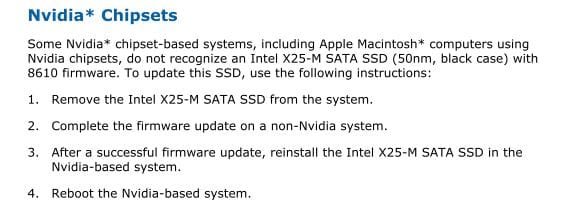
You may need to connect the SSD to a PC that does NOT have a Nvidia chipset, flash the FW, and then put it back in your PC.

The FW flash itself will not hurt the DATA stored on the drive. Or at least shouldn't.
Theres always that off the wall chance something bad may happen, as with anything.
But this would be rare & not at all the norm.
Power loss or something of that nature during the flash would be bad.

Maybe the Read Me/PDFs that come with the FW Update tool may help.
Found this from it:
 

Attachments

  • Capture.JPG
    Capture.JPG
    26.5 KB · Views: 9

My Computer

Computer Manufacturer/Model Number
Custom (Self Build)
OS
Windows 7 Home Premium 64bit
CPU
Intel Core i7 2700k
Motherboard
eVGA P67 SLI
Memory
8GB Mushkin Redline Ridgebacks @1866
Graphics Card(s)
EVGA GTX570 SC
Sound Card
XiFi Titanium HD
Monitor(s) Displays
LG W2453V
Screen Resolution
1920x1080
Hard Drives
Intel 320 80GB -- Intel X25-V 40GB --WD Black 1TB x2 -- WD Blue 640GB
PSU
Seasonic x750
Case
Corsair 600T SE White
Cooling
eVGA Superclocked CPU Cooler
Keyboard
Saitek Cyborg
Antivirus
Kaspersky
Browser
IE
Other Info
LG BD/DVD
Wishmaster, your right.. contacted Intel and they sad it was either conflicting with the chipset or the lack of ACHI mode in BIOS.
I could just pop the drive in my laptop and see if that does the trick, but more research turned up that to use the Intel Toolbox for SSD optimization you need to have the drive in ACHI/Legazy mode. Switching between lap-/desktop everytime I want to use the toolbox is not an option :(
Trading it for the 300gb VelociRaptor..
 

My Computer

Computer Manufacturer/Model Number
Took the blue pill and built this one while Trinity was getting me coffee..
OS
Win7 Professional x64
CPU
i7-930
Motherboard
Asus Rampage Extreme 2
Memory
3*Corsair XMS3 DDR3 1600MHz 6GB CL9
Graphics Card(s)
XFX Radeon HD 5870 CrossfireX
Sound Card
SupremeFX X-Fi
Monitor(s) Displays
BENQ 22" FullHD
Screen Resolution
1920*1080
Hard Drives
Corsair SSD Extreme X64 2,5" 64GB || WD VelociRaptor® 300GB
PSU
Corsair HX 1000W PSU
Case
Antec 1200
Cooling
Windtunnel effect
Keyboard
Logitech G15 gen.2
Mouse
Roccat KONE
Internet Speed
12,5mb/3mb
nVidia chipsets seem to have issues with many types of SSD's.
 

My Computer

Computer Manufacturer/Model Number
DIY #3, #2
OS
W7 Ulti/64, XP Pro/32
CPU
INTEL i7 920 DO, Core2 Duo 6400
Motherboard
GIGABYTE EX58 UD3R-SLI, EP45-UD3R
Memory
KINGSTON DDR3 1333MHz, CORSAIR DDR2 800MHz
Graphics Card(s)
EVGA GTX 260 x2, 8800 GTX
Sound Card
REALTEK HD onboard, ditto
Monitor(s) Displays
SONY 40" BRAVIA LCD
Screen Resolution
1360 X 768
Hard Drives
OCZ VERTEX/RAID0 -3, Vertex 30GB
PSU
COOLERMASTER 900W, ENERMAX 850W
Case
COOLERMASTER HAF 932 x2
Cooling
stock
Keyboard
MS
Mouse
MS
Internet Speed
ADSL 3MB/768KBs
Other Info
amateur enthusiast
Back
Top