Solved Help to create a regular LAN to share drives/folders - not Home

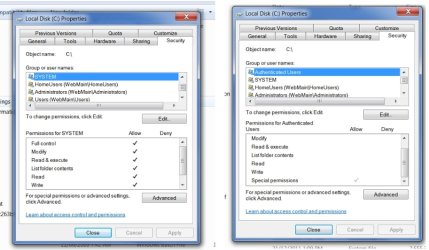
Noticed in Permission for Local Disk (C:) Group or User Names..
Authenticated users and the Permissions are all UNticked.

All below have all ticks.. Full Perm
SYSTEM
HomeUsers(Webmain\HomeUsers)
Administrators(Webmain\Administrators)
Users(Webmain\Users)
 

My Computer My Computer

At a glance

Win 7 Pro 32 and 64 versions2.5 up4 to 8Nividia and AMD
Computer type
PC/Desktop
Computer Manufacturer/Model Number
Custom Builds but also Surface Pro 3, Dells Desk and HP laptop
OS
Win 7 Pro 32 and 64 versions
CPU
2.5 up
Motherboard
Different types
Memory
4 to 8
Graphics Card(s)
Nividia and AMD
Hard Drives
From 60GB to 2 TB
Antivirus
Avast Free
Browser
Firefox latest
Can you post a screenshot please? Also scroll down a bit to the bottom where the ticks are, perhaps Special is ticked?

Also:
I see you selected 40-56 bit encryption in advanced sharing, it should be 128-bit unless you have a compelling reason. Try changing that one.
 

My Computer My Computer

At a glance

Windows 7 Ultimate x64 SP1AMD Phenom 2 1090T2x8GB Kingston HyperX Fury Black 1600Mhz Unga...MSI GTX 970 Gaming 4G
Computer type
PC/Desktop
Computer Manufacturer/Model Number
Custom Build
OS
Windows 7 Ultimate x64 SP1
CPU
AMD Phenom 2 1090T
Motherboard
Gigabyte GA-890FXA-UD5
Memory
2x8GB Kingston HyperX Fury Black 1600Mhz Unganged
Graphics Card(s)
MSI GTX 970 Gaming 4G
Sound Card
Realtek On-Board HD 7.1 Audio / Logitech G35
Monitor(s) Displays
3xAcer GD245HQ
Screen Resolution
1920x1080
Hard Drives
Samsung 850 Pro 512GB SSD - OS /
WD Caviar Black SATA 3 - 1 TBx2 - Dynamic RAID 0 /
WD Caviar Green SATA 2 - 640GBx2 - Dynamic RAID 0 /
WD Caviar Green SATA 2 - 640GB - Internal Backup /
Seagate Barracude SATA 3 - 3TB - External Backup/ Sync
PSU
HighPower 1000W
Case
Cooler Master HAF 932
Cooling
Noctua NH-D14
Keyboard
Logitech G19
Mouse
Logitech G500
Internet Speed
100/4 Mbit Cable (100GB quota)
Antivirus
ZoneAlarm Extreme Security / MBAM Pro / MBAE Free / SAS Free
Browser
IE 11 - Firefox - Chrome
Other Info
Logitech F710/ G27/ G940/ Z5500 // TrackIR 5 // Nvidia 3D Surround Vision
HI,

Changed to 128. Special is ticked for Auth Users
 

Attachments

  • Local Disk Properties-Perms.jpg
    Local Disk Properties-Perms.jpg
    68 KB · Views: 1

My Computer My Computer

At a glance

Win 7 Pro 32 and 64 versions2.5 up4 to 8Nividia and AMD
Computer type
PC/Desktop
Computer Manufacturer/Model Number
Custom Builds but also Surface Pro 3, Dells Desk and HP laptop
OS
Win 7 Pro 32 and 64 versions
CPU
2.5 up
Motherboard
Different types
Memory
4 to 8
Graphics Card(s)
Nividia and AMD
Hard Drives
From 60GB to 2 TB
Antivirus
Avast Free
Browser
Firefox latest
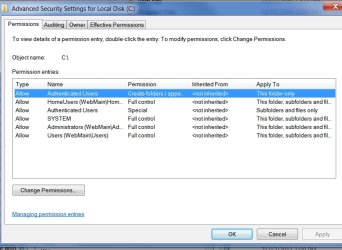
You can then see what they (Auth users) are given by clicking the Advanced button.
 

My Computer My Computer

At a glance

Windows 7 Ultimate x64 SP1AMD Phenom 2 1090T2x8GB Kingston HyperX Fury Black 1600Mhz Unga...MSI GTX 970 Gaming 4G
Computer type
PC/Desktop
Computer Manufacturer/Model Number
Custom Build
OS
Windows 7 Ultimate x64 SP1
CPU
AMD Phenom 2 1090T
Motherboard
Gigabyte GA-890FXA-UD5
Memory
2x8GB Kingston HyperX Fury Black 1600Mhz Unganged
Graphics Card(s)
MSI GTX 970 Gaming 4G
Sound Card
Realtek On-Board HD 7.1 Audio / Logitech G35
Monitor(s) Displays
3xAcer GD245HQ
Screen Resolution
1920x1080
Hard Drives
Samsung 850 Pro 512GB SSD - OS /
WD Caviar Black SATA 3 - 1 TBx2 - Dynamic RAID 0 /
WD Caviar Green SATA 2 - 640GBx2 - Dynamic RAID 0 /
WD Caviar Green SATA 2 - 640GB - Internal Backup /
Seagate Barracude SATA 3 - 3TB - External Backup/ Sync
PSU
HighPower 1000W
Case
Cooler Master HAF 932
Cooling
Noctua NH-D14
Keyboard
Logitech G19
Mouse
Logitech G500
Internet Speed
100/4 Mbit Cable (100GB quota)
Antivirus
ZoneAlarm Extreme Security / MBAM Pro / MBAE Free / SAS Free
Browser
IE 11 - Firefox - Chrome
Other Info
Logitech F710/ G27/ G940/ Z5500 // TrackIR 5 // Nvidia 3D Surround Vision
Here that is..
 

Attachments

  • Advanced security for C.jpg
    Advanced security for C.jpg
    74 KB · Views: 1

My Computer My Computer

At a glance

Win 7 Pro 32 and 64 versions2.5 up4 to 8Nividia and AMD
Computer type
PC/Desktop
Computer Manufacturer/Model Number
Custom Builds but also Surface Pro 3, Dells Desk and HP laptop
OS
Win 7 Pro 32 and 64 versions
CPU
2.5 up
Motherboard
Different types
Memory
4 to 8
Graphics Card(s)
Nividia and AMD
Hard Drives
From 60GB to 2 TB
Antivirus
Avast Free
Browser
Firefox latest
That authenticated users permissions are normal. Mine is same.

------------------------------
Now, this shouldn't happen but can we try something?

On Webmain create a new admin account (doesn't need to be admin but to have max permissions..)
UserName - test, password - 1234 (get the idea? something simple :)) - http://www.sevenforums.com/tutorials/181024-user-account-create.html
You don't need to logon on Webmain with new account or anything else.
Lets not mess with C. Share another drive if you haven't already, don't change any permissions.
Try to enter the new account's credentials.
 

My Computer My Computer

At a glance

Windows 7 Ultimate x64 SP1AMD Phenom 2 1090T2x8GB Kingston HyperX Fury Black 1600Mhz Unga...MSI GTX 970 Gaming 4G
Computer type
PC/Desktop
Computer Manufacturer/Model Number
Custom Build
OS
Windows 7 Ultimate x64 SP1
CPU
AMD Phenom 2 1090T
Motherboard
Gigabyte GA-890FXA-UD5
Memory
2x8GB Kingston HyperX Fury Black 1600Mhz Unganged
Graphics Card(s)
MSI GTX 970 Gaming 4G
Sound Card
Realtek On-Board HD 7.1 Audio / Logitech G35
Monitor(s) Displays
3xAcer GD245HQ
Screen Resolution
1920x1080
Hard Drives
Samsung 850 Pro 512GB SSD - OS /
WD Caviar Black SATA 3 - 1 TBx2 - Dynamic RAID 0 /
WD Caviar Green SATA 2 - 640GBx2 - Dynamic RAID 0 /
WD Caviar Green SATA 2 - 640GB - Internal Backup /
Seagate Barracude SATA 3 - 3TB - External Backup/ Sync
PSU
HighPower 1000W
Case
Cooler Master HAF 932
Cooling
Noctua NH-D14
Keyboard
Logitech G19
Mouse
Logitech G500
Internet Speed
100/4 Mbit Cable (100GB quota)
Antivirus
ZoneAlarm Extreme Security / MBAM Pro / MBAE Free / SAS Free
Browser
IE 11 - Firefox - Chrome
Other Info
Logitech F710/ G27/ G940/ Z5500 // TrackIR 5 // Nvidia 3D Surround Vision
I could now access Webmain drives from the other boxes, and whilst I could see all drives, got the 'No Access' when touching.

I can get to Users in Webmain.
You can access the 'Users' share because the NTFS permissions on C:\Users has the Everyone group set to Read and Execute, which is default.

For some reason the HomeUsers group on the NTFS permissions aren't taking effect.

Ozstar, please verify if you are using a HomeGroup network, as the permissions assigned to HomeUsers will not take effect if you're in a WorkGroup instead. See my post #76 to how to tell if you're using a HomeGroup or not.

If you're not using a HomeGroup, Ozstar, I managed to find another builtin group type that should work for remote WorkGroup users as well as HomeGroup users.


GokAy, if you can interpret the output of the Icacls command, all permissions you need to know are revealed in Ozstar's, ShareDetails.txt.
 

My Computer My Computer

At a glance

Windows 10, Windows 8.1 Pro, Windows 7 Profes...
Computer type
PC/Desktop
OS
Windows 10, Windows 8.1 Pro, Windows 7 Professional, OS X El Capitan
Yes Pyprohly Webmain belongs to a homegroup sharing all pics,docs,vids etc.

Network Home network

I used the HomeGroup panels..
Troubleshoot HomeGroup diags and its says..
Some HomeGroup problems are net related. We recomend troubleshoot network probs before continuing.
 

My Computer My Computer

At a glance

Win 7 Pro 32 and 64 versions2.5 up4 to 8Nividia and AMD
Computer type
PC/Desktop
Computer Manufacturer/Model Number
Custom Builds but also Surface Pro 3, Dells Desk and HP laptop
OS
Win 7 Pro 32 and 64 versions
CPU
2.5 up
Motherboard
Different types
Memory
4 to 8
Graphics Card(s)
Nividia and AMD
Hard Drives
From 60GB to 2 TB
Antivirus
Avast Free
Browser
Firefox latest
Okay. Forget the HomeUsers group then, I have no clue why the group's permissions aren't kicking in.

Let's try a new group--Network--and let's test it for size first by applying it to only one share: we'll use the 'WebMain-Video' share, which maps to K drive. Run the below command on WebMain, Ozstar, and see if you can connect to the 'WebMain-Video' share after.
Code:
icacls "K:/" /grant "Network:(OI)(CI)(F)"
 

My Computer My Computer

At a glance

Windows 10, Windows 8.1 Pro, Windows 7 Profes...
Computer type
PC/Desktop
OS
Windows 10, Windows 8.1 Pro, Windows 7 Professional, OS X El Capitan
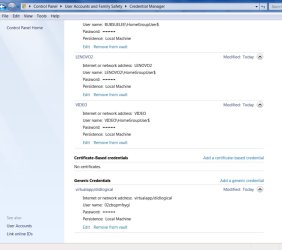
I did notice just now on my David Account Credentials .

Generic Creds at bottom...

What is that ?


EDITED LATER: Googled and it is an MS script with 'Live'..
 

Attachments

  • Credentials Mgr.jpg
    Credentials Mgr.jpg
    56.1 KB · Views: 1
Last edited:

My Computer My Computer

At a glance

Win 7 Pro 32 and 64 versions2.5 up4 to 8Nividia and AMD
Computer type
PC/Desktop
Computer Manufacturer/Model Number
Custom Builds but also Surface Pro 3, Dells Desk and HP laptop
OS
Win 7 Pro 32 and 64 versions
CPU
2.5 up
Motherboard
Different types
Memory
4 to 8
Graphics Card(s)
Nividia and AMD
Hard Drives
From 60GB to 2 TB
Antivirus
Avast Free
Browser
Firefox latest
Yes that works..

Connected from Lenovo2..

got Video K: drive/folders/files.

Still get No access on others.
 

My Computer My Computer

At a glance

Win 7 Pro 32 and 64 versions2.5 up4 to 8Nividia and AMD
Computer type
PC/Desktop
Computer Manufacturer/Model Number
Custom Builds but also Surface Pro 3, Dells Desk and HP laptop
OS
Win 7 Pro 32 and 64 versions
CPU
2.5 up
Motherboard
Different types
Memory
4 to 8
Graphics Card(s)
Nividia and AMD
Hard Drives
From 60GB to 2 TB
Antivirus
Avast Free
Browser
Firefox latest
The Network group works. Let's apply it to all drives now, while stripping HomeUsers from them.

Place the following script in the same directory as the "shares-list.csv" file and run. After it's done, test your access to your shares.

set_ntfs_permissions_2.bat
Code:
@echo off
setlocal EnableDelayedExpansion
REM Set NTFS permissions on share paths
 
set "shares_csv=%~dp0\shares-list.csv"
goto :main
 
:PromptUacAndFocus ScriptFullPath
setlocal
    set "temp1="%TEMP%\%~nx0_1_%RANDOM%.vbs""
    set "temp2="%TEMP%\%~nx0_2_%RANDOM%.vbs""
    net sess>NUL 2>&1||goto 2>NUL||(
        ( echo CreateObject^("Shell.Application"^).ShellExecute "%~1",,,"RunAs",1) > %TEMP1%
        (
            echo strTmpFile_1 = %TEMP1%
            echo strTmpFile_2 = %TEMP2%& echo.
            echo Function CountWindowInstance^(strProcessName^)
            echo     CountWindowInstance = GetObject^("winmgmts:\\.\root\cimv2"^).ExecQuery^("Select * from Win32_Process Where Name = '" ^& strProcessName ^& "'"^).Count
            echo End Function& echo.
            echo Set WshShell = CreateObject^("WScript.Shell"^)& echo.
            echo For I = 0 To 1
            echo     If CountWindowInstance^("consent.exe"^) ^> 1 Then WScript.Sleep 200 Else WScript.Sleep 50
            echo     WshShell.AppActivate^("User Account Control"^)
            echo Next& echo.
            echo On Error Resume Next& echo.
            echo With CreateObject^("Scripting.FileSystemObject"^)
            echo     If .FileExists^(strTmpFile_1^) Then .DeleteFile^(strTmpFile_1^)
            echo     If .FileExists^(strTmpFile_2^) Then .DeleteFile^(strTmpFile_2^)
            echo End With
        ) > %TEMP2%
        for /l %%_ in (1,1,2) do ping >NUL
        start WScript %TEMP1%
        for /l %%_ in (1,1,2) do ping >NUL
        start WScript %TEMP2%
        for /l %%_ in (1,1,2) do ping >NUL
        exit
    )
endlocal
goto :eof
 
:main
call :PromptUacAndFocus %0
 
for /f "skip=1 delims=" %%I in ('type "%SHARES_CSV%"') do (
    for /f "usebackq tokens=1,2,3 delims=," %%J in ('%%I') do (
        set "locations=!LOCATIONS!,%%~K"
    )
)
 
for %%I in (%LOCATIONS%) do (
    set "location=%%~I"
    icacls "!LOCATION:\=/!" /grant:r "Network:(OI)(CI)(F)" /c
)
 
REM remove the HomeUsers group from each %LOCATIONS%: 
 
for %%I in (%LOCATIONS%) do (
    set "location=%%~I"
    icacls "!LOCATION:\=/!" /remove "HomeUsers" /c
)
 
echo.& echo Done.& echo.& echo Press any key to exit...& pause >NUL

 

My Computer My Computer

At a glance

Windows 10, Windows 8.1 Pro, Windows 7 Profes...
Computer type
PC/Desktop
OS
Windows 10, Windows 8.1 Pro, Windows 7 Professional, OS X El Capitan
OKay running now

9:50pm Down to L:/ some time to go yet...
 
Last edited:

My Computer My Computer

At a glance

Win 7 Pro 32 and 64 versions2.5 up4 to 8Nividia and AMD
Computer type
PC/Desktop
Computer Manufacturer/Model Number
Custom Builds but also Surface Pro 3, Dells Desk and HP laptop
OS
Win 7 Pro 32 and 64 versions
CPU
2.5 up
Motherboard
Different types
Memory
4 to 8
Graphics Card(s)
Nividia and AMD
Hard Drives
From 60GB to 2 TB
Antivirus
Avast Free
Browser
Firefox latest
Hmm, I just noticed something and I wonder if it was part of the problem we had earlier with correct credentials not granting access. Bah, we may have lost the time over nothing :o

- When you were accessing Webmain from Lenovo with password protection off, the open session was Guest (you know this by now)
- After turning on password protection, you got asked for credentials (which we wanted)
- But since the session was still open on Lenovo (even if you close the session on Webmain), Lenovo was trying to use the open session even if you entered correct credentials
- Restarting/relogging or running this command ("net use * /del" ) would correct the issue (need to close session on both PCs). Command may be deleting drive/folder maps though. (Ok, checked and mapped folders were unaffected)

I was testing with password protected sharing off, and after turning it on, I wasn't granted access with my admin account. First I tried closing the session on my "Webmain" and it still didn't grant access. Then it hit me to delete the connections on my "Lenovo" :)
 
Last edited:

My Computer My Computer

At a glance

Windows 7 Ultimate x64 SP1AMD Phenom 2 1090T2x8GB Kingston HyperX Fury Black 1600Mhz Unga...MSI GTX 970 Gaming 4G
Computer type
PC/Desktop
Computer Manufacturer/Model Number
Custom Build
OS
Windows 7 Ultimate x64 SP1
CPU
AMD Phenom 2 1090T
Motherboard
Gigabyte GA-890FXA-UD5
Memory
2x8GB Kingston HyperX Fury Black 1600Mhz Unganged
Graphics Card(s)
MSI GTX 970 Gaming 4G
Sound Card
Realtek On-Board HD 7.1 Audio / Logitech G35
Monitor(s) Displays
3xAcer GD245HQ
Screen Resolution
1920x1080
Hard Drives
Samsung 850 Pro 512GB SSD - OS /
WD Caviar Black SATA 3 - 1 TBx2 - Dynamic RAID 0 /
WD Caviar Green SATA 2 - 640GBx2 - Dynamic RAID 0 /
WD Caviar Green SATA 2 - 640GB - Internal Backup /
Seagate Barracude SATA 3 - 3TB - External Backup/ Sync
PSU
HighPower 1000W
Case
Cooler Master HAF 932
Cooling
Noctua NH-D14
Keyboard
Logitech G19
Mouse
Logitech G500
Internet Speed
100/4 Mbit Cable (100GB quota)
Antivirus
ZoneAlarm Extreme Security / MBAM Pro / MBAE Free / SAS Free
Browser
IE 11 - Firefox - Chrome
Other Info
Logitech F710/ G27/ G940/ Z5500 // TrackIR 5 // Nvidia 3D Surround Vision
Then, I assume it worked! That's right, the last time I did not reboot both Lenovo2 and Webmain.

The script is still running and from where it's at now L:\ second time around, I think a few hours to go through the 2 ext 2TB drives.

It sure has been a marathon !

I love working with scripts though lost touch with it now. Reminds me of my time at it before Windows 30/40 years ago. The guys with Linux are still living it although that too is changing. Linux Mint 17 is a good example.

My son is an Analyst using mainly Net but also the C family and others.

Anyway, just a bit of banter to loosen up this morning !
 

My Computer My Computer

At a glance

Win 7 Pro 32 and 64 versions2.5 up4 to 8Nividia and AMD
Computer type
PC/Desktop
Computer Manufacturer/Model Number
Custom Builds but also Surface Pro 3, Dells Desk and HP laptop
OS
Win 7 Pro 32 and 64 versions
CPU
2.5 up
Motherboard
Different types
Memory
4 to 8
Graphics Card(s)
Nividia and AMD
Hard Drives
From 60GB to 2 TB
Antivirus
Avast Free
Browser
Firefox latest
Good morning by the way :) Will head to bed myself in an hour or so. I guess I won't be up to see the result tonight.
 

My Computer My Computer

At a glance

Windows 7 Ultimate x64 SP1AMD Phenom 2 1090T2x8GB Kingston HyperX Fury Black 1600Mhz Unga...MSI GTX 970 Gaming 4G
Computer type
PC/Desktop
Computer Manufacturer/Model Number
Custom Build
OS
Windows 7 Ultimate x64 SP1
CPU
AMD Phenom 2 1090T
Motherboard
Gigabyte GA-890FXA-UD5
Memory
2x8GB Kingston HyperX Fury Black 1600Mhz Unganged
Graphics Card(s)
MSI GTX 970 Gaming 4G
Sound Card
Realtek On-Board HD 7.1 Audio / Logitech G35
Monitor(s) Displays
3xAcer GD245HQ
Screen Resolution
1920x1080
Hard Drives
Samsung 850 Pro 512GB SSD - OS /
WD Caviar Black SATA 3 - 1 TBx2 - Dynamic RAID 0 /
WD Caviar Green SATA 2 - 640GBx2 - Dynamic RAID 0 /
WD Caviar Green SATA 2 - 640GB - Internal Backup /
Seagate Barracude SATA 3 - 3TB - External Backup/ Sync
PSU
HighPower 1000W
Case
Cooler Master HAF 932
Cooling
Noctua NH-D14
Keyboard
Logitech G19
Mouse
Logitech G500
Internet Speed
100/4 Mbit Cable (100GB quota)
Antivirus
ZoneAlarm Extreme Security / MBAM Pro / MBAE Free / SAS Free
Browser
IE 11 - Firefox - Chrome
Other Info
Logitech F710/ G27/ G940/ Z5500 // TrackIR 5 // Nvidia 3D Surround Vision
Must be late there ! Nice sunny day here with a cool breeze!!

Yes hopefully it won't be too long, although it may take another few hours to complete.

It is still blinking away on L:\ and has been for a few hours.

Can't thank you guys enough for your help. I remember I used to have weird things happen with Win 95 and 98, then Xp came along..

Enjoy your sleep..
 

My Computer My Computer

At a glance

Win 7 Pro 32 and 64 versions2.5 up4 to 8Nividia and AMD
Computer type
PC/Desktop
Computer Manufacturer/Model Number
Custom Builds but also Surface Pro 3, Dells Desk and HP laptop
OS
Win 7 Pro 32 and 64 versions
CPU
2.5 up
Motherboard
Different types
Memory
4 to 8
Graphics Card(s)
Nividia and AMD
Hard Drives
From 60GB to 2 TB
Antivirus
Avast Free
Browser
Firefox latest
Update: Still at L:\ blinking however can access all drives/folders/files on Webmain from all boxes. Great news..
 

My Computer My Computer

At a glance

Win 7 Pro 32 and 64 versions2.5 up4 to 8Nividia and AMD
Computer type
PC/Desktop
Computer Manufacturer/Model Number
Custom Builds but also Surface Pro 3, Dells Desk and HP laptop
OS
Win 7 Pro 32 and 64 versions
CPU
2.5 up
Motherboard
Different types
Memory
4 to 8
Graphics Card(s)
Nividia and AMD
Hard Drives
From 60GB to 2 TB
Antivirus
Avast Free
Browser
Firefox latest
Okay Done !

All drive/folders and files are accessible

Woo Hoo...
 

My Computer My Computer

At a glance

Win 7 Pro 32 and 64 versions2.5 up4 to 8Nividia and AMD
Computer type
PC/Desktop
Computer Manufacturer/Model Number
Custom Builds but also Surface Pro 3, Dells Desk and HP laptop
OS
Win 7 Pro 32 and 64 versions
CPU
2.5 up
Motherboard
Different types
Memory
4 to 8
Graphics Card(s)
Nividia and AMD
Hard Drives
From 60GB to 2 TB
Antivirus
Avast Free
Browser
Firefox latest
Good job :)
 

My Computer My Computer

At a glance

Windows 7 Ultimate x64 SP1AMD Phenom 2 1090T2x8GB Kingston HyperX Fury Black 1600Mhz Unga...MSI GTX 970 Gaming 4G
Computer type
PC/Desktop
Computer Manufacturer/Model Number
Custom Build
OS
Windows 7 Ultimate x64 SP1
CPU
AMD Phenom 2 1090T
Motherboard
Gigabyte GA-890FXA-UD5
Memory
2x8GB Kingston HyperX Fury Black 1600Mhz Unganged
Graphics Card(s)
MSI GTX 970 Gaming 4G
Sound Card
Realtek On-Board HD 7.1 Audio / Logitech G35
Monitor(s) Displays
3xAcer GD245HQ
Screen Resolution
1920x1080
Hard Drives
Samsung 850 Pro 512GB SSD - OS /
WD Caviar Black SATA 3 - 1 TBx2 - Dynamic RAID 0 /
WD Caviar Green SATA 2 - 640GBx2 - Dynamic RAID 0 /
WD Caviar Green SATA 2 - 640GB - Internal Backup /
Seagate Barracude SATA 3 - 3TB - External Backup/ Sync
PSU
HighPower 1000W
Case
Cooler Master HAF 932
Cooling
Noctua NH-D14
Keyboard
Logitech G19
Mouse
Logitech G500
Internet Speed
100/4 Mbit Cable (100GB quota)
Antivirus
ZoneAlarm Extreme Security / MBAM Pro / MBAE Free / SAS Free
Browser
IE 11 - Firefox - Chrome
Other Info
Logitech F710/ G27/ G940/ Z5500 // TrackIR 5 // Nvidia 3D Surround Vision
Back
Top