Solved [HELP] Windows Desktop Gadgets is not displaying

Technology

New member
Local time
2:58 PM
Messages
6
I'm running Windows 7 32bit. When Windows start, the gadgets isn't display.
Even, it's not displaying "Windows Desktop Gadgets has stopped working" message.
When I right-clicked on my desktop and select the gadgets, the gadgets isn't displaying too. I go to the Windows Task Manager and view the process, the 'sidebar.exe' is not shown. When I search on the programs and run 'View list of running Gadgets', it's displaying "Windows Desktop Gadgets has stopped working" message. I already try a lot of a methods to fix it, but it's not worked for me.
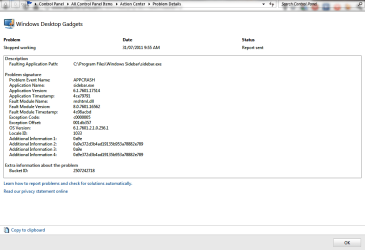
Here is the technical details of it.

Source
Windows Desktop Gadgets

Summary
Stopped working

Date
‎31/‎07/‎2011 10:06 AM

Status
Report sent

Description
Faulting Application Path: C:\Program Files\Windows Sidebar\sidebar.exe

Problem signature
Problem Event Name: APPCRASH
Application Name: sidebar.exe
Application Version: 6.1.7601.17514
Application Timestamp: 4ce79791
Fault Module Name: mshtml.dll
Fault Module Version: 8.0.7601.16562
Fault Module Timestamp: 4c08acbd
Exception Code: c0000005
Exception Offset: 001db357
OS Version: 6.1.7601.2.1.0.256.1
Locale ID: 1033
Additional Information 1: 0a9e
Additional Information 2: 0a9e372d3b4ad19135b953a78882e789
Additional Information 3: 0a9e
Additional Information 4: 0a9e372d3b4ad19135b953a78882e789

Any help would be greatly appreciated. :)
 

Attachments

  • Windows Gadgets Error.png
    Windows Gadgets Error.png
    22.1 KB · Views: 49

My Computer My Computer

OS
Windows 7 Ultimate 32bit
CPU
Intel Core 2 Duo
Motherboard
ASUS
Memory
2GB
Graphics Card(s)
Geforce 9500GT
Hello Technology,

You might see if running a sfc /scannow command may be able to help.

If not, then turn off the Windows Gadget Platform in Windows Features, OK it, then turn it back on to see if toggling it like may help.

Hope this helps,
Shawn
 

My Computer My Computer

Computer type
PC/Desktop
Computer Manufacturer/Model Number
Self built custom
OS
64-bit Windows 11 Pro for Workstations
CPU
Intel i7-8700K OC'd to 5 GHz
Motherboard
ASUS ROG Maximus XI Formula Z390
Memory
64 GB (4x16GB) G.SKILL TridentZ RGB DDR4 3600 MHz
Graphics Card(s)
ASUS ROG-STRIX-GTX1080TI-O11G-GAMING
Sound Card
Integrated
Monitor(s) Displays
2 x Samsung Odyssey G7 27"
Screen Resolution
2560x1440
Hard Drives
1TB Samsung 990 PRO M.2,
4TB Samsung 990 PRO PRO M.2,
TerraMaster F8 SSD Plus NAS
PSU
Seasonic Prime Titanium 850W
Case
Thermaltake Core P3
Cooling
Corsair Hydro H115i
Keyboard
Logitech wireless K800
Mouse
Logitech MX Master 4
Internet Speed
2 Gb/s Download and 100 Mb/s Upload
Antivirus
Malwarebyte Anti-Malware Premium
Browser
Google Chrome
Other Info
Logitech Z625 speaker system,
Logitech BRIO 4K Pro webcam,
HP Color LaserJet Pro MFP M477fdn,
APC SMART-UPS RT 1000 XL - SURT1000XLI,
Galaxy S23 Plus phone
If you have a restore point from before the problem started, you can try that first.

If no fix, you can see if the error is stored in Reliability Monitor

http://www.sevenforums.com/tutorials/2270-reliabilty-monitor.html

If so, it may point towards the culprit (newly installed software or hardware? Webcam, keyboard?)

If not, clearing the gadgets folder

C:\users\(Your user name)\AppData\Local\Microsoft\Windows Sidebar\Gadgets

and then restoring default gadgets usually fixes this.

A Guy
 

My Computer My Computer

Computer type
PC/Desktop
OS
Windows 10 Home x64
CPU
INTEL Core i5-750 Quad-Core 3.37GHz
Motherboard
ASUS P7P55D
Memory
HyperX Fury Black Series 8GB (2 x 4GB) 1866Mhz
Graphics Card(s)
EVGA GeForce GTX 750 Superclocked 1GB 128-Bit GDDR5
Monitor(s) Displays
LG 32MA68HY 32" IPS
Screen Resolution
1920 x 1080
Hard Drives
Samsung 840 Evo 120GB, SEAGATE 500GB Barracuda® 7200.12, SATA 3 Gb/s, 7200 RPM, 16MB cache
PSU
ANTEC TruePower New TP-550, 80 PLUS, 550W
Case
ANTEC Three Hundred Illusion
Cooling
COOLER MASTER Hyper 212 Plus, 4 x 120mm 1 x 140mm Noctua's
Internet Speed
85 + Mbps
Antivirus
Avast
Browser
Vivaldi
Hello Technology,

You might see if running a sfc /scannow command may be able to help.

If not, then turn off the Windows Gadget Platform in Windows Features, OK it, then turn it back on to see if toggling it like may help.

Hope this helps,
Shawn

I've tried it before, but it doesn't work for me.


If you have a restore point from before the problem started, you can try that first.

If no fix, you can see if the error is stored in Reliability Monitor

Reliabilty Monitor

If so, it may point towards the culprit (newly installed software or hardware? Webcam, keyboard?)

If not, clearing the gadgets folder

C:\users\(Your user name)\AppData\Local\Microsoft\Windows Sidebar\Gadgets

and then restoring default gadgets usually fixes this.

A Guy

I've tried it and reboot it, but it doesn't work for me.
 

My Computer My Computer

OS
Windows 7 Ultimate 32bit
CPU
Intel Core 2 Duo
Motherboard
ASUS
Memory
2GB
Graphics Card(s)
Geforce 9500GT
I've tried it and reboot it, but it doesn't work for me.

Sorry, you tried the Reliability Monitor and found no error? You tried System Restore? You tried clearing the folder? All three?

A Guy
 

My Computer My Computer

Computer type
PC/Desktop
OS
Windows 10 Home x64
CPU
INTEL Core i5-750 Quad-Core 3.37GHz
Motherboard
ASUS P7P55D
Memory
HyperX Fury Black Series 8GB (2 x 4GB) 1866Mhz
Graphics Card(s)
EVGA GeForce GTX 750 Superclocked 1GB 128-Bit GDDR5
Monitor(s) Displays
LG 32MA68HY 32" IPS
Screen Resolution
1920 x 1080
Hard Drives
Samsung 840 Evo 120GB, SEAGATE 500GB Barracuda® 7200.12, SATA 3 Gb/s, 7200 RPM, 16MB cache
PSU
ANTEC TruePower New TP-550, 80 PLUS, 550W
Case
ANTEC Three Hundred Illusion
Cooling
COOLER MASTER Hyper 212 Plus, 4 x 120mm 1 x 140mm Noctua's
Internet Speed
85 + Mbps
Antivirus
Avast
Browser
Vivaldi
Sorry, you tried the Reliability Monitor and found no error? You tried System Restore? You tried clearing the folder? All three?

A Guy

I've tried the Reliability Monitor, I found only the 'gadgets stopped working' error, no solutions found by the Reliability Monitor. And the attached image is the technical details provided by the Reliability Monitor. I've tried System Restore too, but not working too. I also tried clearing the gadgets folder and restore the default gadget, and reboot it. My gadgets is still not displaying.
 

My Computer My Computer

OS
Windows 7 Ultimate 32bit
CPU
Intel Core 2 Duo
Motherboard
ASUS
Memory
2GB
Graphics Card(s)
Geforce 9500GT

My Computer My Computer

Computer type
PC/Desktop
OS
Windows 10 Home x64
CPU
INTEL Core i5-750 Quad-Core 3.37GHz
Motherboard
ASUS P7P55D
Memory
HyperX Fury Black Series 8GB (2 x 4GB) 1866Mhz
Graphics Card(s)
EVGA GeForce GTX 750 Superclocked 1GB 128-Bit GDDR5
Monitor(s) Displays
LG 32MA68HY 32" IPS
Screen Resolution
1920 x 1080
Hard Drives
Samsung 840 Evo 120GB, SEAGATE 500GB Barracuda® 7200.12, SATA 3 Gb/s, 7200 RPM, 16MB cache
PSU
ANTEC TruePower New TP-550, 80 PLUS, 550W
Case
ANTEC Three Hundred Illusion
Cooling
COOLER MASTER Hyper 212 Plus, 4 x 120mm 1 x 140mm Noctua's
Internet Speed
85 + Mbps
Antivirus
Avast
Browser
Vivaldi

My Computer My Computer

OS
Windows 7 Ultimate 32bit
CPU
Intel Core 2 Duo
Motherboard
ASUS
Memory
2GB
Graphics Card(s)
Geforce 9500GT
Well, hopefully someone else will be along with more help, sorry. There is always a Repair Install option worse comes to worse. Hang in there. A Guy
 

My Computer My Computer

Computer type
PC/Desktop
OS
Windows 10 Home x64
CPU
INTEL Core i5-750 Quad-Core 3.37GHz
Motherboard
ASUS P7P55D
Memory
HyperX Fury Black Series 8GB (2 x 4GB) 1866Mhz
Graphics Card(s)
EVGA GeForce GTX 750 Superclocked 1GB 128-Bit GDDR5
Monitor(s) Displays
LG 32MA68HY 32" IPS
Screen Resolution
1920 x 1080
Hard Drives
Samsung 840 Evo 120GB, SEAGATE 500GB Barracuda® 7200.12, SATA 3 Gb/s, 7200 RPM, 16MB cache
PSU
ANTEC TruePower New TP-550, 80 PLUS, 550W
Case
ANTEC Three Hundred Illusion
Cooling
COOLER MASTER Hyper 212 Plus, 4 x 120mm 1 x 140mm Noctua's
Internet Speed
85 + Mbps
Antivirus
Avast
Browser
Vivaldi
Back
Top