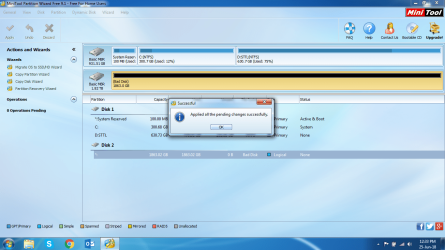
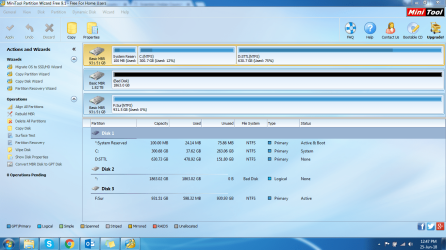
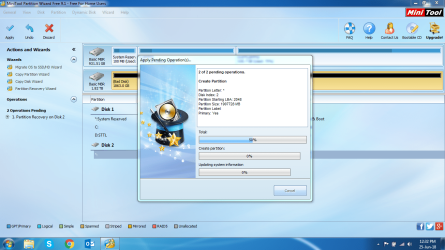
external hard disk which is not displaying data stored in it

I clicked okay, and here are the step wise screenshots after that.
 

Attachments

  • 34.PNG
    34.PNG
    243.5 KB · Views: 0
  • 35.PNG
    35.PNG
    240.5 KB · Views: 0
  • 36.PNG
    36.PNG
    236.8 KB · Views: 0

My Computer My Computer

At a glance

Windows 7 64 bit
Computer type
Laptop
Computer Manufacturer/Model Number
Acer
OS
Windows 7 64 bit
Close Partition Wizard, safely remove the 1TB drive, plug it again and check in Partition Wizard.
 

My Computer My Computer

At a glance

Windows 7 Home Premium 32 bit
OS
Windows 7 Home Premium 32 bit
Close Partition Wizard, safely remove the 1TB drive, plug it again and check in Partition Wizard.

The one that we have arranged for copying the data?
 

My Computer My Computer

At a glance

Windows 7 64 bit
Computer type
Laptop
Computer Manufacturer/Model Number
Acer
OS
Windows 7 64 bit
I connected both the drives. My 2TB one and my friend's 1TB one.

Screenshot attached
 

Attachments

  • 37.PNG
    37.PNG
    225.4 KB · Views: 0

My Computer My Computer

At a glance

Windows 7 64 bit
Computer type
Laptop
Computer Manufacturer/Model Number
Acer
OS
Windows 7 64 bit
Sorry, I forgot that yours is a 2TB drive. You can safely remove your friend's 1TB drive. Then run Partition Recovery Wizard on your 2TB drive and post the screen showing the partitions found.
 

My Computer My Computer

At a glance

Windows 7 Home Premium 32 bit
OS
Windows 7 Home Premium 32 bit
Ohh.... I thought we were ready to start copying my data :D

I did as you directed and here are the screenshots.
 

Attachments

  • 38.PNG
    38.PNG
    22.4 KB · Views: 13
  • 39.PNG
    39.PNG
    26 KB · Views: 13

My Computer My Computer

At a glance

Windows 7 64 bit
Computer type
Laptop
Computer Manufacturer/Model Number
Acer
OS
Windows 7 64 bit
So Partition Wizard really did not do anything. It still shows an anamalous partition starting at sector 0 and the real partition starting at sector 2048. I really did not want to do that for I know for sure that sector 0 which is the heart of any HDD has gone bad but Vineet Garg said why not try and I said OK :-).

The best way to recover the data is to clone the drive sector by sector to a good drive and then run PW on the cloned drive. ( The cloned drive being a good drive Partition Wizard will write the correct partition table into sector 0 for the partition starting at 2048 and you should be able to access the data) Best method/tool for cloning a failing HDD for Data Recovery? Solved - Windows 7 Help Forums

Based on that discussion resourceful OPs had done that. Check whether you can experiment and do it. What all you need to get a grip on it is a 8GB full of junk data ( which you can afford to lose if something goes wrong in your experiment) and another empty 16 GB pendrive ( anything larger than the 8GB source drive) Check and see whether you can successfully clone the 8GB to 16GB. If you can do it you will require a 3TB HDD to clone your 2TB drive. ( anything larger than 2TB)
 

My Computer My Computer

At a glance

Windows 7 Home Premium 32 bit
OS
Windows 7 Home Premium 32 bit
Jumanji Sir,

Can we try Testdisk? as you mentioned earlier.

It may take some time and effort for me to arrange for a 3TB drive. [No-one I can think of owns one. And even if I did find one, copying its data to other spaces would again be a task!] [Shall I buy a new 3 TB HD?]

Can we not work on my drive partially? Like cloning 500 GB of my data to a 1TB drive and so forth?

Edit: If I have to buy a new HD, would it not be better to pay to some Data recovery service [may-be seagate itself], who may recover my data within the same(or less) cost?
 

My Computer My Computer

At a glance

Windows 7 64 bit
Computer type
Laptop
Computer Manufacturer/Model Number
Acer
OS
Windows 7 64 bit
You cannot clone into a smaller drive. Cloning will fail. The number of sectors in the new drive should be equal to or more than the number of sectors in the drive that is being cloned. Even if you buy the same seagate 2TB the number of sectors in the new drive can be marginally less, you never know. And you should not clone unless you experiment as I had stated and get a grip on it and make sure that you can do it. If you ask me to clone now, even I have to start from the scratch and get a grip. Nothing remains in my memory :-)

For using TestDisk, please wait for some more time till I gather all info. You will get a mention when I post. May be by 7 PM.
 

My Computer My Computer

At a glance

Windows 7 Home Premium 32 bit
OS
Windows 7 Home Premium 32 bit
Sure sir,

However, off the topic, can someone suggest me how to make sure such an issue never occurs with other external drives?

I would like to ensure I do not face this kind of scenario with my WD Elements.

Edit: Also, which brand to go for if I decide to buy a 3 TB HD. Suggestions are welcome
 

My Computer My Computer

At a glance

Windows 7 64 bit
Computer type
Laptop
Computer Manufacturer/Model Number
Acer
OS
Windows 7 64 bit
Hi,
I will be back shortly.
 

My Computer My Computer

At a glance

Windows 7 Ultimate x32 With Sp1 + Vista Ultim...Intel Mobile Core 2 Duo T5750 @ 2.00GHz Merom...2.00GB Dual-Channel DDR2 @ 332MHz (5-5-5-15)Mobile Intel(R) 965 Express Chipset Family
Computer type
Laptop
Computer Manufacturer/Model Number
hp compaq presario c795VU notebook pc
OS
Windows 7 Ultimate x32 With Sp1 + Vista Ultimate x32 with Sp1 & Sp2 !!
CPU
Intel Mobile Core 2 Duo T5750 @ 2.00GHz Merom 65nm Technolog
Motherboard
Hewlett-Packard 30D9 (CPU)
Memory
2.00GB Dual-Channel DDR2 @ 332MHz (5-5-5-15)
Graphics Card(s)
Mobile Intel(R) 965 Express Chipset Family
Sound Card
High Definition Audio Device
Monitor(s) Displays
LP154WX4-TLCB on Mobile Intel 965 Express Chipset Family
Screen Resolution
1280x800 @ 60Hz
Hard Drives
149GB Western Digital WDC WD1600BEVS-60VAT0 ATA Device (SATA)
Keyboard
Standard 101/102-Key or Microsoft Natural PS/2 Key + HP QLB
Mouse
ALPS pointing device
Antivirus
Kaspersky AV 2017(Win 7) & AVG AntiVirus Free 2016 (VISTA)
Browser
google chrome
sheena bansal


TestDisk: For most part you will be following the TestDisk procedure mentioned here UPDATED How To Fix: External Disk Drive Suddenly Became RAW Unknown Kadath

Download TestDisk the stable version 7.0 for Windows from here TestDisk Download - CGSecurity ( Scroll down in the page and you will see 7.0.) Extract the testdisk-7.0.win.zip to the root of your system drive C:. You will run testdisk_win.exe in the extracted testdisk-7.0 folder.

On your 1TB disk create a folder named Recovery. This will be your destination to copy the files.

Plugin your faulty 2TB disk ( Source Disk) and also the 1TB disk ( Destination Disk)

Run testdisk_win.exe by clicking/double clicking on it.

[Within the TestDisk Window you will be navigating ( selecting by moving the Highlight) with up/down, left/right arrow keys. Read the contents in each window. Anytime a different Window appears stop, post the screenshot, ask for clarification. You can at anytime close TestDisk by clicking on the X at top right in the title bar]

Screen 1: Move the highlight to [No Log]and press Enter Key. We do not need the log.

Screen 2: This screen will show the System disk, the 1TB destination disk and 2TB faulty disk. Move the highlight to your faulty 2TB disk. ( Select only disk and not the drives shown below the disks) Please note the drive letter of your 1TB destination disk ( you will require it later to navigate to the Recovery folder in that disk to copy the files) and press Enter key.

Screen 3: Highlight [Intel] if not already highlighted and press Enter.

Screen 4: This screen in your case may or may not show the partition structure . [Quick Search] may be highlighted. Press Enter

Screen 5: Type y if it asks if the disk was made in Vista/Win7 and press Enter

Screen 6: You will see the search scanning your disk.

Screen 7: Will appear on completion of the search. Does it show any partition/s found? Highlight it and then press P ( Shift+P, Capital ) to list the folders.

If the files and folders are shown you can copy those to your destination disk. If your destination drive letter is I: your destination to copy will be Directory I: \Recovery. ( Replace I: with the drive letter of the destination disk you noted in screen 2)

Give the copy command.

Copying files listed by TestDisk during Recovery: Post #28 here My external hard drive suddenly became unllocated: - Page 3 - Windows 7 Help Forums ( screenshot 5 onwards)
 
Last edited:

My Computer My Computer

At a glance

Windows 7 Home Premium 32 bit
OS
Windows 7 Home Premium 32 bit
Thanks Jumanji,

I shall try it out at my home Laptop tonight.

Also, an update on the 3TB drive, I did not find a 3TB one with any of my friends. So I will have to buy a drive. Please suggest a brand/type.
 

My Computer My Computer

At a glance

Windows 7 64 bit
Computer type
Laptop
Computer Manufacturer/Model Number
Acer
OS
Windows 7 64 bit
Hi All,
Greets,
Sir/Madam,
Sorry for the delay, i was just waiting where i can do something!
1) So Partition Wizard really did not do anything. It still shows an anamalous partition starting at sector 0 and the real partition starting at sector 2048. I really did not want to do that for I know for sure that sector 0 which is the heart of any HDD has gone bad but Vineet Garg said why not try and I said OK .
Rightly, partition recovery wizard did not do anything. I emphasised on running it & am a little disappointed with the software. Sir, please go your way, your experience is unmatched.
2) Sir, your cloning idea is great ! Will i get some time to work with ? I want to use Macrium Reflect Free. It is unmatched! Though i use it regularly to make & restore system images, but cloning is a little different thing. The fact is when we make clone of a disk or partition by drag & drop in macrium , only its healthy sectors are copied as you said ! Here i have to see how an unallocated drive/partition (drive: here) is cloned by drag & drop!
Besides, while it is cloned the way, no harm will be done to the disk's present status. So, we can use a number of good cloning utilities, one after other, but would somebody like to advise other cloning utilities which is as good as macrium !
One more thing to add is while cloning any partition/drive, only the space occupied is needed on the other drive. But here the things are little different, So one should make sure the effective storage of the new drive is at least as big as the original's effective storage capacity! I would go for 3 TB ! If the original drive can't be repaired (i don't know !), mam has to go for new drive anyway !
3) When she was working with the partition wizard recovery, there was a warning box saying to switch to High Performance Plan instead of a power saving or even balanced power plan! So, before doing anything, switch to High Performance Plan in power options. ( One thing is to mention that its possible that switching to High Performance Plan triggers the cooling fans a bit early.) ( It's advised to save laptop from the heat by using a good laptop bed )
4)would it not be better to pay to some Data recovery service
Mam you can buy data recovery services irrespective of buying a new disk or not, even good independent services are there. Today, the things are so advanced that one can't imagine but make sure that the services are good !
5) how to make sure such an issue never occurs with other external drives?
Follow good practices for eg. never go for defragmentation or wiping of the external disks, handle with care, save from heat, dust, other infected devices!,etc. Of course make 200 gb sized partitions on such big external drives! So, if something happens to a particular area/sector, you lose/work with only that ! This way i faced only one problem i.e. when i connect the drive to my laptop, my antivirus starts scanning them all in different/individual instances as multiple drives are on scan ! ( I don't scan external hard drives as they are dedicated to the laptops & laptops have Kaspersky Antivirus on them )
6) which brand to go for if I decide to buy a 3 TB HD
Mam, I have no idea about that but i have seagate . But when i came to know that the WD belongs to SanDisk, suddenly its respect was raised in my mind. But everything is made by out sourcing now ! You can make sure one which is made in Japan,Germany and not only by a company of Japan, Germany,etc.!
Thats for now ! let me know!

Thanks & Regards. ...
 
Last edited:

My Computer My Computer

At a glance

Windows 7 Ultimate x32 With Sp1 + Vista Ultim...Intel Mobile Core 2 Duo T5750 @ 2.00GHz Merom...2.00GB Dual-Channel DDR2 @ 332MHz (5-5-5-15)Mobile Intel(R) 965 Express Chipset Family
Computer type
Laptop
Computer Manufacturer/Model Number
hp compaq presario c795VU notebook pc
OS
Windows 7 Ultimate x32 With Sp1 + Vista Ultimate x32 with Sp1 & Sp2 !!
CPU
Intel Mobile Core 2 Duo T5750 @ 2.00GHz Merom 65nm Technolog
Motherboard
Hewlett-Packard 30D9 (CPU)
Memory
2.00GB Dual-Channel DDR2 @ 332MHz (5-5-5-15)
Graphics Card(s)
Mobile Intel(R) 965 Express Chipset Family
Sound Card
High Definition Audio Device
Monitor(s) Displays
LP154WX4-TLCB on Mobile Intel 965 Express Chipset Family
Screen Resolution
1280x800 @ 60Hz
Hard Drives
149GB Western Digital WDC WD1600BEVS-60VAT0 ATA Device (SATA)
Keyboard
Standard 101/102-Key or Microsoft Natural PS/2 Key + HP QLB
Mouse
ALPS pointing device
Antivirus
Kaspersky AV 2017(Win 7) & AVG AntiVirus Free 2016 (VISTA)
Browser
google chrome
For 3TB external HDD

If you want to buy a Western Digital, buy only the Elements Model. All other models use hardware encryption in the enclosure Electronics. If the enclosure electronics fail you will be totally locked out of your drive. Only WD data recovery partners can recover, and decrypt the encrypted data and it will cost heavily.

If you want to buy Seagate, go for the Expansion Models only. Their Backup models seem to have a high failure rate of the electronics. Read the recent thread by yoongcy421 here Seagate 2TB Unallocated, Unknown, Not Initialized - Windows 7 Help Forums. I have seen other user reports also on this.

To avoid all these hassles, many people by a good branded enclosure and stuff it with a 2.5" laptop drive. Now don't ask me which is a good external enclosure. I don't know for I had never bought one :-) You can buy Seagate or WD 2.5'' laptop drives to go with the enclosure. Personally I would prefer a Seagate.
 

My Computer My Computer

At a glance

Windows 7 Home Premium 32 bit
OS
Windows 7 Home Premium 32 bit
Hi All,
Sir(s),
jumanji: I am sorry to admit that the matter is beyond my understanding & reach. So, i give up here ! All the best to you & sheena !

( Go for the high performance power plan for this particular troubleshooting.
Power Plan - Select - Windows 7 Help Forums
The missing device PCI has to be taken into account once the troubleshooting completes )

Thanks & Regards. ...
 
Last edited:

My Computer My Computer

At a glance

Windows 7 Ultimate x32 With Sp1 + Vista Ultim...Intel Mobile Core 2 Duo T5750 @ 2.00GHz Merom...2.00GB Dual-Channel DDR2 @ 332MHz (5-5-5-15)Mobile Intel(R) 965 Express Chipset Family
Computer type
Laptop
Computer Manufacturer/Model Number
hp compaq presario c795VU notebook pc
OS
Windows 7 Ultimate x32 With Sp1 + Vista Ultimate x32 with Sp1 & Sp2 !!
CPU
Intel Mobile Core 2 Duo T5750 @ 2.00GHz Merom 65nm Technolog
Motherboard
Hewlett-Packard 30D9 (CPU)
Memory
2.00GB Dual-Channel DDR2 @ 332MHz (5-5-5-15)
Graphics Card(s)
Mobile Intel(R) 965 Express Chipset Family
Sound Card
High Definition Audio Device
Monitor(s) Displays
LP154WX4-TLCB on Mobile Intel 965 Express Chipset Family
Screen Resolution
1280x800 @ 60Hz
Hard Drives
149GB Western Digital WDC WD1600BEVS-60VAT0 ATA Device (SATA)
Keyboard
Standard 101/102-Key or Microsoft Natural PS/2 Key + HP QLB
Mouse
ALPS pointing device
Antivirus
Kaspersky AV 2017(Win 7) & AVG AntiVirus Free 2016 (VISTA)
Browser
google chrome
Hi All,

Really sorry for not responding to the posts but I have been a bit off since last few days.

I had to return the 1TB HD to its owner. Will now move my WD Element's content to other drives and start with the Testdisk steps shared in earlier post.
 

My Computer My Computer

At a glance

Windows 7 64 bit
Computer type
Laptop
Computer Manufacturer/Model Number
Acer
OS
Windows 7 64 bit
Back
Top