
You are using an out of date browser. It may not display this or other websites correctly.
You should upgrade or use an alternative browser.
You should upgrade or use an alternative browser.
help with explorer
- Thread starter linkysys
- Start date
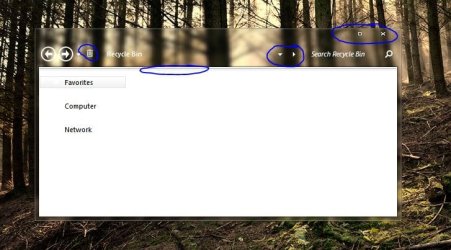
If this is a custom theme, please post a link for downloading.
My Computer
- Computer type
- PC/Desktop
- OS
- Windows 8.1 ; Windows 7 x86 (Dec2008-Jan2013)
- Other Info
- "The scale icon at the top right of a post or tutorial is how you can give rep to the member."

Welcome to the Seven Forums
#1
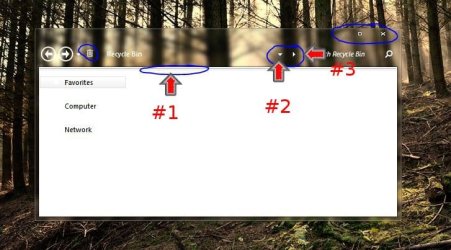
I see the command bar has been removed so I would check the images at
Explorer & Shell > Explorer > CommandModule > <1>
Explorer & Shell > Explorer > Menu Bar > Background
Toolbars, Headers and Rebar > Rebar > Rebar
maybe some of them are showing up still?
#2 & #3 are in ExplorerFrame.dll Bitmap # 288 at C:\Windows\System32
+ #2 is at
Buttons, Boxes & Controls > Boxes > ComboBox > DropDownButtonRight > Glyph Image, DPI 96
I do not know about the trash icon sorry.
The buttons I do not know but you could mess with the Sizing Margins or the Content Margins at
Windows and Caption Buttons > Aero > Dwm Window > CloseButton > Normal Button > Active
Windows and Caption Buttons > Aero > Dwm Window > CloseButton > Normal Button > Inactive
Windows and Caption Buttons > Aero > Dwm Window > Minimize/Help Button > Button > Active
Windows and Caption Buttons > Aero > Dwm Window > Minimize/Help Button > Button > Inactive
Windows and Caption Buttons > Aero > Dwm Window > Restore/Maximize Button > Button > Active
Windows and Caption Buttons > Aero > Dwm Window > Restore/Maximize Button > Button > Inactive
Or the Atlasrect:rect of the Glyph under the Button locations above
NOTE I HAVE NEVER DONE THIS WITH THE BUTTONS SO TRY IT ON A COPY 1st AT YOUR RISK.
Jerry
#1
I see the command bar has been removed so I would check the images at
Explorer & Shell > Explorer > CommandModule > <1>
Explorer & Shell > Explorer > Menu Bar > Background
Toolbars, Headers and Rebar > Rebar > Rebar
maybe some of them are showing up still?
#2 & #3 are in ExplorerFrame.dll Bitmap # 288 at C:\Windows\System32
+ #2 is at
Buttons, Boxes & Controls > Boxes > ComboBox > DropDownButtonRight > Glyph Image, DPI 96
I do not know about the trash icon sorry.
The buttons I do not know but you could mess with the Sizing Margins or the Content Margins at
Windows and Caption Buttons > Aero > Dwm Window > CloseButton > Normal Button > Active
Windows and Caption Buttons > Aero > Dwm Window > CloseButton > Normal Button > Inactive
Windows and Caption Buttons > Aero > Dwm Window > Minimize/Help Button > Button > Active
Windows and Caption Buttons > Aero > Dwm Window > Minimize/Help Button > Button > Inactive
Windows and Caption Buttons > Aero > Dwm Window > Restore/Maximize Button > Button > Active
Windows and Caption Buttons > Aero > Dwm Window > Restore/Maximize Button > Button > Inactive
Or the Atlasrect:rect of the Glyph under the Button locations above
NOTE I HAVE NEVER DONE THIS WITH THE BUTTONS SO TRY IT ON A COPY 1st AT YOUR RISK.
Jerry
My Computer
- Computer type
- Laptop
- Computer Manufacturer/Model Number
- Sager NP9170
- OS
- Win 7 Pro x64 / Win 10 Pro
- CPU
- Intel(R) Core(TM) i7-3630QM CPU @ 2.40GHz
- Motherboard
- CLEVO P170EM
- Memory
- 12 GB
- Graphics Card(s)
- (1) Intel(R) HD Graphics 4000 (2) NVIDIA GeForce GTX 675M
- Sound Card
- (1) Realtek High Definition Audio (2) Intel(R) Display Aud
- Monitor(s) Displays
- 17.3
- Screen Resolution
- 1920x1080
- Hard Drives
- (1) Samsung 860 EVO 500GB(OS) (1) Samsung 860 EVO 500GB(Data)
- Keyboard
- Backlite
- Antivirus
- MSE, Malwarebytes Pro
- Browser
- Firefox
- Other Info
- DESKTOP: Custom-built.
OS: Win 10 Pro x64.
CASE: Rosewill R5.
CPU: Intel I5 4670K CPU @ 3.40GHz.
CPU COOLER: Cool Master Hyper 212 EVO.
MOTHERBOARD: Asus Z87-A.
MEMORY: Kingston HyperX 2x4 GB.
GPU: Nvidia Geforce 650 TI.
PSU: Corsair TX750.
DRIVES: (1) Samsung 840 120 GB SSD (2) Western Digital blue 500 GB 7200 RPM.
thank you guys, i managed to removed some resources in explorerframe.dll (bitmap #288) and others to clear the address bar in explorer. but with the breadcrumb icon i guess its a code within explorerframe, but i would not mess up. i also found out that caption button spacing is hard coded, and can only be centered if you mess up with the code. the only thing that bugs me is the folder band margin which is always there despite erasing the contents in Explorer & Shell>Explorer>CommandModule><1> and also readjusting Explorerframe padding by -77rp at the last line.
@Neutron16 i modified shine 2.0 visual style by zainadeel, im not allowed to release my mod.
@Neutron16 i modified shine 2.0 visual style by zainadeel, im not allowed to release my mod.
My Computer
- OS
- Windows 7 SP1 x86

I do not understand what you mean by the white margin becomes dark?i also find this taskbar gradient to be obstrusive, i found this in VSB but when i save it the white margin becomes dark and the taskbar somewhat blurry...
The taskbar always has a slight blur to it.
Jerry
My Computer
- Computer type
- Laptop
- Computer Manufacturer/Model Number
- Sager NP9170
- OS
- Win 7 Pro x64 / Win 10 Pro
- CPU
- Intel(R) Core(TM) i7-3630QM CPU @ 2.40GHz
- Motherboard
- CLEVO P170EM
- Memory
- 12 GB
- Graphics Card(s)
- (1) Intel(R) HD Graphics 4000 (2) NVIDIA GeForce GTX 675M
- Sound Card
- (1) Realtek High Definition Audio (2) Intel(R) Display Aud
- Monitor(s) Displays
- 17.3
- Screen Resolution
- 1920x1080
- Hard Drives
- (1) Samsung 860 EVO 500GB(OS) (1) Samsung 860 EVO 500GB(Data)
- Keyboard
- Backlite
- Antivirus
- MSE, Malwarebytes Pro
- Browser
- Firefox
- Other Info
- DESKTOP: Custom-built.
OS: Win 10 Pro x64.
CASE: Rosewill R5.
CPU: Intel I5 4670K CPU @ 3.40GHz.
CPU COOLER: Cool Master Hyper 212 EVO.
MOTHERBOARD: Asus Z87-A.
MEMORY: Kingston HyperX 2x4 GB.
GPU: Nvidia Geforce 650 TI.
PSU: Corsair TX750.
DRIVES: (1) Samsung 840 120 GB SSD (2) Western Digital blue 500 GB 7200 RPM.
Try editing the image here (remove the color)thank u for the response jerry im just confused, but how can i remove that extra white gradient in the taskbar?
Windows and Caption Buttons > Aero > Dwm Window > Reflections > Main
If that's not it let me know
Jerry
My Computer
- Computer type
- Laptop
- Computer Manufacturer/Model Number
- Sager NP9170
- OS
- Win 7 Pro x64 / Win 10 Pro
- CPU
- Intel(R) Core(TM) i7-3630QM CPU @ 2.40GHz
- Motherboard
- CLEVO P170EM
- Memory
- 12 GB
- Graphics Card(s)
- (1) Intel(R) HD Graphics 4000 (2) NVIDIA GeForce GTX 675M
- Sound Card
- (1) Realtek High Definition Audio (2) Intel(R) Display Aud
- Monitor(s) Displays
- 17.3
- Screen Resolution
- 1920x1080
- Hard Drives
- (1) Samsung 860 EVO 500GB(OS) (1) Samsung 860 EVO 500GB(Data)
- Keyboard
- Backlite
- Antivirus
- MSE, Malwarebytes Pro
- Browser
- Firefox
- Other Info
- DESKTOP: Custom-built.
OS: Win 10 Pro x64.
CASE: Rosewill R5.
CPU: Intel I5 4670K CPU @ 3.40GHz.
CPU COOLER: Cool Master Hyper 212 EVO.
MOTHERBOARD: Asus Z87-A.
MEMORY: Kingston HyperX 2x4 GB.
GPU: Nvidia Geforce 650 TI.
PSU: Corsair TX750.
DRIVES: (1) Samsung 840 120 GB SSD (2) Western Digital blue 500 GB 7200 RPM.
Can you post a better screenshot of it@Jerry the white gradient was still there when i removed it. i think the reflections are the window images (the white bands) when aero peek is active.
Jerry
My Computer
- Computer type
- Laptop
- Computer Manufacturer/Model Number
- Sager NP9170
- OS
- Win 7 Pro x64 / Win 10 Pro
- CPU
- Intel(R) Core(TM) i7-3630QM CPU @ 2.40GHz
- Motherboard
- CLEVO P170EM
- Memory
- 12 GB
- Graphics Card(s)
- (1) Intel(R) HD Graphics 4000 (2) NVIDIA GeForce GTX 675M
- Sound Card
- (1) Realtek High Definition Audio (2) Intel(R) Display Aud
- Monitor(s) Displays
- 17.3
- Screen Resolution
- 1920x1080
- Hard Drives
- (1) Samsung 860 EVO 500GB(OS) (1) Samsung 860 EVO 500GB(Data)
- Keyboard
- Backlite
- Antivirus
- MSE, Malwarebytes Pro
- Browser
- Firefox
- Other Info
- DESKTOP: Custom-built.
OS: Win 10 Pro x64.
CASE: Rosewill R5.
CPU: Intel I5 4670K CPU @ 3.40GHz.
CPU COOLER: Cool Master Hyper 212 EVO.
MOTHERBOARD: Asus Z87-A.
MEMORY: Kingston HyperX 2x4 GB.
GPU: Nvidia Geforce 650 TI.
PSU: Corsair TX750.
DRIVES: (1) Samsung 840 120 GB SSD (2) Western Digital blue 500 GB 7200 RPM.
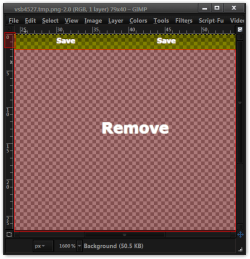
Look at these images & remove all the color but the top 2px rows & try that.
Taskbar & System Tray > TaskBar > Aero > TaskBar > <1>
Taskbar & System Tray > TaskBand > Aero > TaskBand > BackgroundBottom
Taskbar & System Tray > TaskBand > Aero > TaskBand (SmallIcons) > BackgroundBottom
Jerry
Taskbar & System Tray > TaskBar > Aero > TaskBar > <1>
Taskbar & System Tray > TaskBand > Aero > TaskBand > BackgroundBottom
Taskbar & System Tray > TaskBand > Aero > TaskBand (SmallIcons) > BackgroundBottom
Jerry
Attachments
My Computer
- Computer type
- Laptop
- Computer Manufacturer/Model Number
- Sager NP9170
- OS
- Win 7 Pro x64 / Win 10 Pro
- CPU
- Intel(R) Core(TM) i7-3630QM CPU @ 2.40GHz
- Motherboard
- CLEVO P170EM
- Memory
- 12 GB
- Graphics Card(s)
- (1) Intel(R) HD Graphics 4000 (2) NVIDIA GeForce GTX 675M
- Sound Card
- (1) Realtek High Definition Audio (2) Intel(R) Display Aud
- Monitor(s) Displays
- 17.3
- Screen Resolution
- 1920x1080
- Hard Drives
- (1) Samsung 860 EVO 500GB(OS) (1) Samsung 860 EVO 500GB(Data)
- Keyboard
- Backlite
- Antivirus
- MSE, Malwarebytes Pro
- Browser
- Firefox
- Other Info
- DESKTOP: Custom-built.
OS: Win 10 Pro x64.
CASE: Rosewill R5.
CPU: Intel I5 4670K CPU @ 3.40GHz.
CPU COOLER: Cool Master Hyper 212 EVO.
MOTHERBOARD: Asus Z87-A.
MEMORY: Kingston HyperX 2x4 GB.
GPU: Nvidia Geforce 650 TI.
PSU: Corsair TX750.
DRIVES: (1) Samsung 840 120 GB SSD (2) Western Digital blue 500 GB 7200 RPM.

I sent you a PMthanks Jer but as soon as i test the VS the white border thing in the taskbar is also gone...its turns into black...i can send you my mod if u want to...
My Computer
- Computer type
- Laptop
- Computer Manufacturer/Model Number
- Sager NP9170
- OS
- Win 7 Pro x64 / Win 10 Pro
- CPU
- Intel(R) Core(TM) i7-3630QM CPU @ 2.40GHz
- Motherboard
- CLEVO P170EM
- Memory
- 12 GB
- Graphics Card(s)
- (1) Intel(R) HD Graphics 4000 (2) NVIDIA GeForce GTX 675M
- Sound Card
- (1) Realtek High Definition Audio (2) Intel(R) Display Aud
- Monitor(s) Displays
- 17.3
- Screen Resolution
- 1920x1080
- Hard Drives
- (1) Samsung 860 EVO 500GB(OS) (1) Samsung 860 EVO 500GB(Data)
- Keyboard
- Backlite
- Antivirus
- MSE, Malwarebytes Pro
- Browser
- Firefox
- Other Info
- DESKTOP: Custom-built.
OS: Win 10 Pro x64.
CASE: Rosewill R5.
CPU: Intel I5 4670K CPU @ 3.40GHz.
CPU COOLER: Cool Master Hyper 212 EVO.
MOTHERBOARD: Asus Z87-A.
MEMORY: Kingston HyperX 2x4 GB.
GPU: Nvidia Geforce 650 TI.
PSU: Corsair TX750.
DRIVES: (1) Samsung 840 120 GB SSD (2) Western Digital blue 500 GB 7200 RPM.
Just looked at it & I got rid of the white by editing the images like I said 3 post ago.
Put this image in the zip in your mstyles at (import it)
Taskbar & System Tray > TaskBar > Aero > TaskBar > <1>
Taskbar & System Tray > TaskBand > Aero > TaskBand > BackgroundBottom
Taskbar & System Tray > TaskBand > Aero > TaskBand (SmallIcons) > BackgroundBottom
& try it.
Jerry
Put this image in the zip in your mstyles at (import it)
Taskbar & System Tray > TaskBar > Aero > TaskBar > <1>
Taskbar & System Tray > TaskBand > Aero > TaskBand > BackgroundBottom
Taskbar & System Tray > TaskBand > Aero > TaskBand (SmallIcons) > BackgroundBottom
& try it.
Jerry
Attachments
My Computer
- Computer type
- Laptop
- Computer Manufacturer/Model Number
- Sager NP9170
- OS
- Win 7 Pro x64 / Win 10 Pro
- CPU
- Intel(R) Core(TM) i7-3630QM CPU @ 2.40GHz
- Motherboard
- CLEVO P170EM
- Memory
- 12 GB
- Graphics Card(s)
- (1) Intel(R) HD Graphics 4000 (2) NVIDIA GeForce GTX 675M
- Sound Card
- (1) Realtek High Definition Audio (2) Intel(R) Display Aud
- Monitor(s) Displays
- 17.3
- Screen Resolution
- 1920x1080
- Hard Drives
- (1) Samsung 860 EVO 500GB(OS) (1) Samsung 860 EVO 500GB(Data)
- Keyboard
- Backlite
- Antivirus
- MSE, Malwarebytes Pro
- Browser
- Firefox
- Other Info
- DESKTOP: Custom-built.
OS: Win 10 Pro x64.
CASE: Rosewill R5.
CPU: Intel I5 4670K CPU @ 3.40GHz.
CPU COOLER: Cool Master Hyper 212 EVO.
MOTHERBOARD: Asus Z87-A.
MEMORY: Kingston HyperX 2x4 GB.
GPU: Nvidia Geforce 650 TI.
PSU: Corsair TX750.
DRIVES: (1) Samsung 840 120 GB SSD (2) Western Digital blue 500 GB 7200 RPM.
I just reread your posts maybe I am not understanding you.
You what a white boarder at the top & remove the white in the taskbar?
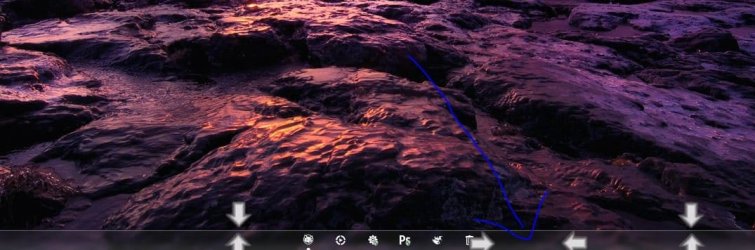
Not this?

Jerry
You what a white boarder at the top & remove the white in the taskbar?
Not this?
Jerry
My Computer
- Computer type
- Laptop
- Computer Manufacturer/Model Number
- Sager NP9170
- OS
- Win 7 Pro x64 / Win 10 Pro
- CPU
- Intel(R) Core(TM) i7-3630QM CPU @ 2.40GHz
- Motherboard
- CLEVO P170EM
- Memory
- 12 GB
- Graphics Card(s)
- (1) Intel(R) HD Graphics 4000 (2) NVIDIA GeForce GTX 675M
- Sound Card
- (1) Realtek High Definition Audio (2) Intel(R) Display Aud
- Monitor(s) Displays
- 17.3
- Screen Resolution
- 1920x1080
- Hard Drives
- (1) Samsung 860 EVO 500GB(OS) (1) Samsung 860 EVO 500GB(Data)
- Keyboard
- Backlite
- Antivirus
- MSE, Malwarebytes Pro
- Browser
- Firefox
- Other Info
- DESKTOP: Custom-built.
OS: Win 10 Pro x64.
CASE: Rosewill R5.
CPU: Intel I5 4670K CPU @ 3.40GHz.
CPU COOLER: Cool Master Hyper 212 EVO.
MOTHERBOARD: Asus Z87-A.
MEMORY: Kingston HyperX 2x4 GB.
GPU: Nvidia Geforce 650 TI.
PSU: Corsair TX750.
DRIVES: (1) Samsung 840 120 GB SSD (2) Western Digital blue 500 GB 7200 RPM.
thank you for all the help jerry it seems there are no other solution but to replace the ugly taskbar with a dock. im sorry for bothering you most of the time..
you can check my current screen in my DA page:
L1nkysys on deviantART
have a great day jerry...
=D
you can check my current screen in my DA page:
L1nkysys on deviantART
have a great day jerry...
=D
My Computer
- OS
- Windows 7 SP1 x86
Similar threads
- Replies
- 5
- Views
- 7K

- Replies
- 5
- Views
- 1K

- Replies
- 1
- Views
- 1K
- Replies
- 20
- Views
- 3K
- Replies
- 2
- Views
- 3K