Solved Help with GTX970

shanefromoz

New member
Member
Local time
8:13 PM
Messages
72
Hello,

A few days ago I put together a tower for my son with an Asus Z97 pro motherboard and the GTX970 graphics card.
We have it connected to a tv via hdmi until my son can get himself a monitor.
Our issue is that 1 minute I turn the tower on and everything is working fine.
The next time I turn tower on the tower itself lights up but we have no picture.
The graphics card driver is up to date.
I have tried with different hdmi leads also.
Hoping someone could please assist me.

Thanks
 

My Computer

OS
Windows 7 Ultimate
This begs the question Shane mate is the TV ok?? and even more obvious - sorry but have to ask have you got a dedicated AV channel picked out on the TV?

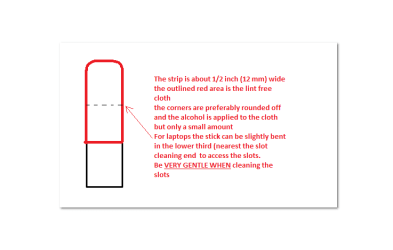
I would suggest reseating the GPU too and perhaps even this
SLOT CLEANING
Now as for the slots to clean them use a strip of old credit card about 1/2 inch wide nip the corners off one end - preferably round them off hold a piece of thin lint free cloth over the end dab on some form of alcohol - iso propyl alcohol (what we swab the skin with before an injection) is good and GENTLY swipe along the slots.
This can also be done for the GPU slot/s and do not forget to clean the contacts on the cards / sticks either.
It is an idea to clean the contacts on the sticks / cards while you are at it but be VERY gentle when doing this.

The next thing to look at is this
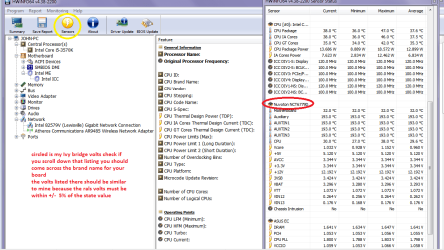
UsingHW Info PSU

Download HW Info and pick the right bit version -
HWiNFO, HWiNFO32/64 - Download -(copyand paste this site into the search bar) If you do not need the runninginformation in the smaller right hand panel close it. In the left hand windowclick on the + for the individual device groupings and they will open out tothe various components.

Go on opening out further until you get to the device itself. click on it andit will highlight. In the right hand window there will be a very detaileddescription of that device as in brand, speeds model number etc etc These arevery detailed and are just what is needed for searching for drivers etc.


To getthe PSU volts you need to select the Sensor button circled in yellow in the picfor PSU testing do the same and scroll down the readout as in my pic to whereit has Nuvoton = yours might be a different section name / title. Post back apic of that please.

If you want a more definitive test see this
http://www.sevenforums.com/tutorials/301799-psu-test-dc-output-voltage.html butlease only use a digital multimeter and not an analogue as they injecttypically 9v into a circuit to test and into a 3.3v or 5v rail - not a good idea!!see the partial pic of the correct sort of meter in that tutorial. details ifyou scroll down that listing.

Now a good reference article is this
Voltage Rails - Power Supply 101: A Reference Of Specifications it will explain in detail what the voltages are and functions of the PSU/
Could be something as simple as lack of power to the GPU or board.
 

Attachments

  • STICK.PNG
    STICK.PNG
    6 KB · Views: 1
  • HW Info PSU VOLTS DSEKTOP.PNG
    HW Info PSU VOLTS DSEKTOP.PNG
    51.7 KB · Views: 1

My Computer

Computer type
PC/Desktop
Computer Manufacturer/Model Number
Own build (new) Desk1 / Asus ROG Win 7 / Desk2 1st build
OS
Desk1 7 Home Prem / Desk2 10 Pro / Main lap Asus ROG 10 Pro 2 laptop Toshiba 7 Pro Asus P2520 7 & 10
CPU
Desk1 i5 3750K / Laptop i7 GTX 860M / Desk2 i5 2500
Motherboard
Desk1 Asus P877-V / Desk2 Gigabyte H67 UD3H / Laptop ?
Memory
Desk1 8GB (1866) / Desk2 16GB (1333) / Laptop 8Gb DDR3
Graphics Card(s)
Desk 1& 2NVidia GTX 650 & Laptops on board Intel
Sound Card
Desk 1 & 2 -XONAR DG Realtek High Def audio Laptop
Monitor(s) Displays
Desk 1 Benq HD 2450 / Desk2 Philips 24" / Laptop 17.5"
Screen Resolution
1920x1080 D1 & D2 & Laptop 1
Hard Drives
Desk1 Samsung 120GB 830 SSD
Asus ROG 256GB 850 Pro SSD
Desk2 Samsung 840 256 SSD
Toshiba 120GB EVO
PSU
Desk 1 Corsair HX 1050/ Laptop ? / Desk 2 Corsair HX 650
Case
Desk 1 Cooler HAF XM ? Toshiba laptop / Desk2 Coolermaster
Cooling
Fans on all Desk1 -2 Desk2 - all Coolermasters 5 Laptop ?
Keyboard
Desk 1 MS Sidewinder X6 Desk 2 MS Sidewinder X 4
Mouse
Desk 1&2 - Gigabyte MS 900 gamer - laptop - Logitec wireless
Internet Speed
ADSL2+
Other Info
One other Desktop (tester) and spare Toshba laptop both with SSD's
Running Kaspersky 2016 ISS on all machines config'd identically
Logitec audio stereo systems on each machine (x3)
Canon MG5250MFC
Router/modem TP-Link running WPA2SK
The issue was a compatibility issue between power supply and graphics card.
I have now changed graphics cards and the new one works perfect.
Thanks to all that tried to assist.
 

My Computer

OS
Windows 7 Ultimate
Very odd and I would hazard a guess at the old card being faulty as I do not know of any cards that incompatible with a PSU because the PSU only delivers volts and current to all components and cannot be any different as they are governed by laws of physics.
But at least it is going:)
 

My Computer

Computer type
PC/Desktop
Computer Manufacturer/Model Number
Own build (new) Desk1 / Asus ROG Win 7 / Desk2 1st build
OS
Desk1 7 Home Prem / Desk2 10 Pro / Main lap Asus ROG 10 Pro 2 laptop Toshiba 7 Pro Asus P2520 7 & 10
CPU
Desk1 i5 3750K / Laptop i7 GTX 860M / Desk2 i5 2500
Motherboard
Desk1 Asus P877-V / Desk2 Gigabyte H67 UD3H / Laptop ?
Memory
Desk1 8GB (1866) / Desk2 16GB (1333) / Laptop 8Gb DDR3
Graphics Card(s)
Desk 1& 2NVidia GTX 650 & Laptops on board Intel
Sound Card
Desk 1 & 2 -XONAR DG Realtek High Def audio Laptop
Monitor(s) Displays
Desk 1 Benq HD 2450 / Desk2 Philips 24" / Laptop 17.5"
Screen Resolution
1920x1080 D1 & D2 & Laptop 1
Hard Drives
Desk1 Samsung 120GB 830 SSD
Asus ROG 256GB 850 Pro SSD
Desk2 Samsung 840 256 SSD
Toshiba 120GB EVO
PSU
Desk 1 Corsair HX 1050/ Laptop ? / Desk 2 Corsair HX 650
Case
Desk 1 Cooler HAF XM ? Toshiba laptop / Desk2 Coolermaster
Cooling
Fans on all Desk1 -2 Desk2 - all Coolermasters 5 Laptop ?
Keyboard
Desk 1 MS Sidewinder X6 Desk 2 MS Sidewinder X 4
Mouse
Desk 1&2 - Gigabyte MS 900 gamer - laptop - Logitec wireless
Internet Speed
ADSL2+
Other Info
One other Desktop (tester) and spare Toshba laptop both with SSD's
Running Kaspersky 2016 ISS on all machines config'd identically
Logitec audio stereo systems on each machine (x3)
Canon MG5250MFC
Router/modem TP-Link running WPA2SK
Hmm I would curious as to what happened if I shoved the old card into another machine and tried it but that's just me:)
 

My Computer

Computer type
PC/Desktop
Computer Manufacturer/Model Number
Own build (new) Desk1 / Asus ROG Win 7 / Desk2 1st build
OS
Desk1 7 Home Prem / Desk2 10 Pro / Main lap Asus ROG 10 Pro 2 laptop Toshiba 7 Pro Asus P2520 7 & 10
CPU
Desk1 i5 3750K / Laptop i7 GTX 860M / Desk2 i5 2500
Motherboard
Desk1 Asus P877-V / Desk2 Gigabyte H67 UD3H / Laptop ?
Memory
Desk1 8GB (1866) / Desk2 16GB (1333) / Laptop 8Gb DDR3
Graphics Card(s)
Desk 1& 2NVidia GTX 650 & Laptops on board Intel
Sound Card
Desk 1 & 2 -XONAR DG Realtek High Def audio Laptop
Monitor(s) Displays
Desk 1 Benq HD 2450 / Desk2 Philips 24" / Laptop 17.5"
Screen Resolution
1920x1080 D1 & D2 & Laptop 1
Hard Drives
Desk1 Samsung 120GB 830 SSD
Asus ROG 256GB 850 Pro SSD
Desk2 Samsung 840 256 SSD
Toshiba 120GB EVO
PSU
Desk 1 Corsair HX 1050/ Laptop ? / Desk 2 Corsair HX 650
Case
Desk 1 Cooler HAF XM ? Toshiba laptop / Desk2 Coolermaster
Cooling
Fans on all Desk1 -2 Desk2 - all Coolermasters 5 Laptop ?
Keyboard
Desk 1 MS Sidewinder X6 Desk 2 MS Sidewinder X 4
Mouse
Desk 1&2 - Gigabyte MS 900 gamer - laptop - Logitec wireless
Internet Speed
ADSL2+
Other Info
One other Desktop (tester) and spare Toshba laptop both with SSD's
Running Kaspersky 2016 ISS on all machines config'd identically
Logitec audio stereo systems on each machine (x3)
Canon MG5250MFC
Router/modem TP-Link running WPA2SK
Back
Top