Help with new Build

VXER

█║▌│║▌
Member
VIP
Local time
9:21 PM
Messages
158
Hi

ASUS GTX 770 2GB Directcu II OC
Asus Maximus vii hero z97 ATX
i7-4790K
EVGA SuperNova 850w Gold
Corsair Hydro H80i
Kingston HyperX 3K 240GB SSD (primary)
500GB HDD (secondary)

As for ram i still don't know what to go with,i've heard that it should not be more than 1.5V,is that true ?
and how much Mhz should it have ? (1600Mhz,more or less..whats better?)...

also i have no idea on how to set the cables i've looked around on youtube but they just dont show how to put the cables,i literally have no clue when it comes to the cables so if someone knows where i can find any video that shows in detail how to put every single cable in...

When im done installing all the hardware isnt there some steps that i should do to set the BIOS ? for the system and the SSD?

Will windows be installed on the SDD same way as the HDD ?
Thanks.
 

My Computer

Computer type
PC/Desktop
Computer Manufacturer/Model Number
Custom Build
OS
Windows 7 Home Premium
CPU
Intel Core i7 4790
Motherboard
Asus MAXIMUS VII RANGER z97
Memory
Kingston HyperX Beast 16GB 2400Mhz
Graphics Card(s)
Gigabyte 970 4GB G1 GAMING
Monitor(s) Displays
LG 23 Cinema 3D 1080p
Screen Resolution
1920x1080 60Hz
Hard Drives
Samsung 840 EVO 250GB SSD / WD Blue 500GB HDD / Seagate 1TB HDD USB
PSU
EVGA SuperNova 850w G2 Gold
Case
Corsair 300R Custom
Cooling
Corsair Hydro H80i
Keyboard
Alienware TactX
Mouse
Alienware TactX
Antivirus
Bitdefender
Browser
Mozilla FireFox
Other Info
Razer Vespula
Go with these :D

G.SKILL Trident X Series 16GB (4 x 4GB) 240-Pin DDR3 SDRAM DDR3 2400 (PC3 19200) Desktop Memory Model F3-2400C10Q-16GTX - Newegg.com


The sata data cable from the ssd should go to port 0/1 (whichever your board starts with) 6 Gbps
It should be written right on the board.

Boot order: In the BIOS

1) DVD drive
2) SSD

Have all other hard drives unplugged when you install windows on the ssd.

http://www.sevenforums.com/tutorials/113967-ssd-alignment.html

http://www.sevenforums.com/tutorials/1649-clean-install-windows-7-a.html

http://www.asus.com/Motherboards/MAXIMUS_VII_HERO/

http://www.overclock3d.net/reviews/cpu_mainboard/asus_maximus_vii_hero_review/1
 
Last edited:

My Computer

Computer type
PC/Desktop
Computer Manufacturer/Model Number
Skylake Special #666
OS
Windows 10 Pro x64
CPU
Intel Core i7 6700K
Motherboard
Asus Sabertooth Z170 Mark 1
Memory
GSkill TridentZ RGB 16GB 3600 16-16-16-36
Graphics Card(s)
EVGA GTX 980 Ti SC x2
Sound Card
Realtek High Definition
Monitor(s) Displays
AOC G2460PG
Screen Resolution
1920 x 1080 144Hz
Hard Drives
Samsung 860 Pro 256GB, Seagate Barracuda 4TB x2
PSU
EVGA 1000 P2, EVGA White Custom Braided Cables
Case
Corsair Vengeance C70 Gunmetal Black
Cooling
Corsair H100i v2, Corsair ML120 x2, Thermal Grizzly Kryonaut
Keyboard
Logitech G910 Orion Spectrum
Mouse
Logitech G700s
Internet Speed
Verizon Fios Quantum Gateway 75/75
Antivirus
Windows Defender, Malwarebytes Free 3.8.3
Browser
Chrome
Other Info
Corsair SP120 x4, LG Blu-ray Drive, Durabrand HT-395 100 Watt Dolby Digital Amp, Corsair H2100 Wireless 7.1 Headset
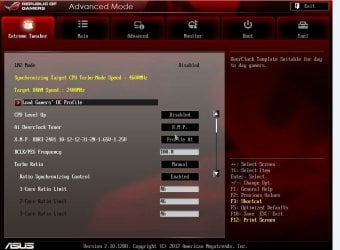
vxer, perhaps I can be of a little more assistance. It's just I have a Maximus V Extreme Which operates a little different than your board. However, for your purposes, it should work the same. As AddRam said, the sata cables work the same. Connect the sata data cable from port 0 to the SSD. For installation of Windows 7, you will want just the SSD connected. You will want a sata Power cable, from your PSU connected to the SSD also. One cable is for power and the smaller cable that connects to the Motherboard port 0 is for data transfer from the motherboard to the SSD. When you first boot up, it will send you to BIOS to configure everything. When you first get into bios the first thing you want to do, is set optimized defaults (usually F5) that will set everything to what Asus believes will make it run well. You will want to go to advanced settings, which is just the whole bios. There will be tabs on the top for different settings. You will need to go to the Main tab and set the date and time, then go to the Advanced tab and look under storage configuration and make sure you sata mode is in AHCI mode, which is usually the default setting for Asus boards. If it is in AHCI mode, you don't have to set anything. Next go to advanced Tweaker, The picture I am going to show you, is my bios. This is just the first part. If yours is like this, set it the same and you will be fine there. except the Turbo ratio, leave it to auto. Yours, should be set the OC Tuner to XMP and everything else to auto. load gamers profile is disabled in mine and should be in yours too.

advanced 1.JPG

When you set the XMP profile, it should set the ram just as it should be set, but make sure that farther down, the Dram Voltage is set to 1.65V. I know what they say about 1.5V, but 1.65 will not hurt anything. and your ram has to have 1.65V to run right.

Next go to the boot tab, set the DVD/CD player as 1st boot device and the SSD as the second boot device. Put your installation DVD in the DVD drive at that time. Save and exit. The computer should boot into the DVD installation media. Just select your language, accept the terms, select custom install and then click on the only drive showing which will be your SSD as it should be the only hard drive connected at that time. The click install. If it tells you that there is no partition. Click near the bottom of the drive, advanced, and create a partition of the whole drive, then after that highlight it again and click install, the installation should begin. If you need any more help, feel free to ask. After Windows 7 is installed and booting properly, shut down the computer and install the other hard drives. You may have to go to disk management and initialize them. Select new simple partition select MBR partition and follow the prompts. It's pretty simple.
 
Last edited:

My Computers

System One System Two

  • Computer type
    PC/Desktop
    Computer Manufacturer/Model Number
    ALWAYS UNDER CONSTRUCTION
    OS
    Windows 11 Pro
    CPU
    Ryzen 9 5900X
    Motherboard
    Asus X570 Crosshair Viii Hero
    Memory
    32GB G Skill DDR4-3600
    Graphics Card(s)
    EVGA RTX 3080 FTW 3 Ultra
    Sound Card
    On Board/Sennheiser PC37X Headset
    Monitor(s) Displays
    3 X Asus 27"
    Screen Resolution
    2560x1440
    Hard Drives
    2 X 1 TB NVME drives
    PSU
    EVGA 850
    Case
    Phanteks Eclipse P400A
    Cooling
    EVGA 280 AIO
    Keyboard
    Logitech G510s/ Logitech G13
    Mouse
    Logitech G502
    Internet Speed
    24/1
    Antivirus
    ESET/MBAM Pro/SAS Pro
    Browser
    Chrome/ Firefox/ Edge
  • Computer type
    Laptop
    System Manufacturer/Model Number
    Dell 16 Plus
    OS
    Windows 11 Pro
    CPU
    Intel Ultra 9 288V
    Memory
    32 GB LPDDR5X 8533
    Monitor(s) Displays
    16" Mini-LED HDR600 Touch 90 Hz
    Screen Resolution
    2560X1600
    Hard Drives
    1 TB NVME
As far as cabling goes, all the cables should be labeled. Where the 24 pin goes is obvious, make sure the 8 pin cable that plugs in above the CPU on the top of the board is labeled CPU. I can't tell you how to run them as I don't know what case you have. But, I believe you have a modular power supply, which means it will be easier in that you only use the cables you need. You will need a 24 pin cable(the largest cable there) and 8 pin CPU cable (the second largest) 2 pcie cables, a sata power cable and probably at least 1 molex cable. With most of those cables, there will be a clip on them. Feel the connection they plug into. They will have a small ridge on one side of it. That is where the clip on the cable goes and clips on to that ridge. That insures you get the correct orientation and it is not done wrong. Cases are pretty personal items and what the style and size is, is up to you. I have my own list of things I look for. But, that's just me. I want a full tower case. They are a pain to find a place to put them, but if you are the one who is working inside of it, you will think the space issue is trivial. I have to have space behind the motherboard to run cables. And it has to fit my components and have excellent air flow. My personal criteria is if it meets all those needs, but does not have space behind the motherboard, I will not buy it. Looks is important to me too, but is secondary to function. Function is #1 to me and looks is #2. Almost everyone has their own criteria, but that is mine. I can usually find a case that fulfills both of those. Depending on what you are going to have in your case and whether you are going to have room in the back to run cables, depends on what else you will need, but probably you will need a 8 pin CPU extension cable and a couple of Molex splitter cables and maybe a molex to sata extension cable. The 8 pin CPU extension should come with your case as well as zip ties. You will want plenty of those. By all means, in your motherboard bod is the back panel shield. That goes in first. If you don't put it in first, it will never go in unless you pull the motherboard out of the case.
 

My Computers

System One System Two

  • Computer type
    PC/Desktop
    Computer Manufacturer/Model Number
    ALWAYS UNDER CONSTRUCTION
    OS
    Windows 11 Pro
    CPU
    Ryzen 9 5900X
    Motherboard
    Asus X570 Crosshair Viii Hero
    Memory
    32GB G Skill DDR4-3600
    Graphics Card(s)
    EVGA RTX 3080 FTW 3 Ultra
    Sound Card
    On Board/Sennheiser PC37X Headset
    Monitor(s) Displays
    3 X Asus 27"
    Screen Resolution
    2560x1440
    Hard Drives
    2 X 1 TB NVME drives
    PSU
    EVGA 850
    Case
    Phanteks Eclipse P400A
    Cooling
    EVGA 280 AIO
    Keyboard
    Logitech G510s/ Logitech G13
    Mouse
    Logitech G502
    Internet Speed
    24/1
    Antivirus
    ESET/MBAM Pro/SAS Pro
    Browser
    Chrome/ Firefox/ Edge
  • Computer type
    Laptop
    System Manufacturer/Model Number
    Dell 16 Plus
    OS
    Windows 11 Pro
    CPU
    Intel Ultra 9 288V
    Memory
    32 GB LPDDR5X 8533
    Monitor(s) Displays
    16" Mini-LED HDR600 Touch 90 Hz
    Screen Resolution
    2560X1600
    Hard Drives
    1 TB NVME
Hey there,

Check out this guys YouTube channel:

NeweggTV - - - https://www.youtube.com/playlist?list=PLB029F381E29C6002

More specifically this video is a tutorial on the actual building (from the same guy): https://www.youtube.com/watch?v=d_56kyib-Ls&index=43&list=PLB029F381E29C6002

It may vary for different components and cases of course, but the basics are generally the same and universal I have found.

They helped me to build my Desktop and have really good tutorials on what goes where.

Hope that helps :)

Phill
 
Last edited:

My Computer

Computer type
PC/Desktop
Computer Manufacturer/Model Number
Custom Build
OS
Windows 7 Home Premium x64
CPU
Intel(R) Core(TM) i5-4670k CPU @ 3.40 GHz, 4 Cores
Motherboard
MSI Z87 - G45 Gaming ATX Motherboard
Memory
Corsair Vengeance 8GB (2x4GB) DDR3 1600 MHz
Graphics Card(s)
GeForce GTX 660
Sound Card
Realtek HD Audio, Sound Blaster Cinema
Monitor(s) Displays
ACER S236HL 23" HDMI Monitor
Screen Resolution
1920x1080
Hard Drives
2TB HDD
PSU
Corsair Builder Series CXM 600W Modular 80 PLUS ATX/EPS PSU
Case
Zalman Z11 PLUS Midi Tower Case
Cooling
Cooler Master Hyper 212 EVO (120mm) CPU Cooling, 5x Case Fan
Keyboard
Saitek Cyborg V.5 USB Gaming Keyboard
Mouse
Sharkoon Drakonia Gaming Mouse
Internet Speed
16.96 MB
Antivirus
Avast (Free Version), MalwareBytes, SuperantiSpyware
Browser
Google Chrome
Other Info
Samsung 24x Retail SATA DVD Writer, Creative Inspire T10 Multimedia Speakers, Also have a: Toshiba CT30 Chromebook
Nice job, Phill. This will help him a lot.


My Computers

System One System Two

  • Computer type
    PC/Desktop
    Computer Manufacturer/Model Number
    ALWAYS UNDER CONSTRUCTION
    OS
    Windows 11 Pro
    CPU
    Ryzen 9 5900X
    Motherboard
    Asus X570 Crosshair Viii Hero
    Memory
    32GB G Skill DDR4-3600
    Graphics Card(s)
    EVGA RTX 3080 FTW 3 Ultra
    Sound Card
    On Board/Sennheiser PC37X Headset
    Monitor(s) Displays
    3 X Asus 27"
    Screen Resolution
    2560x1440
    Hard Drives
    2 X 1 TB NVME drives
    PSU
    EVGA 850
    Case
    Phanteks Eclipse P400A
    Cooling
    EVGA 280 AIO
    Keyboard
    Logitech G510s/ Logitech G13
    Mouse
    Logitech G502
    Internet Speed
    24/1
    Antivirus
    ESET/MBAM Pro/SAS Pro
    Browser
    Chrome/ Firefox/ Edge
  • Computer type
    Laptop
    System Manufacturer/Model Number
    Dell 16 Plus
    OS
    Windows 11 Pro
    CPU
    Intel Ultra 9 288V
    Memory
    32 GB LPDDR5X 8533
    Monitor(s) Displays
    16" Mini-LED HDR600 Touch 90 Hz
    Screen Resolution
    2560X1600
    Hard Drives
    1 TB NVME
My pleasure,

the Newegg team do an excellent job with tutorials they helped me and a few of my friends begin building PCs with confidence.

Phill3990
 

My Computer

Computer type
PC/Desktop
Computer Manufacturer/Model Number
Custom Build
OS
Windows 7 Home Premium x64
CPU
Intel(R) Core(TM) i5-4670k CPU @ 3.40 GHz, 4 Cores
Motherboard
MSI Z87 - G45 Gaming ATX Motherboard
Memory
Corsair Vengeance 8GB (2x4GB) DDR3 1600 MHz
Graphics Card(s)
GeForce GTX 660
Sound Card
Realtek HD Audio, Sound Blaster Cinema
Monitor(s) Displays
ACER S236HL 23" HDMI Monitor
Screen Resolution
1920x1080
Hard Drives
2TB HDD
PSU
Corsair Builder Series CXM 600W Modular 80 PLUS ATX/EPS PSU
Case
Zalman Z11 PLUS Midi Tower Case
Cooling
Cooler Master Hyper 212 EVO (120mm) CPU Cooling, 5x Case Fan
Keyboard
Saitek Cyborg V.5 USB Gaming Keyboard
Mouse
Sharkoon Drakonia Gaming Mouse
Internet Speed
16.96 MB
Antivirus
Avast (Free Version), MalwareBytes, SuperantiSpyware
Browser
Google Chrome
Other Info
Samsung 24x Retail SATA DVD Writer, Creative Inspire T10 Multimedia Speakers, Also have a: Toshiba CT30 Chromebook
Yes, they do a good job and I have used their videos several times in posts
 

My Computers

System One System Two

  • Computer type
    PC/Desktop
    Computer Manufacturer/Model Number
    ALWAYS UNDER CONSTRUCTION
    OS
    Windows 11 Pro
    CPU
    Ryzen 9 5900X
    Motherboard
    Asus X570 Crosshair Viii Hero
    Memory
    32GB G Skill DDR4-3600
    Graphics Card(s)
    EVGA RTX 3080 FTW 3 Ultra
    Sound Card
    On Board/Sennheiser PC37X Headset
    Monitor(s) Displays
    3 X Asus 27"
    Screen Resolution
    2560x1440
    Hard Drives
    2 X 1 TB NVME drives
    PSU
    EVGA 850
    Case
    Phanteks Eclipse P400A
    Cooling
    EVGA 280 AIO
    Keyboard
    Logitech G510s/ Logitech G13
    Mouse
    Logitech G502
    Internet Speed
    24/1
    Antivirus
    ESET/MBAM Pro/SAS Pro
    Browser
    Chrome/ Firefox/ Edge
  • Computer type
    Laptop
    System Manufacturer/Model Number
    Dell 16 Plus
    OS
    Windows 11 Pro
    CPU
    Intel Ultra 9 288V
    Memory
    32 GB LPDDR5X 8533
    Monitor(s) Displays
    16" Mini-LED HDR600 Touch 90 Hz
    Screen Resolution
    2560X1600
    Hard Drives
    1 TB NVME
This is really helpful,thanks a lot guys ! and sorry for replying so late was outta town...i still have to get the SSD/CASE/RAM(Maybe tmw) and start with the build.

Oh and i got the 4790 non K,does that change anything here ?

@ADDRAM still can't rep u :huh:
 

My Computer

Computer type
PC/Desktop
Computer Manufacturer/Model Number
Custom Build
OS
Windows 7 Home Premium
CPU
Intel Core i7 4790
Motherboard
Asus MAXIMUS VII RANGER z97
Memory
Kingston HyperX Beast 16GB 2400Mhz
Graphics Card(s)
Gigabyte 970 4GB G1 GAMING
Monitor(s) Displays
LG 23 Cinema 3D 1080p
Screen Resolution
1920x1080 60Hz
Hard Drives
Samsung 840 EVO 250GB SSD / WD Blue 500GB HDD / Seagate 1TB HDD USB
PSU
EVGA SuperNova 850w G2 Gold
Case
Corsair 300R Custom
Cooling
Corsair Hydro H80i
Keyboard
Alienware TactX
Mouse
Alienware TactX
Antivirus
Bitdefender
Browser
Mozilla FireFox
Other Info
Razer Vespula
Yeah, 1.5 volt RAM.

There's not much to be gained by going above 1600 or maybe 1866 speed RAM. Higher is faster, but you pay dearly for very small and likely unnoticeable increases. 1600 is kind of the de facto choice, but occasionally you can find 1866 at virtually the same price.

If you got a non-K processor, no sense in getting an overclocking motherboard. I think the Z97 is an overclocking board if that's what you got?
 

My Computer

Computer type
PC/Desktop
Computer Manufacturer/Model Number
Ignatz Special; 4 speed manual gearbox; factory air conditioning; one of one
OS
Windows 7 Home Premium SP1, 64-bit
CPU
Intel Skylake i5-6600K, not overclocked
Motherboard
AsRock Z170M Extreme 4, micro ATX
Memory
8 GB HyperX DDR4-2666 (2 x 4 GB)
Graphics Card(s)
none; graphics are integrated on CPU
Sound Card
onboard: Realtek ALC1150; external: USB Behringer UF0-202
Monitor(s) Displays
Dell S2340M 23 inch IPS
Screen Resolution
1600 x 900
Hard Drives
System: Crucial MX100 series SSD, 128 GB;
Data: Samsung Spinpoint 103SJ, 1 TB;
Backup: WD Caviar Green WD30EZRX-00D8PB0, 3 TB
PSU
Rosewill SilentNight 500 watt fanless, semi-modular
Case
Antec Solo II
Cooling
Noctua NH-U12S; Noctua F12 intake, Noctua S12A exhaust
Keyboard
Microsoft 200 6JH-00001 USB
Mouse
Dell or Microsoft optical wired; USB
Antivirus
Microsoft Security Essentials and Malwarebytes Premium
Browser
Pale Moon
Other Info
All fans PWM; speeds at idle: CPU circa 500 rpm; intake circa 600 rpm; exhaust circa 600 rpm; CPU temps 27 idle and 47 C load in a warm room (27 C/81 F) when running Intel Extreme Tuning Utility stress test.
Yeah, 1.5 volt RAM.

There's not much to be gained by going above 1600 or maybe 1866 speed RAM. Higher is faster, but you pay dearly for very small and likely unnoticeable increases. 1600 is kind of the de facto choice, but occasionally you can find 1866 at virtually the same price.

If you got a non-K processor, no sense in getting an overclocking motherboard. I think the Z97 is an overclocking board if that's what you got?
I see,yup i got the VII Hero...but if its pointless to have this MB,what should i get(ASUS Versions) ? i still haven't opened its box yet so i could change it with another.....
 

My Computer

Computer type
PC/Desktop
Computer Manufacturer/Model Number
Custom Build
OS
Windows 7 Home Premium
CPU
Intel Core i7 4790
Motherboard
Asus MAXIMUS VII RANGER z97
Memory
Kingston HyperX Beast 16GB 2400Mhz
Graphics Card(s)
Gigabyte 970 4GB G1 GAMING
Monitor(s) Displays
LG 23 Cinema 3D 1080p
Screen Resolution
1920x1080 60Hz
Hard Drives
Samsung 840 EVO 250GB SSD / WD Blue 500GB HDD / Seagate 1TB HDD USB
PSU
EVGA SuperNova 850w G2 Gold
Case
Corsair 300R Custom
Cooling
Corsair Hydro H80i
Keyboard
Alienware TactX
Mouse
Alienware TactX
Antivirus
Bitdefender
Browser
Mozilla FireFox
Other Info
Razer Vespula
Not familiar with that particular board, but generally you could step down to a less expensive board from Asus, Asrock, or Gigabyte.

Just make sure it has the features you need--enough ports of the proper speed, enough slots and connectors for whatever you intend to attach to it. That board is over $200---I'd think you could do very well at the $150 level.

The Hero board may have some features you need other than overclocking that might make it worthwhile enough to keep even though you aren't overclocking. You'll have to investigate.
 

My Computer

Computer type
PC/Desktop
Computer Manufacturer/Model Number
Ignatz Special; 4 speed manual gearbox; factory air conditioning; one of one
OS
Windows 7 Home Premium SP1, 64-bit
CPU
Intel Skylake i5-6600K, not overclocked
Motherboard
AsRock Z170M Extreme 4, micro ATX
Memory
8 GB HyperX DDR4-2666 (2 x 4 GB)
Graphics Card(s)
none; graphics are integrated on CPU
Sound Card
onboard: Realtek ALC1150; external: USB Behringer UF0-202
Monitor(s) Displays
Dell S2340M 23 inch IPS
Screen Resolution
1600 x 900
Hard Drives
System: Crucial MX100 series SSD, 128 GB;
Data: Samsung Spinpoint 103SJ, 1 TB;
Backup: WD Caviar Green WD30EZRX-00D8PB0, 3 TB
PSU
Rosewill SilentNight 500 watt fanless, semi-modular
Case
Antec Solo II
Cooling
Noctua NH-U12S; Noctua F12 intake, Noctua S12A exhaust
Keyboard
Microsoft 200 6JH-00001 USB
Mouse
Dell or Microsoft optical wired; USB
Antivirus
Microsoft Security Essentials and Malwarebytes Premium
Browser
Pale Moon
Other Info
All fans PWM; speeds at idle: CPU circa 500 rpm; intake circa 600 rpm; exhaust circa 600 rpm; CPU temps 27 idle and 47 C load in a warm room (27 C/81 F) when running Intel Extreme Tuning Utility stress test.
If that's the case then i should change it,better get something just for the use...yes ill start doing a full search starting right now.
Thanks !
 

My Computer

Computer type
PC/Desktop
Computer Manufacturer/Model Number
Custom Build
OS
Windows 7 Home Premium
CPU
Intel Core i7 4790
Motherboard
Asus MAXIMUS VII RANGER z97
Memory
Kingston HyperX Beast 16GB 2400Mhz
Graphics Card(s)
Gigabyte 970 4GB G1 GAMING
Monitor(s) Displays
LG 23 Cinema 3D 1080p
Screen Resolution
1920x1080 60Hz
Hard Drives
Samsung 840 EVO 250GB SSD / WD Blue 500GB HDD / Seagate 1TB HDD USB
PSU
EVGA SuperNova 850w G2 Gold
Case
Corsair 300R Custom
Cooling
Corsair Hydro H80i
Keyboard
Alienware TactX
Mouse
Alienware TactX
Antivirus
Bitdefender
Browser
Mozilla FireFox
Other Info
Razer Vespula

My Computer

Computer type
PC/Desktop
Computer Manufacturer/Model Number
Custom Build
OS
Windows 7 Home Premium
CPU
Intel Core i7 4790
Motherboard
Asus MAXIMUS VII RANGER z97
Memory
Kingston HyperX Beast 16GB 2400Mhz
Graphics Card(s)
Gigabyte 970 4GB G1 GAMING
Monitor(s) Displays
LG 23 Cinema 3D 1080p
Screen Resolution
1920x1080 60Hz
Hard Drives
Samsung 840 EVO 250GB SSD / WD Blue 500GB HDD / Seagate 1TB HDD USB
PSU
EVGA SuperNova 850w G2 Gold
Case
Corsair 300R Custom
Cooling
Corsair Hydro H80i
Keyboard
Alienware TactX
Mouse
Alienware TactX
Antivirus
Bitdefender
Browser
Mozilla FireFox
Other Info
Razer Vespula
Back
Top