
Solved Help with Partitions

frasmacon

New member
Local time
3:08 AM
Messages
10
Location
United Kingdom
Hi, I have something quite trivial (especially for a 14 year old like me...). I was helping my friend out the other day with some partitions on a second hard drive when I noticed he had some extra partitions on his disk.

I self built my PC and I don't have any of these partitions and before you say my friend has OEM partitions, I know there not, we found them and got rid of them, things like 'HP_TOOLS' and stuff.

One of them is WinRE which I think is quite important. Whereas on mine I just have one big partition which makes me think that I have my WinRE in the same partition as Windows. Infact I have everything in this one partition (see attached pic). Something tells me this isn't very safe.

Should I be doing something about this, like moving things onto different partitions? Cause I see screenshots of people's drives where they have those things in brackets (System, Active, Page File and such like). Just some advice would be good
 

Attachments
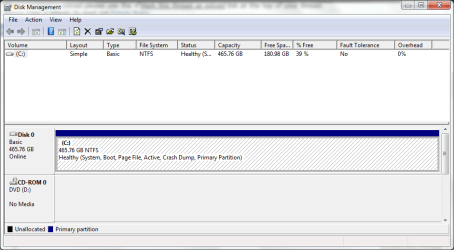
  • disk.PNG
    disk.PNG
    20.1 KB · Views: 17

My Computer

OS
Windows 7 Professional x64
CPU
AMD Phenom II 960T Black Edition @ 3.0GHz
Motherboard
ASUS M489GTD PRO/USB3
Memory
8GB
Graphics Card(s)
XFX Radeon HD 6850
Monitor(s) Displays
Hanns-G HL198
Screen Resolution
1440*900
Hard Drives
1x OCZ Vertex 3 SSD 128GB
1x Western Digital Caviar Green 500GB
PSU
Novatech PowerStation 500W
Case
Novatech Prowler V2
Cooling
Stock
Keyboard
Unbranded keyboard
Mouse
Logitech MX518
Internet Speed
60Mb/s
Antivirus
avast! Free Antivirus
Browser
Google Chrome
That is fine, it`s the best way to use all your space. You could break it into 2 or 3 partitions if you want to. 1 for all your data and 1 for a system image.

Use Partition Wizard.

An example of 2 hard drives.
 
Last edited:

My Computer

Computer type
PC/Desktop
Computer Manufacturer/Model Number
Skylake Special #666
OS
Windows 10 Pro x64
CPU
Intel Core i7 6700K
Motherboard
Asus Sabertooth Z170 Mark 1
Memory
GSkill TridentZ RGB 16GB 3600 16-16-16-36
Graphics Card(s)
EVGA GTX 980 Ti SC x2
Sound Card
Realtek High Definition
Monitor(s) Displays
AOC G2460PG
Screen Resolution
1920 x 1080 144Hz
Hard Drives
Samsung 860 Pro 256GB, Seagate Barracuda 4TB x2
PSU
EVGA 1000 P2, EVGA White Custom Braided Cables
Case
Corsair Vengeance C70 Gunmetal Black
Cooling
Corsair H100i v2, Corsair ML120 x2, Thermal Grizzly Kryonaut
Keyboard
Logitech G910 Orion Spectrum
Mouse
Logitech G700s
Internet Speed
Verizon Fios Quantum Gateway 75/75
Antivirus
Windows Defender, Malwarebytes Free 3.8.3
Browser
Chrome
Other Info
Corsair SP120 x4, LG Blu-ray Drive, Durabrand HT-395 100 Watt Dolby Digital Amp, Corsair H2100 Wireless 7.1 Headset
OK, So if I wanted to, since this kind of fits under the title, change the partitions say to have C;\Windows in one partition and then maybe have program files and data and things in another. Possibly even another HDD or SDD.
 

My Computer

OS
Windows 7 Professional x64
CPU
AMD Phenom II 960T Black Edition @ 3.0GHz
Motherboard
ASUS M489GTD PRO/USB3
Memory
8GB
Graphics Card(s)
XFX Radeon HD 6850
Monitor(s) Displays
Hanns-G HL198
Screen Resolution
1440*900
Hard Drives
1x OCZ Vertex 3 SSD 128GB
1x Western Digital Caviar Green 500GB
PSU
Novatech PowerStation 500W
Case
Novatech Prowler V2
Cooling
Stock
Keyboard
Unbranded keyboard
Mouse
Logitech MX518
Internet Speed
60Mb/s
Antivirus
avast! Free Antivirus
Browser
Google Chrome
You want windows and all your installed programs on the same partition. C: Once you create the other partitions, you can put whatever you want on them.

The whole reason for doing it is, if windows gets messed up or if you just want to reinstall, you don`t have to worry about loosing your data or all of your program installers.

But more importantly, to put a disk image on.
 

My Computer

Computer type
PC/Desktop
Computer Manufacturer/Model Number
Skylake Special #666
OS
Windows 10 Pro x64
CPU
Intel Core i7 6700K
Motherboard
Asus Sabertooth Z170 Mark 1
Memory
GSkill TridentZ RGB 16GB 3600 16-16-16-36
Graphics Card(s)
EVGA GTX 980 Ti SC x2
Sound Card
Realtek High Definition
Monitor(s) Displays
AOC G2460PG
Screen Resolution
1920 x 1080 144Hz
Hard Drives
Samsung 860 Pro 256GB, Seagate Barracuda 4TB x2
PSU
EVGA 1000 P2, EVGA White Custom Braided Cables
Case
Corsair Vengeance C70 Gunmetal Black
Cooling
Corsair H100i v2, Corsair ML120 x2, Thermal Grizzly Kryonaut
Keyboard
Logitech G910 Orion Spectrum
Mouse
Logitech G700s
Internet Speed
Verizon Fios Quantum Gateway 75/75
Antivirus
Windows Defender, Malwarebytes Free 3.8.3
Browser
Chrome
Other Info
Corsair SP120 x4, LG Blu-ray Drive, Durabrand HT-395 100 Watt Dolby Digital Amp, Corsair H2100 Wireless 7.1 Headset
I self built my PC and I don't have any of these partitions and before you say my friend has OEM partitions, I know there not, we found them and got rid of them, things like 'HP_TOOLS' and stuff.

Hope you made the Recovery disks first.

   Information
We always assume you have made your Recovery Disks using the OEM manufacturer's Recovery Media Creator app the first day you had your new PC.
& made the Startup Repair CD.
startup repair disc-create


Did you make the OEM manufacturer's Recovery Disks?

How to make HP Recovery DVD disks:
Performing an HP System Recovery (Windows Vista) | HP® Support

You can Order HP Recovery Disks from here:
Country-Language Selector | HP® Support
 

My Computer

OS
ME/XP/Vista/Win7
Something to keep in mind...with a partitioned drive, if that drive fails, all the data is lost. The only time I partition a drive is for testing other OS's. Other than that I use separate drives for data storage and backups...but that's just me. Others will have different opinions.
 

My Computer

Computer Manufacturer/Model Number
Custom built
OS
Windows 7 Ultimate 64 bit
CPU
AMD Phenom II X4 965 Black Edition
Motherboard
Gigabyte GA-MA790X-DS4
Memory
GSkill 4 X 2 GB PC 8500
Graphics Card(s)
XFX Radeon HD 6790 D
Sound Card
On board RealTek HD
Monitor(s) Displays
Dual monitors:Samsung SyncMaster S20B300
Screen Resolution
1600 X 900
Hard Drives
Seagate Barracuda 1TB (primary)
Seagate Barracuda 2 X 320 GB
PSU
Ultra X4 750 watt fully modular
Case
Thermaltake Overseer RX 1 full tower
Cooling
Core-Contact 92 mm CPU Cooler
Keyboard
Logitech G510
Mouse
Razor DeathAdder
Internet Speed
50/5 Mbps UL/DL
Other Info
Optical: Super Muliti DVD burner w/lightscribe, Hauppauge WinTV HVR-1800
For sake of argument, we`re only talking 1 drive in this example.

But... Always backup what you don`t want to loose.
 

My Computer

Computer type
PC/Desktop
Computer Manufacturer/Model Number
Skylake Special #666
OS
Windows 10 Pro x64
CPU
Intel Core i7 6700K
Motherboard
Asus Sabertooth Z170 Mark 1
Memory
GSkill TridentZ RGB 16GB 3600 16-16-16-36
Graphics Card(s)
EVGA GTX 980 Ti SC x2
Sound Card
Realtek High Definition
Monitor(s) Displays
AOC G2460PG
Screen Resolution
1920 x 1080 144Hz
Hard Drives
Samsung 860 Pro 256GB, Seagate Barracuda 4TB x2
PSU
EVGA 1000 P2, EVGA White Custom Braided Cables
Case
Corsair Vengeance C70 Gunmetal Black
Cooling
Corsair H100i v2, Corsair ML120 x2, Thermal Grizzly Kryonaut
Keyboard
Logitech G910 Orion Spectrum
Mouse
Logitech G700s
Internet Speed
Verizon Fios Quantum Gateway 75/75
Antivirus
Windows Defender, Malwarebytes Free 3.8.3
Browser
Chrome
Other Info
Corsair SP120 x4, LG Blu-ray Drive, Durabrand HT-395 100 Watt Dolby Digital Amp, Corsair H2100 Wireless 7.1 Headset
You want windows and all your installed programs on the same partition. C: Once you create the other partitions, you can put whatever you want on them.

The whole reason for doing it is, if windows gets messed up or if you just want to reinstall, you don`t have to worry about loosing your data or all of your program installers.

But more importantly, to put a disk image on.

So if I have just one hard drive, the only real use for partitions is to put Windows WITH program files onto its own partition so if Windows fails I only lose that?

I self built my PC and I don't have any of these partitions and before you say my friend has OEM partitions, I know there not, we found them and got rid of them, things like 'HP_TOOLS' and stuff.

Hope you made the Recovery disks first.

   Information
We always assume you have made your Recovery Disks using the OEM manufacturer's Recovery Media Creator app the first day you had your new PC.
& made the Startup Repair CD.
startup repair disc-create


Did you make the OEM manufacturer's Recovery Disks?

How to make HP Recovery DVD disks:
Performing an HP System Recovery (Windows Vista) | HP® Support

You can Order HP Recovery Disks from here:
Country-Language Selector | HP® Support

No that was on my friends laptop that I helped him recover the hard drive. Although I really should look into getting some kind of backup. I have none whatsoever so if HDD dies completely I am screwed. :/

Something to keep in mind...with a partitioned drive, if that drive fails, all the data is lost. The only time I partition a drive is for testing other OS's. Other than that I use separate drives for data storage and backups...but that's just me. Others will have different opinions.

So it doesn't matter if WinRE is on the same partition as Windows then, because if the drive goes, even if it's on a different partition it won't work anyway.
 

My Computer

OS
Windows 7 Professional x64
CPU
AMD Phenom II 960T Black Edition @ 3.0GHz
Motherboard
ASUS M489GTD PRO/USB3
Memory
8GB
Graphics Card(s)
XFX Radeon HD 6850
Monitor(s) Displays
Hanns-G HL198
Screen Resolution
1440*900
Hard Drives
1x OCZ Vertex 3 SSD 128GB
1x Western Digital Caviar Green 500GB
PSU
Novatech PowerStation 500W
Case
Novatech Prowler V2
Cooling
Stock
Keyboard
Unbranded keyboard
Mouse
Logitech MX518
Internet Speed
60Mb/s
Antivirus
avast! Free Antivirus
Browser
Google Chrome
Question #1 Yes
 

My Computer

Computer type
PC/Desktop
Computer Manufacturer/Model Number
Skylake Special #666
OS
Windows 10 Pro x64
CPU
Intel Core i7 6700K
Motherboard
Asus Sabertooth Z170 Mark 1
Memory
GSkill TridentZ RGB 16GB 3600 16-16-16-36
Graphics Card(s)
EVGA GTX 980 Ti SC x2
Sound Card
Realtek High Definition
Monitor(s) Displays
AOC G2460PG
Screen Resolution
1920 x 1080 144Hz
Hard Drives
Samsung 860 Pro 256GB, Seagate Barracuda 4TB x2
PSU
EVGA 1000 P2, EVGA White Custom Braided Cables
Case
Corsair Vengeance C70 Gunmetal Black
Cooling
Corsair H100i v2, Corsair ML120 x2, Thermal Grizzly Kryonaut
Keyboard
Logitech G910 Orion Spectrum
Mouse
Logitech G700s
Internet Speed
Verizon Fios Quantum Gateway 75/75
Antivirus
Windows Defender, Malwarebytes Free 3.8.3
Browser
Chrome
Other Info
Corsair SP120 x4, LG Blu-ray Drive, Durabrand HT-395 100 Watt Dolby Digital Amp, Corsair H2100 Wireless 7.1 Headset
For sake of argument, we`re only talking 1 drive in this example.

But... Always backup what you don`t want to loose.

I don't have anything TOO valuable on here. Mostly games and a couple of pieces of Adobe stuff. But I know where all my license keys and things are for these and all my games are from Steam so I can get them anywhere. I know it's not very good practice or a good attitude but I don't have much data storage space in my house.
 

My Computer

OS
Windows 7 Professional x64
CPU
AMD Phenom II 960T Black Edition @ 3.0GHz
Motherboard
ASUS M489GTD PRO/USB3
Memory
8GB
Graphics Card(s)
XFX Radeon HD 6850
Monitor(s) Displays
Hanns-G HL198
Screen Resolution
1440*900
Hard Drives
1x OCZ Vertex 3 SSD 128GB
1x Western Digital Caviar Green 500GB
PSU
Novatech PowerStation 500W
Case
Novatech Prowler V2
Cooling
Stock
Keyboard
Unbranded keyboard
Mouse
Logitech MX518
Internet Speed
60Mb/s
Antivirus
avast! Free Antivirus
Browser
Google Chrome
Question #1 Yes

OK. Simple Answer :D that's what I like. But then if the drive goes the whole thing goes. Oh well, I'm much more likely to screw up Windows than to mess up a hard drive. (touch wood). I don't think I'll partition it that way anyway. If Windows fails it's not a massive deal.
 

My Computer

OS
Windows 7 Professional x64
CPU
AMD Phenom II 960T Black Edition @ 3.0GHz
Motherboard
ASUS M489GTD PRO/USB3
Memory
8GB
Graphics Card(s)
XFX Radeon HD 6850
Monitor(s) Displays
Hanns-G HL198
Screen Resolution
1440*900
Hard Drives
1x OCZ Vertex 3 SSD 128GB
1x Western Digital Caviar Green 500GB
PSU
Novatech PowerStation 500W
Case
Novatech Prowler V2
Cooling
Stock
Keyboard
Unbranded keyboard
Mouse
Logitech MX518
Internet Speed
60Mb/s
Antivirus
avast! Free Antivirus
Browser
Google Chrome
Well then you`re fine, as long as you know how to reinstall windows.
 

My Computer

Computer type
PC/Desktop
Computer Manufacturer/Model Number
Skylake Special #666
OS
Windows 10 Pro x64
CPU
Intel Core i7 6700K
Motherboard
Asus Sabertooth Z170 Mark 1
Memory
GSkill TridentZ RGB 16GB 3600 16-16-16-36
Graphics Card(s)
EVGA GTX 980 Ti SC x2
Sound Card
Realtek High Definition
Monitor(s) Displays
AOC G2460PG
Screen Resolution
1920 x 1080 144Hz
Hard Drives
Samsung 860 Pro 256GB, Seagate Barracuda 4TB x2
PSU
EVGA 1000 P2, EVGA White Custom Braided Cables
Case
Corsair Vengeance C70 Gunmetal Black
Cooling
Corsair H100i v2, Corsair ML120 x2, Thermal Grizzly Kryonaut
Keyboard
Logitech G910 Orion Spectrum
Mouse
Logitech G700s
Internet Speed
Verizon Fios Quantum Gateway 75/75
Antivirus
Windows Defender, Malwarebytes Free 3.8.3
Browser
Chrome
Other Info
Corsair SP120 x4, LG Blu-ray Drive, Durabrand HT-395 100 Watt Dolby Digital Amp, Corsair H2100 Wireless 7.1 Headset
Correct...a dead drive is a dead drive...now there are some 3rd party software out there (paid) that claim they can recover the data on a failed drive. It depends on how bad the corruption is. There was one in particular but I can't think of it at the moment. Will have a search for it....
 

My Computer

Computer Manufacturer/Model Number
Custom built
OS
Windows 7 Ultimate 64 bit
CPU
AMD Phenom II X4 965 Black Edition
Motherboard
Gigabyte GA-MA790X-DS4
Memory
GSkill 4 X 2 GB PC 8500
Graphics Card(s)
XFX Radeon HD 6790 D
Sound Card
On board RealTek HD
Monitor(s) Displays
Dual monitors:Samsung SyncMaster S20B300
Screen Resolution
1600 X 900
Hard Drives
Seagate Barracuda 1TB (primary)
Seagate Barracuda 2 X 320 GB
PSU
Ultra X4 750 watt fully modular
Case
Thermaltake Overseer RX 1 full tower
Cooling
Core-Contact 92 mm CPU Cooler
Keyboard
Logitech G510
Mouse
Razor DeathAdder
Internet Speed
50/5 Mbps UL/DL
Other Info
Optical: Super Muliti DVD burner w/lightscribe, Hauppauge WinTV HVR-1800

My Computer

OS
Windows 7 Professional x64
CPU
AMD Phenom II 960T Black Edition @ 3.0GHz
Motherboard
ASUS M489GTD PRO/USB3
Memory
8GB
Graphics Card(s)
XFX Radeon HD 6850
Monitor(s) Displays
Hanns-G HL198
Screen Resolution
1440*900
Hard Drives
1x OCZ Vertex 3 SSD 128GB
1x Western Digital Caviar Green 500GB
PSU
Novatech PowerStation 500W
Case
Novatech Prowler V2
Cooling
Stock
Keyboard
Unbranded keyboard
Mouse
Logitech MX518
Internet Speed
60Mb/s
Antivirus
avast! Free Antivirus
Browser
Google Chrome
Figure what out ? You said you built your own pc, didn`t you install windows on it ?
 

My Computer

Computer type
PC/Desktop
Computer Manufacturer/Model Number
Skylake Special #666
OS
Windows 10 Pro x64
CPU
Intel Core i7 6700K
Motherboard
Asus Sabertooth Z170 Mark 1
Memory
GSkill TridentZ RGB 16GB 3600 16-16-16-36
Graphics Card(s)
EVGA GTX 980 Ti SC x2
Sound Card
Realtek High Definition
Monitor(s) Displays
AOC G2460PG
Screen Resolution
1920 x 1080 144Hz
Hard Drives
Samsung 860 Pro 256GB, Seagate Barracuda 4TB x2
PSU
EVGA 1000 P2, EVGA White Custom Braided Cables
Case
Corsair Vengeance C70 Gunmetal Black
Cooling
Corsair H100i v2, Corsair ML120 x2, Thermal Grizzly Kryonaut
Keyboard
Logitech G910 Orion Spectrum
Mouse
Logitech G700s
Internet Speed
Verizon Fios Quantum Gateway 75/75
Antivirus
Windows Defender, Malwarebytes Free 3.8.3
Browser
Chrome
Other Info
Corsair SP120 x4, LG Blu-ray Drive, Durabrand HT-395 100 Watt Dolby Digital Amp, Corsair H2100 Wireless 7.1 Headset
Figure what out ? You said you built your own pc, didn`t you install windows on it ?

Yeah I did, I just didn't know if there was a different procedure or something to reinstall.
 

My Computer

OS
Windows 7 Professional x64
CPU
AMD Phenom II 960T Black Edition @ 3.0GHz
Motherboard
ASUS M489GTD PRO/USB3
Memory
8GB
Graphics Card(s)
XFX Radeon HD 6850
Monitor(s) Displays
Hanns-G HL198
Screen Resolution
1440*900
Hard Drives
1x OCZ Vertex 3 SSD 128GB
1x Western Digital Caviar Green 500GB
PSU
Novatech PowerStation 500W
Case
Novatech Prowler V2
Cooling
Stock
Keyboard
Unbranded keyboard
Mouse
Logitech MX518
Internet Speed
60Mb/s
Antivirus
avast! Free Antivirus
Browser
Google Chrome
Back
Top