Help with SpeedFan

MPN

New member
Power User
VIP
Local time
4:02 PM
Messages
128
Hello folks.
Since i dont have a fan controller on my case, and my fans are running a bit to slow. So i figured il try out speedfan, but i dont understand squat about it xD
Ive been trying to buff up the speed on my case fans ( front, top, side and rear) and so far i just get confused by looking at it :sarc:

My speccs are listed on my page.

So would be glad if anyone can point me at what buttons to push and stuff.
 
Last edited:

My Computer

OS
Windows 7 Home x64
CPU
Intel Core i5-3570K Processor
Motherboard
MSI Z77A-G43 Gaming, Socket-1155
Memory
Corsair XMS3 DDR3 1600MHz 8GB CL9
Graphics Card(s)
HIS Radeon HD 7970 GHz X 3GB GDDR5
Monitor(s) Displays
LG FLATRON W2453V
Hard Drives
Crusial M4 128GB
Western Digital Caviar® Black 500GB
PSU
Chieftec Nitro Series BPS-950C 950W PSU
Case
Cooler Master HAF XM Midi Tower Black
Cooling
Corsair H60 Hydro Series CPU cooler
Keyboard
Razer some thing
Mouse
Logitech G400
Internet Speed
25mb
Antivirus
MSE
Browser
Firefox
Other Info
I like turtles!
Now what makes you think they are running a bit slow?

Try running this and see what the temps are. As a matter of fact I have the same case with an Ivy Bridge set up and my fans are all running around an average of 700 rpm.

Plus what size fans have you running mine are all 200 and 140 mm fans ??

Speccy - Download from piriform
 

My Computer

Computer type
PC/Desktop
Computer Manufacturer/Model Number
Own build (new) Desk1 / Asus ROG Win 7 / Desk2 1st build
OS
Desk1 7 Home Prem / Desk2 10 Pro / Main lap Asus ROG 10 Pro 2 laptop Toshiba 7 Pro Asus P2520 7 & 10
CPU
Desk1 i5 3750K / Laptop i7 GTX 860M / Desk2 i5 2500
Motherboard
Desk1 Asus P877-V / Desk2 Gigabyte H67 UD3H / Laptop ?
Memory
Desk1 8GB (1866) / Desk2 16GB (1333) / Laptop 8Gb DDR3
Graphics Card(s)
Desk 1& 2NVidia GTX 650 & Laptops on board Intel
Sound Card
Desk 1 & 2 -XONAR DG Realtek High Def audio Laptop
Monitor(s) Displays
Desk 1 Benq HD 2450 / Desk2 Philips 24" / Laptop 17.5"
Screen Resolution
1920x1080 D1 & D2 & Laptop 1
Hard Drives
Desk1 Samsung 120GB 830 SSD
Asus ROG 256GB 850 Pro SSD
Desk2 Samsung 840 256 SSD
Toshiba 120GB EVO
PSU
Desk 1 Corsair HX 1050/ Laptop ? / Desk 2 Corsair HX 650
Case
Desk 1 Cooler HAF XM ? Toshiba laptop / Desk2 Coolermaster
Cooling
Fans on all Desk1 -2 Desk2 - all Coolermasters 5 Laptop ?
Keyboard
Desk 1 MS Sidewinder X6 Desk 2 MS Sidewinder X 4
Mouse
Desk 1&2 - Gigabyte MS 900 gamer - laptop - Logitec wireless
Internet Speed
ADSL2+
Other Info
One other Desktop (tester) and spare Toshba laptop both with SSD's
Running Kaspersky 2016 ISS on all machines config'd identically
Logitec audio stereo systems on each machine (x3)
Canon MG5250MFC
Router/modem TP-Link running WPA2SK
I got 2 120mm fans, 1 140mm and 1 200mm fan.

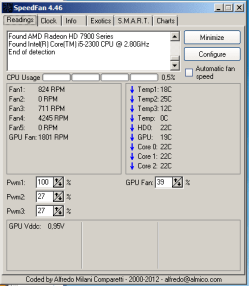
When I look at speed fan my fans are around 700-800 RPM. But there is a some of the fans I would like to crank up a bit.
If you look at my attachment ( if my upload worked) You can see my fan speed. Another thing I also noticed is that no all my fans are listed.
 

Attachments

  • speedfanW7.png
    speedfanW7.png
    7 KB · Views: 3

My Computer

OS
Windows 7 Home x64
CPU
Intel Core i5-3570K Processor
Motherboard
MSI Z77A-G43 Gaming, Socket-1155
Memory
Corsair XMS3 DDR3 1600MHz 8GB CL9
Graphics Card(s)
HIS Radeon HD 7970 GHz X 3GB GDDR5
Monitor(s) Displays
LG FLATRON W2453V
Hard Drives
Crusial M4 128GB
Western Digital Caviar® Black 500GB
PSU
Chieftec Nitro Series BPS-950C 950W PSU
Case
Cooler Master HAF XM Midi Tower Black
Cooling
Corsair H60 Hydro Series CPU cooler
Keyboard
Razer some thing
Mouse
Logitech G400
Internet Speed
25mb
Antivirus
MSE
Browser
Firefox
Other Info
I like turtles!
Back
Top