Help with tweaking

why run background processes that you are never going to need?
Ah, the classic argument. As testing and benchmarking have shown, disabling unneeded services doesn't yield much, if any results because those services are not actually in use and using resources.

Let me give you an example, one that was hotly debated on the [H]ardforums a while ago. On a desktop PC, someone like QuackViper would recommend disabling the wireless zero-config service. Unneeded, right? Right, because no wireless adapter was present in the system. The problem is, setting that service to disabled or manual, isn't going to suddenly give me more memory. It wasn't in use to begin with.

If disabling services makes you feel warm and fuzzy, by all means do it. That's commonly referred to as a placebo effect, because it yields no measurable results. What it can do, however, is render your system with stability issues.

That's why, if you read on just about any enthusiast forum, the best advice for tweaking Vista and Windows 7 is.....leave it alone.
 

My Computer

OS
Windows 7 Ultimate x64 SP1
CPU
Intel Core i7-2600
Motherboard
Gigabyte GA-P67A-UD3P-B3
Memory
12 GB Patriot Extreme DDR3-1333
Graphics Card(s)
Nvidia GTX 470
Monitor(s) Displays
Dell UltraSharp 2209WA
Hard Drives
OCZ Agility3 240 GB, WD5001AALS, WD7501AALS
PSU
OCZ ModStream 700W
Case
CoolerMaster HAF 912 Advanced
Cooling
CoolerMaster Hyper 212 Plus
erm, some services are set to automatic - that means that they automatically run...

...even if not needed.

i don't need those to run.

microsoft sets a default install to suit a hypothetical platonic default user. i don't count myself into that category, so i like to get myself into a warm and fuzzy state of operation by tweaking my os to how it suits me.

i do what i do - you do what you do.
 

My Computer

Computer Manufacturer/Model Number
mickey megabyte 1234
OS
ultimate 64 sp1
CPU
i5 2500K [email protected]
Motherboard
MSI P67A-GD53
Memory
8 gigs GSkill Ripjaws 1600
Graphics Card(s)
amd hd6950
Sound Card
creative x-fi gamer
Monitor(s) Displays
samsung 24"
Screen Resolution
1920x1080
Hard Drives
ocz vertex 2e 60 gig, samsung f3 1tb, buffalo 2tb ext
PSU
antec 550
Case
antec three hundred
Cooling
i'm a cooling fan
Keyboard
saitek eclipse ii
Mouse
logitech g3
Internet Speed
about 4 Mbps
Other Info
i love win7
The arguments are starting to become "religious". I think nobody can win this. We are all free to do with our systems what we like. If we are very smart, we may squeeze a couple of percent better performance out of our systems. It may be fun to do and yield a certain intellectual satisfaction because we learn something in the process - the hard way. I myself prefer to spend a few more Dollars on a more powerful PC and leave the operating system alone. After 35years in operating system development, I know that it is not that simple to outsmart a group of developers that do these things for a living.
 
Last edited:

My Computer

Computer Manufacturer/Model Number
HP, Dell, Gateway, Toshiba - 4 laptops and 2 desktops
OS
Vista, Windows7, Mint Mate, Zorin, Windows 8
CPU
from 1.6GHz Duo to i7
Monitor(s) Displays
2x HP w2207
Hard Drives
5x HDD, 7x SSD, 12x Externals
Keyboard
with trackball - no mices
Mouse
Trackball mice
Internet Speed
DSL 6000
microsoft sets a default install to suit a hypothetical platonic default user. i don't count myself into that category,
In the XP days, you were right. However, this line of thinking doesn't apply anymore, thanks to our self-tuning OSes.
i do what i do - you do what you do.
Absolutely, but you are forgetting one thing. When you participate on an forum such as this, where people are asking for help and advice, it is important to give them correct answers, along with solid suggestions for them. Whatever you choose to do with your own system is completely up to you, and none of mine, or anyone else's concern. We aren't debating what we should do on our own systems...we're trying to give good advice and correct, factual information.
 

My Computer

OS
Windows 7 Ultimate x64 SP1
CPU
Intel Core i7-2600
Motherboard
Gigabyte GA-P67A-UD3P-B3
Memory
12 GB Patriot Extreme DDR3-1333
Graphics Card(s)
Nvidia GTX 470
Monitor(s) Displays
Dell UltraSharp 2209WA
Hard Drives
OCZ Agility3 240 GB, WD5001AALS, WD7501AALS
PSU
OCZ ModStream 700W
Case
CoolerMaster HAF 912 Advanced
Cooling
CoolerMaster Hyper 212 Plus
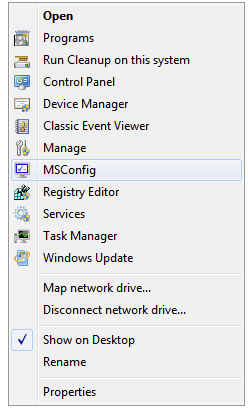
I also like to add some usability tweaks (aside from performance tweaks) to my system, such as adding useful items to various right click context menus. I made a few posts recently about some of those that probably can be found by searching for "computer right click context menu." For example, the screen shot below is of my tweaked "Computer" right click context menu. Info on adding (or subsequently removing) some or all of these tweaks can be found here.
 

Attachments

  • 2009-09-24_213418.png
    2009-09-24_213418.png
    6.1 KB · Views: 5

My Computer

Computer Manufacturer/Model Number
HP DV8t quad
OS
Windows 7 Ultimate x64 (Retail)
CPU
i7-Q 720
Motherboard
Motherboard Chipset Intel Ibex Peak-M PM55, Intel Lynnfield
Memory
6 GB
Graphics Card(s)
nVidia GeForce GT 230M (1GB)
Sound Card
IDT High Definition Audio CODEC
Monitor(s) Displays
18.4 inch HP Infinity FHD (Samsung 184HT03-001)
Screen Resolution
1920 x 1080
Hard Drives
Hitachi 500GB 7200 rpm (x2)
Seagate FreeAgent 1.5 TB External USB (x2)
Thermaltake BlacX eSATA/USB 2.0 3.5/2.5 HD dock
Cooling
Zalman NC-2000 notebook cooling pad
Keyboard
laptop
Mouse
Logitech VX Revolution
Other Info
Backup Unit: Lenovo T61p
why run background processes that you are never going to need?
Ah, the classic argument. As testing and benchmarking have shown, disabling unneeded services doesn't yield much, if any results because those services are not actually in use and using resources.

Let me give you an example, one that was hotly debated on the [H]ardforums a while ago. On a desktop PC, someone like QuackViper would recommend disabling the wireless zero-config service. Unneeded, right? Right, because no wireless adapter was present in the system. The problem is, setting that service to disabled or manual, isn't going to suddenly give me more memory. It wasn't in use to begin with.

If disabling services makes you feel warm and fuzzy, by all means do it. That's commonly referred to as a placebo effect, because it yields no measurable results. What it can do, however, is render your system with stability issues.

That's why, if you read on just about any enthusiast forum, the best advice for tweaking Vista and Windows 7 is.....leave it alone.

You sir deserve reputation and recognition for that post, and for your many other excellent comments :)
 

My Computer

Computer Manufacturer/Model Number
Multiple machines in various stages of decomposition.
OS
Win7x64
You sir deserve reputation and recognition for that post, and for your many other excellent comments :)
+1..many years ago I was a Black Viper fan. After every re-install I'd scour his website and turn off "uneccessary" services. Since Vista however, I've seen the reality and Mr Frost summed it up perfectly..."the placebo effect". Now in Windows 7, there is no gain what-so-ever in turning anything off. It's fine as it is.
 

My Computer

Computer Manufacturer/Model Number
tw33k
OS
Windows 7 Ultimate (x64) SP1
CPU
Intel 3770k 4.6GHz
Motherboard
ASUS Maximus V Formula
Memory
8GB (2x 4GB) Crucial Ballistix
Graphics Card(s)
Sapphire 7950 (1060/1600)
Sound Card
On Board Realtek HD Audio
Monitor(s) Displays
27" Acer B273HU (via HDMI)
Screen Resolution
2048 x 1152
Hard Drives
Crucial M4 128GB
2TB WD Black
1TB Samsung F3 SATA
1TB WD Elite External
2TB WD USB 3.0
PSU
Corsair AX750 Gold
Case
Corsair Obsidian 800DW
Cooling
Corsair H100 (2x AP-121/2x UK-3000 push/pull)
Keyboard
Microsoft Wireless 5000
Mouse
Microsoft Wireless 5000
Internet Speed
5mb/s
Other Info
Logitech z-2300 2.1 speakers
Lamptron FC-5 v2
Wow... I wasn't expecting this kind of debating... but thanks guys, it's all helpful :thumbsup:

Here's my issue with overclocking: I don't really think there's much I can do overclocking-wise with my laptop. I mean it's running at 1.5GHz (667MHz FSB)... how much higher can one push that? My one PC (a desktop) that I use at work has basically the same specs except it's running 4GHz (1066MHz FSB) and honestly the difference in performance is minute. Plus there are risks to overclocking that I cannot afford. This is why I reckon that the answer might ly within the registry...

So far the underlying message I've gotten here and elsewhere is that W7 needs little tweaking. Fair enough, I say. Perhaps my system is already running at it's limit. If however I come across anything I'll be sure to post it.

Also a big thanks to those that posted links :thumbsup:
 

My Computer

Computer type
PC/Desktop
Computer Manufacturer/Model Number
Own build
OS
Windows 7 x64 Professional
CPU
Intel Core i7-870 Lynnfield 2.93 GHz
Motherboard
Intel Whitesburg P55 LGA1156
Memory
Kingston Hyper X 1333MHz DDR3 4x4Gb
Graphics Card(s)
Nvidia GTS 250
Monitor(s) Displays
AOC Q3279VWF 31.5"
Screen Resolution
2560x1440
Hard Drives
Western Digital 1000GB Hard Drive (SATA 3.0Gb/s, 7200rpm, 32MB Cache)
Verbatim 500GB (External)
PSU
650W
Case
Coolermaster HAF 912
Cooling
Stock
Keyboard
Logitech
Mouse
Logitech
Antivirus
Avira
Browser
Firefox
Other Info
LG OptDrive 24x SATA DVDRW Lightscribe
Well one thing in the overclocking area that I do is to overclock my graphics a slight bit, just for 3D performance while gaming only. The overclock settings are not applied or triggered for normal computer use. I have nvidia discrete graphics on my laptop and find Riva Tuner to be useful to quickly and easily apply some 3D performance overclocking that only kicks in when needed.
 

My Computer

Computer Manufacturer/Model Number
HP DV8t quad
OS
Windows 7 Ultimate x64 (Retail)
CPU
i7-Q 720
Motherboard
Motherboard Chipset Intel Ibex Peak-M PM55, Intel Lynnfield
Memory
6 GB
Graphics Card(s)
nVidia GeForce GT 230M (1GB)
Sound Card
IDT High Definition Audio CODEC
Monitor(s) Displays
18.4 inch HP Infinity FHD (Samsung 184HT03-001)
Screen Resolution
1920 x 1080
Hard Drives
Hitachi 500GB 7200 rpm (x2)
Seagate FreeAgent 1.5 TB External USB (x2)
Thermaltake BlacX eSATA/USB 2.0 3.5/2.5 HD dock
Cooling
Zalman NC-2000 notebook cooling pad
Keyboard
laptop
Mouse
Logitech VX Revolution
Other Info
Backup Unit: Lenovo T61p
Well one thing in the overclocking area that I do is to overclock my graphics a slight bit, just for 3D performance while gaming only. The overclock settings are not applied or triggered for normal computer use. I have nvidia discrete graphics on my laptop and find Riva Tuner to be useful to quickly and easily apply some 3D performance overclocking that only kicks in when needed.
I've played around with that... nothing mind-blowing but not bad. Don't really bother with it anymore though.
 

My Computer

Computer type
PC/Desktop
Computer Manufacturer/Model Number
Own build
OS
Windows 7 x64 Professional
CPU
Intel Core i7-870 Lynnfield 2.93 GHz
Motherboard
Intel Whitesburg P55 LGA1156
Memory
Kingston Hyper X 1333MHz DDR3 4x4Gb
Graphics Card(s)
Nvidia GTS 250
Monitor(s) Displays
AOC Q3279VWF 31.5"
Screen Resolution
2560x1440
Hard Drives
Western Digital 1000GB Hard Drive (SATA 3.0Gb/s, 7200rpm, 32MB Cache)
Verbatim 500GB (External)
PSU
650W
Case
Coolermaster HAF 912
Cooling
Stock
Keyboard
Logitech
Mouse
Logitech
Antivirus
Avira
Browser
Firefox
Other Info
LG OptDrive 24x SATA DVDRW Lightscribe
Back
Top