Help with User Profiles in Windows Server 2008

ITtechie7783

New member
Local time
11:29 AM
Messages
19
Hey guys and ladies. So i have scoured the forums looking for answers to my problem and have yet to get a definitive fix. It may just be me though lol.

So I am an IT technician for some schools and i have just implemented a new server. It is running Windows Server 2008. My client machines are running windows 7 in the domain. I have created all my user accounts already and set everything up. However, i have created one universal Student Account for all students to login with. Heres my issue. The students only have access to computers in our computer lab. We have about 20 machines in there and they run Windows 7 Pro. So lets say one student logs in and adds a bunch of items and shortcuts to the desktop. Now all client machines also have these junk icons on their desktops when another user logs in on any machines in the lab under the student profile. Is there something i can do to fix this? And since i have already created the Student Account can anything i apply help to reverse what they have already done, ie. added a pile of shortcuts to the desktop etc.

I tried logging into a client machine (under the student profile) and in their default roaming profile, deleted all the desktop icons,i even tried locally changing the ntuser.dat to ntuser.man after i had deleted the icons... but as soon as i log out and back in the icons all return. I assume this is because the roaming profile desktop changes are stored server side on the share? So, I also tried locating the ntuser.dat file for the student profile on the network path where i assumed the profiles are stored in Student.V2 but there is no ntuser.dat at that location, only an ntuser.ini file.... just need some help to figure out what im doin wrong. Ideally i would like to prevent the student account from being able to edit anything on the desktop or delete anything off it as well. I have no problem creating a new student account as well since no important info has been stored yet on this profile, but i would like to do it correctly this time so any info is greatly appreciated. And if i didn't explain things very well, feel free to ask me any additional questions if it will help you guys help me ! Thanks for your time

P.S. i hope that even though this is a server question its ok in the windows 7 forums. If not i apologize
 
Last edited:

My Computer

Computer type
PC/Desktop
OS
Windows 7 Pro 64 bit
The reason the Icons return is because i believe you are using a Citrix environment, if you was to look into your Citrix server farm under the Server they are connecting to have a look at there roaming profile there, it may be a wise idea to limit their privileges so they cannot save stuff on their desktop.
 

My Computer

Computer type
PC/Desktop
Computer Manufacturer/Model Number
Custom Build
OS
Windows 7 Ultimate 64-bit
CPU
Intel G3420 3.2GHZ Dual Core
Motherboard
Gigabyte H87-HD3
Memory
Kingson 8GB 1600mhz
Graphics Card(s)
MSI R7970 TF 3GD5/OC BE
Monitor(s) Displays
21" LG & "19 Vertical Samsung
Hard Drives
120GB SSD - Boot
1TB WD
350GB External
2TB External (Wireless)
PSU
Corsair CX 500 modular
Case
Zalman Z11 Plus (modified)
Cooling
Corsair H55, 2x 120mm SP Corsair, 1x 140 Coolermaster
Keyboard
Corsair K50
Mouse
CSL Gaming
Internet Speed
164Mbps
Antivirus
Avast, Malwarebytes
Browser
Google Chrome, IE, Firefox
Sounds like you are doing folder redirection, idk why Harrie thinks your using Citrix as that behavior says roaming profile normal domain to me. Regardless look for a folder on the server pertaining to FOLDREDIR or the like. They could have named it anything. and also take a look in your GPO for I believe under User Configuration\Windows Settings\Folder Redirection. look in there for a setting for your redirects and set up the desktop to not be touched then apply your gpo with cmd "gpupdate" on the server and client machines or just reboot all of them starting with the server.
 

My Computer

Computer type
PC/Desktop
Computer Manufacturer/Model Number
Custom
OS
10 Pro x64
CPU
Ryzen 9 3900X
Motherboard
Asrock x370 Tachi
Memory
64GB(4x16GB) DDR4
Graphics Card(s)
EVGA 1080ti FTW3
Sound Card
ASUS Xonar Essence STX (V4 Bursons), ODAC rev B, NFB-11, O2
Monitor(s) Displays
3xASUS PB278Q/R, Optoma HD142X
Screen Resolution
3x1440p, 1080p
Hard Drives
512GB 850 EVO(OS, Programs)
4TB (Movies)
3TB (Downloads)
3TB (Programs)
1TB HDD (Games)
2x6TB R1 (videos)
PSU
AX760
Case
Fractal Define R5
Cooling
NH-D15S
Keyboard
Massdrop Ctrl with Box Navy's
Mouse
G903, Alioth XXL Mat
Internet Speed
280/40
Antivirus
MBAM, ESET
Browser
Canary 64 Bit
Other Info
I also own a Thinkpad P50 Xeon 4K, X220T, X1C5
Sounds like you are doing folder redirection, idk why Harrie thinks your using Citrix as that behavior says roaming profile normal domain to me. Regardless look for a folder on the server pertaining to FOLDREDIR or the like. They could have named it anything. and also take a look in your GPO for I believe under User Configuration\Windows Settings\Folder Redirection. look in there for a setting for your redirects and set up the desktop to not be touched then apply your gpo with cmd "gpupdate" on the server and client machines or just reboot all of them starting with the server.

Because when a user logs on through Citrix it copies there roaming profile folder...

and 9/10 schools or other big agencies would use citrix....
 

My Computer

Computer type
PC/Desktop
Computer Manufacturer/Model Number
Custom Build
OS
Windows 7 Ultimate 64-bit
CPU
Intel G3420 3.2GHZ Dual Core
Motherboard
Gigabyte H87-HD3
Memory
Kingson 8GB 1600mhz
Graphics Card(s)
MSI R7970 TF 3GD5/OC BE
Monitor(s) Displays
21" LG & "19 Vertical Samsung
Hard Drives
120GB SSD - Boot
1TB WD
350GB External
2TB External (Wireless)
PSU
Corsair CX 500 modular
Case
Zalman Z11 Plus (modified)
Cooling
Corsair H55, 2x 120mm SP Corsair, 1x 140 Coolermaster
Keyboard
Corsair K50
Mouse
CSL Gaming
Internet Speed
164Mbps
Antivirus
Avast, Malwarebytes
Browser
Google Chrome, IE, Firefox
Sounds like you are doing folder redirection, idk why Harrie thinks your using Citrix as that behavior says roaming profile normal domain to me. Regardless look for a folder on the server pertaining to FOLDREDIR or the like. They could have named it anything. and also take a look in your GPO for I believe under User Configuration\Windows Settings\Folder Redirection. look in there for a setting for your redirects and set up the desktop to not be touched then apply your gpo with cmd "gpupdate" on the server and client machines or just reboot all of them starting with the server.

Because when a user logs on through Citrix it copies there roaming profile folder...

and 9/10 schools or other big agencies would use citrix....

I would use it too but he/she never mentioned it and if windows server is set up for folder redirection it will do the same thing.
 

My Computer

Computer type
PC/Desktop
Computer Manufacturer/Model Number
Custom
OS
10 Pro x64
CPU
Ryzen 9 3900X
Motherboard
Asrock x370 Tachi
Memory
64GB(4x16GB) DDR4
Graphics Card(s)
EVGA 1080ti FTW3
Sound Card
ASUS Xonar Essence STX (V4 Bursons), ODAC rev B, NFB-11, O2
Monitor(s) Displays
3xASUS PB278Q/R, Optoma HD142X
Screen Resolution
3x1440p, 1080p
Hard Drives
512GB 850 EVO(OS, Programs)
4TB (Movies)
3TB (Downloads)
3TB (Programs)
1TB HDD (Games)
2x6TB R1 (videos)
PSU
AX760
Case
Fractal Define R5
Cooling
NH-D15S
Keyboard
Massdrop Ctrl with Box Navy's
Mouse
G903, Alioth XXL Mat
Internet Speed
280/40
Antivirus
MBAM, ESET
Browser
Canary 64 Bit
Other Info
I also own a Thinkpad P50 Xeon 4K, X220T, X1C5
nope we are not using a citrix environment nor have i changed anything in group policy yet. I do have my profiles stored on the server as windows server 2008 guide suggests. Heres how i have each users profile set up:

each user has a account profile created on the server. I also have a profile path set up for storing the profiles as windows suggests in its server 2008 guide.

Heres an example. Once i created all my users i then went to Start -> Administrative Tools -> Active Directory Users and Computers. In the the properties window of the required user, navigate to the Profile tab and enter the profile path as follows. Heres an example

\\servername.domainname.com\Profiles$\%username%

This will create the user’s profile copy inside the profile folder the first time the user logs in.


So each user has their profile stored on the server but i still dont see any ntuser.dat file within the profile folder on the server. When i am on a client machine and i log on as student for example, if i hit start and type in \\mydomainname (<<example) i can then see my folder but that folder is just for that specific user to save his her documents. I need a way to get to the users profile data which i am assuming is stored on the server.

I am even just looking for an easy way to delete the junk off the desktop that will stick so when they log in again its gone. I need to find the correct way to delete the stored info that keeps adding the crap back to the desktop. I will take some pictures my next day at work as well if it helps.

And what is crappy is if i log into the server and try to edit anything in a users account i am denied. It is something windows has set up on purpose. If i give myself ownership on an already created profile it can break or corrupt the profile from what i have read. However this may be the way for me to get to that student profile to edit etc. Heres what i mean:

https://social.technet.microsoft.co...exclude-domain-admin-access?forum=winserverGP
 

My Computer

Computer type
PC/Desktop
OS
Windows 7 Pro 64 bit
P.S. even if i cannot fix this current profile issue(which i really want to do) i am also looking for suggestions for if i create a new profile and want to keep a user from trashing the desktop. Or, at least a way where if they do trash the desktop, i can clean it back up without it reverting to the old desktop.

Is my solution kind of in the above link? In other words, if as an admin i can access their profile folder on the server i am thinking i would then have access to their roaming profile folder. So i could delete the stored info that is making the desktop revert even after i delete it on the client users machine. My issue is i assumed the user themselves would be able to edit their own profile seeing as each user has their own profile on the server. Yet when the user logs on to their client account (as student for example) and tries to delete the extra junk icons etc. off the desktop it always reverts and puts them back. It doesnt make sense that the user cannot delete without it reverting and the icons coming back... (Note** these icons they are trying to delete are something the user themself originally added to their desktop.) So any time the user adds new things to the desktop, somehow the profile data file which i think its maybe ntuser.dat, saves this info but will not save when they delete......

Again i have not added anything to group policy etc. to stop users from deleting etc.
 

My Computer

Computer type
PC/Desktop
OS
Windows 7 Pro 64 bit
any ideas? Thanks !!!!
 

My Computer

Computer type
PC/Desktop
OS
Windows 7 Pro 64 bit
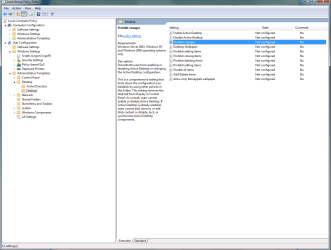
I currently don't have server i can go into atm but you need to set up on your group policy that they can not edit their desktops. This a how to do it in windows 7 policy but it should look similar in your group policy editor for the server. Just find your GPO and right click it and pick edit then make your changes then run in a elevated cmd prompt "gpupdate" on the server and re logg on your test clients. Make sure the gpo you edit is set to affect that userbase though, if it is the default one you edit it should be system wide.
 

Attachments

  • ss (2014-11-01 at 03.08.16).png
    ss (2014-11-01 at 03.08.16).png
    36.9 KB · Views: 3

My Computer

Computer type
PC/Desktop
Computer Manufacturer/Model Number
Custom
OS
10 Pro x64
CPU
Ryzen 9 3900X
Motherboard
Asrock x370 Tachi
Memory
64GB(4x16GB) DDR4
Graphics Card(s)
EVGA 1080ti FTW3
Sound Card
ASUS Xonar Essence STX (V4 Bursons), ODAC rev B, NFB-11, O2
Monitor(s) Displays
3xASUS PB278Q/R, Optoma HD142X
Screen Resolution
3x1440p, 1080p
Hard Drives
512GB 850 EVO(OS, Programs)
4TB (Movies)
3TB (Downloads)
3TB (Programs)
1TB HDD (Games)
2x6TB R1 (videos)
PSU
AX760
Case
Fractal Define R5
Cooling
NH-D15S
Keyboard
Massdrop Ctrl with Box Navy's
Mouse
G903, Alioth XXL Mat
Internet Speed
280/40
Antivirus
MBAM, ESET
Browser
Canary 64 Bit
Other Info
I also own a Thinkpad P50 Xeon 4K, X220T, X1C5
Thanks for the info. However, if the profile is already created i dont think this update to gp will help correct? In other words it will work on a new profile that has not yet been altered, or am i wrong?

I keep hearing something about changing ntuser.dat to ntuser.man as well. Anyone know if this is an option as well?
 

My Computer

Computer type
PC/Desktop
OS
Windows 7 Pro 64 bit
You should drop the users in the active directory manger to their own folder than in the gpo manger apply that gpo to that group you made and then run that cmd from before "gpupdate" and they should on next logon follow it. you might want to copy the default gpo and make your own based off it so that you don't mess with the default one. Just make sure you group only has the modified one applied to it and not the default one. If you need I can grab pics for you tomorrow from a 2008 R2 server.
 

My Computer

Computer type
PC/Desktop
Computer Manufacturer/Model Number
Custom
OS
10 Pro x64
CPU
Ryzen 9 3900X
Motherboard
Asrock x370 Tachi
Memory
64GB(4x16GB) DDR4
Graphics Card(s)
EVGA 1080ti FTW3
Sound Card
ASUS Xonar Essence STX (V4 Bursons), ODAC rev B, NFB-11, O2
Monitor(s) Displays
3xASUS PB278Q/R, Optoma HD142X
Screen Resolution
3x1440p, 1080p
Hard Drives
512GB 850 EVO(OS, Programs)
4TB (Movies)
3TB (Downloads)
3TB (Programs)
1TB HDD (Games)
2x6TB R1 (videos)
PSU
AX760
Case
Fractal Define R5
Cooling
NH-D15S
Keyboard
Massdrop Ctrl with Box Navy's
Mouse
G903, Alioth XXL Mat
Internet Speed
280/40
Antivirus
MBAM, ESET
Browser
Canary 64 Bit
Other Info
I also own a Thinkpad P50 Xeon 4K, X220T, X1C5
Isn't active desktop different than just the user desktop? Just curious

Active Desktop was a feature of Microsoft Internet Explorer 4.0's optional Windows Desktop Update that allows the user to add HTML content to the desktop, along with some other features. This function was intended to be installed on the then-current Windows 95 operating system.

And yes please pics would be awesome !! Just want to make sure i am doing things right
 

My Computer

Computer type
PC/Desktop
OS
Windows 7 Pro 64 bit
I am still thinking my way out of my issue is the ntuser.dat file but I am not 100% so i am looking for more input. I am not saying your reply is wrong i am just uncertain if the active desktop option is going to solve my problem. Can you give me a little more info? Is active desktop the same as desktop? In other words will disabling active desktop actually stop a user from adding or deleting items from the desktop?
 

My Computer

Computer type
PC/Desktop
OS
Windows 7 Pro 64 bit
I am still thinking my way out of my issue is the ntuser.dat file but I am not 100% so i am looking for more input. I am not saying your reply is wrong i am just uncertain if the active desktop option is going to solve my problem. Can you give me a little more info? Is active desktop the same as desktop? In other words will disabling active desktop actually stop a user from adding or deleting items from the desktop?

It should cover both web items and icons. You can always try it then just revert it. make a user group and only put a test user it it then make a gpo with that setup and apply it to just hat group and see if it does the behavior you want. The company's I maintain prefer to use a script to make everyone's desktop the same till they mess with it then folder redirection saves their changes for their profile only.
 

My Computer

Computer type
PC/Desktop
Computer Manufacturer/Model Number
Custom
OS
10 Pro x64
CPU
Ryzen 9 3900X
Motherboard
Asrock x370 Tachi
Memory
64GB(4x16GB) DDR4
Graphics Card(s)
EVGA 1080ti FTW3
Sound Card
ASUS Xonar Essence STX (V4 Bursons), ODAC rev B, NFB-11, O2
Monitor(s) Displays
3xASUS PB278Q/R, Optoma HD142X
Screen Resolution
3x1440p, 1080p
Hard Drives
512GB 850 EVO(OS, Programs)
4TB (Movies)
3TB (Downloads)
3TB (Programs)
1TB HDD (Games)
2x6TB R1 (videos)
PSU
AX760
Case
Fractal Define R5
Cooling
NH-D15S
Keyboard
Massdrop Ctrl with Box Navy's
Mouse
G903, Alioth XXL Mat
Internet Speed
280/40
Antivirus
MBAM, ESET
Browser
Canary 64 Bit
Other Info
I also own a Thinkpad P50 Xeon 4K, X220T, X1C5
My school used deep freeze. After a desktop reboot the system was restore to the point when it was last "frozen" unless it was hacked. http://www.faronics.com/products/deep-freeze/

Another possibility is to only load roaming profiles but I've never set that up before.
 

My Computers

System One System Two

My school used deep freeze. After a desktop reboot the system was restore to the point when it was last "frozen" unless it was hacked. http://www.faronics.com/products/deep-freeze/

Another possibility is to only load roaming profiles but I've never set that up before.

While Deepfreeze would solve this issue they are looking to do it server side and not client side. It is a good alternative though.
 

My Computer

Computer type
PC/Desktop
Computer Manufacturer/Model Number
Custom
OS
10 Pro x64
CPU
Ryzen 9 3900X
Motherboard
Asrock x370 Tachi
Memory
64GB(4x16GB) DDR4
Graphics Card(s)
EVGA 1080ti FTW3
Sound Card
ASUS Xonar Essence STX (V4 Bursons), ODAC rev B, NFB-11, O2
Monitor(s) Displays
3xASUS PB278Q/R, Optoma HD142X
Screen Resolution
3x1440p, 1080p
Hard Drives
512GB 850 EVO(OS, Programs)
4TB (Movies)
3TB (Downloads)
3TB (Programs)
1TB HDD (Games)
2x6TB R1 (videos)
PSU
AX760
Case
Fractal Define R5
Cooling
NH-D15S
Keyboard
Massdrop Ctrl with Box Navy's
Mouse
G903, Alioth XXL Mat
Internet Speed
280/40
Antivirus
MBAM, ESET
Browser
Canary 64 Bit
Other Info
I also own a Thinkpad P50 Xeon 4K, X220T, X1C5
Yah we want to do it server side. And we are using roaming profiles (users can log on to any computers in the schools with their accounts.) And thanks for the info rvcjew. If the group policy for desktop stops web icons and icons being added to the desktop then thats exactly what i am looking for. I also noticed there's a group policy for locking the wallpaper as well which is handy. You wouldn't believe how often students like to mess with wallpapers and put junk as the background lol. So i will give this a shot next week. We just set up our firewalls this week for remoting in to our servers and devices so that should make things easier for me to tweak as well!!
 

My Computer

Computer type
PC/Desktop
OS
Windows 7 Pro 64 bit
Yah we want to do it server side. And we are using roaming profiles (users can log on to any computers in the schools with their accounts.) And thanks for the info rvcjew. If the group policy for desktop stops web icons and icons being added to the desktop then thats exactly what i am looking for. I also noticed there's a group policy for locking the wallpaper as well which is handy. You wouldn't believe how often students like to mess with wallpapers and put junk as the background lol. So i will give this a shot next week. We just set up our firewalls this week for remoting in to our servers and devices so that should make things easier for me to tweak as well!!

Good luck and the wallpaper is a good idea as well, our wallpapers are locked down as well (kids like to hide icons then then use a desktop screenshot for the wallpaper lol).
 

My Computer

Computer type
PC/Desktop
Computer Manufacturer/Model Number
Custom
OS
10 Pro x64
CPU
Ryzen 9 3900X
Motherboard
Asrock x370 Tachi
Memory
64GB(4x16GB) DDR4
Graphics Card(s)
EVGA 1080ti FTW3
Sound Card
ASUS Xonar Essence STX (V4 Bursons), ODAC rev B, NFB-11, O2
Monitor(s) Displays
3xASUS PB278Q/R, Optoma HD142X
Screen Resolution
3x1440p, 1080p
Hard Drives
512GB 850 EVO(OS, Programs)
4TB (Movies)
3TB (Downloads)
3TB (Programs)
1TB HDD (Games)
2x6TB R1 (videos)
PSU
AX760
Case
Fractal Define R5
Cooling
NH-D15S
Keyboard
Massdrop Ctrl with Box Navy's
Mouse
G903, Alioth XXL Mat
Internet Speed
280/40
Antivirus
MBAM, ESET
Browser
Canary 64 Bit
Other Info
I also own a Thinkpad P50 Xeon 4K, X220T, X1C5
Good luck and the wallpaper is a good idea as well, our wallpapers are locked down as well (kids like to hide icons then then use a desktop screenshot for the wallpaper lol).

Reminds me of the time I took a screenshot of the logon screen on a 95 computer, exited out of the logon screen and set that as the desktop. :devil:
 

My Computers

System One System Two

@ rvcjew

Any chance at some step by step instructions if you have time? Again, i have a student account for users that is a roaming profile stored server side. The client machines are running window 7. P.S. do i have to use active directory with gpo?(Sorry that was a bit of a dumb question since gpo is connected to active directory.) I am just wondering if you could give me some instructions though. Like how to add a certain user to the policies i create etc.
 
Last edited:

My Computer

Computer type
PC/Desktop
OS
Windows 7 Pro 64 bit
Back
Top