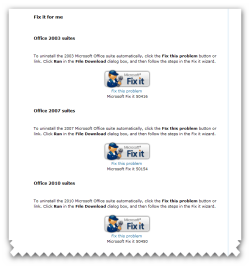
You can uninstall the Microsoft Office system by going to the appropriate "Fix it for me" section that matches your version of Microsoft Office. The Fix It solutions below do not remove any Office program that was installed separately from the Office suite. For example, if you have Microsoft Office Professional 2007 and Microsoft Office Visio 2007 installed on your computer, the Fix It solution only removes Microsoft Office Professional 2007 from your computer. Visio 2007 will not be removed. Additionally, you must reboot your machine if you use one of the Fix it solutions below.
Notes:
The wizard may be in English only; however, the automatic fix also works for other language versions of Windows.
If you are not on the computer that has the problem, save the Fix it solution to a flash drive or a CD and then run it on the computer that has the problem.
For users who are running a Windows 64-bit operating system please download and save the Fix It solution to your desktop and double-click and run it on your computer. If you try to run the solution directly from the article you will have problems running it correctly.