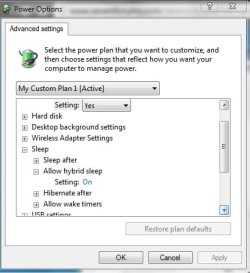
Hibernate missing (it was there yesterday)

nabilalk

New member
Power User
Local time
8:15 AM
Messages
299

Attachments

  • hibernate issue.jpg
    hibernate issue.jpg
    26.2 KB · Views: 12

My Computer My Computer

Computer Manufacturer/Model Number
Gateway M6827
OS
Win 7 Professional 32-bit
CPU
Intel Core 2 Duo CPU T5750 @ 2.00 GHz
Memory
3GB
Monitor(s) Displays
ViewSonic Vx900
Screen Resolution
1280x1024
Hard Drives
150GB Hard Drive
I don't know for sure, but I would bet hibernation was disabled at the bios level after it caused your last problem, probably for a good reason. Some computers just don't support the hibernate function very well.. which brings me to the question of the wisdom in trying to use it again having had that experience already. If the sleep function isn't causing problems, use that instead.. as the power consumption when a computer is sleeping almost nil.. and waking from sleep is almost instantaneous compared to a restart from hibernation in newer systems
 
I don't know for sure, but I would bet hibernation was disabled at the bios level after it caused your last problem, probably for a good reason. Some computers just don't support the hibernate function very well.. which brings me to the question of the wisdom in trying to use it again having had that experience already. If the sleep function isn't causing problems, use that instead.. as the power consumption when a computer is sleeping almost nil.. and waking from sleep is almost instantaneous compared to a restart from hibernation in newer systems

Well, I have only had a problem with hibernate once, so I believe that time was a fluke. I believe that I know what caused the problem, and I think I can fix it again, should the issue ever arise. If the power usage with sleep is close to nil, what is the difference between hibernate and sleep?

I would still like to have the option to choose.
 

My Computer My Computer

Computer Manufacturer/Model Number
Gateway M6827
OS
Win 7 Professional 32-bit
CPU
Intel Core 2 Duo CPU T5750 @ 2.00 GHz
Memory
3GB
Monitor(s) Displays
ViewSonic Vx900
Screen Resolution
1280x1024
Hard Drives
150GB Hard Drive
The difference between hibernation and sleep is that instead of writing the current system state (current running processes) to the HDD and powering off the system completely, it's stored in memory, consuming about 2 -3 watts per hour on average. The tradeoff is that most computers can resume from sleep almost instantaneously, wheres from hibernation, the entire hiberfile.sys file has to be read from the HDD, which usually takes 10-15 seconds on the average newer system.

There's also the hybrid sleep option, which stores the system state in memory, but also backs it up to the HDD, a combination of sleep and hibernate.. I usually use that setting on my desktop systems.

If you want to re-enable hibernation after it has been disabled at the system level.. try using the following commands from an administrative command prompt:
powercfg.exe /hibernate on

followed by:
powercfg -h on

Then go to Power Options.
click on Change Plan Settings and Choose Change Advanced Power Settings.
Then go to Sleep > Hibernate After. Then Adjust that from 0 to more minutes. 0 disables Windows Hibernate.
 
The difference between hibernation and sleep is that instead of writing the current system state (current running processes) to the HDD and powering off the system completely, it's stored in memory, consuming about 2 -3 watts per hour on average. The tradeoff is that most computers can resume from sleep almost instantaneously, wheres from hibernation, the entire hiberfile.sys file has to be read from the HDD, which usually takes 10-15 seconds on average.

If you want to re-enable hibernation after it has been disabled at the system level.. try using the following commands from an administrative command prompt

powercfg.exe /hibernate on

followed by

powercfg -h on


Then go to Power Options.
click on Change Plan Settings and Choose Change Advanced Power Settings.
Then go to Sleep > Hibernate After. Then Adjust that from 0 to more minutes. 0 disables Windows Hibernate.
Click Apply and then Click OK You are done.

If your system still won't hibernate.. I don't see any other way to enable it..

I was under the possibly mistaken impression that hibernate since it has the page file basically saved your system state vs sleep with no page file, that does not occur. Other than the time to boot of difference and the power usage difference, what are the other differences between Sleep and Hibernate? Thanks!

If they are the same, and the power consumption is the only issue, I would prefer sleep, as this is a desktop and I don't need to worry about battery consumption.
 

My Computer My Computer

Computer Manufacturer/Model Number
Gateway M6827
OS
Win 7 Professional 32-bit
CPU
Intel Core 2 Duo CPU T5750 @ 2.00 GHz
Memory
3GB
Monitor(s) Displays
ViewSonic Vx900
Screen Resolution
1280x1024
Hard Drives
150GB Hard Drive
Those are the only differences.. sleep stops all processes but holds their current state of execution in RAM, then shuts down just about everything else. Hibernate stops all processes in their current state of execution and dumps the memory to the HDD, adds a temporary entry to the BDC, then shuts down completely.
 
Those are the only differences.. sleep stops all processes but holds their current state of execution in RAM, then shuts down just about everything else. Hibernate stops all processes in their current state of execution and dumps the memory to the HDD, adds a temporary entry to the BDC, then shuts down completely.

So the advantage of Hibernate is it saves battery life more than sleep. Is there a significant power consumption difference?
 

My Computer My Computer

Computer Manufacturer/Model Number
Gateway M6827
OS
Win 7 Professional 32-bit
CPU
Intel Core 2 Duo CPU T5750 @ 2.00 GHz
Memory
3GB
Monitor(s) Displays
ViewSonic Vx900
Screen Resolution
1280x1024
Hard Drives
150GB Hard Drive
It takes only slightly less power to resume from hibernation than to do a cold boot. If you only use your system for short periods of time, but are on it several times a day, using the hibernate function will is not much better than a full shutdown between each use. A new laptop with a fully charged battery can sleep for nearly a week, so the power savings is actually greater with a frequently used system.
 
If I put Hibernate after 2 minutes, does it mean the system goes to sleep state and only after 2 minutes it copies stuff to hdd and shutdown?

I always have the impression that that option is for 'hibernate after 2 min of inactivity'!
 

My Computer My Computer

OS
Windows 7 Ultimate x64
Back
Top