Solved Hidden CPU use? CPU being used, but no processes show it (screenshot)

frogger4

New member
Member
Local time
1:03 AM
Messages
17
Unknown process taking up CPU (screenshot)

Update: see next post
Hi there,
First, if this question is in the wrong place, please do point me to the right section.
If you take a look at the screenshots of task manager below, you'll notice something odd. I have a bunch of processes, all using 0% of the cpu. That makes sense, since the computer is not doing anything at the moment, so it should be 0. Then, if you take a look at the bottom of the frame, the total cpu use is shown as 9%, and that is shown again in the next screenshot. [as a note about the percent of cpu use: that is about the maximum amount a single threaded process can use on a 6-core processor with hyperthreading. That is like 1 folding@home client running, if you are familiar, although there is no such client running].

So, my question: Where is the cpu use coming from? It starts up like this about two minutes after logging in, and continues like this indefinitely, every time. My computer has not always done this though (it started a few days ago), so I'm concerned. System information in the spec link thing.

Any ideas would be much appreciated!
Thanks,
Frogger4

processes, notice they all say 0 under the cpu column.
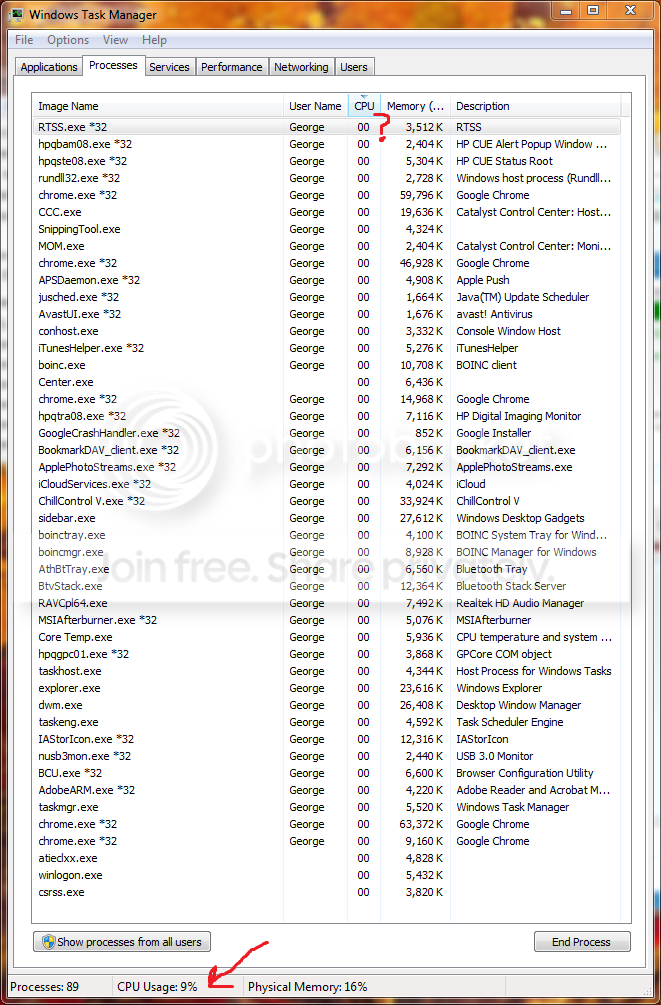
processes-1.png


performance tab, showing that there is significant cpu usage over time.
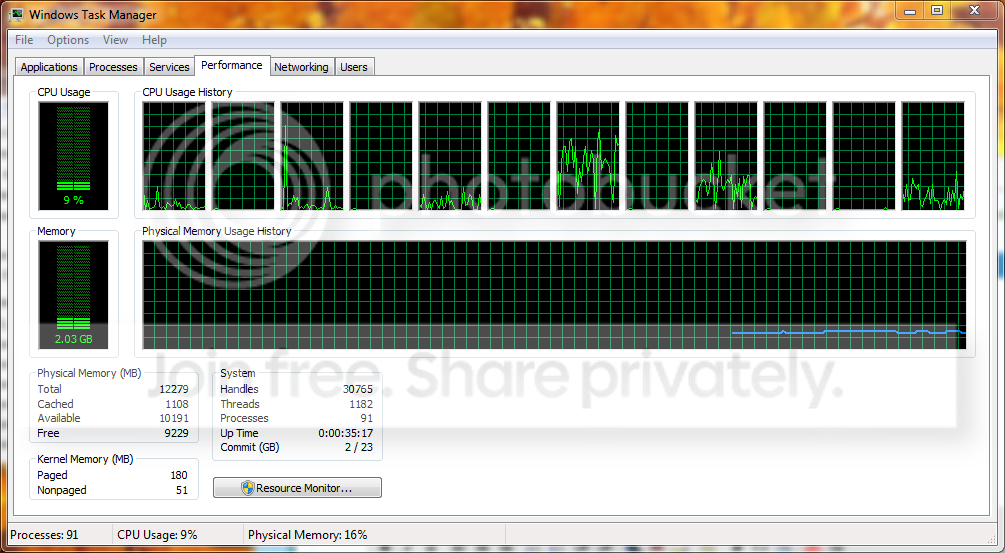
cpuuse.png
 

My Computer My Computer

At a glance

Windows 7 Home Premium 64 bitAMD A8 55002 x 2GB Gskill 1600MHz
Computer type
PC/Desktop
OS
Windows 7 Home Premium 64 bit
CPU
AMD A8 5500
Motherboard
MSI FM2-A75IA-E53
Memory
2 x 2GB Gskill 1600MHz
Hard Drives
OCz Agility 4 64GB
Case
Antec ISK 110
Do you see any noticeable change in processes if you poke "show processes from all users"?
 

My Computer My Computer

At a glance

Windows 7 Home Premium SP1, 64-bitIntel Skylake i5-6600K, not overclocked8 GB HyperX DDR4-2666 (2 x 4 GB)none; graphics are integrated on CPU
Computer type
PC/Desktop
Computer Manufacturer/Model Number
Ignatz Special; 4 speed manual gearbox; factory air conditioning; one of one
OS
Windows 7 Home Premium SP1, 64-bit
CPU
Intel Skylake i5-6600K, not overclocked
Motherboard
AsRock Z170M Extreme 4, micro ATX
Memory
8 GB HyperX DDR4-2666 (2 x 4 GB)
Graphics Card(s)
none; graphics are integrated on CPU
Sound Card
onboard: Realtek ALC1150; external: USB Behringer UF0-202
Monitor(s) Displays
Dell S2340M 23 inch IPS
Screen Resolution
1600 x 900
Hard Drives
System: Crucial MX100 series SSD, 128 GB;
Data: Samsung Spinpoint 103SJ, 1 TB;
Backup: WD Caviar Green WD30EZRX-00D8PB0, 3 TB
PSU
Rosewill SilentNight 500 watt fanless, semi-modular
Case
Antec Solo II
Cooling
Noctua NH-U12S; Noctua F12 intake, Noctua S12A exhaust
Keyboard
Microsoft 200 6JH-00001 USB
Mouse
Dell or Microsoft optical wired; USB
Antivirus
Microsoft Security Essentials and Malwarebytes Premium
Browser
Pale Moon
Other Info
All fans PWM; speeds at idle: CPU circa 500 rpm; intake circa 600 rpm; exhaust circa 600 rpm; CPU temps 27 idle and 47 C load in a warm room (27 C/81 F) when running Intel Extreme Tuning Utility stress test.
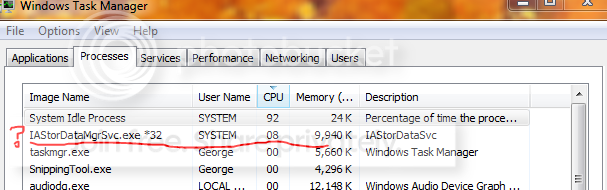
Yep that would do it. Thanks! I suppose my question the is, what is that process, and what causes it? (updating the thread title to be more relevant)

newprocesses.png
 

My Computer My Computer

At a glance

Windows 7 Home Premium 64 bitAMD A8 55002 x 2GB Gskill 1600MHz
Computer type
PC/Desktop
OS
Windows 7 Home Premium 64 bit
CPU
AMD A8 5500
Motherboard
MSI FM2-A75IA-E53
Memory
2 x 2GB Gskill 1600MHz
Hard Drives
OCz Agility 4 64GB
Case
Antec ISK 110
You'll find that exe in an Intel subdirectory on your system. I've got the same file. Currently, mine is using 0 percent of the CPU. I assume it is a necessary system file that you have to live with.
 

My Computer My Computer

At a glance

Windows 7 Home Premium SP1, 64-bitIntel Skylake i5-6600K, not overclocked8 GB HyperX DDR4-2666 (2 x 4 GB)none; graphics are integrated on CPU
Computer type
PC/Desktop
Computer Manufacturer/Model Number
Ignatz Special; 4 speed manual gearbox; factory air conditioning; one of one
OS
Windows 7 Home Premium SP1, 64-bit
CPU
Intel Skylake i5-6600K, not overclocked
Motherboard
AsRock Z170M Extreme 4, micro ATX
Memory
8 GB HyperX DDR4-2666 (2 x 4 GB)
Graphics Card(s)
none; graphics are integrated on CPU
Sound Card
onboard: Realtek ALC1150; external: USB Behringer UF0-202
Monitor(s) Displays
Dell S2340M 23 inch IPS
Screen Resolution
1600 x 900
Hard Drives
System: Crucial MX100 series SSD, 128 GB;
Data: Samsung Spinpoint 103SJ, 1 TB;
Backup: WD Caviar Green WD30EZRX-00D8PB0, 3 TB
PSU
Rosewill SilentNight 500 watt fanless, semi-modular
Case
Antec Solo II
Cooling
Noctua NH-U12S; Noctua F12 intake, Noctua S12A exhaust
Keyboard
Microsoft 200 6JH-00001 USB
Mouse
Dell or Microsoft optical wired; USB
Antivirus
Microsoft Security Essentials and Malwarebytes Premium
Browser
Pale Moon
Other Info
All fans PWM; speeds at idle: CPU circa 500 rpm; intake circa 600 rpm; exhaust circa 600 rpm; CPU temps 27 idle and 47 C load in a warm room (27 C/81 F) when running Intel Extreme Tuning Utility stress test.
You'll find that exe in an Intel subdirectory on your system. I've got the same file. Currently, mine is using 0 percent of the CPU. I assume it is a necessary system file that you have to live with.

Thanks, I suppose everyone has it. The only reason I am concerned (and don't want to just live with it) is because it has been using a bunch of cpu.
 

My Computer My Computer

At a glance

Windows 7 Home Premium 64 bitAMD A8 55002 x 2GB Gskill 1600MHz
Computer type
PC/Desktop
OS
Windows 7 Home Premium 64 bit
CPU
AMD A8 5500
Motherboard
MSI FM2-A75IA-E53
Memory
2 x 2GB Gskill 1600MHz
Hard Drives
OCz Agility 4 64GB
Case
Antec ISK 110
That is from the Intel storage driver - if you've not installed the later version of the Intel rapid storage driver, you might want to do so.
 

My Computer My Computer

At a glance

Windows 10 Pro x64Intel Core i7 4790K @ 4.5GHz32GB DDR3Nvidia GeForce GTX970
Computer type
PC/Desktop
Computer Manufacturer/Model Number
Custom
OS
Windows 10 Pro x64
CPU
Intel Core i7 4790K @ 4.5GHz
Motherboard
Asus Maximus Hero VII
Memory
32GB DDR3
Graphics Card(s)
Nvidia GeForce GTX970
Sound Card
Realtek HD Audio
Screen Resolution
1920x1200
Hard Drives
1x Samsung 250GB SSD
4x WD RE 2TB (RAIDZ)
PSU
Corsair AX760i
Case
Fractal Design Define R4
Cooling
Noctua NH-D15
That is from the Intel storage driver - if you've not installed the later version of the Intel rapid storage driver, you might want to do so.

Yep, just figured that out. I had the latest version of the Intel Rapid Storage Technology thing, uninstalled it, and everything seems to be good now :D
I suppose it is important though, so I'll install it again I suppose.
 

My Computer My Computer

At a glance

Windows 7 Home Premium 64 bitAMD A8 55002 x 2GB Gskill 1600MHz
Computer type
PC/Desktop
OS
Windows 7 Home Premium 64 bit
CPU
AMD A8 5500
Motherboard
MSI FM2-A75IA-E53
Memory
2 x 2GB Gskill 1600MHz
Hard Drives
OCz Agility 4 64GB
Case
Antec ISK 110
Well, this is the driver I needed to update apparently (Intel Rapid Storage Technology), but I go to install it and it says my system does not meet the requirements. So I suppose I'm not going to worry about for now; the original issue is basically solved.

Thanks guys!
 

My Computer My Computer

At a glance

Windows 7 Home Premium 64 bitAMD A8 55002 x 2GB Gskill 1600MHz
Computer type
PC/Desktop
OS
Windows 7 Home Premium 64 bit
CPU
AMD A8 5500
Motherboard
MSI FM2-A75IA-E53
Memory
2 x 2GB Gskill 1600MHz
Hard Drives
OCz Agility 4 64GB
Case
Antec ISK 110
Just an FYI on boinc. If you installed it as a service, boinc will run on it's own without you turning boinc on yourself, when booting up.
 

My Computer My Computer

At a glance

Win7 Pro 642 X5670 2.93 Westmere processors48GBAti 6950
Computer type
PC/Desktop
Computer Manufacturer/Model Number
Home built
OS
Win7 Pro 64
CPU
2 X5670 2.93 Westmere processors
Motherboard
SuperMicro X8DTI-F
Memory
48GB
Graphics Card(s)
Ati 6950
Monitor(s) Displays
Dell 2408wfp
Hard Drives
256 SSD,1tb & 2tb spinner drives
Back
Top